
NetSpot is a powerful and user-friendly Wi-Fi analysis and troubleshooting tool available for both Windows and macOS systems. This comprehensive guide delves into the capabilities of NetSpot, exploring its features, benefits, and how it can significantly improve your wireless network’s performance and security. Whether you’re a home user seeking to optimize your home network or a network administrator responsible for a large-scale deployment, NetSpot provides the tools to analyze, troubleshoot, and enhance your Wi-Fi infrastructure.
Understanding NetSpot’s Core Functionality
At its core, NetSpot functions as a versatile Wi-Fi analyzer, site surveyor, and troubleshooting utility. Its intuitive interface simplifies complex network analysis, making it accessible to users of all technical skill levels. The software’s primary functions include:
-
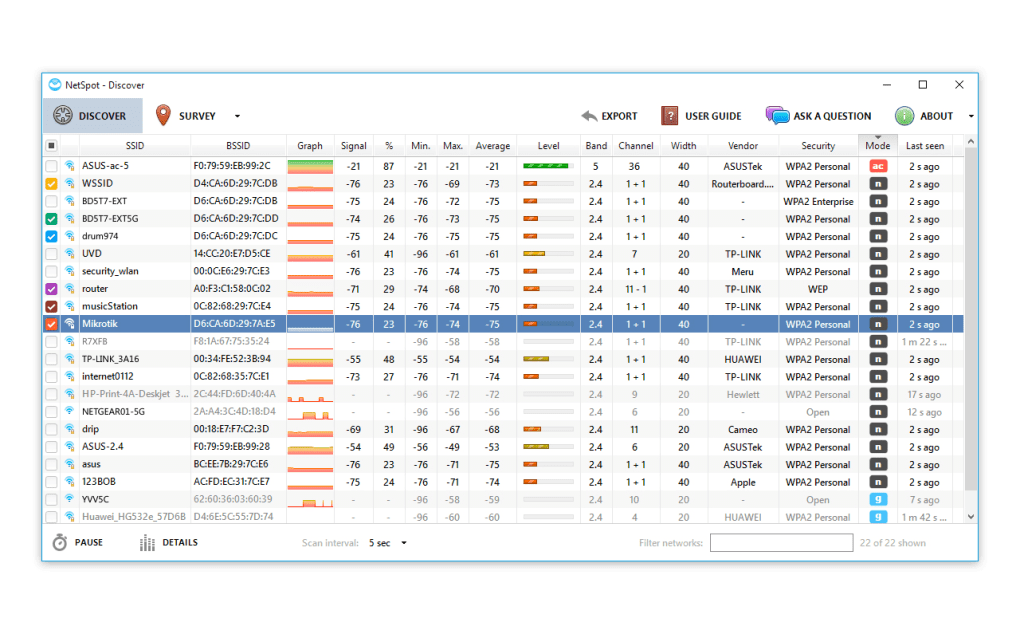
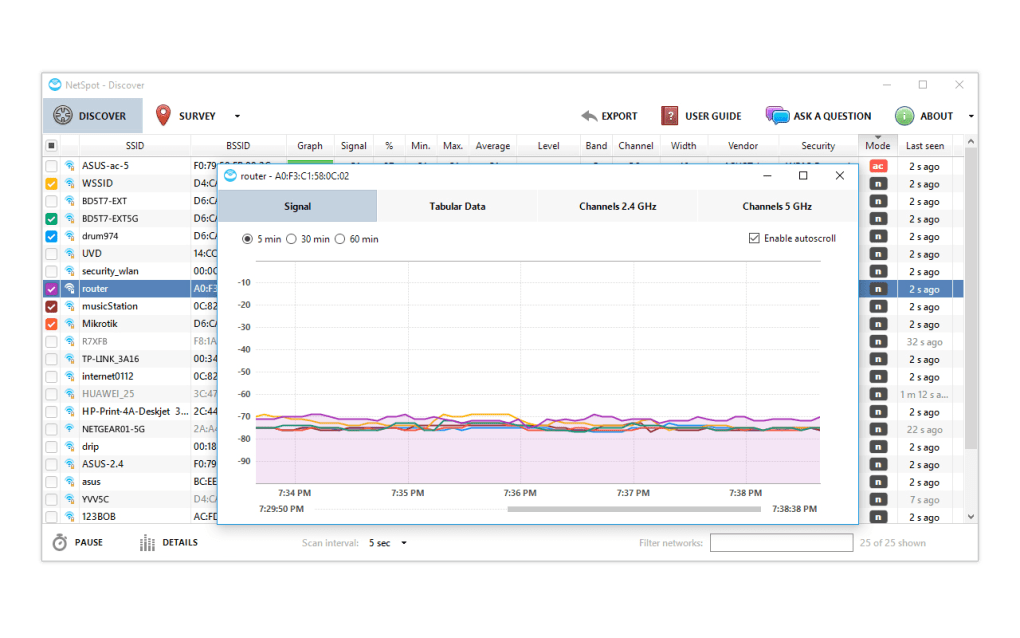
Wi-Fi Network Discovery: NetSpot quickly scans your surroundings to identify all Wi-Fi networks within range. It then provides detailed profiles for each network, including essential information like SSID, BSSID, channel, signal strength, security protocols (WPA2, WPA3, etc.), and more. This detailed information is crucial for understanding the network landscape and identifying potential issues.
-
Interactive Heatmaps: One of NetSpot’s most valuable features is its ability to generate interactive heatmaps. These visual representations of Wi-Fi signal strength across a physical area provide an immediate understanding of coverage areas, dead zones, and areas of strong interference. By visually mapping signal strength, NetSpot helps pinpoint optimal locations for access points (APs) and identify areas needing improvement. Users can easily import floor plans or create their own maps within the software for precise heatmap generation.
-
Channel Analysis: Efficient channel utilization is critical for optimal Wi-Fi performance. NetSpot analyzes the channel usage of neighboring networks, helping users identify congested channels and select less crowded options. This allows for minimizing interference and maximizing network throughput. The software clearly displays channel occupancy, facilitating informed decisions about channel assignments for optimal network performance.
-
Rogue Access Point Detection: Unauthorized or rogue access points can pose significant security risks to a network. NetSpot helps identify these rogue APs by detecting wireless signals not registered within the managed network infrastructure. Identifying and mitigating these threats is crucial for securing the network and preventing unauthorized access.
-
Troubleshooting and Optimization: Beyond identification, NetSpot provides the tools necessary to troubleshoot and optimize your Wi-Fi network. Its detailed reports highlight potential issues, such as signal interference, channel congestion, and weak signal areas, enabling users to take corrective actions, such as repositioning APs, adjusting channel settings, or upgrading network equipment. The software’s comprehensive analysis enables efficient problem-solving and network performance enhancement.
Performing a Wireless Site Survey with NetSpot
A wireless site survey is a crucial step in designing and deploying a robust and reliable Wi-Fi network. NetSpot streamlines this process, making it accessible even to users without extensive networking experience. The site survey process typically involves:
-
Map Creation or Import: Begin by importing an existing floor plan or creating a new map within NetSpot. Accurate mapping is essential for generating meaningful heatmaps. The software supports various map formats, making integration with existing floor plans straightforward.
-
Data Collection: Walk or move through the area you wish to survey, allowing NetSpot to continuously collect data on Wi-Fi signal strength and other relevant parameters. The software actively scans and records data, providing comprehensive coverage of the survey area.
-
Heatmap Generation: Once data collection is complete, NetSpot automatically processes the information and generates an interactive heatmap. This visualization clearly shows signal strength across the entire surveyed area, identifying areas with strong coverage, weak coverage, and areas of significant interference.
-
Analysis and Reporting: NetSpot provides detailed reports summarizing the findings of the survey. These reports highlight key metrics such as signal strength, channel utilization, and potential interference sources, providing valuable insights for network optimization. The reports offer a comprehensive overview of the network’s performance and areas requiring attention.
- Optimization and Deployment: Based on the survey’s findings, users can make informed decisions about AP placement, channel selection, and other network configurations to optimize coverage and performance. The actionable insights provided by NetSpot guide users in deploying the most effective Wi-Fi infrastructure.
NetSpot’s Advantages and Limitations
NetSpot offers several key advantages, making it a valuable tool for both casual and professional users:
-
Ease of Use: NetSpot’s intuitive interface makes it user-friendly, even for users without a background in networking. The software’s clear visual representations and simplified reporting eliminate the complexities often associated with Wi-Fi analysis.
-
Comprehensive Analysis: NetSpot provides a wide range of analysis capabilities, delivering detailed insights into Wi-Fi network performance and identifying potential issues. The software’s capacity for detailed analysis allows for efficient troubleshooting and network optimization.
-
Visualizations: The software’s heatmaps and visual representations make it easy to understand complex network data. The visualizations provide intuitive insights, making network analysis easily accessible and understandable.
-
Scalability: NetSpot can be utilized for both small home networks and large-scale enterprise deployments, demonstrating its adaptability to various needs and scales. The software’s scalable nature caters to diverse network environments.
However, NetSpot does have some limitations to consider:
- Limited Free Version: While NetSpot offers a free version, it has limitations compared to the paid version. The free version might restrict the scope of analysis and reporting capabilities, limiting its functionality for large or complex network deployments.
- Platform Compatibility: Although NetSpot is available for both Windows and macOS, compatibility with older operating systems may be limited. Users should verify compatibility with their operating system before using the software.
NetSpot’s Role in Enhancing Network Security
Beyond performance optimization, NetSpot contributes to enhanced network security. By identifying rogue access points and unauthorized devices, NetSpot aids in protecting the network from unauthorized access and potential security breaches. Early detection and mitigation of security vulnerabilities through NetSpot can significantly improve overall network security.
The detection of rogue access points, often undetected by conventional methods, is crucial for maintaining a secure network environment. NetSpot’s ability to identify these threats enables timely intervention, strengthening the network’s security posture.
Conclusion
NetSpot is a valuable tool for anyone seeking to analyze, troubleshoot, and optimize their Wi-Fi network. Its user-friendly interface, comprehensive analysis capabilities, and valuable visualizations make it an accessible and effective solution for both novice and expert users. From enhancing home network performance to securing large-scale enterprise deployments, NetSpot provides the tools necessary for creating a reliable, efficient, and secure wireless network. While limitations regarding the free version and platform compatibility exist, NetSpot’s advantages significantly outweigh these drawbacks, solidifying its position as a leading Wi-Fi analysis tool.
File Information
- License: “Free”
- Latest update: “July 12, 2023”
- Platform: “Windows”
- OS: “Windows 8”
- Language: “English”
- Downloads: “29.9K”
- Size: “274.82 KB”


