
NetTime, a time synchronization client primarily designed for Windows 95, 98, NT, and 2000, offers a glimpse into the past of network timekeeping. While modern operating systems often handle time synchronization automatically and seamlessly, NetTime provided a dedicated solution for users needing precise time accuracy or server-side synchronization capabilities in the late 90s and early 2000s. This examination will delve into its functionality, features, historical context, and its place within the broader evolution of network time protocols.
Functionality and Features of NetTime
NetTime’s core function is straightforward: it synchronizes a computer’s system clock with a network time server. This synchronization ensures the computer maintains accurate time, crucial for various applications, from logging events to coordinating network activities. The software achieved this by employing the Network Time Protocol (NTP) and RFC 868, two prominent protocols for time synchronization over networks. NTP, still widely used today, offers high accuracy and robust error correction, while RFC 868 provides a simpler, though less precise, method.
One of NetTime’s noteworthy features was its flexibility in deployment. Users could run it as a standard application, an NT service (for Windows NT and later versions), or as a pseudo-service for Windows 95/98. The installer handled the configuration automatically based on the user’s choice. Running NetTime as a service ensured continuous operation even after a user logged off, maintaining constant time synchronization.
Even when operating as a service, NetTime maintained user accessibility through a system tray icon. This icon provided a quick overview of the software’s status, allowing users to monitor its operation and make adjustments without needing to launch the main application. This blend of robust background operation and convenient user interface design highlights a thoughtful approach to usability within the limitations of the era’s software environments.
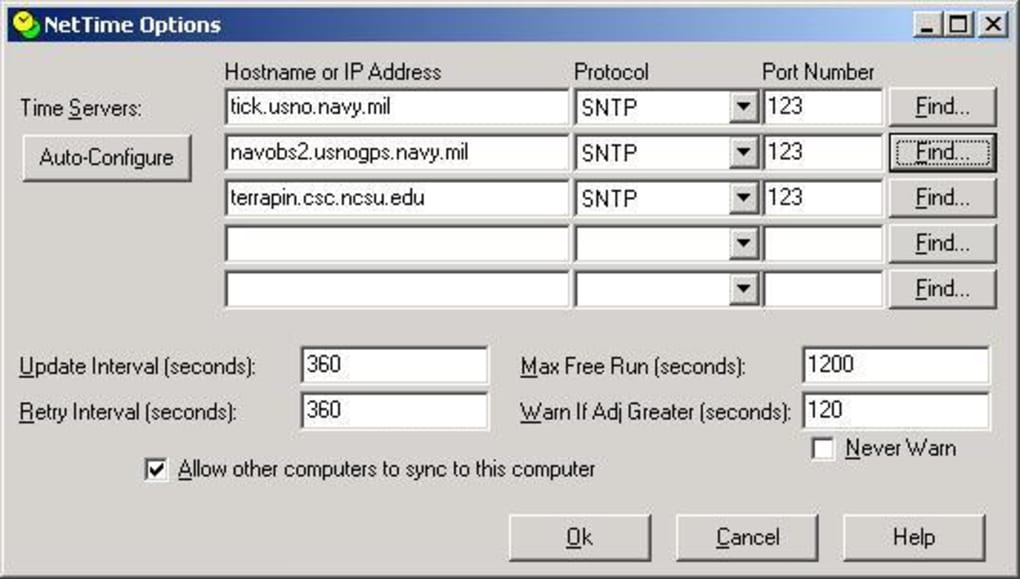
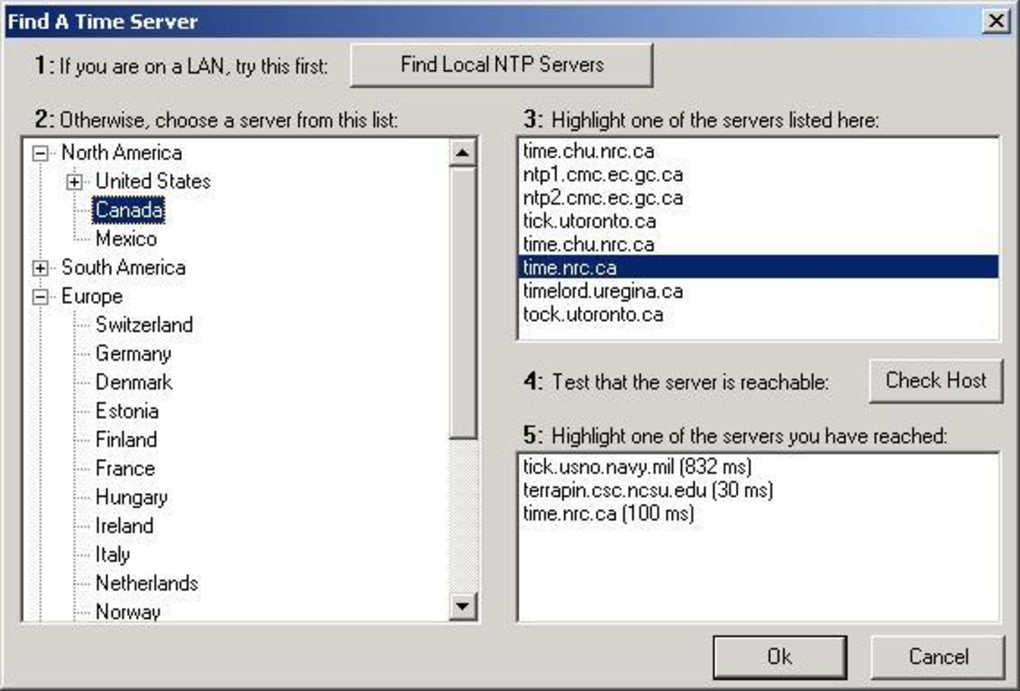
The software included a pre-loaded list of roughly 150 public NTP servers, eliminating the need for users to manually configure server addresses. This list was customizable through a configuration file (likely an INI file), enabling users to add, remove, or prioritize specific servers based on their network configuration and geographic location. Alternatively, NetTime provided a “Find…” function to search within its extensive list, making it easy to select a suitable server from a geographically diverse selection of public time servers. This consideration for ease of use, coupled with the flexibility to manage the server list, demonstrates an awareness of differing network needs and user skill levels.
Beyond its client-side functionality, NetTime also functioned as a time server itself. This allowed other PCs on the same network to synchronize their clocks with the computer running NetTime. This feature could have been particularly valuable in localized networks, providing a time source within the network rather than relying solely on external servers. This server-side capability, however, placed demands on the machine hosting NetTime, potentially affecting its performance if numerous clients were simultaneously synchronizing.
Historical Context: The Need for Dedicated Time Synchronization Software
In the context of the late 1990s and early 2000s, dedicated time synchronization software like NetTime played a significant role. While operating systems were beginning to integrate rudimentary time synchronization features, these often lacked the precision, reliability, and configurability that NetTime offered. Network administrators and users demanding highly accurate time often relied on third-party solutions.
Many applications and systems relied on precise timekeeping. Databases, financial transactions, and log files all benefit from accurate timestamping. Network devices also relied on time synchronization for various functions. Without a dedicated solution like NetTime, ensuring accurate time across a network could be challenging and error-prone.
Furthermore, the internet infrastructure of that era was not as robust or widespread as it is today. Access to reliable network time servers could be a significant issue, making a well-configured, local time server, like the one provided by NetTime, extremely valuable in many network environments.
NetTime’s Technological Limitations and Modern Alternatives
NetTime’s reliance on older protocols and its limited platform compatibility reflect the technological constraints of its time. Today, modern operating systems typically include advanced time synchronization capabilities, often leveraging NTP directly. These built-in features often offer greater precision, security features, and automatic configuration, often eliminating the need for third-party solutions.
While NetTime provided a useful tool for its era, it lacks many features found in modern alternatives. Sophisticated network management tools offer extensive time synchronization capabilities, integrating with larger system monitoring and management frameworks. Modern tools often incorporate redundancy and failover mechanisms, ensuring continuous time accuracy even if primary servers become unavailable. Moreover, modern software often supports more advanced time protocols and security enhancements not available to NetTime.
Considering that NetTime’s last reported update was in July 2025, it’s highly likely that security vulnerabilities exist and should not be used on active networks or systems requiring strong security.
Conclusion: A Legacy Tool and its Significance
NetTime serves as a historical artifact, illustrating the challenges and solutions related to network time synchronization in the pre-ubiquitous internet era. It represents a dedicated approach to a problem now largely handled automatically by modern operating systems. While its functionality is largely superseded by modern tools, it provides a valuable insight into the development of networking technologies and the growing demand for precise timekeeping in increasingly interconnected systems. Understanding NetTime’s function and limitations illuminates the significant advancements in network time synchronization over the past two decades, demonstrating how software evolves to address user needs while taking advantage of improvements in both hardware and network infrastructure. It is a testament to the enduring importance of accurate timekeeping across computer networks, a necessity that persists and evolves alongside technological advances.
File Information
- License: “Free”
- Latest update: “July 9, 2025”
- Platform: “Windows”
- OS: “Windows ME”
- Language: “English”
- Downloads: “15.1K”
- Size: “775.21 KB”


