
In the vibrant and ever-evolving world of PC gaming, modification, or “modding,” has become a cornerstone for players seeking to extend the lifespan of their favorite titles, inject fresh content, or simply personalize their experience. Among the pantheon of modding tools, OpenIV GTA Mod stands out as a colossal utility, particularly for fans of the Grand Theft Auto series. Developed by GTA 5 Mods, this free-to-download application transcends being just another modding tool; it serves as a sophisticated gateway into the very heart of several iconic game worlds, granting players unprecedented control over their digital playgrounds.
OpenIV GTA Mod is more than just a simple file opener; it’s a multi-purpose modification program designed to empower users to delve into game directories, tweak features, manage archives, and seamlessly integrate a myriad of custom content. While its name explicitly links it to Grand Theft Auto V, its utility extends far beyond, embracing other beloved Rockstar titles such as Grand Theft Auto IV, Max Payne 3, Red Dead Redemption 2, and Grand Theft Auto: Episodes from Liberty City. This broad compatibility makes it an indispensable asset for a significant portion of the modding community, allowing for a unified approach to enhancing diverse gaming experiences.
The appeal of OpenIV lies in its ability to facilitate deep-level modifications without directly disturbing the game’s original source code. This crucial design choice helps maintain the integrity of the base game while allowing for extensive customization. From altering vehicle models and textures to implementing new missions or character abilities, OpenIV provides the framework for these ambitious projects. However, like any powerful software, it comes with its own set of nuances, including a potential learning curve for newcomers and occasional bug issues, which are common in complex utility applications. Despite these minor setbacks, its comprehensive feature set and widespread adoption firmly cement its status as a must-have for anyone serious about modding their Grand Theft Auto and other compatible Rockstar games.
What is OpenIV GTA Mod?
At its core, OpenIV GTA Mod is a dedicated utility application for Windows, meticulously crafted by the GTA 5 Mods community to serve as the ultimate platform for game modification. Far from a restrictive tool, it’s a testament to the community-driven spirit of modding, providing an accessible yet powerful environment for players to mold their gaming experiences. This section will delve deeper into its fundamental nature and multi-game compatibility, illustrating why it has become such a pivotal instrument for modders.
A Gateway to Game Modification
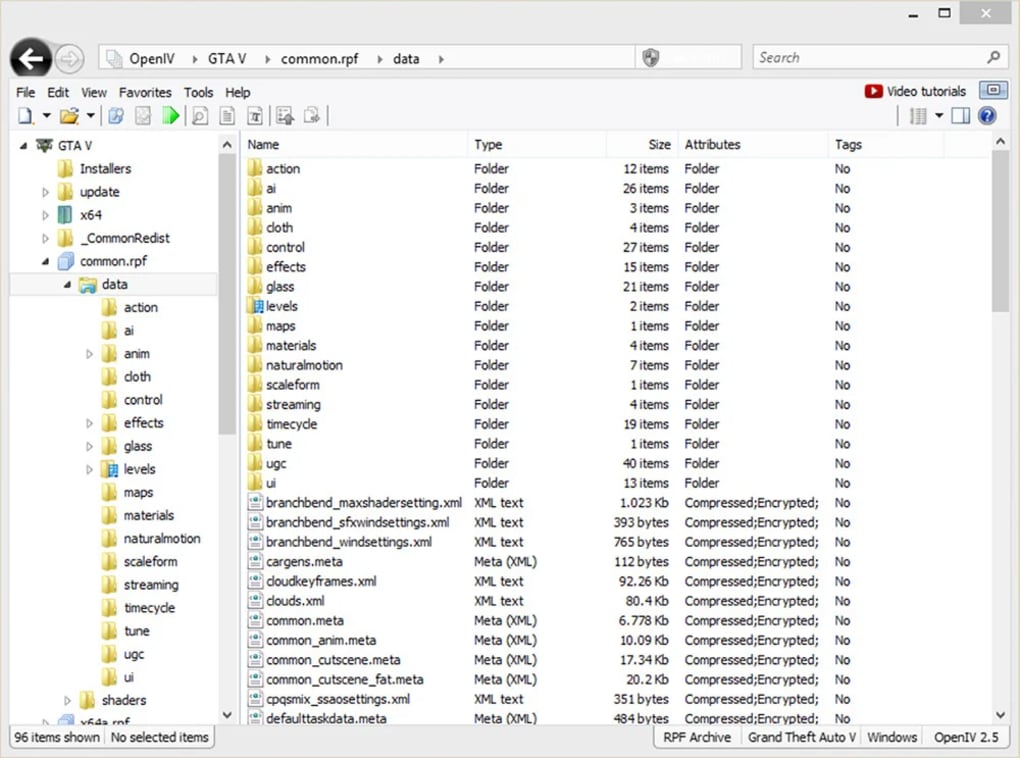
OpenIV GTA Mod functions primarily as a sophisticated file explorer and editor for game directories. Imagine the core files of a game as a tightly sealed vault; OpenIV provides the key and the specialized tools to open that vault, allowing users to inspect, extract, and modify its contents. This capability is paramount because many game files, especially those from Rockstar Games, are often packaged in proprietary archive formats (like the .rpf files in GTA V) that are not easily accessible through standard operating system tools.
The application allows users to open and navigate these complex game archives, exposing a treasure trove of editable files, including textures, models, scripts, and configuration data. By providing access to pretty much all DLL and editable files within an advanced editor program, OpenIV empowers users to:
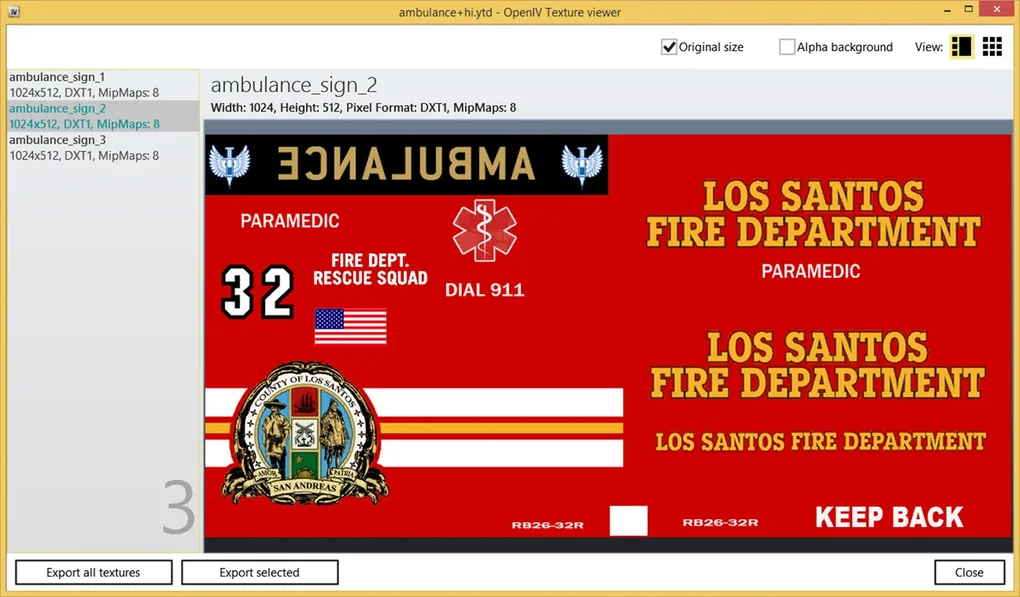
- Tweak features: Modify existing game mechanics, adjust parameters, or change visual elements. This could range from altering the handling characteristics of a car to changing the appearance of in-game advertisements.
- Manage archives: Efficiently organize, add, or remove files within game archives, which is crucial for installing new mods or ensuring game stability.
- Fix bug errors: Sometimes, modders might use OpenIV to directly patch minor bugs or inconsistencies introduced by other mods, or even the base game itself, by manually adjusting specific files.
Crucially, OpenIV achieves these modifications without directly disturbing the game’s original source code. Instead, it works by modifying the game’s asset files and configuration, which are then loaded by the game engine. This approach minimizes the risk of irreparable damage to the base game, as original files can often be backed up or restored if something goes wrong. The entire process requires an internet connection for an initial download of approximately 20MB, after which the application can be easily launched from the desktop or Start menu, providing a straightforward entry point into the intricate world of game modding.
Multi-Game Compatibility
While “GTA Mod” is explicitly in its name, suggesting a primary focus on Grand Theft Auto titles, OpenIV’s versatility is one of its most compelling features. It extends its powerful modding capabilities across a respectable roster of Rockstar Games’ highly acclaimed titles, significantly broadening its appeal and utility for a diverse set of players. The list of compatible games includes:
- Grand Theft Auto V (GTAV): The primary target, where OpenIV shines brightest, supporting a vast ecosystem of mods that enhance every aspect of Los Santos.
- Grand Theft Auto IV (GTAIV): Even older, but still beloved, the Liberty City of GTAIV benefits immensely from OpenIV’s tools, allowing for similar levels of customization.
- Grand Theft Auto: Episodes from Liberty City: The expansion packs for GTAIV, featuring The Lost and Damned and The Ballad of Gay Tony, are also fully supported, allowing modders to explore and expand these distinct narratives.
- Max Payne 3: Rockstar’s gritty, stylistic shooter also falls under OpenIV’s purview, enabling modifications to its assets and potentially opening doors for custom content in its unique universe.
- Red Dead Redemption 2 (RDR2): The sprawling, incredibly detailed world of the Old West in RDR2 also benefits from OpenIV. Modders can introduce new outfits, environmental changes, or even new gameplay elements, pushing the boundaries of what’s possible in the Wild West.
This multi-game compatibility is a significant advantage. It means that players invested in multiple Rockstar franchises don’t need to learn a different modding tool for each game. OpenIV provides a consistent interface and workflow, allowing modding skills learned in one game to be largely transferable to another. This fosters a more cohesive and productive modding community across these titles, making OpenIV an invaluable tool for dedicated fans of Rockstar’s rich game worlds.
Core Functionalities and Features
OpenIV GTA Mod is not just a passive viewer of game files; it’s an active participant in the modding process, offering a suite of functionalities that range from basic file access to advanced editing and seamless integration with complex modifications. These core features are what truly empower the modding community, providing the granular control necessary to realize ambitious creative visions.
Delving into Game Directories
The fundamental utility of OpenIV lies in its ability to navigate and interact with the intricate directory structures of supported games. Unlike typical software, game files are often packaged into proprietary archives (.rpf files being a prime example for Rockstar titles). These archives efficiently bundle thousands of individual assets—models, textures, sounds, scripts, and configurations—into compressed files, making them difficult to access with standard file explorers.
OpenIV acts as a specialized archive explorer. When you open a game’s directory through OpenIV, it intelligently parses these archives, presenting their contents in a user-friendly, hierarchical tree view. This allows modders to:
- Browse and Preview: Easily locate specific files within deeply nested folders. OpenIV often provides built-in previewers for common file types, allowing modders to see textures, 3D models, and even some animations directly within the application without needing external software.
- Extract Files: Pull individual files or entire folders out of game archives. This is crucial for creating backups of original files before modification, or for using original assets as a base for new custom content.
- Add New Files: Insert custom files created by modders (e.g., a new vehicle model, a custom weapon texture) into the appropriate game archives, effectively adding new content to the game.
- Replace Existing Files: Substitute original game assets with modified versions. For example, replacing a default car model with a custom, higher-resolution version or a new vehicle from a mod.
This direct access to game directories is the cornerstone of all advanced modding. Without OpenIV, manually manipulating these archives would be a cumbersome, if not impossible, task for the average user, highlighting its critical role in making modding accessible.
Advanced Editing and Archive Management
Beyond simply browsing and replacing files, OpenIV integrates advanced editing capabilities that elevate it from a mere file manager to a comprehensive modding suite. The application boasts an “advanced editor program” that allows direct manipulation of various editable files. This means:
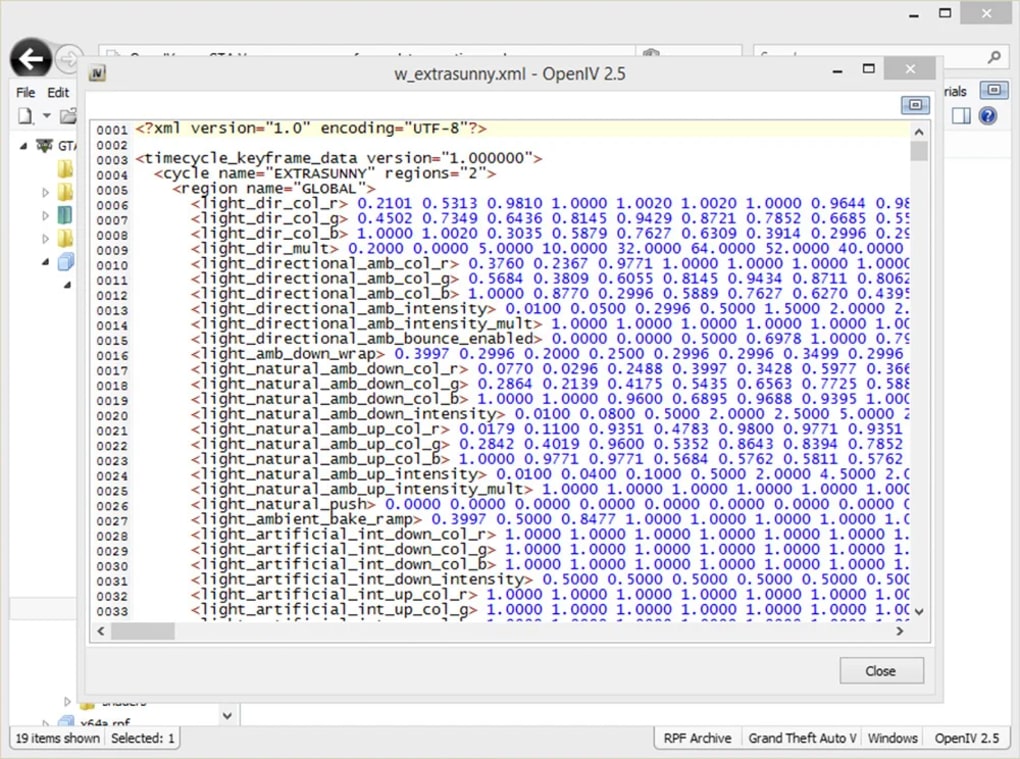
- In-App File Editing: For certain file types, modders can directly edit their contents within OpenIV. This is particularly useful for configuration files (e.g.,
.xmlfiles) or simple text-based scripts where minor tweaks can have significant in-game effects. The ability to directly edit reduces the need to constantly extract, edit in a third-party program, and then re-import files, streamlining the workflow. - Texture Manipulation: OpenIV is adept at handling texture files. Modders can export textures, modify them in image editing software (like Photoshop or GIMP), and then re-import them back into the game archives. This is how countless custom liveries for cars, new clothing options, or environmental texture overhauls are created.
- Model Importing/Exporting: For 3D models, OpenIV often facilitates the importing and exporting of common model formats, allowing modders to bring custom-made vehicles, weapons, or character models into the game, or extract existing models for detailed analysis and modification in dedicated 3D modeling software.
- Archive Optimization: Users can manage the game’s archives for a better experience. This might involve repacking archives to improve load times, consolidating files, or ensuring that custom assets are correctly integrated to prevent conflicts and ensure smooth performance. For instance, ensuring that a new car model is packed efficiently within its
.rpfcontainer. - Resolving Conflicts: In complex modding scenarios, conflicts between different mods can arise. OpenIV’s detailed file view and editing capabilities often allow experienced modders to identify conflicting files and make manual adjustments to resolve them, ensuring harmonious coexistence of multiple modifications.
These advanced editing and archive management features are what truly distinguish OpenIV. They provide the necessary tools for both minor adjustments and large-scale overhauls, allowing modders to exert fine-grained control over virtually every aspect of the game’s assets and configurations.
Seamless Integration with Other Mods
One of OpenIV’s most critical functionalities is its robust support for installing and managing other, often larger, modifications. Many popular GTA 5 mods, especially those that involve significant changes to the game’s visuals, gameplay, or content, are designed specifically to be installed via OpenIV. This synergy between OpenIV and the wider modding ecosystem is what makes it such an indispensable tool.
A prime example is the Redux Mod for GTA 5. Redux is a comprehensive graphical overhaul that significantly enhances the game’s visuals, weather systems, and environmental effects. Installing such a large-scale mod manually, by dragging and dropping hundreds of files, would be not only prone to errors but also incredibly tedious. OpenIV streamlines this process:
- Dedicated Mod Manager: OpenIV often includes an “ASI Manager” or similar feature that helps install essential components (like Script Hook V’s ASI loader) that allow the game to load custom
.asiplugins and modified game files. This is the bedrock upon which many complex mods are built. - Package Installer: For larger mods that come in a dedicated
.oivpackage format, OpenIV features a simple package installer. Users simply open the.oivfile with OpenIV, and the tool guides them through the installation process, automatically placing files in the correct directories and making necessary adjustments. This automates what would otherwise be a highly complex and error-prone manual installation. - Conflict Resolution Assistance: While OpenIV doesn’t automatically resolve all mod conflicts, its structured approach to file management and clear display of file locations helps modders troubleshoot and identify potential clashes between different modifications, especially when using its “mods folder” system (which allows modifications to be stored separately from original game files).
- Ensuring Smooth Performance: By providing a structured and controlled environment for installing mods, OpenIV helps ensure that these additions integrate smoothly with the base game. This leads to a more stable and enjoyable modded experience, reducing crashes and performance issues that can arise from improperly installed modifications.
The ability of OpenIV to work seamlessly with a vast array of other GTA 5 mods is a testament to its design and flexibility. It acts as the central hub for most significant modifications, providing the infrastructure for the modding community to build upon and continuously innovate within Rockstar’s immersive game worlds. This strong interoperability makes it an essential component for anyone looking to truly customize their gaming experience beyond what the base game offers.
Installation and Getting Started
For newcomers to the world of modding, the initial setup process can seem daunting. However, OpenIV GTA Mod has been designed with a relatively straightforward installation procedure, guiding users from download to their first interaction with the game files. Understanding these steps is crucial for a smooth entry into game customization.
Setting Up OpenIV
The journey with OpenIV begins with a modest download. The program itself requires an internet connection to download its core files, which typically amount to around 20MB. This relatively small initial footprint ensures that users can quickly acquire the necessary installer.
Once the installer is downloaded, the process follows standard Windows application installation conventions:
- Download: Obtain the OpenIV installer from a reputable source, such as PhanMemFree.org or the official OpenIV website.
- Run Installer: Execute the downloaded file. The installer will guide you through a series of prompts.
- Language Selection: Choose your preferred installation language.
- License Agreement: Accept the End User License Agreement (EULA) to proceed.
- Installation Path: Select where you want OpenIV to be installed on your computer. It’s generally recommended to use the default path unless you have specific reasons to change it.
- Component Download: The installer will then download the necessary files, which is where the 20MB internet connection requirement comes into play. Ensure you have a stable connection during this phase.
- Completion: Once the download and installation are complete, a shortcut to OpenIV GTA Mod will typically be placed on your desktop and in your Start Menu, making it easily accessible for future use.
The simplicity of this setup means that even those with limited technical experience can get OpenIV up and running without significant hurdles. The next crucial step involves directing OpenIV to the specific game you wish to modify.
Navigating GTA V Integration
After OpenIV is successfully installed, the next critical step is to link it with your Grand Theft Auto V installation. This process is intuitive and ensures that OpenIV can correctly locate and interact with the game’s files. The application’s design makes this initial configuration accessible, even for those new to modding.
Here’s a step-by-step guide to integrate OpenIV with GTA V:
- Launch OpenIV: Double-click the OpenIV shortcut on your desktop or select it from your Start Menu to open the application.
- Locate the Game: Upon its first launch, or if you need to switch games, OpenIV will present you with a selection screen featuring the games it supports. In this instance, you will see options like Grand Theft Auto V, Grand Theft Auto IV, Max Payne 3, Red Dead Redemption 2, and Grand Theft Auto: Episodes from Liberty City.
- Hover Over GTA V: Move your mouse cursor over the “Grand Theft Auto V” option.
- Select Windows Button: A “Windows” button will appear underneath the GTA V icon (or similar depending on the OpenIV version, indicating the PC platform). Click this button.
- Click Browse: OpenIV will then prompt you to locate your GTA V installation folder. Click the “Browse” button.
- Find Your Directory: A file explorer window will open. You will need to navigate to the directory where Grand Theft Auto V is installed on your computer. Common default installation paths include:
C:\Program Files\Rockstar Games\Grand Theft Auto V\(for Rockstar Games Launcher version)C:\Program Files\Epic Games\GTAV\(for Epic Games Store version)C:\Program Files (x86)\Steam\steamapps\common\Grand Theft Auto V\(for Steam version)- If you installed it to a custom location, navigate to that specific folder.
- Select the GTA V Folder: Once you have located the main “Grand Theft Auto V” folder (the one containing
GTA5.exe), select it. Do not go into subfolders; select the root game folder. - Hit the Select Folder Button: Confirm your selection by clicking the “Select Folder” button.
OpenIV will then analyze the selected folder to confirm it’s a valid GTA V installation. If successful, it will load the game’s archives and present you with its main interface, ready for modification. This straightforward integration ensures that users spend less time configuring and more time exploring the vast possibilities of modding.
Addressing Challenges and Considerations
While OpenIV GTA Mod is an incredibly powerful and versatile tool, like any advanced software, it comes with its own set of challenges and considerations. Users, especially those new to modding, should be aware of these aspects to ensure a positive and productive experience. Addressing these points upfront can help mitigate frustration and potential issues.
The Learning Curve for Novices
One of the primary concerns for new users of OpenIV is its potential complexity. The provided reference content notes that “making changes can be quite confusing for novice players” and warns that “if you are knowledgeable, you might cause more harm than good.” This isn’t an exaggeration; OpenIV provides direct access to fundamental game files, and incorrect modifications can lead to:
- Game Crashes: Changing or corrupting critical files can prevent the game from launching or cause it to crash frequently during gameplay.
- Glitches and Bugs: Minor incorrect edits might introduce visual glitches, broken mechanics, or unexpected behaviors within the game.
- Save File Corruption: In rare cases, extensive or incorrect modding could potentially interfere with save game files, leading to loss of progress.
- Online Bans: For games with online components like GTA Online, modifying game files (even for single-player content) can be detected by anti-cheat systems, leading to temporary or permanent bans if precautions are not taken. OpenIV users must always exercise extreme caution and never use modified files when playing online.
To navigate this learning curve, novice players are strongly encouraged to:
- Follow Tutorials Diligently: Start with simple, well-documented mods and follow step-by-step video or written tutorials. YouTube channels and modding forums are excellent resources.
- Understand File Structures: Take time to understand what different game files and folders represent before making changes.
- Backup, Backup, Backup: Always create backups of original game files and your save games before applying any significant mods. OpenIV often facilitates creating a “mods” folder to keep original files separate, which is a highly recommended practice.
- Start Small: Begin with cosmetic changes (e.g., car textures) before attempting more complex gameplay overhauls.
- Engage with the Community: Join modding forums (like GTA5-Mods.com or Nexus Mods) where you can ask questions, troubleshoot issues, and learn from experienced modders.
The power of OpenIV is immense, but with great power comes the responsibility of careful and informed use. Patience and a willingness to learn are key to mastering this tool.
Localization and Community Contributions
Another important consideration, highlighted in the reference material, is the “lack of translation and localization for other languages.” OpenIV primarily operates in English, which can pose a barrier for modders and players whose native language is not English. While the interface is largely icon-driven and intuitive once understood, specific file names, error messages, or detailed instructions might be harder to grasp.
However, the OpenIV development team and the broader modding community recognize this limitation and provide a pathway for community-driven localization. If the mod isn’t available in your language, the following steps allow for manual translation and contribution:
- Find the Localization Files: Navigate to your OpenIV installation folder and locate the specific “Localization Files.” These are typically XML-based files that contain the text strings used within the application.
- Edit XML Files: Using a text editor (syntax highlighting is highly recommended for clarity, as XML files can be complex), open and edit these XML files. You will need to translate the English text strings into your desired language. It’s crucial to “validate” the XML files after editing to ensure no syntax errors have been introduced, which could break the application.
- Set Language ID (LIP.xml): For the
LIP.xmlfile, specifically, you only need to set the correct language ID name for the language you wish to translate it to. This tells OpenIV which language pack to load. - Share Your Work: Modders or localization teams are strongly encouraged to reupload their translated works to be used by other players sharing the same language. This fosters a more inclusive global modding community, making OpenIV accessible to a wider audience. Platforms like PhanMemFree.org or dedicated modding sites serve as excellent repositories for such community contributions.
This community-centric approach to localization underscores the collaborative spirit of modding. While it requires effort from dedicated users, it ensures that language barriers can be gradually overcome, making OpenIV a truly global tool for game customization.
Understanding Potential Issues
Beyond the learning curve and localization, users should be aware of potential technical issues that can arise when using OpenIV. The reference mentions that “the program is not immune to bugs and may sometimes crash mid-use.” This is a realistic expectation for any complex software that interacts deeply with other applications (in this case, games).
Potential issues include:
- Application Crashes: OpenIV itself might occasionally crash, especially when dealing with very large archives, performing complex operations, or encountering corrupted files. This is usually not indicative of a problem with your game, but rather an instability within the OpenIV application itself.
- Mod Conflicts: While OpenIV facilitates mod installation, it doesn’t magically prevent conflicts between different mods. Installing too many incompatible mods can lead to instability, visual glitches, or game crashes.
- Updates and Compatibility: Game updates (e.g., new patches for GTA V) can sometimes break compatibility with existing mods or even OpenIV itself, requiring updates to OpenIV or the mods to restore functionality. Rockstar Games has, in the past, released updates that initially rendered OpenIV non-functional, causing temporary disruption in the modding community until the OpenIV team released their own compatibility updates.
- System Resource Usage: While OpenIV itself is light, modifying and rebuilding large game archives can be resource-intensive, temporarily slowing down your system.
When encountering such issues, the recommended course of action includes:
- Check for Updates: Ensure you are using the latest version of OpenIV. Developers frequently release updates to fix bugs and improve stability.
- Consult Community Forums: Search for solutions on popular modding forums or the OpenIV official support channels. Chances are, if you’re experiencing an issue, others have too, and a solution might already be available.
- Isolate the Problem: If your game is crashing after installing a mod, try removing the most recent mod to see if the issue resolves, helping you identify the culprit.
- Reinstall (as a last resort): If OpenIV itself becomes unstable, a clean reinstallation might be necessary.
Understanding these potential issues and knowing how to approach them systematically will allow users to navigate the complexities of modding with greater confidence and minimize downtime.
Why OpenIV is a Must-Have for Modding Enthusiasts
For the dedicated gaming enthusiast who views their favorite titles not just as products to consume but as canvases for creativity, OpenIV GTA Mod transcends the definition of a mere utility; it becomes an essential extension of their gaming experience. Its comprehensive feature set, robust capabilities, and community integration solidify its position as an indispensable tool for anyone eager to venture beyond the vanilla game.
Empowering the Modding Community
OpenIV’s true power lies in its ability to unlock the latent potential within games like Grand Theft Auto V, Red Dead Redemption 2, and others. It is the crucial bridge that connects a modder’s vision with the game’s executable files. Without OpenIV, many of the breathtaking graphical overhauls, intricate custom scripts, and innovative gameplay additions that define the modern modding landscape would simply not be possible or would be incredibly difficult to implement.
Here’s how OpenIV empowers the modding community:
- Versatility and Control: It provides direct, granular access to game files, allowing for modifications at almost any level, from simple texture swaps to complex script injections. This level of control is unparalleled among free modding tools.
- Direct Access to Game Directories: By intelligently parsing and displaying proprietary game archives, OpenIV demystifies the game’s internal structure, making it accessible even for those with limited technical expertise, provided they follow instructions carefully.
- Compatibility with Other Mods: OpenIV isn’t just a standalone tool; it’s a foundational element for many other complex mods. Its
ASI Managerand.oivpackage installer make it the de facto standard for installing large-scale graphical and gameplay modifications, ensuring that a vast ecosystem of community-created content can be easily integrated. - Multi-Game Support: Its ability to support five major Rockstar titles means that modders can apply their learned skills and workflows across multiple franchises, maximizing their productivity and enjoyment without needing to adapt to different tools for each game.
- Community Backbone: OpenIV has fostered a thriving modding community around these games. It provides a common language and methodology for mod creators and users alike, facilitating collaboration, sharing, and problem-solving, as evidenced by the community-driven localization efforts.
Ultimately, OpenIV transforms the passive player into an active creator. It allows users to truly make the game their own, tailoring every aspect to fit their personal preferences, or experiencing entirely new content generated by the vibrant modding community. This capacity for deep personalization is what keeps games like GTA V relevant and exciting years after their initial release.
A Verdict for Aspiring Game Tweakers
Considering its extensive capabilities and profound impact on the modding scene, the verdict for OpenIV GTA Mod is overwhelmingly positive, especially for those who are “the type of player who loves adding mods.” With such an app, you can truly tweak your game to fit your needs, enhancing replayability and satisfaction.
Pros:
- Multi-purpose modding tool: Covers a wide spectrum of modification needs, from simple file replacement to complex script integration.
- Grants access to game directories: Essential for any serious modding, providing a clear window into game assets.
- Works well with other GTA 5 mods: Acts as a central hub for installing and managing a vast array of community-created content.
- Works with five major Rockstar games: Offers broad utility across GTA V, GTA IV, Max Payne 3, Red Dead Redemption 2, and Episodes from Liberty City.
- Free to download and use: Accessibility is a key factor in its widespread adoption.
Cons:
- Can be confusing to novice players: Requires a degree of patience and willingness to learn; incorrect usage can lead to issues.
- Some bug issues: Like any complex software, it is not entirely immune to occasional crashes or minor glitches.
- Lack of direct multi-language support (requires community effort): While community localization is possible, out-of-the-box support is limited.
In conclusion, if you’re an avid fan of Grand Theft Auto V or other supported Rockstar titles and harbor a desire to customize, enhance, or extend your gaming experience, OpenIV GTA Mod is unequivocally a must-have tool. While it demands a cautious approach and a bit of learning, the creative freedom and depth of personalization it offers are unparalleled. It serves as the foundation for countless hours of enhanced gameplay, allowing players to truly explore the boundless possibilities within their favorite virtual worlds. Download it from PhanMemFree.org today and unlock the true modding potential of your games.
File Information
- License: “Free”
- Version: “4.0”
- Latest update: “May 12, 2023”
- Platform: “Windows”
- OS: “Windows 8.1”
- Language: “English”
- Downloads: “141.4K”
- Size: “4.62 MB”


