
PDF Reader for Windows 10 is a lightweight, free PDF viewer designed specifically for Windows 10 users. This software allows users to view, read, save, and print Adobe PDF files quickly and efficiently. While its interface might appear dated compared to modern applications, its speed and minimal system resource usage make it a compelling option for users prioritizing performance over visual aesthetics. This review delves into the software’s features, performance, ease of use, and overall suitability for various needs.
Performance and System Resources
One of the standout features of PDF Reader for Windows 10 is its speed and efficiency. Developed using high-performance native code, it avoids the resource-intensive Metro UI, ensuring that opening and viewing PDF files, even large ones, doesn’t significantly impact system performance. Unlike some PDF readers that can slow down a computer, particularly when handling extensive documents or complex layouts, this software maintains a light footprint, preserving system responsiveness. This is particularly beneficial for users with older machines or those working with multiple applications simultaneously. The fast loading times allow users to access their PDF files almost instantaneously, minimizing interruptions to workflow. This performance advantage is a key selling point for users who prioritize speed and efficiency.
User Interface and Ease of Use
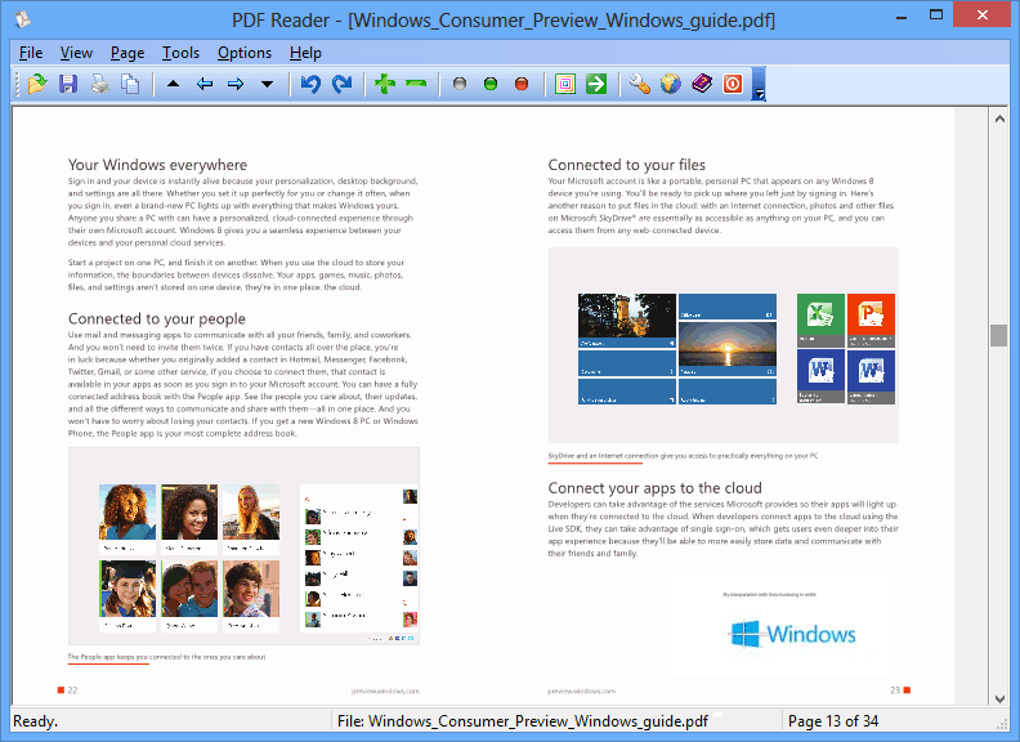
While the interface of PDF Reader for Windows 10 is described as dated, its simplicity contributes to ease of use. The straightforward design features two main panels: one for primary functions such as opening, printing, and saving files; and a second for tools that facilitate navigation and interaction with document content. This clear separation of functions makes the software intuitive, even for users unfamiliar with PDF readers. The lack of a cluttered interface minimizes confusion, allowing users to quickly locate and utilize essential features. While the visual design may not be contemporary, the functional layout enhances the user experience by facilitating efficient navigation and document manipulation.
Key Features and Functionality
PDF Reader for Windows 10 offers a range of features designed to enhance the user experience:
-
Viewing and Navigation: The software provides robust viewing capabilities, including zoom in/out functionality, page rotation (clockwise and counter-clockwise), and full-screen mode. This allows for detailed examination of specific sections within documents, whether text, images, or charts. Navigation is straightforward, with easy access to the first, last, next, and previous pages, along with the ability to quickly jump to a specific page number. The smooth navigation ensures a seamless reading experience without performance lag.
-
Document Manipulation: While this free version doesn’t support editing, users can copy text and images. This allows for selective extraction of information from PDF documents for use in other applications. This limited editing capability is sufficient for many users who primarily need to extract information rather than modify the original document.
-
Saving and Printing: The software provides seamless options for saving and printing PDF files. The ability to directly save copies of viewed documents or print them directly from the application is a significant benefit for users needing hard copies or wanting to retain local copies. This eliminates the need to utilize additional applications for these functions.
-
Slideshow Presentation: PDF Reader for Windows 10 offers the unique feature of converting documents into a slideshow format, making it convenient for presentations. The ability to create a slideshow presentation directly from the PDF reader streamlines workflow and removes the need for additional presentation software. This feature enhances the software’s versatility.
Comparison with Other PDF Readers
Several alternatives exist, including Adobe Acrobat Reader DC, Nitro PDF Reader, and various online PDF editors. Adobe Acrobat Reader DC, a widely used and established PDF reader, offers extensive features, including editing capabilities, but demands significantly more system resources. Nitro PDF Reader also boasts a robust feature set, including editing functionalities, but shares a similar resource-intensive nature with Adobe Acrobat Reader. Online PDF editors provide editing capabilities, but rely on internet connectivity and may not be suitable for users working offline or dealing with sensitive information.
PDF Reader for Windows 10 distinguishes itself by prioritizing speed and minimal resource consumption. While it lacks the extensive editing capabilities of other options, it provides a quick and efficient means of viewing and managing PDF documents, particularly beneficial for users with older hardware or those working under resource-constrained environments. The focus on performance offers a valuable alternative for users who value speed and efficiency over extensive editing features.
Limitations and Considerations
The software has some limitations:
-
Dated Interface: The user interface is undeniably dated, lacking the modern aesthetic of many contemporary applications. While the functionality is not compromised, the visual presentation may be off-putting to some users who value a visually appealing interface.
-
No Editing Capabilities (Free Version): The free version of the software doesn’t offer editing features. Users seeking to edit or annotate PDFs must upgrade to the Pro version or utilize other applications. The absence of editing functions is a significant limitation for users who require extensive document modification capabilities.
-
Windows 10 Exclusivity: The software is exclusively compatible with Windows 10. Users with other operating systems will need to look for alternatives. This operating system limitation restricts its broader use across different platforms.
-
Pro Version Features: The free version includes prompts encouraging an upgrade to the Pro version, which adds features such as file format conversion (PDF to JPEG, TXT, GIF, TIFF, etc.) and removes promotional messaging. While the free version provides adequate functionality for viewing and basic tasks, the limitations might incentivize an upgrade for more advanced users.
Should You Download PDF Reader for Windows 10?
The decision of whether to download PDF Reader for Windows 10 depends on individual needs and priorities. If speed, minimal resource usage, and straightforward viewing functionality are paramount, then this software is an excellent choice. Users who require extensive editing features, a modern interface, or compatibility with operating systems other than Windows 10 should explore alternative solutions. The software shines in its efficiency and speed, making it an ideal solution for users who prioritize these aspects above other features, particularly those with less powerful machines. The balance between speed, efficiency, and ease of use makes it a strong contender for those seeking a lightweight and quick PDF reader. However, the dated interface and lack of editing features may not be suitable for everyone.
File Information
- License: “Free”
- Latest update: “May 23, 2023”
- Platform: “Windows”
- OS: “Windows 8.1”
- Language: “English”
- Downloads: “1.5M”
- Size: “3.79 MB”


