
In the vast landscape of digital document management, the ability to effortlessly create and manipulate PDFs and images is no longer a luxury but a fundamental necessity. Whether you’re a student compiling research papers, a teacher preparing lesson plans, a small business owner handling invoices, or a job seeker perfecting a resume, the demand for versatile, reliable, and – crucially – free tools is ever-present. Enter PDFill FREE PDF and Image Writer, a powerful, yet remarkably accessible, solution designed for the Windows ecosystem. This comprehensive application stands out by providing an extensive suite of features for generating high-quality PDF documents and image files from virtually any Windows application, all without the burden of cost, watermarks, or intrusive advertisements.
At its core, PDFill FREE PDF and Image Writer operates as a virtual printer. This ingenious design allows users to “print” any document, spreadsheet, presentation, or graphic directly into a PDF or image file. The beauty of this approach lies in its universal compatibility – if your application can print, PDFill can convert it. But this tool is far more than a simple converter; it’s a robust platform offering a rich array of customization and manipulation options, making it an indispensable asset for anyone navigating the complexities of modern document workflows. Released by PlotSoft LLC, this software has maintained its commitment to providing a free, functional, and user-friendly experience for both personal and commercial users, distinguishing itself in a market often saturated with restrictive trialware or ad-laden freeware.
Unleashing Comprehensive PDF and Image Creation
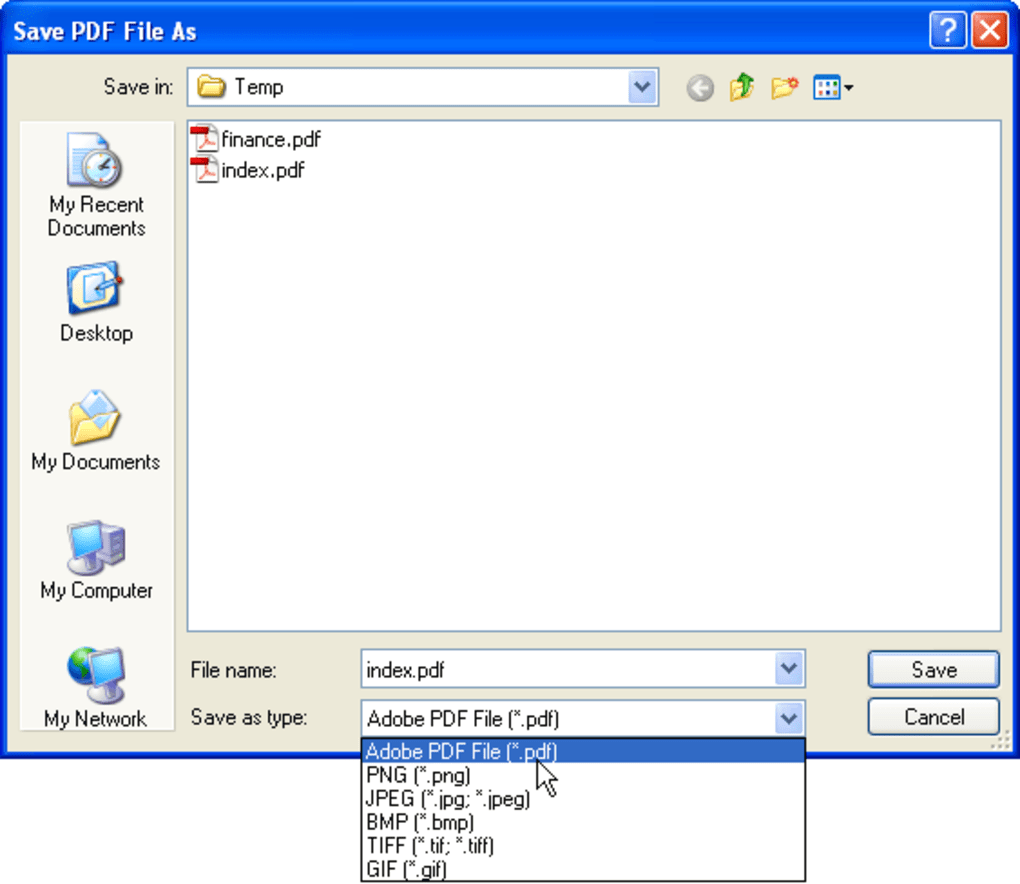
The primary function of PDFill FREE PDF and Image Writer is its ability to create new PDF documents and various image formats. This creation process is intuitive, leveraging the familiar “print” command found in nearly all Windows applications. However, what truly sets PDFill apart is the depth of control it offers over the output, allowing users to tailor their files to meet specific requirements, from security to presentation.
Seamless Conversion from Any Windows Application
The cornerstone of PDFill’s utility is its virtual printer driver. Once installed, PDFill appears as a selectable printer in any application that supports printing. This means you can convert documents from Microsoft Word, Excel, PowerPoint, web pages from your browser, designs from graphic editors, or even emails from your client – essentially, anything you can send to a physical printer can be turned into a PDF or image file. This universal compatibility eliminates the need for individual conversion tools for different file types, consolidating your document creation process into a single, efficient workflow. The conversion is designed for high-quality output, ensuring that fonts, layouts, and graphics are faithfully reproduced in the resulting PDF or image, maintaining the professional integrity of your original content.
Advanced PDF Output Customization
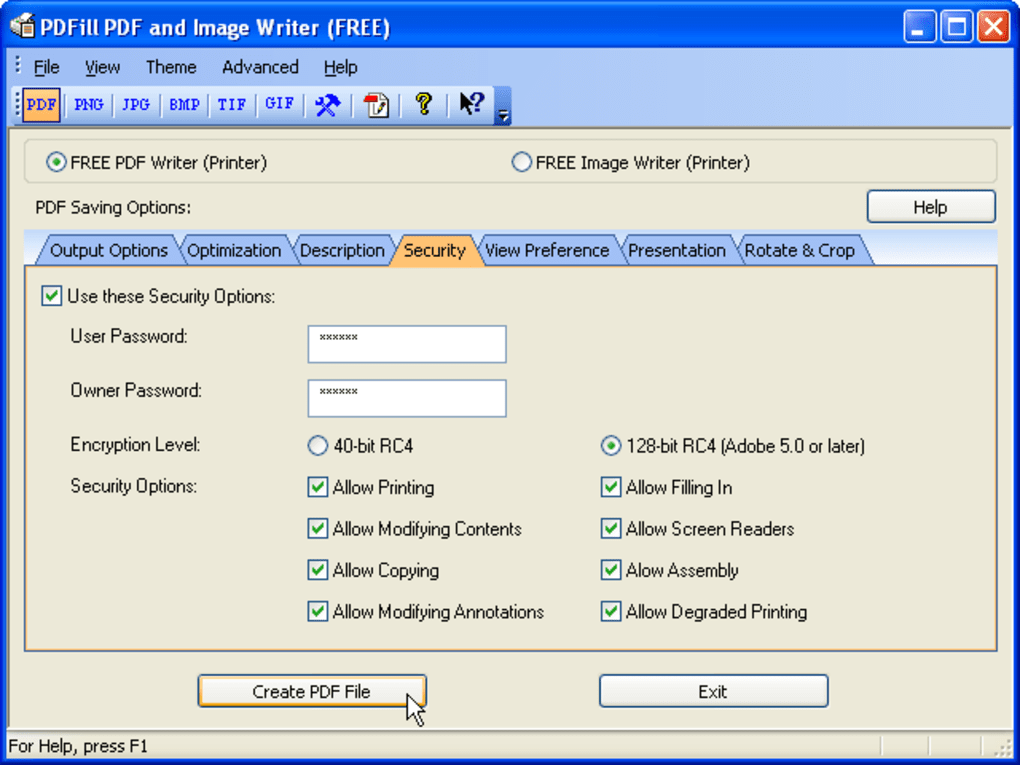
When creating a PDF, PDFill provides an impressive array of options that go far beyond basic conversion. These settings allow users to fine-tune every aspect of their PDF document, catering to diverse needs, from security to visual presentation.
- Optimization: This feature allows users to compress images, remove redundant objects, and optimize the file structure, resulting in smaller file sizes. This is particularly useful for documents intended for email distribution or web publishing, where file size can impact loading times and bandwidth.
- Information: Users can embed metadata into their PDFs, such as title, author, subject, and keywords. This information is crucial for document organization, searchability, and professional presentation, especially in corporate or academic environments.
- Password Protection: For sensitive documents, PDFill offers robust encryption and password protection. Users can set an “open password” to restrict access to the document itself, and a “permissions password” to control actions like printing, copying text, modifying, or adding annotations. This ensures that confidential information remains secure.
- View Settings: Customize how the PDF appears when opened. Options include setting the initial view mode (e.g., single page, continuous, two-page), the page number to open to, and whether to show bookmarks, thumbnails, or toolbars. This enhances the user experience for recipients.
- Presentation Mode: Create PDFs suitable for presentations, with options like full-screen mode, page transitions, and automatic page advance. This transforms a static document into an engaging slideshow.
- Rotate and Crop: These options allow for precise adjustments to the page layout. Individual pages or the entire document can be rotated to correct orientation issues, while the cropping tool helps remove unwanted margins or portions of a page, ensuring a clean and focused presentation.
- Email Integration: Directly email the newly created PDF upon conversion. This seamless integration streamlines workflows, making it quick and easy to share documents immediately after creation.
- Merge and Split: Though often considered manipulation tools, PDFill integrates merging and splitting capabilities directly into the creation process. You can choose to append your newly created PDF to an existing one, prepend it, or replace parts of it, offering dynamic control over your document collection right from the print dialog.
- Reformat: This feature allows for adjustments to page size and layout, which can be critical when preparing documents for specific printing requirements or digital display standards.
- Header and Stamp: Add headers and footers with page numbers, dates, or custom text. The “Stamp” feature allows for the application of watermarks, such as “Confidential” or “Draft,” to brand or protect your documents.
Flexible Image Export Options
Beyond PDF creation, PDFill is also a capable image writer, providing options to convert documents into several popular image formats. This functionality is invaluable for creating excerpts, thumbnails, or graphics for web use or other applications that prefer image files over PDFs.
- Format Selection: Users can choose from PNG, JPG, BMP, GIF, and TIF. This covers a wide range of needs, from web-optimized (JPG, PNG, GIF) to high-quality archival or print-ready formats (TIF, BMP).
- Color Control: Options to manage color depth and palette for optimized image quality and file size.
- Rotate and Flip: Similar to PDF options, images can be rotated and flipped to achieve the desired orientation.
Streamlined Workflow and Output Management
Efficiency is key in any productivity tool, and PDFill addresses this with several smart output management features:
- Default Folder and File Name: Set a default save location and a base file name to speed up the saving process.
- Use Print Job Name: Automatically name the output file based on the name of the print job, saving users from manual renaming.
- Hide the Save-As Dialog: For quick, repetitive tasks, users can configure PDFill to skip the “Save As” dialog and automatically save the file to a predefined location with a predefined naming convention.
- Replace, Append, or Prepend Existing PDF: Offers direct integration with existing PDFs, allowing users to either overwrite an old file, add the new content before it, or append it to the end, making document assembly incredibly flexible.
- Append Time Stamp onto File Name: A highly useful feature for version control and chronological organization, automatically adding the current year, month, day, hour, minute, and second to the file name.
Beyond Creation: Robust PDF Manipulation Tools
While its primary role is creation, PDFill FREE PDF and Image Writer also inherently includes robust capabilities for manipulating and organizing PDF documents. These features elevate it from a simple converter to a comprehensive document utility, enabling users to refine, secure, and structure their PDFs with ease.
Merging and Splitting Documents
One of the most frequently needed PDF manipulation features is the ability to combine multiple documents or break down large ones into smaller, manageable files. PDFill addresses this directly:
- Merging: Users can effortlessly merge multiple PDF files into a single document. This is ideal for combining chapters of a book, consolidating different reports, or assembling various source materials into one cohesive PDF. The intuitive interface allows for easy selection and reordering of files before the merge operation.
- Splitting: Conversely, PDFill enables users to split a large PDF into multiple smaller files. You can choose to split by a specific page range, extract individual pages, or break the document into segments of a fixed number of pages. This is perfect for distributing specific sections of a lengthy document or archiving parts separately. These features are accessible either through the print options (when appending/prepending) or via the broader PDFill suite (which includes a dedicated “PDF Tools” application, as mentioned in the original reference).
Security and Optimization Features
The digital age necessitates strong security for sensitive information and efficient file handling. PDFill provides essential tools in both these areas:
- Encryption and Password Protection: As detailed in the creation section, PDFill allows for comprehensive encryption using user and owner passwords. The user password restricts document viewing, while the owner password controls permissions like printing, copying, and modification. This multi-layered security ensures that your confidential data remains protected against unauthorized access and alteration.
- Optimization: Beyond merely converting, PDFill helps users optimize their PDF files. This involves compressing images, removing unnecessary embedded objects, and streamlining the document’s internal structure. The result is a significantly smaller file size, which is invaluable for reducing storage space, speeding up email attachments, and improving load times for web-based documents. For businesses and individuals regularly sharing documents, this optimization can lead to tangible benefits in terms of efficiency and resource management.
Enhancing Document Presentation
A well-presented document leaves a lasting impression. PDFill offers several tools to polish the appearance and readability of your PDFs:
- Rotation: Correcting page orientation is a common need. PDFill allows users to rotate individual pages or entire documents by 90, 180, or 270 degrees. This is particularly useful for scanned documents that might have been oriented incorrectly or for integrating content from various sources with different layouts.
- Cropping: Eliminate unwanted margins, headers, footers, or blank spaces from your PDF pages. The cropping tool provides precise control, allowing you to define the exact area of the page you wish to retain, ensuring that your documents look clean and professional, focusing the reader’s attention on the essential content.
- Reordering Pages: For complex documents or compiled reports, the ability to rearrange pages is critical. PDFill allows users to easily change the sequence of pages within a PDF, ensuring logical flow and correct organization.
- Headers and Footers: Add consistent information across all pages, such as page numbers, dates, document titles, or custom text. These are essential for professional reports, academic papers, and official documents, providing context and aiding navigation.
- Watermarks: Protect your intellectual property or indicate the status of a document (e.g., “Draft,” “Confidential,” “Sample”) by applying customizable text or image watermarks. Watermarks can be configured for opacity, position, and size, allowing for subtle branding or clear cautionary markings.
Direct Integration for Office Users
Recognizing the widespread use of Microsoft Office applications, PDFill includes a highly convenient feature for Word, PowerPoint, and Excel users:
- One-Click PDF Button: Dedicated buttons are integrated directly into the toolbars of Word, PowerPoint, and Excel. This “One Click PDF” functionality significantly streamlines the process of converting Office documents into PDFs, making it faster and more accessible for everyday users. Instead of going through the print menu, a single click can initiate the conversion, applying predefined settings for rapid PDF generation. This level of integration highlights PDFill’s commitment to enhancing user productivity across common platforms.
Why Choose PDFill FREE PDF and Image Writer?
In a crowded market of PDF tools, PDFill FREE PDF and Image Writer distinguishes itself through a set of compelling advantages that address common user frustrations and provide exceptional value.
Truly Free for All Users
Perhaps the most significant differentiator of PDFill FREE PDF and Image Writer is its commitment to being genuinely free. Unlike many applications that offer a “free” version with severe limitations or time-bound trials, PDFill is free for both personal and commercial use. This means individuals, students, small businesses, and even larger enterprises can leverage its full capabilities without incurring any licensing costs. This policy makes it an incredibly attractive option for budget-conscious users who still require a robust and feature-rich PDF solution. The developer, PlotSoft LLC, explicitly states that customers can distribute the software freely, underscoring its open and accessible nature.
No Watermarks, No Pop-up Ads
A common drawback of many “free” software solutions is the inclusion of watermarks on output documents or intrusive pop-up advertisements within the application. These elements can undermine the professionalism of documents and disrupt the user experience. PDFill FREE PDF and Image Writer prides itself on a clean user experience: “The new PDF and Image created by PDFill PDF and Image Writer has not Watermarks or Pop-up advertisements.” This commitment to an unblemished output and an uninterrupted workflow is a huge advantage, allowing users to create professional-grade documents without any visual compromises or annoying distractions.

Broad User Appeal
The versatility and accessibility of PDFill make it suitable for a wide array of users across various sectors. Its features cater to common daily document needs:
- Students: Can easily convert assignments, research papers, and notes into PDFs for submission or archiving, with options for secure sharing or combining multiple sources.
- Teachers: Ideal for creating and distributing handouts, lesson plans, and tests in a universally readable format, often with added security or watermarks.
- Small Business Owners: Essential for managing invoices, contracts, reports, and marketing materials. The ability to add information, optimize file size, and protect documents is critical for business operations.
- Job Seekers: Perfect for creating professional resumes and cover letters in PDF format, ensuring consistent presentation across different viewing platforms and often adding password protection for personal data.
- Everyday Users: Anyone who deals with digital documents regularly will find PDFill invaluable for organizing, securing, and sharing information efficiently. Its straightforward operation makes it accessible to users of all technical proficiencies.
Continuous Improvement and Reliability
While the specific version mentioned (10.0) from December 2012 indicates an established product, the reference content highlights a commitment to ongoing refinement. Version 10, for instance, specifically mentions “a lot of bugs fixed.” This indicates a developer dedicated to maintaining the software’s stability and reliability. Additionally, the inclusion of practical new features, such as adding a “BUSY flag when it is converting PS to PDF” and the ability to “Add time stamp (Year, Month, Day, Hour, Minute, Second) to the file name,” demonstrates a responsiveness to user needs and a focus on improving the user experience and workflow efficiency. Even older, established software that has received diligent bug fixes can prove highly stable and reliable for its intended purpose.
Technical Specifications and User Experience
Understanding the technical foundations and practical usability of any software is crucial for potential users. PDFill FREE PDF and Image Writer is designed to be accessible and efficient on the Windows platform.
System Requirements and Installation
PDFill FREE PDF and Image Writer is specifically built for Windows operating systems. The reference explicitly mentions Windows 7, implying broad compatibility across various Windows versions. Its relatively small file size of 9.08 MB ensures a quick download and minimal impact on system resources, making it a lightweight yet powerful addition to any Windows PC. Installation is typically straightforward, following the standard Windows installer procedure, after which the virtual printer driver is seamlessly integrated into the system.
Ease of Use
The design philosophy behind PDFill leans heavily towards user-friendliness. The concept of a virtual printer is inherently intuitive for anyone familiar with printing documents. Once installed, using PDFill is as simple as selecting it from your printer list. The configuration options, though extensive, are well-organized and presented in a clear manner, making it easy for users to navigate and apply desired settings. The “One Click PDF” buttons for Microsoft Office applications further exemplify this commitment to ease of use, streamlining common tasks into a single, effortless action.
Performance and Stability
Despite its comprehensive feature set, PDFill is designed for efficient performance. The bug fixes mentioned in version updates suggest a focus on stability, ensuring that the conversion and manipulation processes are reliable and error-free. The software’s lightweight nature contributes to its responsiveness, allowing for quick PDF and image generation without bogging down the system. For users who need dependable document processing without unnecessary delays, PDFill offers a consistent and stable experience.
Comparing with Alternatives and Complementary Tools
While PDFill FREE PDF and Image Writer stands strong as a standalone solution, it’s also part of a broader ecosystem of PDFill tools and exists within a competitive landscape of other PDF utilities. Understanding its place among these options can help users make informed decisions.
PDFill’s Ecosystem: PDFill FREE PDF Tools and PDFill PDF Editor
PlotSoft LLC, the developer behind PDFill FREE PDF and Image Writer, offers a more extensive suite of PDF tools that can complement the writer’s functionalities.
- PDFill FREE PDF Tools: This is another free offering from the same developer, designed to perform specific PDF operations beyond creation. It focuses on utilities like merging, splitting, reordering, encrypting, decrypting, rotating, cropping, reformatting, adding watermarks, headers, footers, and converting PDF to images or images to PDF. While some of these features overlap with the Writer’s output options, the dedicated “PDF Tools” application provides a more robust and standalone environment for batch processing and complex manipulations.
- PDFill PDF Editor: For users requiring a more comprehensive and advanced PDF editing experience, PlotSoft LLC also offers the PDFill PDF Editor. This is typically a trial version (or paid) software that provides a full array of editing capabilities, including the ability to add text, images, shapes, comments, and perform direct content modifications within a PDF. It’s a step up for those who need to deeply interact with and modify existing PDF content, rather than just create or manipulate document structure.
Contextualizing Among Other Free PDF Utilities
The market for free PDF tools is vibrant, with many options offering various functionalities. PDFill FREE PDF and Image Writer carves out its niche by offering a highly comprehensive “print-to-PDF/image” solution combined with strong output customization and basic manipulation features, all completely free and without ads or watermarks.
Alternatives like Doro PDF Writer or CutePDF Writer also provide virtual printer functionalities, but they might not offer the same depth of customization for security, presentation, or output management directly within their free versions. Dedicated PDF splitters or mergers exist, but PDFill integrates these functions alongside its creation capabilities. For those prioritizing a single, reliable, and entirely free tool for creating and initially preparing PDFs and images from any Windows application, PDFill FREE PDF and Image Writer remains a top-tier choice. It provides a foundational set of tools that meets the daily needs of a broad user base, setting a high standard for free utility software.
Conclusion
PDFill FREE PDF and Image Writer stands as a testament to the idea that powerful productivity tools don’t need to come with a hefty price tag or hidden compromises. As a free-to-use application for Windows, it empowers users to transform virtually any document or image from any application into high-quality PDF or various image formats. Its strength lies not just in its core conversion capability but in the extensive array of customization options it provides: from robust security features like password protection and encryption, to presentation enhancements like rotation, cropping, headers, and watermarks, and efficient workflow tools such as automatic naming conventions and seamless email integration.
What truly sets PDFill apart in the competitive digital landscape is its unwavering commitment to user freedom and a clean experience. It is entirely free for both personal and commercial use, ensuring that individuals, educators, and businesses alike can harness its power without licensing concerns. Crucially, it achieves this without resorting to intrusive watermarks on your output documents or disruptive pop-up advertisements within the application, ensuring that your professional documents remain unblemished and your workflow uninterrupted.
For students, teachers, small business owners, job seekers, and anyone who routinely interacts with digital documents, PDFill FREE PDF and Image Writer offers an indispensable, reliable, and user-friendly solution. It simplifies complex document tasks, enhances security, and improves the overall quality and presentation of your digital files. While other tools in the PDFill family offer even deeper editing or manipulation features, the Writer provides a solid, foundational utility that meets a vast majority of daily PDF and image creation needs. If you’re seeking a comprehensive, free, and hassle-free tool for converting and preparing your digital documents, PDFill FREE PDF and Image Writer from PhanMemFree is an excellent choice that continues to deliver exceptional value.
File Information
- License: “Free”
- Version: “10”
- Latest update: “December 13, 2012”
- Platform: “Windows”
- OS: “Windows 7”
- Language: “English”
- Downloads: “19.7K”
- Size: “9.08 MB”


