
In an increasingly digital world, the Portable Document Format (PDF) has become the ubiquitous standard for sharing documents across various platforms and applications. From critical business reports and academic papers to official forms and personal correspondence, PDFs are an integral part of our daily lives. However, merely viewing these documents often isn’t enough. The need to modify, combine, secure, or convert PDFs arises frequently, presenting a challenge for many users who are hesitant to invest in expensive proprietary software. This is where PDFill FREE PDF Tools steps in, offering a robust, feature-rich, and — as its name suggests — completely free suite of tools designed to handle virtually any PDF manipulation task imaginable.
PDFill FREE PDF Tools, available for Windows, stands out as an exceptionally useful utility for anyone seeking to modify or convert the contents within a PDF document without incurring any cost. Its appeal is broad, catering equally to the needs of a novice user looking for straightforward solutions and a seasoned professional requiring a powerful, no-nonsense toolkit. The software’s design prioritizes ease of use, presenting all its numerous options within a single, intuitive window. This approach ensures that users can access and utilize its extensive functionalities with just the click of a button, making complex PDF operations surprisingly simple. Crucially, PDFill FREE PDF Tools is not only free for personal use but also for commercial deployment, and it proudly boasts an output free from watermarks or intrusive pop-up advertisements, distinguishing it from many other “free” alternatives that often come with hidden caveats.
The Evolving Landscape of PDF Management and the Need for Robust Tools
The PDF format, developed by Adobe in the early 1990s, was envisioned as a way to present documents, including text formatting and images, in a manner independent of application software, hardware, and operating systems. Its stability, security features, and universal compatibility quickly established it as the gold standard for digital document exchange. Today, the sheer volume of PDF documents generated, shared, and stored daily is staggering. Businesses rely on PDFs for invoices, contracts, presentations, and reports. Educational institutions use them for textbooks, assignments, and research papers. Individuals encounter them for bank statements, utility bills, application forms, and e-books.
While basic PDF viewers are readily available, the demands of modern digital workflows often extend far beyond passive consumption. Users frequently need to:
- Consolidate Information: Combine multiple reports or chapters into a single, cohesive document.
- Customize Content: Extract specific pages from a large PDF, delete irrelevant sections, or reorder pages for a new sequence.
- Enhance Security: Protect sensitive information with encryption and restrict access or modification permissions.
- Improve Aesthetics and Readability: Rotate incorrectly oriented pages, crop extraneous margins, or add professional headers and footers.
- Bridge Formats: Convert images into PDFs for archiving or convert PDFs into image formats for web use or graphic design.
- Digitize Physical Documents: Scan paper forms and directly convert them into editable or searchable PDF files.
These diverse requirements highlight the essential role of specialized PDF tools. Many commercial solutions offer these capabilities but often come with hefty price tags or subscription models that may not be feasible for every user or small business. The absence of an effective, free alternative often forces users to either compromise on their document management needs or resort to less reliable online converters that may pose security risks or impose limitations like watermarks and file size restrictions. PDFill FREE PDF Tools directly addresses this gap, providing an enterprise-grade feature set without the associated costs, thus democratizing advanced PDF functionalities for everyone.
Unpacking the Core Features of PDFill FREE PDF Tools
PDFill FREE PDF Tools is not just a single-purpose utility; it’s a comprehensive toolkit offering 15 distinct functionalities, each designed to tackle a specific aspect of PDF management. Its strength lies in this breadth and depth, allowing users to perform a wide array of tasks from a single application. Let’s delve into the specific capabilities that make this software an indispensable asset.
Seamless Document Assembly and Disassembly
One of the most common requirements for PDF users is the ability to manipulate the structure of documents. Whether consolidating scattered files or breaking down a monolithic document, PDFill provides intuitive tools for both.
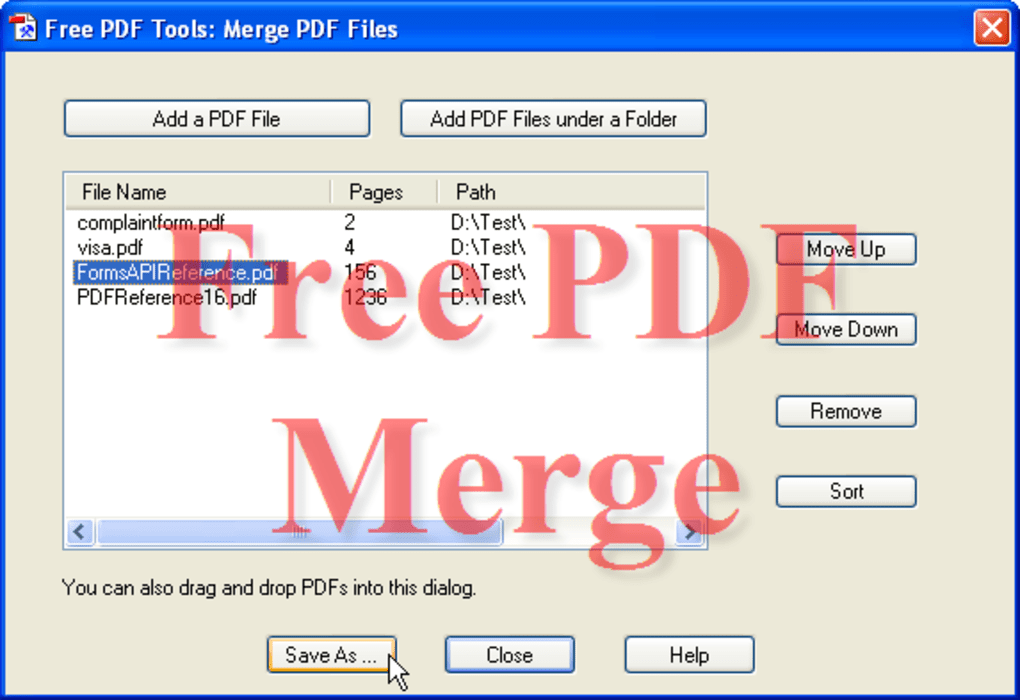
- Merge or Combine Multiple PDF Files into One: This feature is invaluable for professionals, students, and anyone needing to consolidate information. Imagine compiling a comprehensive project report from individual departmental contributions, merging several chapters of a book, or combining multiple research papers into a single portfolio. PDFill makes this process effortless, allowing users to select numerous PDF files and merge them into a new, unified document. The efficiency of selecting all PDFs within a folder, a feature introduced in version 10.0, further streamlines this task, making batch merging significantly quicker.
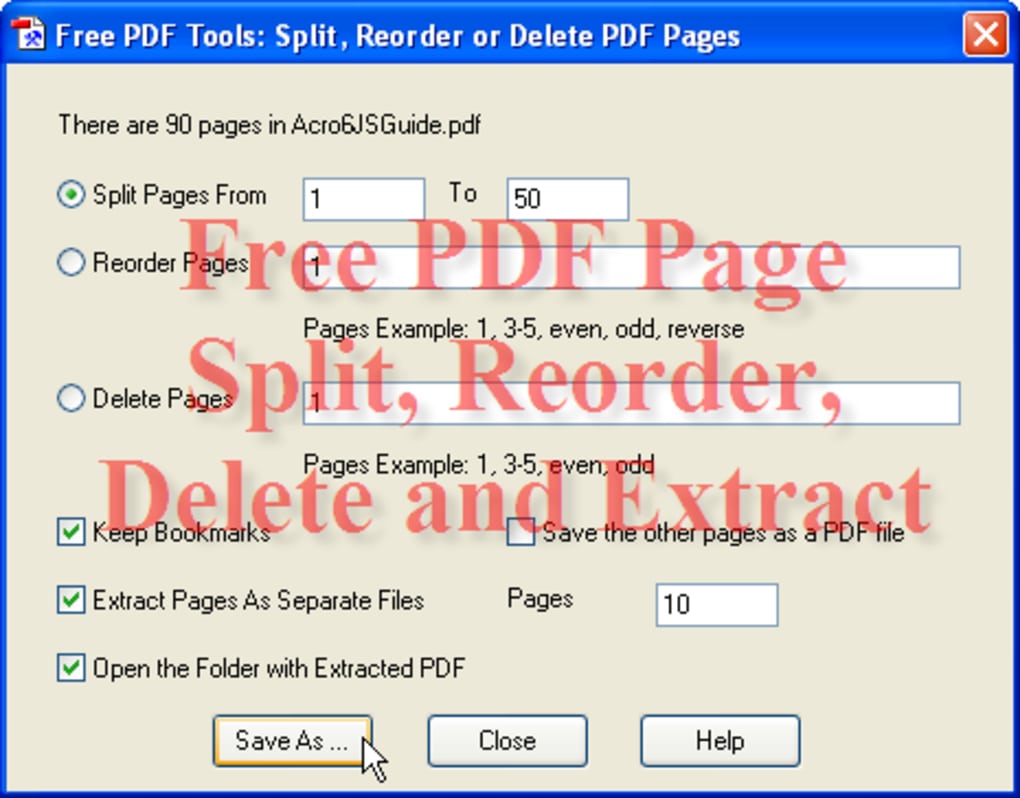
- Split, Extract, Reorder, or Delete PDF Pages to Get a New File: Equally important is the ability to deconstruct PDFs. Users might need to extract specific pages from a lengthy legal document, delete outdated sections from a draft, or reorder pages to fit a new narrative flow for a presentation. PDFill offers precise control over page management, allowing users to specify page ranges for splitting, extract individual pages, rearrange their sequence, or delete unwanted pages. The “Reverse Option” added to the Split Tool in version 10.0 provides even greater flexibility, catering to specific organizational needs.
Enhancing Security and Integrity
The security and authenticity of digital documents are paramount, especially when dealing with sensitive or confidential information. PDFill equips users with essential tools to protect their PDFs.
- Encrypt or Decrypt PDF with Permission Options: Security is a major concern for many documents. PDFill supports robust Adobe 128-bit encryption, allowing users to protect their files with passwords. Beyond simple access restriction, the software provides granular permission options. Users can control whether recipients can print the document, copy its content, modify it, or fill out form fields. This level of control is crucial for distributing sensitive information while maintaining its integrity and managing its usage. Conversely, the decrypt function allows authorized users to remove these security layers when necessary.
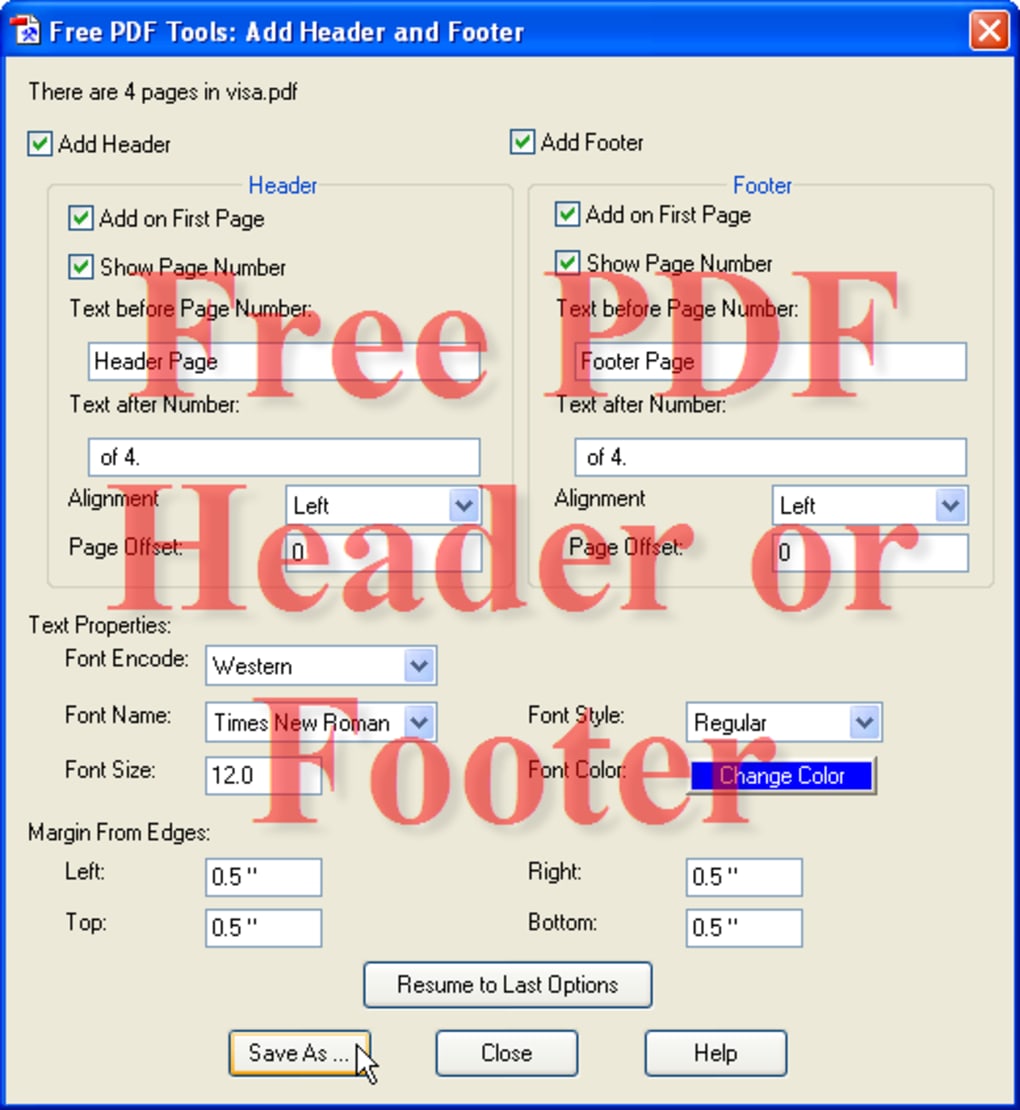
- Add Headers or Footers with Date and Page Number: For professional documents, consistent formatting is key. Headers and footers are essential for branding, navigation, and professional presentation. PDFill enables users to easily add custom headers and footers, which can include automatic date stamps and sequential page numbers. This feature is particularly useful for reports, manuals, and official documents, ensuring a polished and organized appearance.
- Add Stamp Using a Formatted Text or Image: Watermarks serve multiple purposes, from indicating document status (e.g., “Draft,” “Confidential,” “Sample”) to protecting intellectual property or branding. PDFill allows users to apply both text-based and image-based stamps. A text stamp can be customized with various fonts, sizes, colors, and positions, while an image stamp allows for the overlaying of logos, signatures, or specific graphics onto the PDF pages. This provides a clear visual indicator without altering the document’s core content.
Visual Adjustments and Content Manipulation
Physical documents often require physical adjustments; digital PDFs sometimes need the same. PDFill offers tools to optimize the visual presentation and layout of your documents.
- Rotate by 90/180/270 Degree and Crop PDF Page by Specifying Margins: Scanned documents frequently end up misaligned, or certain parts of a PDF page might be irrelevant or contain sensitive information that needs to be removed. PDFill’s rotate function allows users to correct orientation issues with precision. The crop tool enables users to define custom margins, effectively trimming unwanted edges or focusing on specific content areas. The redesigned Rotate/Crop interface in version 10.0 further enhances the user experience, making these adjustments more intuitive.
- Reformat Multiple Pages into One Page with Note Lines for Handout: This niche but incredibly useful feature is perfect for educational settings or presentations. It allows users to consolidate several smaller PDF pages onto a single larger page, often with additional space or lines for notes. This is ideal for creating handouts from slides or reports, saving paper, and providing an organized format for annotations.
Bridging Formats: Images, PostScript, and Scans
PDFill isn’t limited to working solely within the PDF ecosystem; it also facilitates seamless conversion between PDFs and other common formats like images and PostScript, and even integrates with physical document scanning.
- Convert Images to PDF with Layout: Many users often have collections of images (e.g., JPEG, PNG, TIFF) that they wish to organize, archive, or share as a single, multi-page document. PDFill allows for the conversion of various image formats into a PDF, with options to control the layout of images on each page. This is extremely useful for creating photo albums, archiving scanned documents (as images), or compiling visual reports. Version 10.0 introduced the ability to add all images under a folder for conversion, significantly speeding up batch processing.
- Convert PDF to Images: Conversely, there are times when PDF content needs to be used in image format, such as for web graphics, social media sharing, or integration into other design software. PDFill can convert entire PDF documents or specific pages into various image formats, giving users flexibility in how they present their content. The addition of a “File Save as Dialog” in version 10.0 for this tool provides better control over output options.
- Convert PostScript into PDF: PostScript is a page description language primarily used in desktop publishing and printing. Many graphic designers and print professionals work with PostScript files. PDFill provides a vital bridge by allowing users to convert these PostScript files directly into the more universally accessible and shareable PDF format, ensuring wider compatibility and easier distribution.
- Scan Paper Form into Images or PDF: In an effort to go paperless or digitize physical records, scanning documents is a daily task for many. PDFill integrates directly with scanners, enabling users to scan paper forms or documents and directly save them as image files or, more conveniently, as new PDF documents. The introduction of the WIA Scanning method in version 10.0 enhances compatibility with a broader range of scanning devices.
Advanced Utilities and Metadata Management
Beyond the most common operations, PDFill offers several sophisticated tools that cater to more specific needs, from form field management to optimizing document transparency and metadata.
- Delete, Flatten, or List the PDF Form Fields: Interactive PDF forms are common, but sometimes the form fields need to be managed. PDFill allows users to list all form fields within a document, delete specific fields, or flatten them. Flattening converts active form fields into static text or images, making the document non-interactive and preventing further data entry, which is useful for finalizing and archiving filled forms.
- Add Meta Information into PDF Document: Metadata (such as title, author, subject, and keywords) is crucial for document organization, searchability, and professional presentation. PDFill enables users to easily add or modify this hidden information, which can greatly improve document management and retrieval, especially in large archives or databases.
- Create Transparent Image with Transparency Options: This feature allows for the creation of images with transparency, which can be particularly useful for overlaying elements in graphic design or for creating specific effects within PDF documents. Users can control the transparency options, providing flexibility for creative applications.
Technical Considerations and User Experience
While the wealth of features is impressive, the practicality of any software also hinges on its technical requirements and user experience. PDFill FREE PDF Tools scores highly in both these aspects, especially for its target audience.
- Prerequisites: GhostScript Integration: PDFill FREE PDF Tools requires GhostScript to be installed on the operating system. GhostScript is an interpreter for PostScript and PDF files, essential for many of the conversion and manipulation functions. However, this is not a barrier to entry. If GhostScript is not detected during the initial installation of PDFill, the software is designed to automatically download and install it, ensuring a smooth setup process for the user. This means that users don’t need to manually hunt down and install additional software; the process is largely automated, requiring minimal user intervention.
- User-Friendly Interface: The developers of PDFill have designed the software with the novice in mind. All 15 functions are presented clearly within a single main window, avoiding complex menus or nested options. Each function is typically represented by a distinct button or clearly labeled section, making it easy for users to identify and select the task they wish to perform. This straightforward approach minimizes the learning curve, allowing users to become productive with the software almost immediately.
- Performance and Reliability: PDFill is generally light on system resources and performs its tasks efficiently. The software is stable, a critical factor when dealing with document manipulation, where data integrity is paramount.
- Unbeatable Value: Free for All, No Strings Attached: Perhaps the most compelling technical consideration is the licensing model. PDFill FREE PDF Tools is explicitly stated to be free for both personal and commercial use. This is a significant advantage over many competitors that offer “free” versions with limitations, watermarks, or embedded advertisements. The assurance that “The new PDF created by PDFill PDF Tools has not Watermarks or Pop-up advertisements” is a powerful testament to its genuine commitment to providing a high-quality, unencumbered experience. Users can confidently distribute documents created or modified with PDFill without worrying about unprofessional branding or distractions. Moreover, the software can be freely distributed by customers, further enhancing its reach and utility within communities and organizations.
Advantages and Limitations: A Balanced Perspective
Like any software, PDFill FREE PDF Tools comes with its own set of strengths and weaknesses. Understanding these helps users determine if it’s the right fit for their specific needs.
Significant Advantages:
- Unrivaled Cost-Effectiveness: Being completely free for both personal and commercial use is its paramount advantage. This eliminates the financial barrier associated with many powerful PDF editors, making advanced functionality accessible to everyone from individual students to small businesses.
- Comprehensive Feature Set: The 15 distinct tools cover a vast range of PDF manipulation tasks, from basic merging and splitting to advanced encryption, metadata editing, and format conversions. This extensive toolkit often negates the need for multiple specialized applications.
- User-Centric Design: The intuitive, single-window interface ensures that even users with limited technical expertise can quickly grasp and utilize the software’s capabilities. The clear presentation of options minimizes confusion and accelerates task completion.
- Professional Output: The absence of watermarks or forced pop-up advertisements in the generated PDFs ensures that documents maintain a professional and clean appearance, suitable for any official or business context.
- Robust Security Features: With support for Adobe 128-bit encryption and granular permission controls, users can effectively protect sensitive information within their PDFs, giving them peace of mind regarding document security.
- Active Development (as seen in v10.0): The documented updates in version 10.0 demonstrate a commitment from the developer, PlotSoft LLC, to continuously improve the software, fix bugs, and add new functionalities based on user feedback and evolving needs.
Current Limitations:
- GhostScript Dependency: While the automatic download and installation of GhostScript simplifies the process, it still represents an external dependency. In rare cases, users might encounter issues if their system has strict security configurations or if the GhostScript download link experiences temporary outages. It’s an additional component that must be present for full functionality.
- Windows-Only Availability: A significant limitation for a global user base is the software’s exclusivity to Windows operating systems (supporting Windows 2000 and later). There is currently no version designed for Apple macOS or Linux devices. This restricts its accessibility for users who operate in a cross-platform environment or primarily use non-Windows machines. This means Mac users, for instance, would need to look for alternative solutions like PDFill PDF Editor (a trial version is mentioned in the reference) or other free/paid options on PhanMemFree.org or elsewhere.
- Customer Service (as per a user review): While not explicitly stated by the developer, a user review on PhanMemFree.org mentioned issues with customer service regarding license codes for a related product (PDFill PDF Editor, which is a trial version). While PDFill FREE PDF Tools doesn’t require a license, this might hint at the level of direct support available for free users if complex issues arise, though this is speculative.
The V10.0 Enhancements: A Commitment to Improvement
The release of version 10.0 highlights the continuous efforts by PlotSoft LLC to refine and enhance PDFill FREE PDF Tools, demonstrating a responsiveness to user needs and a dedication to improving the overall experience. These updates significantly boost the software’s utility and user-friendliness:
- Numerous Bug Fixes: A general commitment to stability and reliability, ensuring a smoother and more consistent user experience across all functions.
- Merge Tool to Select All PDFs Under a Folder: This is a huge time-saver for batch processing. Instead of individually selecting multiple PDF files, users can now point to a folder, and the tool will automatically include all PDFs within it for merging, greatly enhancing workflow efficiency.
- Split Tool to Add Reverse Option: This provides greater flexibility when extracting or reordering pages. For specific tasks, splitting documents in reverse order can simplify subsequent organizational steps.
- Redesigned the Rotate/Crop Interface: A better user interface means a more intuitive and precise control over visual adjustments. This makes it easier for users to correctly orient scanned documents or remove unwanted margins without frustration.
- Image to PDF Tool to Add All Images Under a Folder: Similar to the merge tool enhancement, this allows for rapid batch conversion of an entire directory of images into a single PDF or multiple PDFs, which is incredibly useful for archiving photo collections or digitizing physical documents captured as images.
- PDF to Images Tool to Add a File Save as Dialog: This enhancement provides users with more control over the output format, quality, and naming conventions when converting PDFs to image files, allowing for tailored results.
- Add WIA Scanning Method: WIA (Windows Image Acquisition) is a standard API for connecting to imaging devices. Adding this method improves compatibility with a wider range of scanners, making the “Scan Paper Form into images or PDF” feature more accessible to more users.
- Add Option for the Single Color Selection Tolerance: This is a more specialized feature, likely benefiting users who work with creating transparent images or specific image manipulation within the PDF context, offering finer control over color selection thresholds.
- Add View Menu: A standard “View” menu can offer various display options, zooming, or navigation tools within the application, enhancing overall usability and control for the user.
These updates collectively underscore PDFill’s commitment to not just maintaining but actively improving its free offering, ensuring it remains relevant and highly functional in the face of evolving user demands.
Conclusion
PDFill FREE PDF Tools stands as an exemplary solution in the realm of PDF management software. It elegantly addresses the common pain points associated with PDF manipulation by providing a comprehensive, powerful, and, most importantly, genuinely free suite of tools. From consolidating scattered documents and protecting sensitive information with robust encryption to making precise visual adjustments and bridging various file formats, PDFill empowers users with capabilities often found only in expensive commercial packages.
Its user-friendly interface, coupled with the absence of watermarks or bothersome advertisements, makes it an attractive choice for anyone needing reliable PDF utilities on a Windows platform. While its dependency on GhostScript and lack of cross-platform support are minor drawbacks, the immense value offered by its extensive feature set and ongoing development, as evidenced by the V10.0 enhancements, far outweighs these limitations for its target audience.
Whether you are a student compiling research, a teacher preparing handouts, a small business owner managing invoices, or a job seeker perfecting your resume, PDFill FREE PDF Tools provides a robust and accessible solution for all your PDF needs. It is a testament to the power of well-designed free software, proving that high-quality document management does not have to come with a hefty price tag. For Windows users, PDFill FREE PDF Tools from PhanMemFree.org is an indispensable addition to their digital toolkit, offering professional-grade PDF manipulation capabilities without any cost.
File Information
- License: “Free”
- Version: “10”
- Latest update: “November 18, 2021”
- Platform: “Windows”
- OS: “Windows 2000”
- Language: “English”
- Downloads: “137.8K”
- Size: “7.83 MB”


