
The default Windows Task Manager, while a fundamental tool for monitoring system performance and managing applications, often leaves power users wanting more. For those who delve deeper into their system’s operations, requiring granular control and comprehensive oversight, the standard offering can feel rudimentary. This is precisely where Prio steps in – a discreet yet powerful utility designed to seamlessly integrate with and significantly enhance the Windows Task Manager, transforming it into a more robust control center for expert users. Rather than introducing a separate interface, Prio intelligently extends the existing Task Manager, adding crucial functionalities that empower users to better understand, optimize, and secure their Windows environment.
Prio: Bridging the Gap in Windows System Management
Prio doesn’t reinvent the wheel; it meticulously refines and augments an already familiar tool. Its core philosophy revolves around providing additional layers of information and control directly within the Windows Task Manager that users access daily. From the moment Prio is installed, a simple Ctrl+Alt+Del reveals a transformed Task Manager, boasting new tabs and intelligent features that cater to a more discerning user base. This direct embedding is a significant advantage, eliminating the need to learn a new application or switch between multiple tools for system oversight. It makes Prio feel like an integral, albeit unofficial, upgrade to the operating system itself.
The initial impact of Prio is immediately visible through the addition of three new, highly functional tabs: “Users,” “Services,” and “TCP/IP.” Each of these tabs provides a level of detail and management capability that is conspicuously absent from the stock Task Manager, allowing users to gain a far more comprehensive perspective on their system’s active components.
The “Users” tab, for instance, offers a clear listing of all active user accounts on the system. While seemingly straightforward, this feature is invaluable in multi-user environments or for diagnosing issues related to user sessions. Administrators can quickly see who is logged in, what processes they are running, and potentially identify unauthorized activity or resource hogs associated with specific user profiles. This granular visibility is crucial for maintaining system integrity and ensuring fair resource allocation.
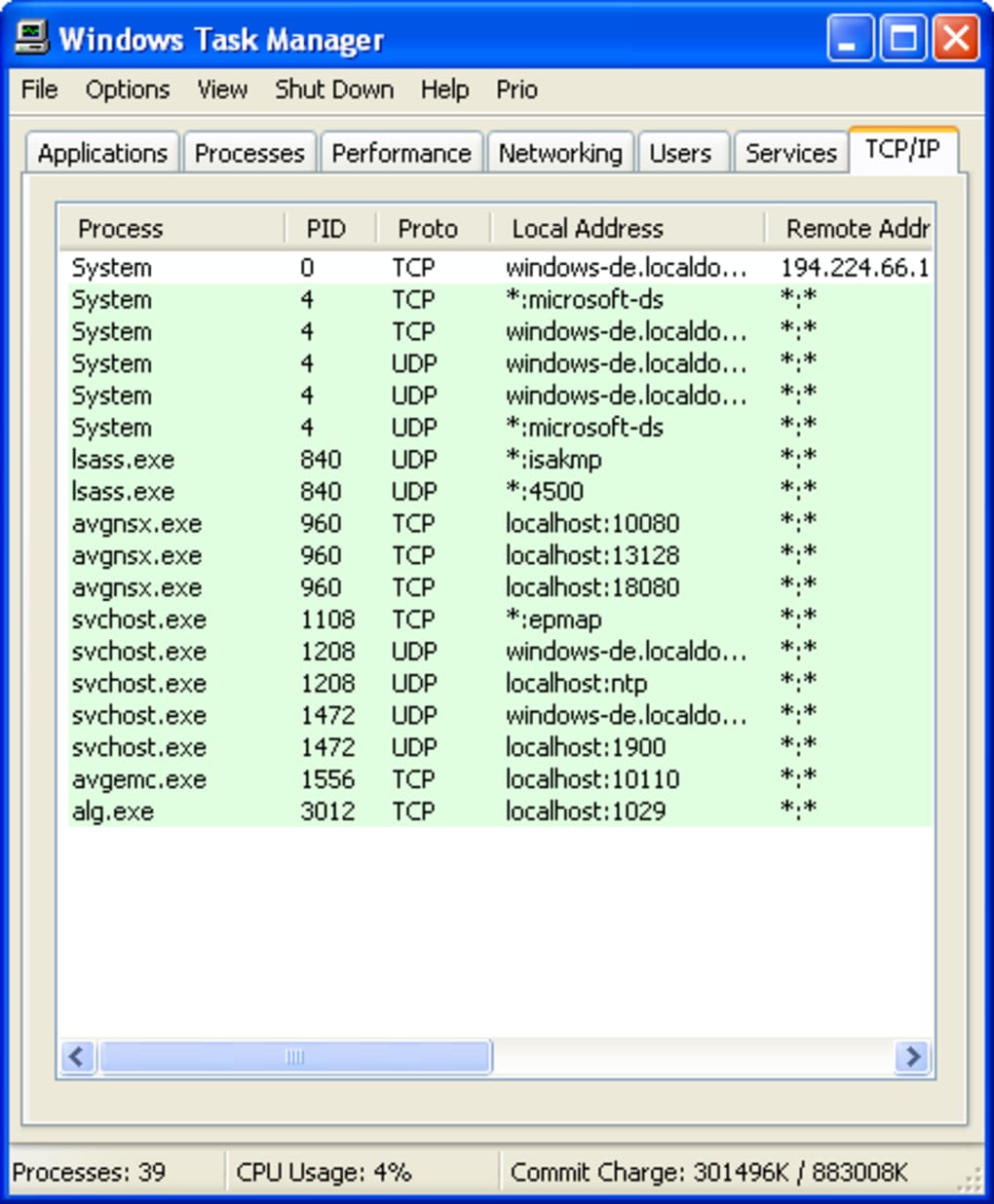
Moving to the “Services” tab, Prio presents a detailed overview of all currently active system services. Windows services are the backbone of the operating system, performing critical background tasks ranging from networking to hardware management. The native Windows Services console is separate and can be cumbersome to navigate. By integrating service management directly into the Task Manager, Prio offers a streamlined approach to monitoring and, importantly, understanding the impact of these services on system performance. Expert users can quickly identify which services are running, their status, and their associated processes, facilitating troubleshooting and system optimization. This ability to instantly cross-reference services with other running processes provides a holistic view that is essential for advanced diagnostics.
Perhaps one of the most compelling additions for those concerned with network activity is the “TCP/IP” tab. This tab provides a real-time display of all active network connections on the system. In an age where online security and connectivity are paramount, understanding what applications are communicating with the internet and to which external addresses is vital. This feature can help users identify suspicious connections, monitor bandwidth usage by specific processes, and troubleshoot network-related issues without resorting to complex command-line tools or third-party network monitors. It’s a powerful diagnostic aid for anyone managing network resources or concerned about potential malware activity.

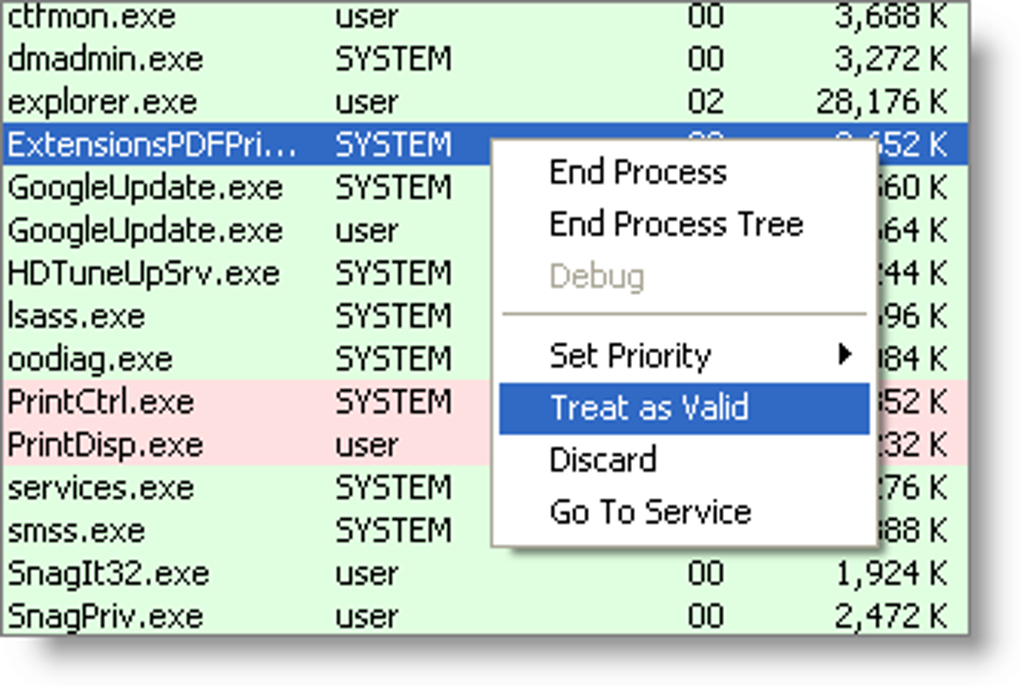
Beyond these informative tabs, Prio introduces another critical visual aid: a color-coding system for processes. This simple yet effective enhancement immediately highlights processes that do not possess a valid digital signature, marking them as red. A digital signature acts as a verifiable stamp of authenticity from the software developer, assuring users that the software has not been tampered with since its publication. Processes without valid signatures can sometimes be legitimate, especially from smaller developers or open-source projects. However, in many cases, unsigned processes can indicate potentially malicious software, unverified applications, or even rootkits attempting to hide their presence. This instant visual alert empowers users to quickly identify and investigate potentially unsafe elements within their system, significantly bolstering their “Security & Privacy” posture.
The Critical Role of Utilities & Tools in System Health
Prio’s existence underscores the broader importance of “Utilities & Tools” in maintaining a healthy, efficient, and secure computing environment. In the vast landscape of software, utilities are the unsung heroes that optimize, diagnose, and enhance the core functionalities of an operating system. From basic file managers and compression tools to complex data recovery and backup solutions, these applications fill the gaps left by default OS offerings, catering to specific user needs and improving overall productivity.
Tools like Prio, which fall under this critical category, provide users with greater control and insight into their system’s inner workings. While the operating system provides a foundation, utilities allow users to customize and fine-tune their experience to an extraordinary degree. For a business, this might mean specialized “Accounting” or “Project Management” software, but for individual system health, it means tools that manage processes, monitor hardware, or secure data. Prio, by extending the Task Manager, directly contributes to “Productivity” by allowing users to optimize application performance and ensures a layer of “Security & Privacy” through its process identification features. It is a testament to the fact that even well-designed operating systems benefit from specialized enhancements that allow users to push the boundaries of performance and control.
Beyond Basic Monitoring: Advanced Features for Power Users
While the new tabs and visual cues are immediately beneficial, Prio’s most profound and enduring feature lies in its ability to save process priority settings. In Windows, every running program or process is assigned a priority level, which dictates how much CPU time it receives relative to other processes. By default, Windows dynamically manages these priorities, but sometimes a user might want to assign a higher priority to a critical application (e.g., a video editor, a game, or a specific “Development Kit”) to ensure it receives maximum resources, or a lower priority to a background task to prevent it from hogging resources.
The standard Windows Task Manager allows users to manually change a process’s priority, but this setting is typically reset every time the program is closed and relaunched. This means users have to manually reconfigure priorities for frequently used applications, which can be tedious and counterproductive. Prio elegantly solves this problem by enabling the system to remember the assigned priority for a specific executable. Once a user sets a process to a certain priority (e.g., “High” for their favorite game or “Low” for a demanding background “AI Video Generator & Editor” task), Prio ensures that this setting is automatically applied every time that program is launched.
This seemingly subtle feature has significant implications for system optimization and user experience. For gamers, it means consistently better frame rates and smoother performance by ensuring their game always gets preferential CPU access. For professionals using resource-intensive “Office Suites” or “Graphic & Design” applications, it ensures that their primary workflow tools operate at peak efficiency, minimizing lag and maximizing responsiveness. For developers or IT professionals engaged in “Programming Languages” or “Web Development” tasks, it provides a stable and predictable environment for their critical tools. This persistent priority management is a game-changer for anyone who regularly interacts with demanding software, allowing for a truly tailored and optimized computing experience. It transforms a reactive adjustment into a proactive system configuration, significantly enhancing the overall “Productivity” of the user.
Securing Your System: A Look at Prio’s Security Aspects
The digital landscape is fraught with threats, making “Security & Privacy” a paramount concern for all computer users. While Prio isn’t an antivirus or a firewall, its contribution to system security is noteworthy, particularly through its color-coding of unsigned processes. In the context of “Security & Privacy,” this visual distinction is an invaluable early warning system.
When a process is marked in red because it lacks a valid digital signature, it immediately raises a red flag. This isn’t an automatic condemnation of the software, as many legitimate, smaller applications might not bother with the often costly and cumbersome process of obtaining digital certificates. However, for a user, it signals a need for caution and further investigation. It prompts questions like: “Where did this software come from?”, “Is it from a trusted source?”, or “Did I intentionally install it?”.
This feature becomes especially critical in identifying potentially unwanted programs (PUPs), adware, or even certain types of malware that often try to operate without proper identification to evade detection. By quickly highlighting these anomalies, Prio empowers users to perform a more focused security audit. They can then cross-reference these unsigned processes with other security tools, search online for information about the executable, or even terminate the process if it’s deemed suspicious. This proactive capability complements traditional antivirus software by providing real-time insight into the trust level of running executables, adding an extra layer of vigilance to one’s digital defenses. In a broader sense, it contributes to overall system “Security & Privacy” by giving users more information and control over the software executing on their machines, bridging the gap between passive protection and active user awareness.
Prio’s Place in the Modern Software Ecosystem
Despite its last update being in 2009, Prio maintains a unique and relevant position in the modern software ecosystem, especially for users running various versions of Windows, including legacy systems, or those who simply prefer a lightweight, integrated solution over more complex alternatives. Its enduring appeal lies in its simplicity of function, robust integration, and effective addressing of specific pain points within the Windows Task Manager. While Windows has evolved and its built-in Task Manager has seen some improvements, Prio’s core enhancements – particularly persistent process priority and detailed network/service tabs – remain distinct and highly desirable for many.
In a world filled with sophisticated “AI” tools, expansive “Office Suites,” and complex “Development Kits,” Prio stands as a testament to the power of a focused utility. It doesn’t aim to be an all-encompassing system optimizer or a full-fledged “Internet & Network” diagnostic suite; instead, it perfects a specific niche. Its value proposition is clear: minimal footprint, maximum impact on a critical system component. For users who might also be exploring “Google Chrome Extensions” to enhance their browsing or “Wordpress” plugins for their website, Prio offers a parallel approach to desktop enhancement – finding specialized tools to improve core functionality.
When considering “Best Products” for system management, Prio often comes up in discussions for its category. It’s not about being the flashiest or having the most features, but about excelling at what it promises. For those who frequently adjust process priorities or need quick oversight of network connections and services without installing heavy third-party software like a full “Antivirus” or “VPN” suite, Prio remains an excellent, free choice. Its compact size (483.54 KB) and efficiency mean it consumes negligible system resources, making it suitable even for older machines or those seeking to avoid system bloat.
The fact that Prio has been downloaded over 8.8K times, with 9 downloads in the last month (as of the provided data), speaks to its continued, albeit niche, relevance. Its availability across “Other platforms (1)” beyond just Windows NT – likely referring to later Windows versions like XP, Vista, 7, and potentially even newer ones due to backward compatibility – further solidifies its position as a go-to utility for a certain demographic. Its multilingual support, demonstrated by its availability in numerous languages ranging from Arabic (عربي) to Vietnamese (Tiếng Việt), highlights its global reach and the universal need for such enhancements among tech-savvy users worldwide.
PhanMemFree.org, like other software repositories, categorizes Prio under “Utilities & Tools,” emphasizing its practical purpose. While there are more comprehensive “System Monitoring” or “Process Management” solutions available, Prio’s direct integration and focus on persistent priority settings carve out a unique space. It’s a prime example of how even small, targeted applications can provide significant value by addressing specific limitations of an operating system’s default tools. For users looking to gain a deeper, more persistent level of control over their Windows processes without overhauling their system, Prio remains a trusted and highly effective choice.
In conclusion, Prio is more than just a simple add-on; it’s an intelligent enhancement that transforms the Windows Task Manager into a more powerful and user-centric tool. By adding critical tabs for users, services, and TCP/IP connections, color-coding unsigned processes for enhanced security, and, most importantly, enabling persistent process priority settings, Prio empowers expert users with unprecedented control and insight. While it may initially seem daunting for novices, its value to those who demand fine-tuned system performance and meticulous oversight is undeniable. Prio exemplifies how a focused utility can provide substantial improvements to core operating system functionalities, ensuring that users can optimize their Windows environment for maximum “Productivity,” “Security & Privacy,” and overall efficiency, solidifying its place as a classic and continuously relevant utility in the vast software landscape available on platforms like PhanMemFree.org.
File Information
- License: “Free”
- Version: “1.9.8.1536”
- Latest update: “February 27, 2009”
- Platform: “Windows”
- OS: “Windows NT”
- Language: “English”
- Downloads: “8.8K”
- Size: “483.54 KB”


