
Prism Launcher is a powerful and versatile tool designed to significantly improve your Minecraft gameplay experience. Born from the legacy of MultiMC, a well-regarded custom launcher, Prism Launcher provides users with unparalleled control and flexibility over their Minecraft installations. This comprehensive launcher offers a streamlined approach to managing multiple Minecraft instances, simplifying the process of installing and configuring mods, resource packs, and various game settings. Whether you’re a seasoned Minecraft veteran or a newcomer exploring the vast world of modifications, Prism Launcher empowers you to customize your gameplay experience like never before.
Streamlined Instance Management: A World of Possibilities
One of the most significant advantages of Prism Launcher is its ability to effortlessly manage multiple Minecraft instances. This feature is invaluable for players who enjoy experimenting with different mods, resource packs, or even different versions of the game itself. Imagine effortlessly switching between a vanilla survival world, a heavily modded adventure map, and a custom server – all without the cumbersome process of manually installing and uninstalling modifications or juggling different game directories. Prism Launcher eliminates this hassle, allowing you to create and maintain a diverse collection of Minecraft instances, each tailored to your specific preferences and gaming style.
This multi-instance management isn’t just convenient; it’s essential for players who delve into the extensive world of Minecraft modding. Many mods are incompatible with each other or require specific game versions to function correctly. Without a tool like Prism Launcher, managing these conflicts can become incredibly complex and time-consuming. With Prism Launcher, however, you can dedicate specific instances to individual modpacks or combinations of modifications, ensuring a smooth and stable gameplay experience without the risk of conflicts or crashes. You can experiment freely, knowing that each instance is isolated and protected from the potential instability of incompatible mods.
The intuitive interface of Prism Launcher makes managing these multiple instances remarkably straightforward. The launcher provides a clear and organized overview of all your instances, allowing you to quickly launch, edit, or delete them as needed. The process of creating a new instance is simple and intuitive, guiding you through the necessary steps to select the desired game version, install mods, and configure settings. The clean and well-designed interface makes the entire process seamless, even for users with limited technical experience.
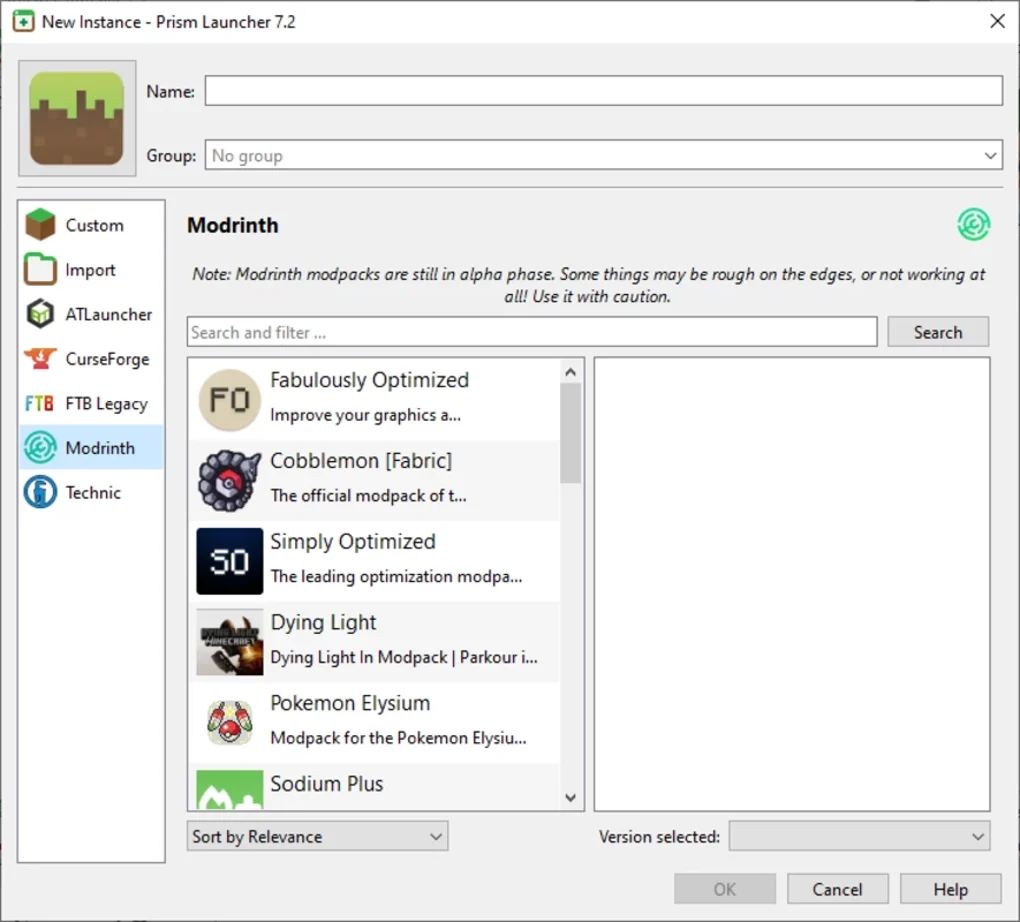
Effortless Mod Installation and Management
Beyond the management of multiple instances, Prism Launcher excels in simplifying the process of installing and managing Minecraft modifications (mods). The launcher offers seamless integration with popular mod repositories and provides a user-friendly interface for browsing, searching, and installing mods. This eliminates the need for manual downloading, extracting, and placing files into the correct directories, a process that can be tedious and error-prone, especially for larger or more complex modpacks.
The built-in mod management features of Prism Launcher go beyond simple installation. The launcher allows you to easily update mods, remove unwanted mods, and manage dependencies between mods. This ensures that your Minecraft instances remain stable and functional, even as you add, remove, or update modifications. The ability to manage dependencies is particularly crucial, as many mods require other mods to function correctly. Prism Launcher automatically handles these dependencies, preventing conflicts and simplifying the overall mod installation process. This eliminates the guesswork and frustration often associated with manual mod installation, especially for more complex modpacks.
The clear and concise presentation of mod information within the launcher is another significant advantage. For each mod, Prism Launcher provides key information such as the version number, description, author, and any necessary dependencies. This information allows users to make informed decisions about which mods to install and helps prevent conflicts between incompatible modifications. The ability to quickly see what mods are installed in each instance ensures you have full control and understanding of your setup, facilitating troubleshooting and optimization.
Customization and Configuration Options: Tailor Your Experience
Prism Launcher provides extensive customization and configuration options, allowing players to fine-tune their Minecraft experience to their exact preferences. From changing the game’s memory allocation to adjusting graphical settings, Prism Launcher provides granular control over numerous aspects of the game. This level of customization is essential for optimizing performance, particularly on systems with limited resources, or for enhancing the visual fidelity of the game.
Furthermore, Prism Launcher allows for the easy customization of launch arguments, a powerful feature for advanced users. Launch arguments provide a method to fine-tune the game’s behavior and performance through specific command-line instructions. While this may be considered advanced usage, Prism Launcher simplifies the process, making it accessible to users who want to delve deeper into optimization and configuration.
Beyond technical settings, Prism Launcher also enables customization of the visual appearance of the launcher itself. This allows users to personalize the look and feel of the application to match their preferences, further enhancing their overall Minecraft experience. The customizable options extend to the organization of your instances, allowing for a tailored and efficient workflow.
Security and Stability: A Reliable Platform
Prism Launcher prioritizes the security and stability of its users’ Minecraft installations. The launcher is developed with security best practices in mind, minimizing the risk of malware or other security threats. The launcher also incorporates mechanisms to detect and prevent potential conflicts between mods, ensuring a smoother and more stable gaming experience.
The developers of Prism Launcher maintain a robust update schedule, releasing regular updates to address bugs, improve performance, and add new features. These updates are essential for maintaining the security and stability of the launcher and keeping it compatible with the latest versions of Minecraft and its mods. This commitment to ongoing development and support demonstrates a dedication to providing users with a reliable and up-to-date platform for their Minecraft adventures. The active community support surrounding Prism Launcher further enhances its reliability, with users and developers collaborating to solve issues and improve the overall experience.
In conclusion, Prism Launcher is more than just a Minecraft launcher; it’s a comprehensive tool that empowers players to take complete control of their Minecraft experience. From streamlined instance management and effortless mod installation to extensive customization options and a focus on security and stability, Prism Launcher elevates the Minecraft gaming experience, making it more accessible, enjoyable, and customizable for players of all skill levels. Its intuitive interface, coupled with its powerful features, makes Prism Launcher an indispensable tool for any serious Minecraft player.
File Information
- License: “Free”
- Latest update: “May 15, 2025”
- Platform: “Windows”
- OS: “Windows 11”
- Language: “English”
- Downloads: “1.4K”


