
In the complex digital landscape of today, efficient file management is not just a convenience; it’s a necessity. For many Windows users, the default File Explorer, while functional, often falls short of meeting the demands of power users, IT professionals, or anyone who frequently juggles numerous files across multiple directories. Enter Q-Dir Portable, a standalone, multi-pane file manager designed to transform the way you interact with your digital assets. This innovative utility, developed by Softwareok, offers a streamlined, more comfortable, and incredibly efficient approach to handling files, distinguishing itself through its unique multi-pane interface, customizable visual cues, and inherent portability.
Q-Dir Portable is not just another file explorer; it’s a significant upgrade for those who require more visual real estate and functional flexibility. It allows users to view and manage files in 2, 3, or even 4 panes simultaneously, each configurable to a different location on your hard drive, network, or removable media. This eliminates the tedious process of opening multiple windows, alt-tabbing, or constantly navigating back and forth through directories. The immediate benefit is a dramatic increase in operational speed when moving, copying, comparing, or organizing data. Beyond its structural advantages, Q-Dir Portable introduces a highly intuitive color-coding system for file types, making visual identification instantaneous and immensely simplifying the user experience. Crucially, as its name suggests, it requires no installation, allowing it to be run directly from a USB drive or network share, maintaining system cleanliness and offering unparalleled flexibility for users on the go.
Q-Dir Portable: A Cornerstone of Utilities & Tools
Within the vast ecosystem of software, “Utilities & Tools” represent the backbone of efficient computing. These applications are designed to enhance system performance, automate tasks, or, in Q-Dir Portable’s case, fundamentally improve how users interact with their computer’s core data structure. Q-Dir Portable firmly establishes itself as an indispensable utility by offering a robust and intuitive file management solution that goes beyond the basic capabilities of the standard Windows File Explorer. Its design philosophy centers on maximizing user control and minimizing friction in day-to-day file operations, making it a prime example of a utility that genuinely empowers its users.
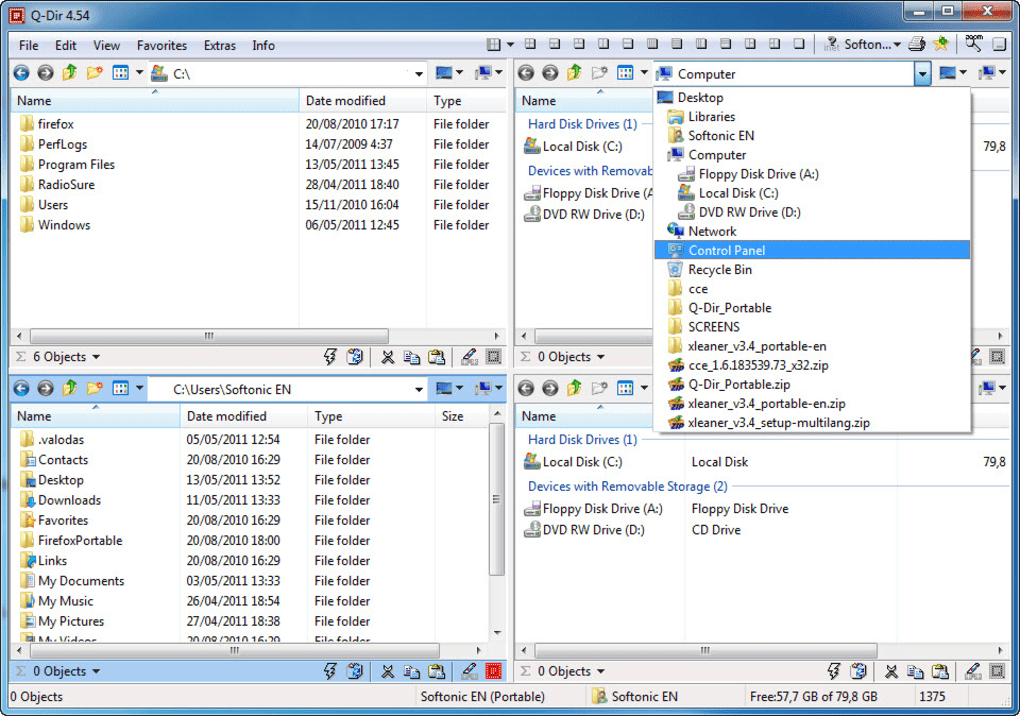
The essence of a great utility lies in its ability to solve common problems with elegance and efficiency. For power users, the “problem” with Windows File Explorer is its singular pane view, which necessitates constant window switching or navigation when working with files from disparate locations. Q-Dir Portable directly addresses this by providing its signature multi-pane interface. Imagine needing to move specific document types from a download folder, archive them in a dedicated backup directory, and simultaneously compare their contents with a working project folder. With the default explorer, this would involve opening at least three separate windows, dragging and dropping between them, and potentially losing track of which window corresponds to which path. Q-Dir Portable simplifies this into a single, cohesive view, allowing you to drag-and-drop between panes with unparalleled ease and clarity. This capability alone positions Q-Dir Portable not just as an alternative, but as a superior utility for any individual or business dealing with significant volumes of data.
Furthermore, Q-Dir Portable’s lightweight footprint—a mere 793.98 KB—is a testament to its efficient design. Unlike many feature-bloated alternatives that consume significant system resources, Q-Dir Portable operates with minimal overhead, ensuring that it enhances productivity without impeding overall system performance. This is a critical attribute for a utility, as it should facilitate rather than hinder the user’s workflow. Its compatibility with Windows 8 and later versions ensures a broad reach, making it accessible to a vast user base seeking to optimize their digital workspace. The continuous development by Softwareok, with regular updates like version 11.14 (latest update January 31, 2025), demonstrates a commitment to refinement and bug fixing, ensuring that Q-Dir Portable remains a reliable and cutting-edge tool in the utilities category. The ability to switch between German, English, French, Italian, Korean, Dutch, Polish, Portuguese, Russian, and Chinese further broadens its appeal, making it a truly global utility for a diverse user base.
Enhancing Productivity Through Superior File Management
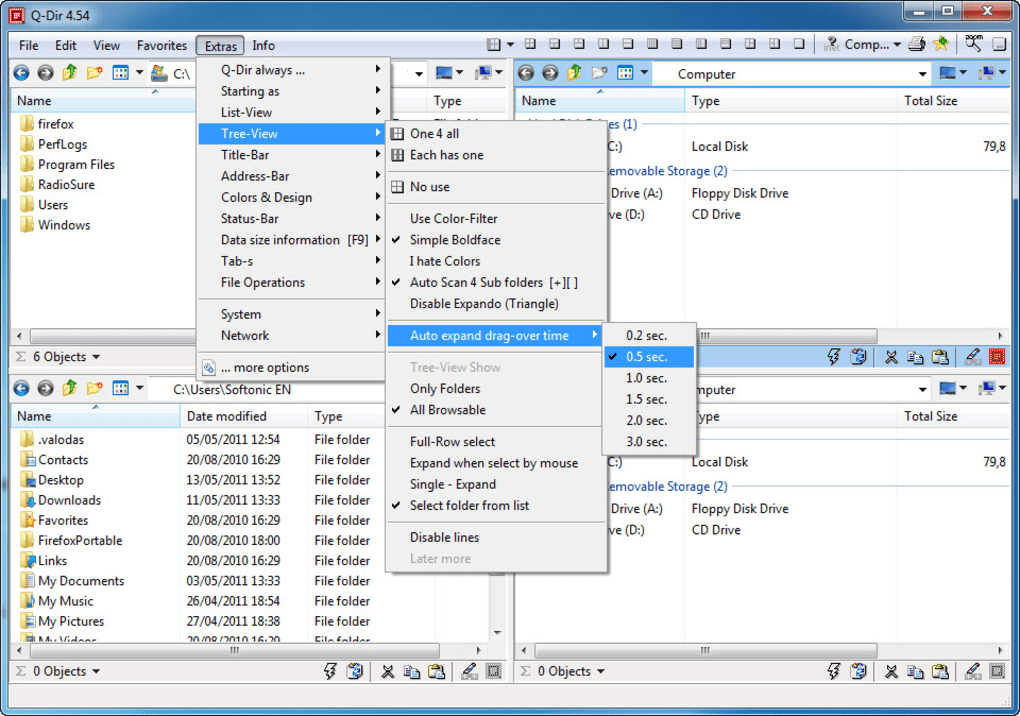
The direct correlation between efficient file management and overall productivity cannot be overstated. For professionals across various domains—from software developers and graphic designers to academic researchers and administrative staff—the ability to swiftly locate, organize, and manipulate files is paramount. Q-Dir Portable dramatically elevates productivity by transforming laborious multi-step processes into seamless, single-window operations.
Consider a software developer working on a project. They might need to access source code files from one directory, pull libraries from another, and view output logs or compiled binaries in yet another. The traditional approach would involve a constant dance of opening, minimizing, and restoring multiple File Explorer windows. Q-Dir Portable’s multi-pane setup allows the developer to dedicate one pane to source code, another to libraries, and a third to build outputs. This immediate visual context not only saves time but also reduces cognitive load, allowing the developer to focus more on coding and less on file navigation. Similarly, a graphic designer can use Q-Dir Portable to manage raw assets in one pane, project files in another, and client-approved images in a third, streamlining their creative workflow.
For individuals managing personal digital archives—be it a vast collection of photos, music, or documents—Q-Dir Portable offers an intuitive way to maintain order. Imagine organizing years of family photos: one pane displays unorganized imports, another shows the categorized “Family Events” folder, and a third previews selected images. Dragging and dropping relevant photos into their correct categories becomes a fluid, enjoyable task rather than a cumbersome chore. This efficiency extends to any scenario requiring extensive file interaction, from archiving old projects to preparing data for cloud synchronization. By consolidating access to multiple locations into a single, highly configurable interface, Q-Dir Portable doesn’t just manage files; it empowers users to manage their time and mental energy more effectively, translating directly into enhanced productivity across all digital endeavors.
Personalization and User Experience
A truly exceptional software utility not only performs its functions flawlessly but also offers a user experience that is intuitive, comfortable, and adaptable to individual preferences. Q-Dir Portable excels in this regard, particularly through its customizable color-coding system and flexible layout options, which collectively enhance personalization and significantly improve the user experience. These features move beyond mere functionality, delving into how users visually perceive and interact with their file system, transforming a potentially mundane task into an engaging and efficient process.
The most striking personalization feature in Q-Dir Portable is its ability to display files in different colors based on their type. For instance, images might appear in blue, music files in red, executable programs in green, and documents in yellow. This isn’t just an aesthetic choice; it’s a powerful organizational tool. In a crowded folder, the visual cue of color instantly highlights specific file types, allowing users to quickly scan and identify what they’re looking for without needing to read filenames or extensions. This rapid visual parsing reduces search time and significantly lowers the cognitive effort required for file management tasks. Furthermore, the beauty of this system lies in its complete customizability. Users are not limited to predefined color schemes; they can assign any color to any file type, tailoring the visual hierarchy to their personal preferences or specific workflow needs. This level of customization ensures that the tool adapts to the user, rather than the other way around, fostering a more personalized and efficient interaction with the digital environment.
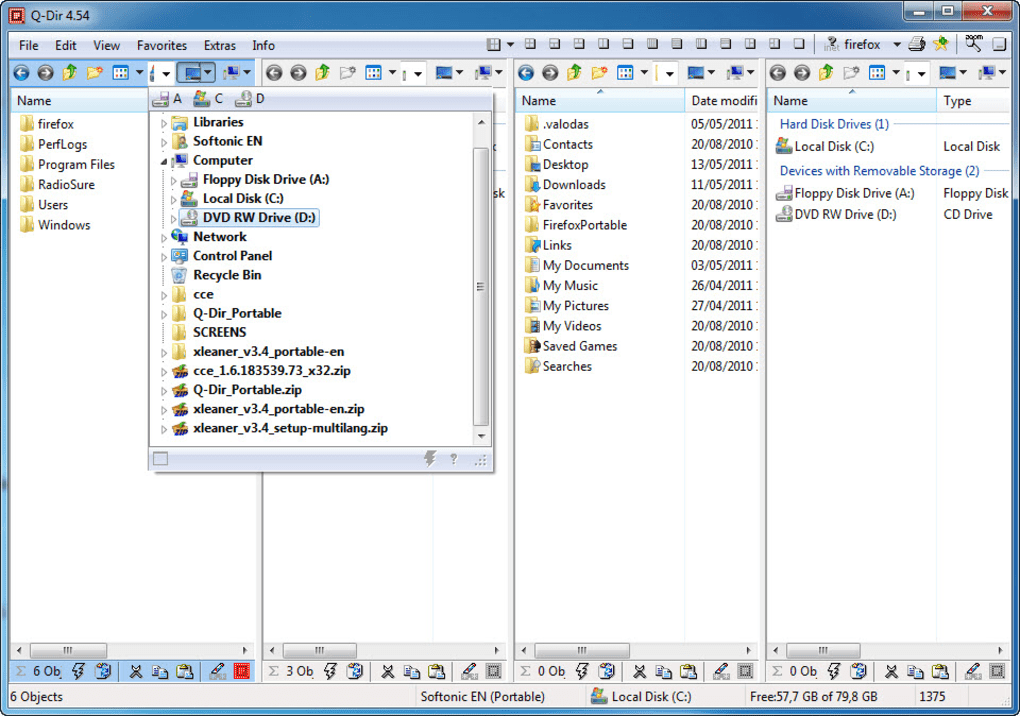
Beyond color coding, Q-Dir Portable offers multiple layout configurations for its multi-pane interface. Users can choose between 2, 3, or 4 panes, arranging them horizontally or vertically to best suit their monitor setup and current task. For a wide monitor, a horizontal split might be ideal for moving files between two main locations. For a more detailed comparison of multiple directories, a four-pane grid might be more appropriate. Each pane can be configured independently, meaning one pane could be in a detailed list view, another in thumbnail view for images, and a third in a tree view for navigation. This flexibility empowers users to design their ideal workspace, ensuring that their file manager is always optimized for the specific demands of their current activity. This adaptability to varying tasks and visual preferences is a hallmark of superior user experience design, contributing to a more comfortable, intuitive, and ultimately more productive computing experience. The ability to save and switch between these custom layouts further solidifies Q-Dir Portable’s commitment to personalized workflow optimization.
Beyond Basic File Operations: A Look at Advanced Use Cases
While Q-Dir Portable deliberately forgoes “extra tools” often found in other file explorer alternatives, its core strengths—the multi-pane interface and visual clarity—make it an exceptionally powerful facilitator for advanced file operations. It streamlines complex scenarios that would be cumbersome with a standard single-pane explorer, proving that sometimes, doing one thing exceptionally well is more valuable than doing many things averagely.
For professionals engaged in tasks such as system administration, data analysis, or content creation, Q-Dir Portable becomes an invaluable workbench. Consider the scenario of a large-scale data migration or synchronization. With Q-Dir Portable, an administrator can open source directories on one pane, target directories on a network drive in another, and a log file in a third. This setup allows for real-time monitoring of file transfers, immediate comparison of directory contents, and quick troubleshooting if issues arise, all within a single view. This proactive oversight is critical in preventing data inconsistencies and ensuring the integrity of vital information. Similarly, developers conducting code reviews or managing version control can simultaneously view different branches of a project, compare file versions side-by-side in separate panes, and perform merges with greater confidence and less risk of error. Its utility also shines in media management, where professionals can organize large batches of raw footage or audio files, moving them from capture drives to editing project folders, while keeping an eye on backup locations. This operational transparency facilitated by multiple panes transforms potentially complex, error-prone tasks into manageable and efficient processes.
Security Considerations in File Handling
While Q-Dir Portable is not a security application in itself, its design inherently supports better security practices in file handling. Effective data security begins with organized and transparent file management. A chaotic file system, where sensitive documents are scattered across various locations, makes it incredibly difficult to implement proper access controls, encryption, or backup strategies. Q-Dir Portable, by simplifying file organization and providing clear visual cues, indirectly contributes to a more secure digital environment.
With Q-Dir Portable’s multi-pane view, users can quickly consolidate sensitive data into protected folders, apply encryption tools more efficiently by having the source and encrypted destination folders visible simultaneously, or verify that backups of critical information are complete and correctly structured. The color-coding feature can also play a subtle role in security; by assigning a distinct color to executable files or script files, users can more easily spot potentially malicious or unexpected files in a folder, especially if they appear in an unusual location. For instance, if a folder typically containing documents suddenly shows a brightly colored executable, it immediately draws attention and prompts caution, acting as an early warning system. Furthermore, its portable nature means it can be run from a secure, read-only medium or a trusted USB drive on multiple machines without leaving traces on the host system, adding an extra layer of security for users who frequently work on shared or public computers. In essence, Q-Dir Portable empowers users with the clarity and control needed to enforce their own security protocols more effectively.
Conclusion
Q-Dir Portable stands out as an exceptional utility that redefines file management for Windows users, particularly those who demand efficiency and adaptability from their software. Its core strength lies in its innovative multi-pane interface, offering unparalleled flexibility to view, organize, and manipulate files across multiple locations simultaneously. This, coupled with its highly customizable color-coding system, transforms what can often be a tedious chore into an intuitive and visually engaging experience, significantly boosting productivity and reducing digital clutter.
Beyond its powerful features, Q-Dir Portable’s inherent portability—requiring no installation and leaving no footprint on the host system—makes it an ideal companion for mobile professionals, IT technicians, and anyone who values a clean system or needs a reliable file manager on the go. While it purposefully avoids the feature bloat of some alternatives, its focused approach ensures it excels at its primary mission: providing a superior, more comfortable, and highly efficient file management solution. Developed by Softwareok and available as a free download from PhanMemFree, Q-Dir Portable is more than just a file explorer; it’s an indispensable tool for anyone looking to reclaim control over their digital workspace and streamline their daily computing tasks.
File Information
- License: “Free”
- Latest update: “January 31, 2025”
- Platform: “Windows”
- OS: “Windows 8”
- Language: “English”
- Downloads: “8.9K”
- Size: “793.98 KB”


