
QuiteRSS is a free, open-source RSS and Atom feed reader designed for ease of use and efficient news aggregation. This review delves into its features, performance, and overall user experience, comparing it to other available RSS readers and assessing its strengths and weaknesses. While its last major update was in 2012, its core functionality remains relevant for users seeking a lightweight and customizable solution.
Functionality and Features: A Deep Dive into QuiteRSS’s Capabilities
QuiteRSS’s primary function is to consolidate news from various RSS and Atom feeds into a single, easily navigable interface. Its design prioritizes simplicity and efficiency, making it a straightforward choice for users of all technical skill levels. Key features include:
-
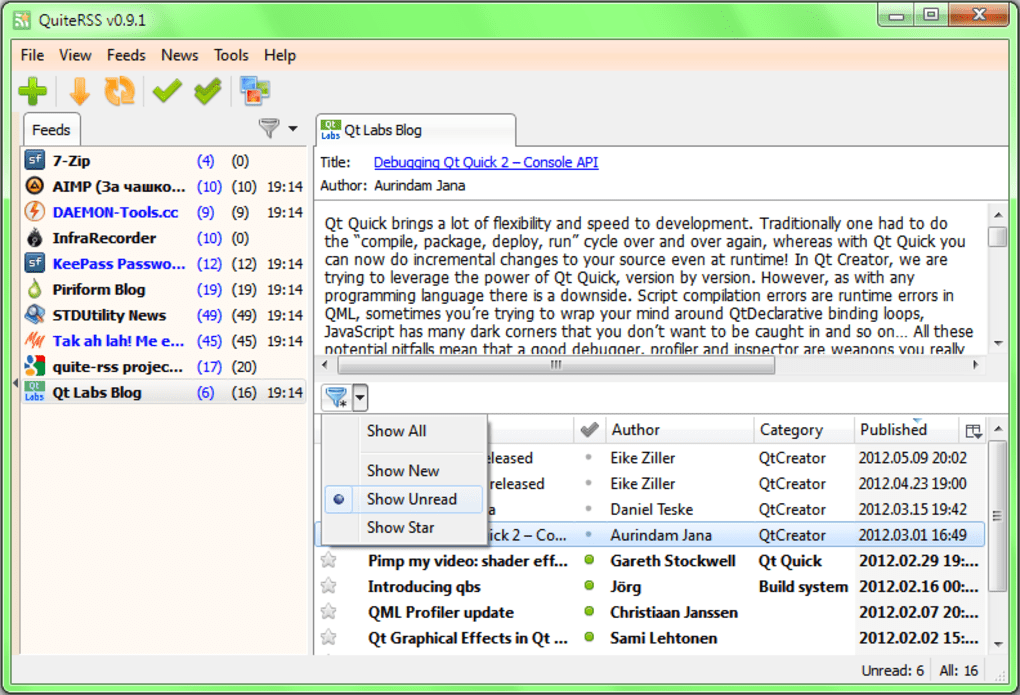
Feed Management: Users can add an unlimited number of RSS feed links, organizing them into a hierarchical tree structure for easy browsing. This allows for the efficient management of numerous subscriptions, preventing information overload. The intuitive interface simplifies the addition and removal of feeds, allowing users to curate their news sources seamlessly.
-
Feed Updates: QuiteRSS offers flexible feed update options. Feeds can be updated manually on demand, or automatically at specified intervals (on startup or using a customizable timer). This allows users to control the frequency of updates based on their preferences and internet connection stability. This flexibility is crucial for managing data usage and ensuring timely access to new content.
-
Filtering and Searching: Sophisticated filtering options allow users to refine their news intake. Filters can be applied based on whether items are new, unread, starred, or deleted. In addition to these pre-defined filters, users can create custom filters based on keywords or other criteria, enhancing the personalization and efficiency of their news consumption. A quick search function allows for rapid identification of specific articles within the vast number of aggregated items.
-
Customization Options: QuiteRSS offers a customizable interface, allowing users to adjust various aspects to fit their preferences. These customizations include enabling or disabling image previews within news items, which can significantly impact loading times and data usage. The ability to quickly hide the feed tree provides a clutter-free reading experience when desired, focusing solely on the news content.
-
Integrated Browser: An embedded browser based on the WebKit engine allows users to view articles directly within QuiteRSS without opening a separate browser window. This improves the workflow, minimizing distractions and maximizing efficiency. The embedded browser enhances user convenience, streamlining the experience of accessing and consuming news articles.
-
Notification System: The application provides customizable popup notifications for new news items, ensuring users are immediately aware of updates across their subscribed feeds. This real-time notification feature keeps users informed without requiring constant manual checks. The configurable nature of these notifications allows users to balance staying informed with avoiding interruptions.
-
Portable Mode: QuiteRSS can be run in portable mode, allowing users to store the application and its data on a USB drive or other external storage. This portability makes it suitable for users who need to access their news feeds from multiple computers without installation complexities.
-
Open-Source Nature: The open-source nature of QuiteRSS provides transparency and community support. This offers users the opportunity to contribute to the software’s development, report bugs, and propose improvements, fostering a collaborative environment and enhancing the software’s long-term viability.
User Interface and Experience: A Look at Usability and Design
QuiteRSS’s interface is designed for simplicity and efficiency. The main window displays a clear hierarchical structure of feeds and their associated articles. Navigation is intuitive, with easily accessible options for managing feeds, filtering content, and customizing the display. While the interface may appear somewhat basic compared to more modern RSS readers, its simplicity contributes to its ease of use and speed. The lack of visual distractions allows users to focus on the content rather than the application’s design elements.
While the interface is functional, it could benefit from some modern design elements to improve the overall aesthetic appeal. The user interface hasn’t seen significant visual updates since its last major release, and a refresh could greatly enhance the user experience. However, the priority on functionality over aesthetics prioritizes efficiency, which caters to users who prioritize speed and ease of use over visual appeal.
Performance and Resource Consumption: Assessing Speed and Efficiency
QuiteRSS is known for its speed and efficiency. It is a lightweight application that consumes minimal system resources, making it suitable for use on older or less powerful computers. The quick loading times and responsiveness contribute to a smooth user experience, ensuring that accessing and reading news articles is fast and efficient. This lightweight nature is a significant advantage, especially for users who prioritize speed and resource efficiency.
Comparison to Other RSS Readers: Highlighting QuiteRSS’s Strengths and Weaknesses
Compared to more modern RSS readers with advanced features like cloud synchronization and sophisticated tagging systems, QuiteRSS lacks some functionalities. However, its simplicity, speed, and open-source nature are significant advantages. Users seeking a lightweight, no-frills RSS reader will find QuiteRSS a suitable choice. Users requiring advanced features like cloud synchronization might find other, more feature-rich readers more appropriate. The choice ultimately depends on individual user needs and priorities.
QuiteRSS excels in its simplicity and efficiency, making it an ideal solution for users who prioritize speed and ease of use. Its lightweight nature and lack of unnecessary features contribute to its fast performance and minimal resource consumption. The open-source nature also adds an element of transparency and community support, allowing for user contributions and collaborative development.
Conclusion: A Verdict on QuiteRSS’s Value and Relevance
Despite its age and lack of recent updates, QuiteRSS remains a valuable tool for users seeking a simple, efficient, and open-source RSS reader. Its strengths lie in its speed, lightweight nature, and intuitive interface. While lacking the advanced features found in some newer RSS readers, its straightforward approach to news aggregation makes it an attractive option for users who prioritize efficiency and simplicity over advanced functionalities. For those seeking a lightweight, reliable RSS reader without unnecessary complexities, QuiteRSS is a strong contender. However, users requiring extensive cloud integration, sophisticated tagging systems, or more modern design elements might need to explore other alternatives. The decision to use QuiteRSS ultimately depends on individual preferences and priorities in an RSS reader.
File Information
- License: “Free”
- Latest update: “September 27, 2012”
- Platform: “Windows”
- OS: “Windows 8”
- Language: “English”
- Downloads: “2.6K”
- Size: “15.95 MB”


