
The R4 3DS Emulator provides a pathway for Nintendo 3DS game enthusiasts to enjoy their favorite titles on a larger screen, leveraging the power of their personal computers. This review delves into the functionalities, strengths, and limitations of this free-to-use emulator, offering a comprehensive understanding of its capabilities and potential drawbacks.
Emulating the Nintendo 3DS Experience
R4 3DS Emulator is a Windows-based utility designed to mimic the functionality of a Nintendo 3DS console. Drawing inspiration from the established Nintendo DS emulator No$GBA, this software allows users to play a broad range of 3DS games on their computers. A key feature mirroring the original console experience is the emulation of the dual-screen setup, providing a faithful representation of the Nintendo 3DS interface. This dual-screen replication enhances the authenticity of the gameplay, making the transition from handheld to PC as seamless as possible.
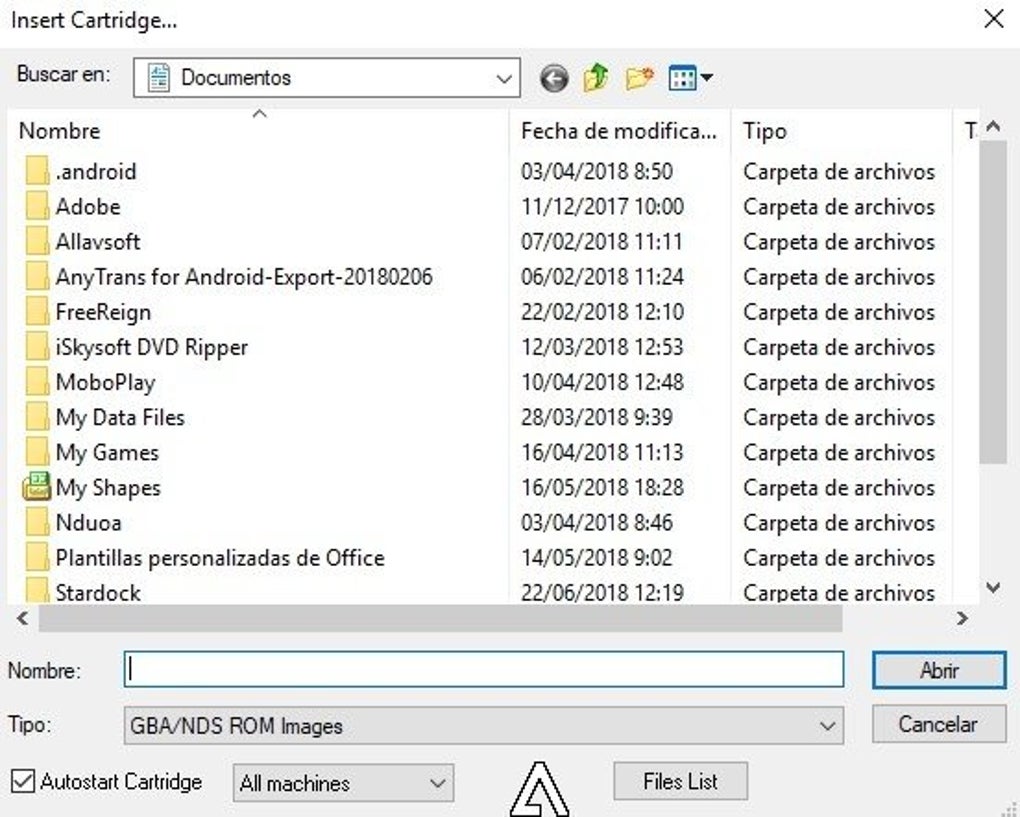
Unlike some emulators that include a bundled game library, R4 3DS Emulator operates as a platform for playing games sourced elsewhere. Users must obtain their ROMs (game files) independently. It’s crucial to emphasize the importance of obtaining ROMs from legitimate and legal sources to avoid copyright infringement. The emulator itself does not provide or distribute any game files. Once installed, the software presents a user-friendly interface. Upon launching the emulator, users are prompted to “Insert a cartridge,” guiding them to select a ROM file from their computer’s local storage. This straightforward navigation allows users to easily browse their game collections and select their desired titles.
Compatibility and Limitations
While R4 3DS Emulator boasts wide compatibility with a significant number of 3DS games, it’s essential to acknowledge its limitations. The emulator may not flawlessly support all 3DS titles, particularly newer releases with more demanding graphical or processing requirements. This compatibility gap stems from the complexities involved in emulating the intricate hardware and software interactions of the Nintendo 3DS console. More advanced 3DS titles, often incorporating more complex graphics and advanced features, may exhibit performance issues, glitches, or outright incompatibility.
It is advised to check the emulator’s compatibility with specific games before attempting to run them. Online communities and forums dedicated to R4 3DS Emulator often contain detailed compatibility lists and troubleshooting guides compiled by users, which can prove invaluable in determining whether a particular game will function correctly. This community support is a valuable asset for troubleshooting any difficulties encountered during gameplay.
Performance and User Experience
The performance of R4 3DS Emulator is heavily influenced by the specifications of the user’s computer. High-end systems with powerful processors and ample RAM will generally deliver smoother gameplay and higher frame rates than older or less powerful machines. Users with less robust systems might encounter slower performance, especially when playing graphically intensive games. This highlights the importance of considering the system requirements before attempting to run demanding 3DS titles.
The emulator’s interface is designed for intuitive navigation. The process of selecting and launching ROMs is straightforward, minimizing the technical hurdles for users unfamiliar with emulators. The emulation of the dual screen provides a familiar and comfortable gameplay experience, reducing the learning curve for users already accustomed to the Nintendo 3DS console.
Security and Ethical Considerations
As with any emulator, it’s imperative to address security and ethical concerns. Downloading ROMs from untrustworthy sources exposes users to the risk of malware infection. It’s crucial to download ROMs only from reputable and verified sources to mitigate this risk. Respecting copyright laws is also essential. Distributing or sharing copyrighted game ROMs without permission is illegal. Users should ensure that their actions comply with all relevant copyright regulations.
The use of emulators doesn’t inherently compromise system security, provided ROMs are sourced responsibly. The emulator itself is a software program, and like any software, it’s susceptible to vulnerabilities. Maintaining up-to-date antivirus and anti-malware software is crucial to mitigate these risks. Regular software updates for the emulator can also help patch any known vulnerabilities, enhancing security.
Comparison to Other 3DS Emulators
The R4 3DS Emulator occupies a niche within the landscape of 3DS emulators. While other emulators may offer superior compatibility or performance in certain areas, R4 3DS Emulator stands out with its user-friendly interface and the faithful replication of the dual-screen 3DS experience. The choice of emulator ultimately depends on individual priorities and the specific needs of the user. Some users might prioritize maximum compatibility, while others may prioritize ease of use and a user-friendly experience.
A comparative analysis with other prominent 3DS emulators would reveal variations in compatibility, performance, features, and user interface. Some emulators might offer superior performance for certain games, while others might excel in their feature sets or level of customization. This necessitates careful consideration of different options based on individual needs and preferences. Online resources and reviews comparing various 3DS emulators can be instrumental in making an informed decision.
Conclusion
R4 3DS Emulator presents a viable option for users seeking to play 3DS games on their Windows computers. Its user-friendly interface, faithful emulation of the dual-screen setup, and broad game compatibility make it an attractive choice for many. However, it’s crucial to acknowledge its limitations concerning compatibility with newer, more demanding titles, and to always prioritize obtaining ROMs from legitimate sources. By understanding both the strengths and weaknesses of R4 3DS Emulator and adhering to ethical and legal considerations, users can effectively leverage this emulator to enjoy their favorite Nintendo 3DS games on a larger display. The emulator serves as a valuable tool for those seeking a convenient and authentic way to experience their 3DS game library on their PCs. Remember always to check for updates and to be mindful of the security implications associated with downloading files from untrusted sources.
File Information
- License: “Free”
- Version: “5.5”
- Latest update: “May 1, 2024”
- Platform: “Windows”
- OS: “Windows 8.1”
- Language: “English”
- Downloads: “2.3K”
- Size: “5.77 MB”


