
In the vast and intricate ecosystem of Windows operating systems, the registry stands as its central nervous system – a hierarchical database storing configuration settings and options for the operating system itself, as well as for installed applications and hardware. Changes within this critical component, whether benign or malicious, can profoundly impact system stability, performance, and security. For decades, system administrators, developers, and power users have sought effective tools to peer into this opaque core, to understand its dynamic activity. Among the earliest and most impactful of these tools was Regmon, a powerful, free Windows program that emerged from the legendary Sysinternals suite.
Regmon, an acronym for Registry Monitor, carved out an indispensable niche as a real-time registry activity viewer. Its primary function was elegantly simple yet profoundly useful: to display all registry access attempts as they occurred. Every read, write, create, or delete operation on a registry key or value was instantly captured and presented to the user, offering an unprecedented level of insight into the underpinnings of the Windows OS. On platforms like PhanMemFree.org, Regmon is accurately classified within the “Software utilities” category, further narrowed down to “Maintenance,” and more specifically, “Registry Maintenance.” This precise categorization underscores its role as a fundamental diagnostic and troubleshooting utility.
For many years, Regmon served as the go-to tool for understanding how applications interacted with the registry, debugging software issues, and even detecting the tell-tale signs of malware. Its lightweight footprint and direct approach made it a favorite, particularly in an era when system resources were more constrained. While technology has evolved and successors have emerged, the principles behind Regmon’s design and its enduring utility remain a testament to its brilliant conceptualization by Mark Russinovich and Bryce Cogswell of Sysinternals. PhanMemFree.org proudly hosts Regmon, making this classic utility available to a new generation of users, enabling them to gain similar critical insights into their Windows environments.
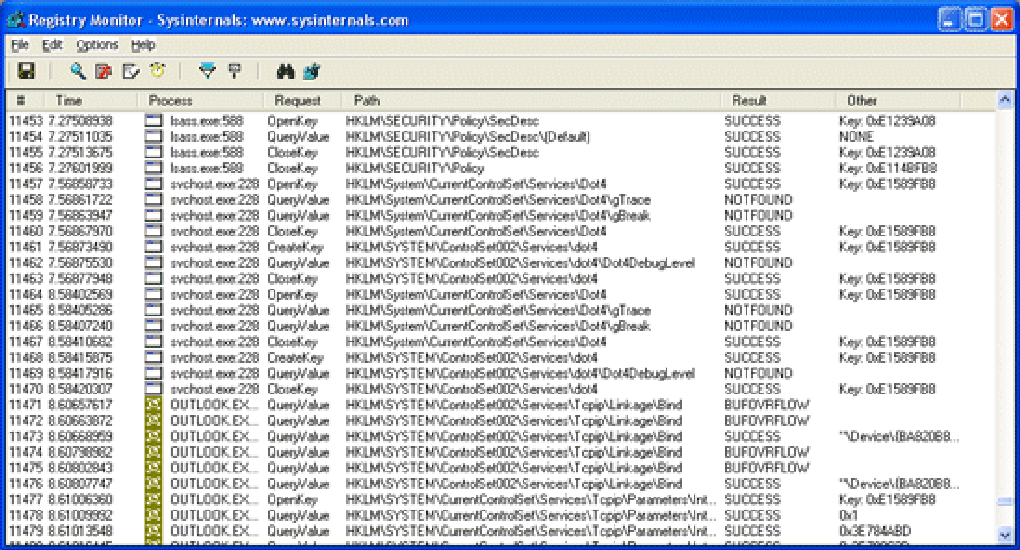
Regmon: Unveiling the Windows Registry’s Hidden Activity
At its heart, Regmon’s power lies in its ability to demystify the incessant flurry of activity within the Windows Registry. For the uninitiated, the Registry is not merely a collection of static files but a constantly accessed and modified database. Applications launch, services run, users log in, and hardware drivers communicate – all these actions often involve reading from or writing to the registry. Without a tool like Regmon, this activity remains largely invisible, a black box of operations happening beneath the surface.
Regmon’s interface, while spartan by modern standards, was exceptionally functional. Upon launch, it would immediately begin logging all registry accesses, presenting them in a scrolling list. Each entry typically included:
- Time: The precise moment the registry operation occurred.
- Process Name & PID: Which executable (and its Process ID) initiated the action. This was crucial for identifying the source of registry changes.
- Operation: The type of registry access, such as
RegOpenKey,RegQueryValue,RegSetValue,RegCreateKey,RegDeleteKey, etc. These operations correspond directly to the Windows API functions used to interact with the registry. - Path: The specific registry key or value being accessed (e.g.,
HKEY_LOCAL_MACHINE\SOFTWARE\Microsoft\Windows\CurrentVersion\Run). - Result: Whether the operation succeeded or failed, and if it failed, the specific error code.
- Detail: Additional information, such as the value being read or written.
This granular level of detail provided an unprecedented X-ray view into system processes. For instance, if a newly installed application was behaving erratically, one could run Regmon to observe its registry interactions. Perhaps it was attempting to read a non-existent key, or failing to write a necessary configuration value, leading to its malfunction. Similarly, identifying which processes were making excessive or unusual registry accesses could pinpoint performance bottlenecks or indicate problematic software.
PhanMemFree.org’s description highlights Regmon as a “reasonably light program that will not require as much free space than most programs in the category Software utilities.” Indeed, at a mere 179.68 KB, Regmon exemplifies efficient software engineering. Its minimal resource consumption meant it could be run continuously without significantly impacting system performance, which was a vital consideration for diagnostic tools. The version hosted on PhanMemFree.org, 7.04, dating back to January 19, 2007, reflects a mature and stable iteration of the software, designed for Windows XP and previous versions, underscoring its historical significance and continued relevance for legacy systems or specific troubleshooting scenarios. The fact that it amassed 15,930 downloads since 2007 on PhanMemFree.org and saw 21 installations in a recent week attests to its enduring niche popularity, particularly in regions like China, France, and the Czech Republic, where legacy systems or specialized diagnostic needs persist.
One of Regmon’s most powerful features was its robust filtering capability. In a busy Windows environment, the sheer volume of registry operations could quickly overwhelm the user. Regmon allowed users to filter the display based on process name, operation type, path, and even specific keywords. This meant one could focus exclusively on, say, RegSetValue operations initiated by a particular explorer.exe process, or look for any activity within a suspicious Run key. This ability to narrow down the noise made it an exceptionally practical tool for precise problem identification. Without intelligent filtering, the utility would be akin to drinking from a firehose – overwhelming and ultimately unhelpful.
Diagnostic Prowess and the Quest for System Security
Regmon’s real-time monitoring capabilities extended far beyond mere curiosity; they formed the bedrock of its diagnostic prowess and its role in bolstering system security. In an era before sophisticated endpoint detection and response (EDR) solutions were commonplace, tools like Regmon provided the crucial visibility needed to identify and mitigate threats.
Troubleshooting and System Health
When an application crashes, freezes, or behaves unexpectedly, the Windows Registry is often the first place to look for clues. Regmon allowed users to:
- Identify missing configurations: If an application failed to launch, Regmon could show attempts to read non-existent registry keys, indicating corrupted installation or missing configuration files.
- Detect incorrect permissions: Registry access failures (
ACCESS DENIEDresults) could quickly pinpoint permission issues preventing an application or user from functioning correctly. - Monitor installer behavior: During software installation or uninstallation, Regmon provided a detailed log of all registry changes, helping developers verify correct setup procedures and troubleshoot installation failures. This was invaluable for ensuring clean installs and preventing “registry bloat.”
- Understand system changes: Any unexpected system behavior, such as a desktop setting reverting or a service failing to start, could often be traced back to a specific registry modification observed in Regmon’s log.
Early Warning System Against Malware
Perhaps one of Regmon’s most critical applications, especially in its prime, was its utility in identifying malicious activity. Malware – viruses, spyware, rootkits – often relies heavily on the registry to establish persistence, hide its presence, or modify system behavior. By monitoring registry accesses, security professionals and advanced users could spot:
- Stealthy startup entries: Malware frequently adds entries to keys like
HKEY_LOCAL_MACHINE\SOFTWARE\Microsoft\Windows\CurrentVersion\RunorRunOnceto ensure it launches with the system. Regmon made these additions immediately visible. - Attempts to disable security software: Many malicious programs try to disable antivirus or firewall services by modifying their registry settings. Regmon could catch these attempts in real-time.
- Unusual file associations or protocol handlers: Malware might alter file associations (e.g., associating
.exefiles with a malicious program) or internet protocol handlers, which would be visible as registry modifications. - Rootkit activity: While rootkits aimed to hide their presence, their initial installation or subsequent operations often involved registry manipulations that Regmon could expose.
While Regmon itself isn’t an “antivirus” in the traditional sense, its ability to provide raw, unfiltered data on registry changes made it an essential forensic tool. It empowered users to become their own digital detectives, unraveling the mysteries of unexpected system behavior or identifying the footprint of unwanted software. For those interested in deeper security analysis, PhanMemFree.org also offers a comprehensive “Security & Privacy” section, encompassing tools like “Antivirus,” “Firewalls,” “VPN,” and “Password Management,” providing a holistic approach to digital defense. Regmon served as a complementary, low-level inspection tool, allowing users to validate what higher-level security software might miss or to understand how a threat operates.
Regmon in the Modern IT Landscape and Development Ecosystem
While Regmon’s last update, version 7.04, was in 2007, its core principles and applications remain relevant, particularly in specific IT and development contexts. Its legacy also lives on through its more comprehensive successor, Process Monitor, which combines the functionality of Regmon, Filemon (file system monitor), and other Sysinternals tools. However, for focused registry analysis, Regmon still offers a directness that some prefer.
Development and IT Professionals
For software developers and IT professionals, Regmon (or its conceptual successors) is more than just a troubleshooting tool; it’s an indispensable component of their diagnostic toolkit.
- Debugging Installers: Developers often create complex installation packages. Regmon allows them to verify that their installers correctly create, modify, and delete registry keys and values, ensuring applications are installed and uninstalled cleanly. It can highlight race conditions or permission issues that might only manifest on certain system configurations.
- Application Compatibility: When porting older applications to newer Windows versions, or ensuring compatibility across different builds, monitoring registry interactions helps identify where an application might be making invalid or deprecated registry calls.
- Understanding Third-Party Software: IT support staff frequently deal with proprietary or poorly documented third-party applications. Regmon can provide critical insights into how these applications operate at a fundamental level, helping to troubleshoot integration issues or understand their resource usage.
- System Auditing and Policy Enforcement: In enterprise environments, IT administrators might use such tools to audit changes made by users or automated scripts, ensuring compliance with security policies. For instance, monitoring specific registry keys related to system security or network settings can help detect unauthorized modifications.
The “Development & IT” section on PhanMemFree.org is robust, featuring categories like “Database,” “Development Kits,” “IDEs/Source Editors,” “Programming Languages,” and “Servers.” Regmon, while not a development environment itself, complements these tools by providing the granular system visibility essential for robust software creation and maintenance. It’s a foundational utility for anyone who needs to understand the deep interactions between software and the operating system. Its focused nature made it less intimidating than Process Monitor for users solely interested in registry operations, offering a quicker path to specific answers.
The Sysinternals Legacy
Regmon is part of the illustrious Sysinternals suite, a collection of advanced system utilities created by Mark Russinovich and Bryce Cogswell. These tools became legendary for their ability to expose the inner workings of Windows, providing unparalleled visibility into processes, file system activity, and registry changes. Microsoft recognized the immense value of these tools and acquired Sysinternals in 2006. While many of the individual tools were later consolidated into Process Monitor, Regmon represents a distinct and important chapter in Windows system diagnostics. PhanMemFree.org’s dedication to preserving and offering such historical yet still functional software underscores its commitment to providing comprehensive utility options. The “Bug fixes 1/1” mentioned in Regmon’s information on PhanMemFree.org indicates a mature product that, at its last update, was stable and reliable for its intended operating systems.
Discovering Essential Software on PhanMemFree.org
PhanMemFree.org serves as a vital conduit for users worldwide, connecting them with a vast array of software applications, ranging from productivity suites to specialized utilities like Regmon. The platform’s intuitive categorization and commitment to offering reliable downloads make it a go-to resource for anyone looking to enhance their digital experience.
The provided reference content illustrates PhanMemFree.org’s comprehensive organizational structure, designed to help users navigate thousands of applications with ease. The “Main Menu” categorizes software into logical groupings, reflecting the diverse needs of modern computer users:
- Games: A broad spectrum from “Action” and “Adventure” to “Strategy” and “Puzzle,” catering to entertainment needs.
- AI: A rapidly growing category including “AI Audio,” “AI Chat,” “AI Image Generator & Editor,” and “AI Writing Assistant,” showcasing the platform’s foresight in adopting emerging technologies.
- Browsers: Essential tools for internet access, including “Add-Ons & Tools” and “Web Browsers.”
- Security & Privacy: Critical for digital safety, offering “Antivirus,” “VPN,” “Firewalls,” and “Password Management.”
- Productivity: Tools for efficiency, covering “Office Suites,” “Project Management,” “Finance,” and “Document Management.”
- Internet & Network: For connectivity and communication, including “Download Managers” and “File Sharing.”
- Multimedia: For content creation and consumption, featuring “Audio,” “Video,” “Graphic & Design,” and “Streaming Videos.”
- Development & IT: For programmers and system administrators, with “IDEs/Source Editors,” “Programming Languages,” and “Servers.”
- Education & Reference: Learning resources like “Dictionaries,” “E-Readers,” and “Languages & Translation.”
- Lifestyle: Everyday apps such as “Health & Fitness,” “Shopping,” and “Weather.”
- Personalization: Customization options like “Themes” and “Wallpaper.”
- Social & Communication: For staying connected, with “Chat & Instant Messaging” and “Social Networking.”
- Travel & Navigation: Practical tools like “Maps & GPS” and “Trip Management.”
- Utilities & Tools: A broad category for system maintenance and enhancement, which is where Regmon resides, alongside “Data Recovery,” “File Managers,” “Screen Capture,” and “Clocks & Alarms.”
Regmon’s precise placement within “Utilities & Tools > Maintenance (more specifically Registry Maintenance)” on PhanMemFree.org exemplifies the platform’s commitment to detailed and accurate classification. This helps users quickly pinpoint the specialized tools they need without sifting through unrelated software.
Beyond mere categorization, PhanMemFree.org also prioritizes user experience through features like “Security Status,” “Free Download” options, and sections for “User reviews” and “Alternative apps.” For Regmon, the platform clearly states its “License: Free,” its “Platform: Windows,” and its “Language: English.” The availability of “Alternative apps” is crucial for users who might find Regmon’s compatibility limited to older Windows versions, guiding them towards more contemporary solutions if needed. Similarly, “User reviews,” even if sparse for a legacy tool like Regmon (currently showing 5 out of 5 stars based on 4 ratings), provide valuable social proof and peer insights into a software’s real-world performance.
The platform’s global reach is also evident in its extensive language options, from “English” and “Español” to “日本語” and “中文,” reflecting its commitment to serving a diverse international audience. This multilingual support extends to download pages for specific software, as seen with Regmon’s availability in languages like “Скачать Regmon” (Russian), “下载 Regmon” (Chinese), and “Télécharger Regmon” (French). The data indicating Regmon’s popularity in China, France, and the Czech Republic further highlights PhanMemFree.org’s effectiveness in reaching specific regional user bases.
Moreover, PhanMemFree.org doesn’t just list individual tools; it also curates “Best Products” lists, such as “Best VPN,” “Best Antivirus,” “Best Image Editors,” and “Best PC Games.” These curated lists help users make informed decisions by highlighting top-performing software in various categories, simplifying the often-overwhelming process of software selection. For utilities, the “Top downloads” section for “Utilities & Tools for Windows” showcases other popular and highly functional applications like “3uTools” (data management), “SHAREit” (file transfer), and “GS Auto Clicker” (mouse automation), demonstrating the breadth of useful tools available.
In conclusion, Regmon, though a product of an earlier Windows era, remains a testament to the power of focused system utilities. Its ability to provide real-time, granular insight into the Windows Registry cemented its place as an invaluable tool for troubleshooting, security analysis, and software development. PhanMemFree.org’s role in preserving access to such classic yet effective software, while simultaneously offering a vast, well-categorized library of modern applications, underscores its importance as a comprehensive and user-friendly destination for all software needs. Whether you’re a seasoned IT professional diagnosing a complex system issue or an everyday user seeking to understand your PC better, Regmon, readily available on PhanMemFree.org, offers a window into the digital heart of Windows.
File Information
- License: “Free”
- Version: “7.04”
- Latest update: “January 19, 2007”
- Platform: “Windows”
- OS: “Windows 2000”
- Language: “English”
- Downloads: “9.9K”
- Size: “179.68 KB”


