
RegScanner is a free, lightweight Windows application designed to streamline the process of searching the Windows Registry for specific registry keys. While the Windows operating system provides native functionality for registry searches through the RegEdit application, RegScanner offers a significantly improved user experience, particularly for users less familiar with the intricacies of the registry. This article will explore the features, functionality, and advantages of RegScanner, comparing it to alternative solutions and highlighting its strengths and limitations.
Simplifying Windows Registry Searches
The Windows Registry is a hierarchical database that stores crucial information about system configuration, software installations, and user preferences. Searching this database manually can be a daunting task, often requiring navigating complex branches and interpreting cryptic data. RegEdit, the built-in registry editor, provides a search function, but its results can be unwieldy and difficult to interpret for novice users. This is where RegScanner excels.
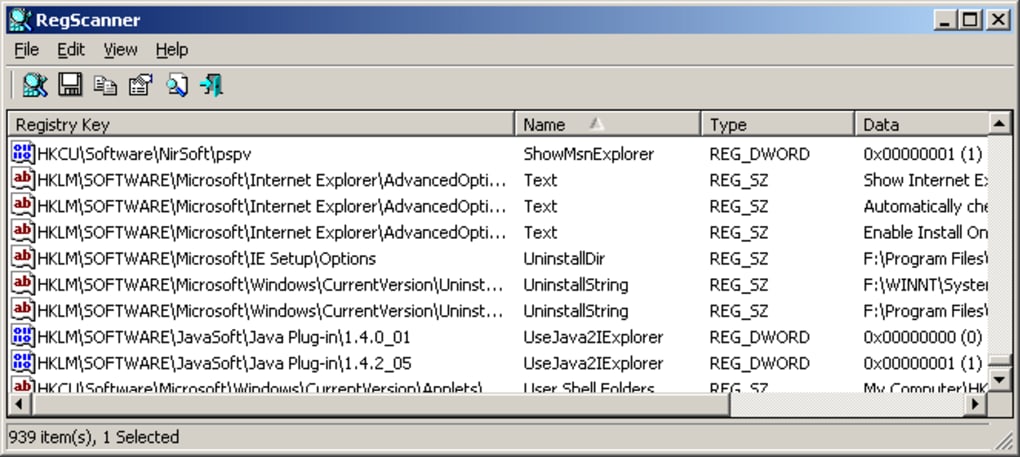
RegScanner’s primary purpose is to simplify the registry search process. It presents search results in a clear, easily navigable list format, contrasting sharply with the potentially overwhelming presentation of RegEdit. This improved presentation reduces the cognitive load on the user, allowing them to quickly identify and locate the desired registry keys without getting lost in a maze of nested entries. The application’s intuitive interface prioritizes ease of use, making it accessible even to users with limited technical expertise.
Key Features and Functionality
RegScanner’s functionality is purposefully focused: it searches, but it doesn’t modify or organize the registry. This narrow scope allows for a highly efficient and user-friendly design. Key features include:
-
Comprehensive List View: Unlike RegEdit, which presents results one at a time, RegScanner displays all matching registry keys in a single, comprehensive list. This allows for a quick overview of all relevant search results, eliminating the need to manually navigate through numerous entries. This single-view approach significantly speeds up the search process and enhances usability.
-
Unicode String Search within Binary Values: A particularly powerful feature is RegScanner’s ability to search for Unicode strings embedded within binary values. Many registry entries store data in binary format, making it challenging to locate specific text strings within these entries using traditional search methods. RegScanner’s capability to efficiently search within binary data dramatically enhances its search power and extends its usefulness beyond standard text-based searches.
-
Real-time Scan Progress: During the search process, RegScanner displays the key currently being scanned. This provides users with visual feedback and reassurance that the application is actively working, preventing the perception of delays or inactivity. This simple feature enhances user experience and confidence in the application’s performance.
-
Simple Search Interface: The application boasts a streamlined interface, presenting a simple search bar and result display. This minimalist approach eliminates unnecessary clutter and keeps the focus on the core functionality: searching the registry. This design decision reflects the application’s focus on efficiency and ease of use.
-
Export Functionality: Although not explicitly mentioned in the provided text, a useful feature for any registry searching tool is the ability to export search results. This allows users to save their findings for future reference or to share them with others. This would add another layer of value to RegScanner’s functionality.
Comparison with Alternative Registry Management Tools
RegScanner is not the only tool available for navigating the Windows Registry. Several alternatives offer broader functionalities, including modification and organization capabilities. However, RegScanner’s niche focus allows it to excel in its chosen task.
Tools such as RegSeeker and Registry Workshop provide more comprehensive registry management functionalities, allowing users to not only search but also edit, delete, and back up registry keys. These tools are excellent for advanced users who require a higher degree of control over the registry. However, this broader functionality comes at the cost of increased complexity and a steeper learning curve.
RegScanner’s simplicity makes it ideal for users who need a dedicated search tool without the overhead of more complex registry management tools. It can be used effectively in conjunction with more comprehensive tools, providing a specialized search function to complement their wider capabilities. Essentially, RegScanner effectively fills a specific gap in registry management software.
Strengths and Limitations
RegScanner’s strengths lie in its simplicity, efficiency, and focused functionality. Its clear list view, Unicode search capability within binary values, and real-time progress indicator make it a superior alternative to native Windows registry searching capabilities for many users. Its light footprint ensures minimal system resource consumption, making it suitable even for older or less powerful machines.
However, RegScanner’s limitations are also apparent. Its exclusive focus on searching prevents users from modifying or organizing the registry within the application itself. Users will need to utilize external tools for editing or managing registry entries once identified. This limitation underscores RegScanner’s role as a specialized search tool rather than a comprehensive registry management suite.
Conclusion: A Valuable Tool for Specific Needs
RegScanner occupies a unique niche in the world of Windows registry management. While not a replacement for comprehensive tools offering broader functionality, it provides a highly effective and user-friendly solution for the specific task of searching the registry. Its clear presentation, efficient search capabilities, and ease of use make it a valuable tool for both novice and experienced users needing a quick and efficient way to find specific registry keys. Its ability to handle Unicode strings within binary values further solidifies its position as a powerful yet specialized registry searching utility. The lack of modification capabilities should be considered, but for users primarily needing a focused search tool, RegScanner provides an excellent solution that excels in its specific application.
File Information
- License: “Free”
- Version: “2.65”
- Latest update: “July 15, 2022”
- Platform: “Windows”
- OS: “Windows 8.1”
- Language: “English”
- Downloads: “2.3K”
- Size: “72.68 KB”


