
Remote PC, developed by iDrive Inc., is a productivity application designed to provide secure remote access to your computers. This review delves into its features, performance, security, and overall usability, comparing it to other popular remote desktop solutions. We’ll examine its strengths and weaknesses, helping you determine if Remote PC is the right choice for your individual or business needs.
Features and Functionality: Seamless Remote Access and Beyond
Remote PC offers a robust set of features geared towards both individual users and businesses. At its core, the software provides reliable remote access to your files, programs, and entire system, regardless of your physical location. This functionality mirrors that of competitors like TeamViewer and AnyDesk, allowing you to control your host computer as if you were sitting directly in front of it.
Beyond basic remote control, Remote PC facilitates seamless file sharing between the host and client computers. This drag-and-drop functionality simplifies the transfer of documents, images, and other files, eliminating the need for cumbersome email attachments or cloud storage services for every file transfer. Furthermore, the software supports remote printing, enabling you to print documents from your host computer to a printer connected to your client machine. This is particularly useful for those working remotely or needing to access printing resources from different locations.
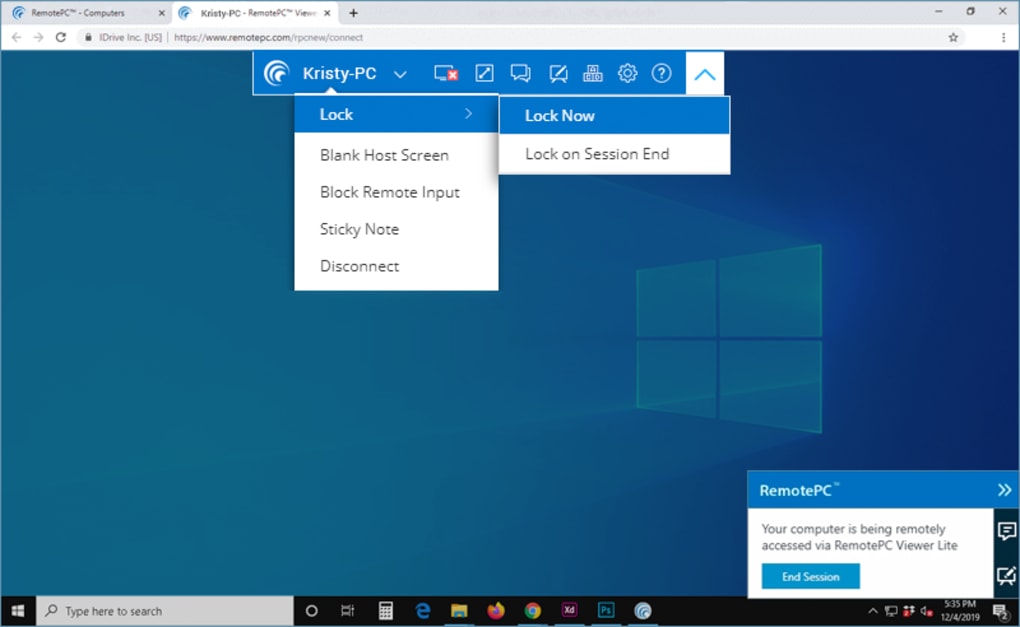
A notable feature setting Remote PC apart is its integrated voice chat. While on-screen text chat is common in remote desktop applications, the addition of voice chat enhances collaboration significantly, offering a more natural and efficient method of communication during remote sessions. This is a considerable advantage for tasks requiring real-time discussion and coordination.
User Experience and Interface: Intuitive Design for Effortless Control
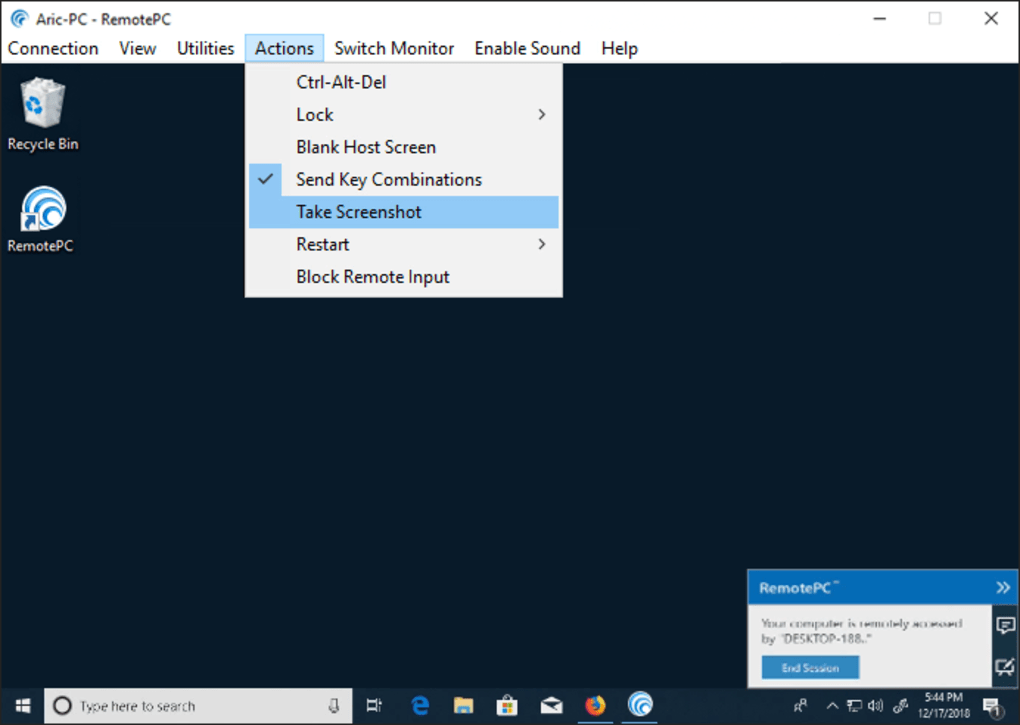
Remote PC boasts a modern and user-friendly interface, making navigation straightforward and intuitive. Even users unfamiliar with remote desktop software should find it easy to learn and use. The intuitive layout ensures that all essential tools are readily accessible, allowing you to quickly initiate remote sessions, manage settings, and configure user permissions. A well-organized Utilities menu provides central access to all crucial functions, streamlining the workflow and minimizing the learning curve.
The scaling capabilities of Remote PC deserve specific praise. The software effectively adapts the screen resolution, ensuring that text remains sharp and images appear clear, even when connecting to a computer with a different screen size or resolution. This consistent visual quality is vital for a productive remote session, preventing eye strain and ensuring that details remain easily discernible. While minor latency may be noticed when changes are made on the host PC, this delay is generally minimal and unlikely to significantly impact workflow.
Performance and Scalability: Handling Multiple Users and Devices
The performance of Remote PC is impressive, with minimal impact on system resources. This is crucial, as sluggish performance can severely hamper productivity during remote sessions. The software’s efficient design ensures that both the host and client computers maintain optimal responsiveness, even during intensive tasks. This means you can work remotely without experiencing frustrating delays or interruptions.
For businesses, Remote PC’s scalability is a valuable asset. While setting up multiple users and devices may take some time, the software offers features to streamline this process. The ability to invite multiple users using comma-delimited email addresses is particularly helpful. Further enhancing organizational efficiency, administrators can create user groups with custom permission levels, ensuring secure and controlled access to company resources. However, it’s important to note that switching to a higher plan may require users to reinstall the software, a minor inconvenience that is offset by the enhanced capabilities provided by the upgraded plan.
Security: Robust Encryption and Access Control
Security is paramount in any remote desktop application, and Remote PC prioritizes this aspect with a strong focus on data protection. The software utilizes TLS v1.2/AES-256 encryption for secure communication between the host and client computers, safeguarding data transmitted during remote sessions. This robust encryption method protects sensitive information from unauthorized access, ensuring confidentiality and integrity.
Access to each computer is secured by a unique personal key, providing an additional layer of protection. This two-factor authentication approach strengthens security by requiring users to possess both their username/password and the unique key to gain access, preventing unauthorized individuals from remotely accessing your computer. This multifaceted security approach makes Remote PC a suitable option for both personal and professional use.
Comparison with Competitors: TeamViewer, AnyDesk, and Others
Remote PC competes with several established remote desktop solutions, including TeamViewer and AnyDesk. While these applications share similar core functionalities, Remote PC distinguishes itself with its integrated voice chat and efficient drag-and-drop file sharing. TeamViewer and AnyDesk also offer robust features, but the inclusion of voice chat provides a clear advantage for collaborative work, streamlining communication and reducing reliance on text-based interactions. The ease of file transfer via drag-and-drop also surpasses the methods sometimes employed by competitors, making file sharing a streamlined and less error-prone process.
Pros and Cons: Weighing the Advantages and Disadvantages
Pros:
- Smooth Performance: Remote PC offers a consistently smooth and responsive remote desktop experience, minimizing latency and ensuring a productive workflow.
- Low System Impact: The application maintains a low footprint on system resources, preventing performance degradation on both the host and client computers.
- Easy Setup: Despite the time investment for multiple devices, the setup process is straightforward and user-friendly, even for those unfamiliar with similar software.
- Drag-and-Drop File Sharing: Seamlessly transfer files between host and client machines with intuitive drag-and-drop functionality.
- Integrated Voice Chat: Facilitates real-time collaboration with an enhanced communication method beyond simple text chat.
Cons:
- Setup Time: While the process is straightforward, setting up multiple devices or users for a business setting can still be time-consuming.
- Slight Host PC Delay: Changes made on the host PC may experience a small delay in appearing on the client machine. This delay is generally minimal but noticeable.
Conclusion: A Solid Choice for Reliable Remote Access
Overall, Remote PC emerges as a solid and reliable option for remote desktop access. Its impressive performance, user-friendly interface, and strong security features make it a compelling choice for both personal and business applications. While some minor drawbacks exist, such as the time investment required for initial setup, these are generally outweighed by the benefits provided by the application’s features and capabilities. The integrated voice chat significantly enhances collaborative potential, further solidifying its position as a strong contender in the competitive remote desktop software market. Businesses seeking a robust and scalable solution, combined with ease of use, will find Remote PC a worthy consideration. For individual users needing reliable remote access, its balance of performance, security, and functionality provides a compelling solution.
File Information
- License: “Free”
- Latest update: “March 5, 2024”
- Platform: “Windows”
- OS: “Windows 8.1”
- Language: “English”
- Downloads: “202.1K”
- Size: “72.44 MB”


