
Revo Uninstaller Portable offers a convenient and powerful solution for uninstalling applications and cleaning your Windows system. This portable version, unlike its installable counterpart, eliminates the need for installation, allowing you to run it directly from a USB drive or other portable storage. This feature makes it ideal for users who frequently work on multiple computers or prefer to maintain a clean system without installing additional software. Despite its portable nature, it retains the robust functionality of its full-fledged sibling, providing a comprehensive suite of tools for maintaining system health and optimizing performance.
Uninstallation Capabilities: Thorough and Efficient
At its core, Revo Uninstaller Portable excels as an uninstaller. It goes beyond the basic uninstall routines provided by the Windows operating system, offering a multi-stage process designed to eliminate all traces of unwanted software. This includes not only the program files themselves but also associated registry entries, leftover files, and potentially lingering folders. This thorough approach prevents system clutter and potential conflicts with other programs, contributing to a more stable and efficient computing experience. The program’s intuitive interface guides users through the process with ease, making it accessible to both novice and experienced computer users. The user can select a program from a neatly organized list of installed applications, and with a single click, initiate the removal process.
The program employs several advanced techniques during the uninstallation process. Unlike standard uninstallers that may leave behind residual files, Revo Uninstaller Portable actively scans for these remnants, offering users the option to manually review and delete them for a truly clean removal. This ensures that uninstallations are thorough and prevent conflicts or performance degradation. The software’s comprehensive scanning capabilities extend to both the hard drive and the Windows registry, targeting all possible locations where remnants of an uninstalled program might reside. This detailed approach is crucial in ensuring a complete and clean removal. The program also allows users to create restore points before undertaking major uninstallation procedures, providing an additional safety net against accidental data loss or system instability.
Beyond Uninstallation: System Optimization Tools
Revo Uninstaller Portable extends beyond its primary uninstallation function to offer a valuable suite of system optimization tools. These features are designed to improve system performance, enhance security, and maintain a cleaner system overall. The program includes tools to clear browsing history, cookies, temporary files, and other remnants of web activity. This functionality contributes to improved privacy and security, as well as enhanced system speed, especially for users who frequently browse the web.
The junk file cleaner is another valuable tool within the portable application. This feature scans the system for files that are no longer needed, including temporary files, log files, and other unnecessary data. By identifying and removing these files, Revo Uninstaller Portable helps reclaim valuable disk space and prevent system slowdown caused by accumulating unnecessary data. This is particularly useful for users who have limited storage space or frequently deal with large files and applications.
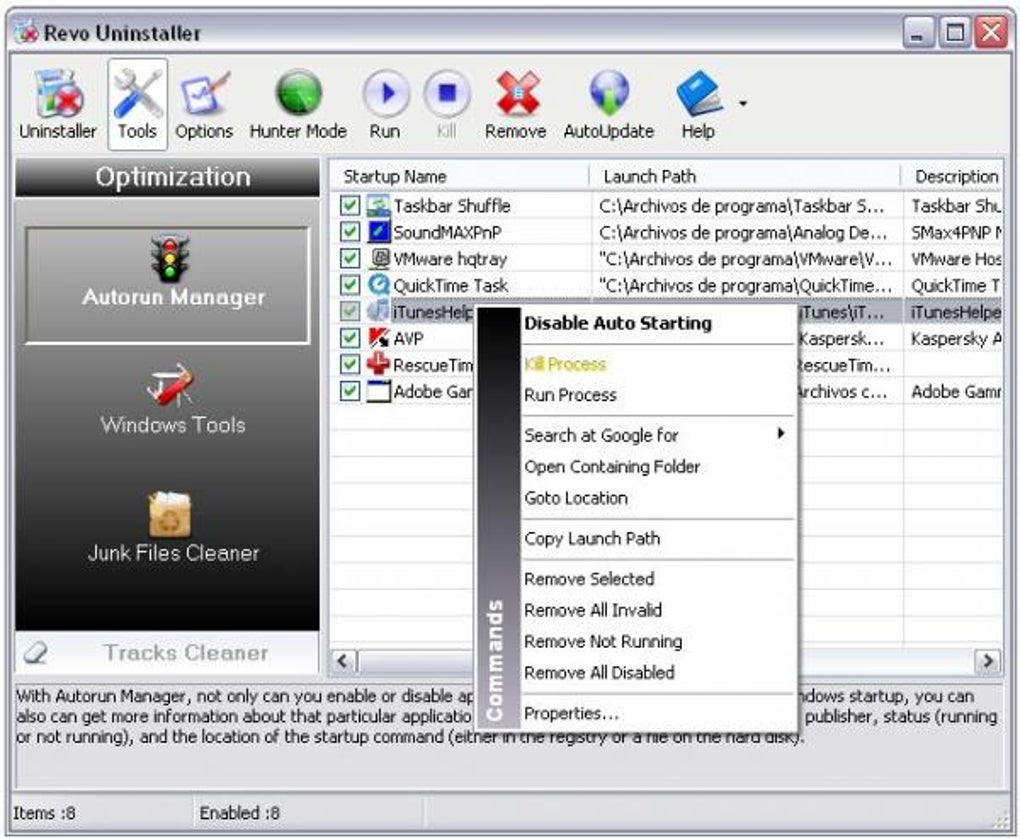
Furthermore, Revo Uninstaller Portable provides insights into startup programs. It displays a comprehensive list of programs automatically launched when the system boots. By identifying and disabling unnecessary startup programs, users can significantly reduce the boot time and improve overall system performance. This is a key feature for users who experience slow boot times or system sluggishness due to an excessive number of startup applications. This feature provides a straightforward way to manage these startup programs, allowing users to selectively disable or enable them as needed.
Portability and Ease of Use: A Winning Combination
The portability aspect of Revo Uninstaller Portable is a major advantage for users who value convenience and flexibility. The program doesn’t require installation; simply download the executable file, save it to a USB drive or other portable storage, and run it on any Windows machine. This makes it ideal for users who work on multiple computers, technicians who need to perform maintenance on various systems, or individuals who simply prefer to keep their primary systems free from unnecessary installations. The program’s intuitive interface further enhances its ease of use, regardless of the user’s technical proficiency.
The streamlined design keeps the user experience uncluttered and efficient. The main interface provides easy access to all the key features, and the program’s workflow is designed to be straightforward and efficient. Even novice users will find the program easy to navigate and use, while experienced users will appreciate its powerful capabilities and advanced options. The program’s user-friendly interface ensures that even users with limited technical expertise can utilize its full potential without difficulty. The combination of portability and ease of use makes Revo Uninstaller Portable a valuable tool for a broad range of users.
Comparison with Alternative Applications
Several alternative uninstallers and system optimization tools are available, both free and paid. However, Revo Uninstaller Portable distinguishes itself through its combination of powerful features, portability, and intuitive interface. While some competitors might offer similar uninstallation capabilities, Revo Uninstaller Portable’s integrated system optimization tools provide a more comprehensive solution in a single, portable package. This all-in-one approach simplifies the maintenance process and avoids the need for multiple applications. The portability feature also sets it apart, making it a particularly attractive option for users who frequently work on multiple computers.
Some alternative programs may focus solely on uninstallation, lacking the additional system optimization features provided by Revo Uninstaller Portable. Others might offer broader system optimization but lack the depth and detail in uninstallation capabilities. Revo Uninstaller Portable successfully balances these aspects, providing a complete solution for system maintenance and optimization in a compact and easily accessible package. The seamless integration of these functionalities eliminates the need for users to manage multiple separate applications for these tasks.
Minor Drawbacks and Areas for Improvement
While Revo Uninstaller Portable is generally praised for its effectiveness and ease of use, some minor drawbacks have been noted. One common criticism is the lack of a progress bar during the junk file scanning process. This lack of visual feedback may leave users unsure about the progress of the scan, creating a slight sense of uncertainty. While the scan itself is typically fast, a progress bar would enhance user experience.
Another minor concern mentioned by some users is the potential for the program to miss certain entries on the installed list. While this issue appears to be relatively infrequent, it’s worth noting that occasionally, some applications might not be detected for removal. In such cases, manual intervention or alternative approaches might be required to completely remove the application. Despite these minor drawbacks, the overwhelming consensus is that Revo Uninstaller Portable’s advantages significantly outweigh its limitations. The program remains a powerful and versatile tool for system maintenance and optimization.
Conclusion: A Highly Recommended Tool
Revo Uninstaller Portable proves to be a valuable asset for maintaining a clean, efficient, and optimized Windows system. Its portability, coupled with its robust uninstallation capabilities and integrated system optimization tools, makes it a highly recommended application for a wide range of users. While minor drawbacks exist, such as the absence of a progress bar during junk file scans and the occasional missed program entry, these issues are minimal compared to the significant benefits it offers. Its ease of use, comprehensive functionality, and portability make it a versatile and highly effective tool for both novice and experienced computer users. For those seeking a convenient and powerful solution for uninstalling applications and optimizing their Windows system, Revo Uninstaller Portable is undoubtedly a top contender.
File Information
- License: “Free”
- Latest update: “May 24, 2023”
- Platform: “Windows”
- OS: “Windows 7”
- Language: “English”
- Downloads: “92.7K”
- Size: “8.30 MB”


