
SageThumbs is a free, lightweight shell extension for Windows that significantly enhances the way you interact with image files within Windows Explorer. Developed by CherubicSoft, this powerful utility leverages the GFL library, renowned for its extensive image format support, to provide a seamless and efficient image management experience. Unlike bulky image editing applications, SageThumbs operates directly within the Explorer context menu, offering quick access to a range of features without requiring you to switch to a separate program. This article delves into the capabilities, features, and benefits of SageThumbs, explaining how it can streamline your image organization and manipulation workflow.
Streamlining Image Management in Windows Explorer
SageThumbs’ primary function is to integrate directly into Windows Explorer, adding functionalities directly to the right-click context menu for image files. This eliminates the need to open a dedicated image viewer or editor for basic tasks, significantly improving efficiency. The core strength lies in its ability to preview a vast array of image formats directly within Explorer, eliminating the need to open each file individually to determine its contents. This rapid preview functionality is crucial for managing large collections of images, enabling quick identification and selection of specific files.
The extended thumbnail view provided by SageThumbs offers a more detailed preview than the default Windows Explorer thumbnails. This is particularly useful for images with complex details or those that are difficult to discern at a small size. The increased clarity enhances the browsing experience, allowing users to quickly identify and select the desired images.
Extensive Image Format Support and Beyond
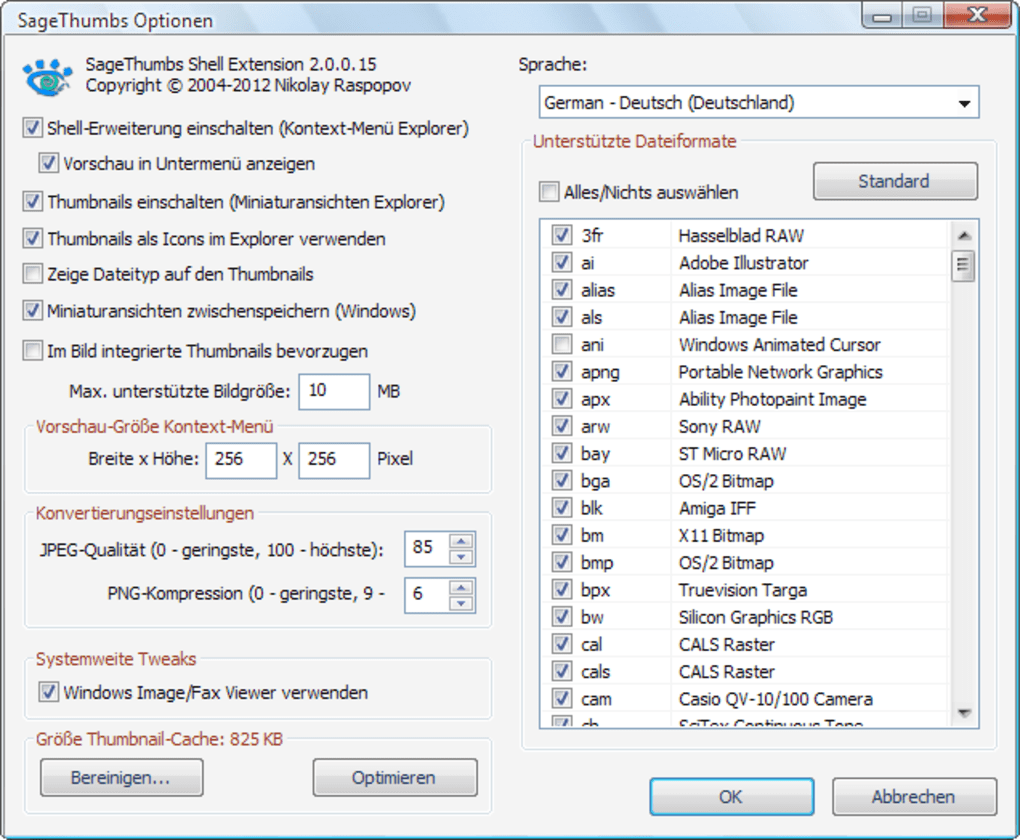
The heart of SageThumbs’ capabilities lies in its use of the GFL library, the same library used by the popular image viewer XnView. This provides compatibility with an impressive range of image formats, supporting over 162 formats and 224 extensions. This wide support is a major advantage, ensuring compatibility with a vast majority of image files encountered. Furthermore, the ability to integrate with XnView plugins extends this support even further, adding an additional 26 image formats for users who already have these plugins installed. This level of compatibility eliminates the frustration of encountering unsupported files, making SageThumbs a versatile tool for users working with diverse image collections.
User-Friendly Interface and Functionality
SageThumbs maintains a remarkably simple and intuitive interface. Despite its powerful features, it remains user-friendly for both beginners and experienced users. The right-click context menu integration provides easily accessible options for various tasks, minimizing the learning curve. The options are clearly presented, allowing users to quickly perform actions such as:
- Preview Image: View an enlarged preview of the selected image directly within the context menu.
- Set as Wallpaper: Quickly set the selected image as your desktop wallpaper.
- Image Conversion: Convert the image to a variety of popular formats with adjustable quality settings. This one-click conversion feature is particularly valuable for quick reformatting tasks, saving considerable time and effort.
- Send by Email: Easily attach the selected image to an email message.
- Copy to Clipboard: Copy the image to the system clipboard for pasting into other applications.
- Extended Info Tips: Access detailed information about the selected image, such as its dimensions, file size, and creation date. This information can be valuable for managing and organizing large image libraries.
The ease of use combined with the extensive feature set makes SageThumbs appealing to a broad spectrum of users, from casual image viewers to professionals working with large image datasets.
Customization Options for Tailored Workflow
While SageThumbs provides a streamlined experience out-of-the-box, it also offers various customization options to tailor the experience to individual preferences and workflows. Users can adjust settings to modify:
- Preview Size: Control the size of the thumbnails displayed within Windows Explorer, optimizing the balance between detail and screen real estate.
- Conversion Quality: Determine the quality of the output images when converting between formats. Higher quality results in larger file sizes, allowing users to balance quality and file size based on their needs.
- Supported Output Formats: Specify the formats available for image conversion, allowing users to restrict the options to only the formats they commonly use.
These customization options allow users to personalize their experience and optimize the tool for their specific workflows.
Comparison with Alternative Software
Several alternative applications offer similar image preview or conversion capabilities. However, SageThumbs distinguishes itself through its unique combination of features and its seamless integration within the Windows Explorer shell. Unlike many standalone image viewers or converters, SageThumbs does not require opening a separate application, thus improving workflow efficiency.
While some alternative software might offer more advanced editing features, SageThumbs focuses on providing fast and efficient access to essential image management tasks. This focused approach results in a lightweight application with a minimal system footprint, making it suitable for use on systems with limited resources. For users primarily focused on organizing and manipulating images within the familiar context of Windows Explorer, SageThumbs proves to be a highly efficient and user-friendly option.
Target Audience and Use Cases
SageThumbs caters to a wide range of users who regularly work with image files on Windows. This includes:
- Photographers: Quickly organize and preview large collections of photos in various formats. The one-click conversion feature is especially valuable for preparing images for sharing or online use.
- Graphic Designers: Easily manage and preview design assets in various formats, streamlining workflows without interrupting the design process.
- Game Developers: Organize and manage game art assets, ensuring compatibility with various game engines and platforms.
- Web Developers: Manage and preview website images in various formats, optimizing for web usage.
- Home Users: Efficiently manage personal photo collections, quickly viewing images and performing simple conversions or organization tasks.
In essence, anyone who needs to frequently interact with image files in Windows will find SageThumbs a valuable addition to their workflow. The combination of ease of use, extensive format support, and seamless integration into Windows Explorer makes it a highly versatile and efficient tool.
Conclusion: A Powerful and Efficient Tool for Image Management
SageThumbs stands out as a powerful and versatile tool for managing image files within the Windows environment. Its seamless integration into Windows Explorer, coupled with its extensive format support and user-friendly interface, makes it an indispensable tool for anyone frequently working with image files. The ability to perform quick conversions and previews directly within the Explorer context menu significantly streamlines workflows, enhancing efficiency and productivity. Whether you’re a professional photographer, a casual user, or a developer working with image assets, SageThumbs offers a valuable and efficient solution for your image management needs. Its lightweight design and extensive customization options further solidify its position as a valuable addition to any Windows system.
File Information
- License: “Free”
- Latest update: “July 12, 2019”
- Platform: “Windows”
- OS: “Windows 2003”
- Language: “English”
- Downloads: “53.6K”
- Size: “2.23 MB”


