
Scan2PDF is a free Windows application designed to simplify the process of converting scanned images and existing image files into PDF documents. While boasting ease of use and support for multiple file types, its age and limited feature set warrant a closer examination to determine its suitability for modern users. This review delves into its functionality, user experience, advantages, disadvantages, and compares it to alternative solutions.
Functionality and Features: Simplicity Meets Limitations
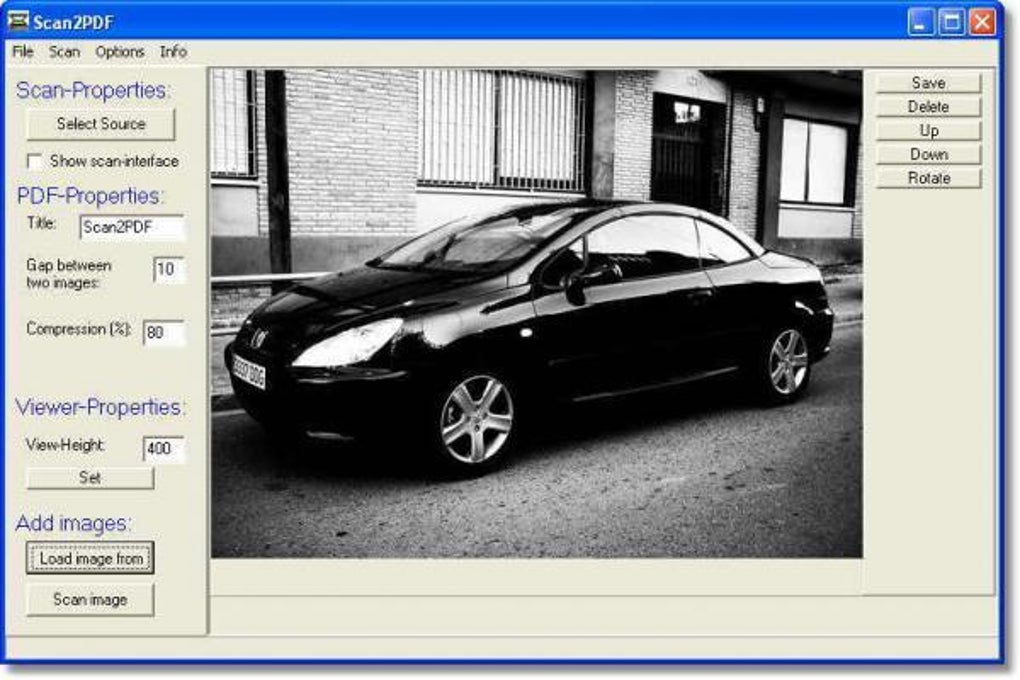
Scan2PDF presents a straightforward interface, immediately familiar to anyone who has used basic image editing software. Its core function revolves around importing image files (from various formats), arranging them, and compiling them into a single PDF document. Users can select images from their hard drive, adjust their size and orientation (maintaining aspect ratio), and align them within the PDF page (centered, left, or right). This level of control provides a degree of customization lacking in simpler scan-to-PDF utilities. The program offers options for rotating images, manually adjusting height and width, modifying image order within the document, and deleting individual images from the list before final PDF creation.
The simplicity of Scan2PDF is both its strength and weakness. While this ease of use makes it accessible to even novice users, it lacks advanced features found in many contemporary PDF editors and image manipulation programs. Users will not find options for adjusting image parameters such as saturation, color balance, hues, or contrast. This limits its usefulness for users needing fine-grained control over image quality or those requiring more sophisticated editing capabilities. The absence of advanced features also means that Scan2PDF is not a suitable replacement for a full-fledged image editor or professional PDF manipulation software. Its focus remains squarely on the straightforward conversion of images into PDF files, prioritizing simplicity over comprehensive editing functionalities.
User Interface and Experience: Intuitive but Dated
The user interface (UI) of Scan2PDF is intentionally minimalist, reflecting its core functionality. Navigation is intuitive, with clearly labeled buttons and options that are easily understandable. The lack of overwhelming features contributes to the program’s ease of use. The process of importing images, arranging them, and creating the PDF is straightforward and requires minimal technical expertise. This simplicity is a significant advantage, particularly for users unfamiliar with more complex PDF editing software. However, the program’s visual design reflects its age, lacking the modern aesthetic of many newer applications. The interface feels somewhat dated, although this does not significantly impede usability. The lack of visual appeal might be a factor for users accustomed to modern, visually engaging software.
The absence of extensive tooltips or in-application help might pose a slight challenge for completely new users. While the program’s functionality is simple, a brief tutorial or readily available help section could enhance the user experience for those encountering the software for the first time. However, the simplicity of the functions largely mitigates this issue. The intuitive nature of the interface minimizes the need for extensive documentation.
Pros and Cons: Weighing the Benefits and Drawbacks
Pros:
- Ease of use: Scan2PDF’s simplicity makes it incredibly user-friendly, ideal for users of all technical skill levels. The straightforward interface and minimal features contribute to a quick learning curve.
- Free software: The program is available for free, making it an attractive option for users on a budget or those who only need basic image-to-PDF functionality. This affordability makes it accessible to a wider range of users.
- Multiple file format support: Scan2PDF supports a variety of image file formats, enhancing its versatility and usability. This flexibility ensures compatibility with a wide range of scanned documents and existing image files.
- Basic image manipulation: While limited, the ability to resize, rotate, and reposition images within the PDF provides a degree of customization beyond simple conversion. This level of control offers users some flexibility in arranging the final output.
- Compact size: The program’s small size ensures minimal impact on system resources, a beneficial factor for users with older or less powerful computers. This efficiency makes it suitable for systems with limited storage or processing capabilities.
Cons:
- Outdated software: The last update dates back several years, raising concerns about compatibility with modern operating systems and potential security vulnerabilities. This lack of recent updates is a significant drawback.
- Limited image editing: The program lacks essential image editing features like brightness/contrast adjustments, color correction, and other tools found in standard image editing software. This absence significantly restricts its usability for tasks requiring image enhancement.
- No OCR capability: Scan2PDF does not include optical character recognition (OCR) functionality, making it unsuitable for converting scanned documents into editable text. The lack of OCR is a major limitation for users needing to extract text from scanned documents.
- Potential for image degradation: Some users have reported minor image quality degradation upon conversion, especially at lower compression settings. While not universally experienced, this issue underscores the limitations of the software’s image processing capabilities.
- Dated interface: The visual design of the interface appears outdated compared to modern software standards. While this does not necessarily impact functionality, it can negatively impact user experience for those accustomed to more contemporary design principles.
Alternatives: Exploring Comparable Software
Several alternative applications offer comparable or superior functionality to Scan2PDF. Many free and paid options exist, catering to different needs and budgets. Some popular alternatives include:
-
PDF-XChange Editor: This free PDF editor offers far more advanced features than Scan2PDF, including robust editing tools, OCR capabilities, and support for various file formats. However, its complexity makes it less user-friendly for beginners compared to Scan2PDF.
-
Adobe Acrobat Reader DC: While primarily a PDF reader, the free version of Adobe Acrobat Reader DC offers basic PDF creation tools, including the ability to combine images into a PDF. It lacks the fine-grained control offered by dedicated image editing software but provides a convenient option for basic conversions.
-
Office Lens: This free mobile app (available for iOS and Android) is specifically designed for scanning documents and creating PDFs. Its optical character recognition capabilities provide a significant advantage over Scan2PDF. However, it requires using a mobile device, which is not always convenient.
- Scanbot: Another mobile app, Scanbot offers a similar functionality to Office Lens, including advanced features like automated cropping and image enhancement. This is a great alternative for users on-the-go and who need higher quality scans than Scan2PDF.
The choice of alternative depends largely on the user’s specific requirements and preferences. Users seeking a simple, free solution for basic conversions may still find Scan2PDF suitable. However, those needing advanced editing tools, OCR capabilities, or a modern user experience should explore the alternatives mentioned above.
Conclusion: A Niche Tool in a Competitive Landscape
Scan2PDF serves a specific niche: providing a straightforward and free method for converting images into PDFs. Its ease of use is its primary strength, making it accessible to users who simply need to quickly compile images into a PDF document without needing sophisticated editing functions. However, its outdated nature, lack of advanced features (especially OCR), and potential image quality issues limit its appeal to a broader audience. While suitable for very basic needs, users with more demanding requirements should consider the numerous alternatives available, offering superior functionality and modern interfaces. The decision to use Scan2PDF largely hinges on the user’s tolerance for its limitations in exchange for its simplicity and free access.
File Information
- License: “Free”
- Latest update: “July 12, 2023”
- Platform: “Windows”
- OS: “Windows 98”
- Language: “English”
- Downloads: “307.5K”
- Size: “2.08 MB”


