
ScreenshotX is a lightweight, freeware application designed for Windows users seeking a simple yet effective solution for capturing screenshots. This guide provides a detailed overview of its features, capabilities, and overall user experience, exploring why it’s a compelling choice for both personal and professional use.
ScreenshotX Features and Functionality
ScreenshotX prioritizes ease of use without sacrificing essential functionality. Its core strength lies in its streamlined interface and straightforward approach to screenshot capture. The application offers several key features, designed to meet the needs of users with varying levels of technical expertise.
Free Area and Window Snip Screenshots: The application offers two primary modes of screenshot capture: free area and window snip. The free area selection allows users to drag a rectangular box across the screen, capturing only the desired portion of the display. This is ideal for selecting specific elements within a larger image or document. The window snip option provides a more targeted approach, enabling users to quickly capture an entire application window with a single click. This feature simplifies the process of grabbing screenshots of specific programs or dialog boxes without needing to manually adjust selection boundaries.
Automatic Screenshot Balancing: A unique feature of ScreenshotX is its automatic screenshot balancing. This feature automatically adjusts the brightness and contrast of the captured image, ensuring a consistent and visually appealing result. This is particularly beneficial when capturing screenshots from applications with varying levels of brightness or contrast, helping maintain a professional look across all captured images. The automated balancing eliminates the need for manual adjustments in image editing software, saving users valuable time and effort.
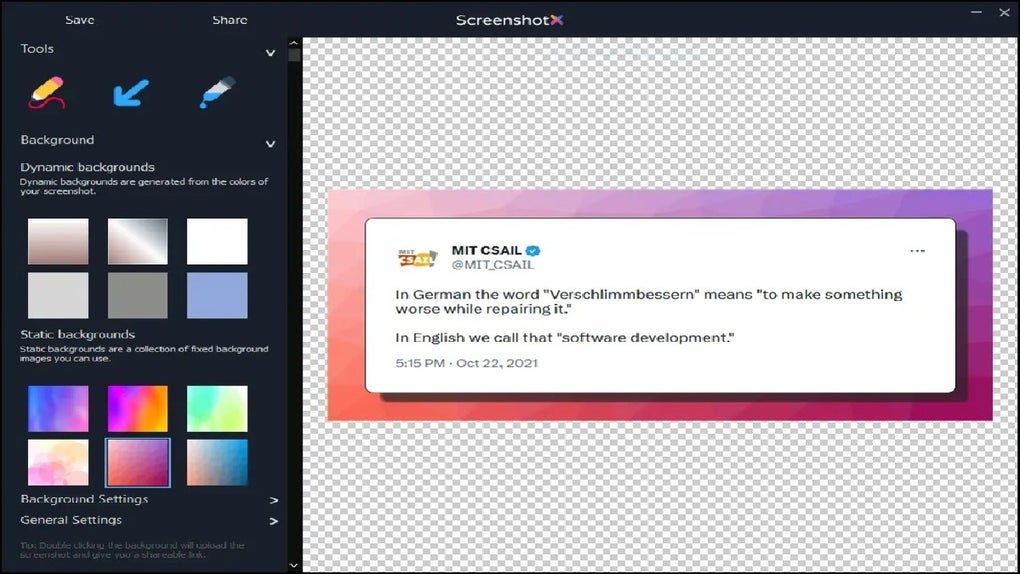
Visually Appealing Background Options: Beyond the core functionality, ScreenshotX allows users to customize the visual presentation of their screenshots. Users can add a pleasing background to their captures, enhancing the aesthetic appeal and overall presentation. This simple yet effective addition sets ScreenshotX apart from other basic screenshot tools, offering a touch of visual polish that’s often overlooked.
Brush Tool and Color Picker: For added functionality, ScreenshotX includes a brush tool for drawing directly onto the screenshot and a color picker to accurately select colors for annotations or highlighting. This allows for quick and easy annotations or markings to emphasize specific points within a screenshot, without the need for separate image editing software. The brush tool provides a basic level of in-app editing, making it possible to add simple visual cues or highlight key areas within the captured image.
Future Enhancements and Planned Features
Macecraft Software, the developer of ScreenshotX, has indicated plans for future enhancements that will further expand the application’s capabilities. These additions are anticipated to significantly enhance the user experience and provide a more comprehensive screenshot solution.
Redaction of Sensitive Information: A highly anticipated feature is the ability to redact sensitive information directly within the application. This feature will allow users to easily obscure or blur private data, such as personal details, addresses, or financial information, ensuring privacy and compliance before sharing screenshots. This functionality will be particularly important for users who need to share screenshots containing confidential data.
Text and Annotation Capabilities: The addition of text and annotation capabilities will provide users with a more versatile tool for adding detailed explanations or commentary directly to their screenshots. This feature eliminates the need for external image editing software for adding simple text notes or labels to images. Users will be able to highlight key aspects and provide additional context, making screenshots more easily understood.
Highlighting Important Areas: The planned addition of highlighting tools will allow users to emphasize critical areas within the screenshot. This could involve highlighting specific elements with different colors or using shapes to draw attention to important details within the captured image. This improves the clarity of the screenshot and makes it easier for recipients to understand the key message.
ScreenshotX: A Seamless User Experience
ScreenshotX prioritizes a simple, intuitive user interface. Its native Windows design ensures a smooth and seamless experience, avoiding the complexities and potential compatibility issues sometimes associated with third-party applications. The application’s core strength lies in its minimalist approach: focusing on essential screenshot features without overwhelming users with unnecessary options or complicated settings.
A Comparison with Other Screenshot Tools
While several other screenshot tools exist, ScreenshotX distinguishes itself through its combination of simplicity, essential functionality, and a pleasing aesthetic. Many other free tools lack the automatic balancing or visual enhancements offered by ScreenshotX. Some paid applications offer advanced features but come with a price tag and a steeper learning curve. ScreenshotX strikes a balance between functionality and usability, making it an attractive option for users who don’t need advanced editing capabilities but still desire a visually appealing and easy-to-use screenshot tool. Its focus on a straightforward user experience, coupled with its ability to generate visually appealing screenshots, distinguishes it in a crowded market.
System Requirements and Compatibility
ScreenshotX is designed to be compatible with a wide range of Windows operating systems, ensuring accessibility for most users. While the specific system requirements are not explicitly listed, its lightweight design suggests it should run smoothly on even older systems. The small download size indicates a minimal impact on system resources, ensuring a responsive and efficient experience for users. The application’s compatibility across various Windows versions makes it a versatile tool for individual users and businesses alike.
ScreenshotX: An Efficient Tool for Work and Personal Use
ScreenshotX’s strengths lie in its simplicity and efficiency. For personal use, it provides a quick and easy way to capture and share moments online or create visually appealing tutorials. Its ability to add a background and include basic annotations makes it ideal for casual users. For professional use, its speed and ease of use mean that users can quickly generate visually appealing screenshots for presentations, reports, or internal communications. The planned features, particularly the redaction tool, would make it even more valuable for professionals handling sensitive data. Overall, ScreenshotX offers a practical, versatile, and user-friendly solution for anyone needing to create and share screenshots.
Security and Privacy Considerations
ScreenshotX is presented as a freeware application with no ads, spyware, or registration requirements. This is a significant advantage over some competing tools that may bundle unwanted software or collect user data. The emphasis on a clean, secure application is crucial for building user trust and ensuring a positive user experience. The absence of intrusive elements enhances the overall reliability and appeal of ScreenshotX, making it a safer and more trustworthy option for many users concerned about privacy and security.
Conclusion: ScreenshotX - Simple, Effective, and Visually Appealing
ScreenshotX offers a compelling alternative to more complex screenshot applications. Its lightweight design, straightforward interface, and focus on essential features make it an excellent choice for users who value simplicity and efficiency. While lacking some advanced editing capabilities found in more sophisticated tools, its intuitive design and ease of use, along with the promise of future enhancements, position ScreenshotX as a strong contender in the screenshot capture arena. Its strength is its simplicity, combined with thoughtful features that enhance the quality and presentation of the final screenshots. The addition of planned features such as redaction, text annotations, and highlighting will further solidify its position as a versatile and user-friendly tool for both personal and professional use.
File Information
- License: “Free”
- Version: “1.1”
- Latest update: “July 6, 2024”
- Platform: “Windows”
- OS: “Windows 11”
- Language: “English”
- Downloads: “184”
- Size: “2.88 MB”


