
Seeker is a robust and versatile file search and replace utility designed for Windows operating systems. Its powerful capabilities extend beyond simple file location; it offers advanced search algorithms, regular expression support, and multiple reporting modes, making it a comprehensive solution for anyone needing to efficiently manage and manipulate files. This in-depth exploration will delve into Seeker’s features, functionality, and its place within the broader landscape of file search tools.
Unparalleled Search Capabilities: Finding the Needle in the Haystack
Seeker boasts an ultra-fast file search engine built on a sophisticated algorithm. This isn’t your typical “find file” utility. While it excels at locating files based on name, location, date, and size—standard features expected in a modern file search tool—Seeker’s true strength lies in its ability to search within files. This means you can quickly locate files containing specific text strings, regardless of their filenames or locations. This capability significantly reduces the time spent manually sifting through numerous files, a common frustration for users dealing with large datasets or complex file structures. The speed and efficiency offered by Seeker’s advanced algorithm are particularly beneficial when working with extensive libraries of documents, code repositories, or log files where finding specific information is crucial.
The search functionality extends beyond simple keyword matching. Seeker supports regular expressions, a powerful tool for pattern matching that significantly expands the scope and precision of searches. Regular expressions allow for flexible searches involving character classes, quantifiers, anchors, and other advanced constructs, enabling users to locate files based on intricate patterns rather than just exact matches. This feature is highly valuable for developers, system administrators, and anyone dealing with data that follows specific patterns or formats. The ability to define complex search criteria opens up opportunities for targeted searches, eliminating the need for multiple searches with simpler criteria.
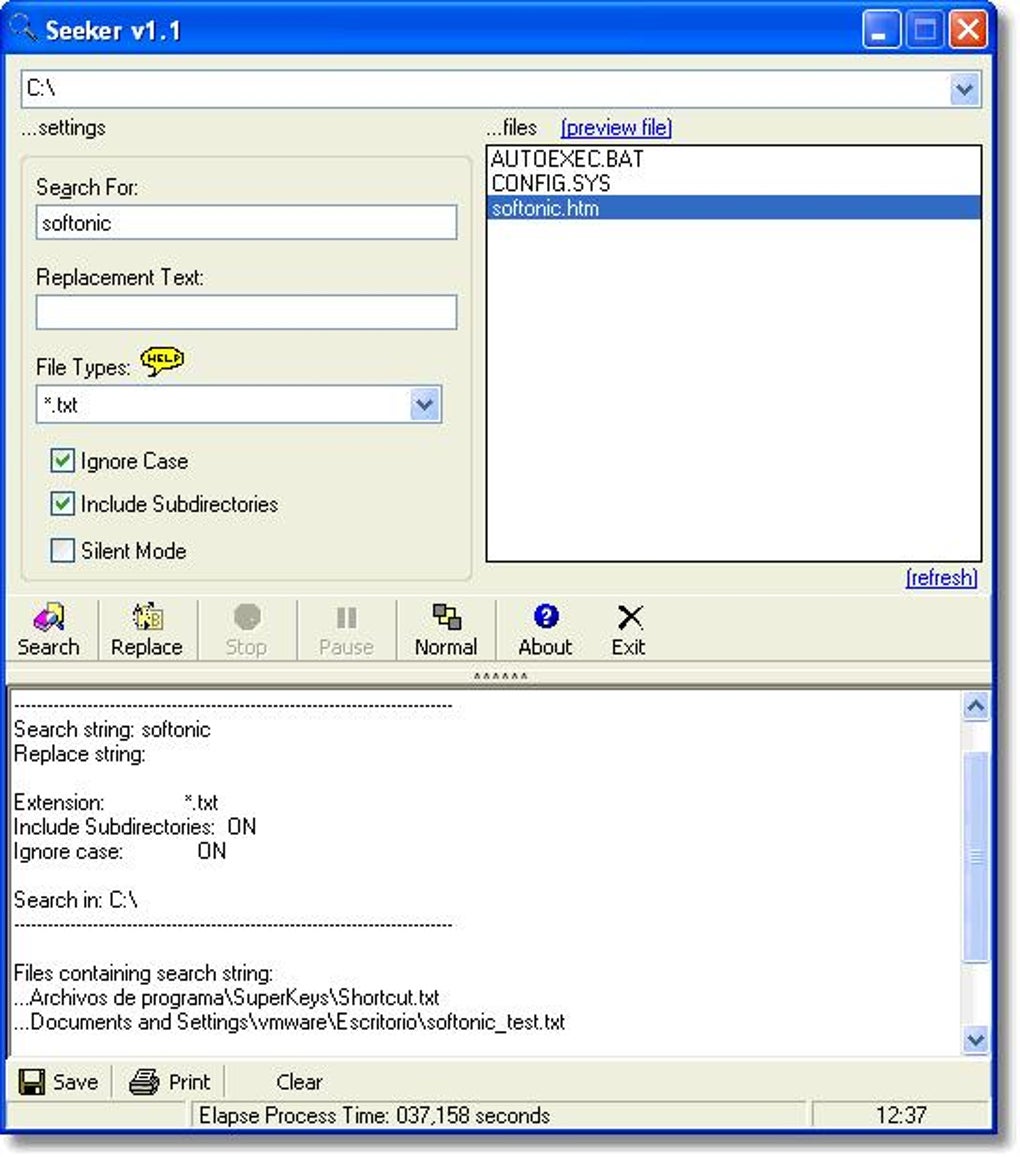
Beyond the core search functionality, Seeker offers a command-line interface. This allows for automation and integration with other scripts or applications. This functionality is incredibly useful for automating repetitive tasks, such as regularly searching for updated files or performing batch replacements. Power users can leverage this capability to create custom workflows, enhancing their productivity and streamlining their processes. For instance, a system administrator could integrate Seeker into a script to automatically identify and update log files containing specific error messages. This level of integration distinguishes Seeker from simpler file search tools and positions it as a highly customizable and flexible option.
Advanced Reporting: Making Sense of the Results
The results of a Seeker search are presented in a clear and organized manner, unlike some file search tools that may present overwhelming volumes of data in an unstructured format. Seeker offers four distinct reporting modes, allowing users to customize the output to suit their specific needs:
-
Detailed File List: This mode provides a comprehensive list of all files matching the search criteria, including filenames, file paths, sizes, modification dates, and the specific instances of the search term within the files. This level of detail is essential for users who need a granular understanding of the search results.
-
Structured Report: This mode presents the results in a more concise format, summarizing the search findings without overwhelming the user with minute details. It highlights key information such as the number of files found, the total size of the files, and the locations where the search term appears. This mode is suitable for users who need a quick overview of the search results without needing to analyze a large amount of detailed data.
-
Summary Report: This offers a highly condensed view of the search results, focusing only on the key statistics. The summary report provides a high-level overview of the number of matching files and other relevant aggregate metrics. This mode is suitable for users who only require a quick assessment of the overall search outcome without delving into individual file details.
-
Summary Report with File List: This mode combines the conciseness of the summary report with the detailed information of the file list, providing a balanced approach to data presentation. This is particularly useful when a high-level overview is needed along with the ability to examine individual files if necessary. This mode is suitable for users who want a good balance of summary data and access to the complete list of files found.
This range of reporting options allows Seeker to adapt to various situations and user preferences. Whether you need a detailed analysis or a quick overview, Seeker provides the tools necessary to effectively interpret the search results and act upon them.
Beyond Searching: Powerful Text Replacement Capabilities
Seeker’s capabilities extend beyond simple file discovery. It offers a robust text replacement feature, enabling users to modify the content of files directly. This functionality allows for bulk modifications, saving significant time and effort compared to manual editing of numerous files. The ability to perform text replacements within multiple files simultaneously is a significant advantage, especially when dealing with large datasets requiring uniform changes.
This replacement function also supports regular expressions, allowing for complex and precise substitutions based on patterns rather than literal text matches. This is particularly useful for tasks such as updating code, standardizing data formats, or performing mass replacements based on specific patterns. The combination of regular expression support and bulk replacement capabilities makes Seeker a powerful tool for automating complex text manipulation tasks.
The combination of search and replace capabilities within Seeker streamlines workflows. For instance, imagine a user needs to update a specific code snippet across numerous files in a large software project. Using Seeker, they can perform this task efficiently and accurately, significantly reducing the time and effort required for manual updates.
Seeker’s Place in the File Search Landscape
Seeker distinguishes itself from other file search utilities through a combination of its speed, accuracy, advanced features, and ease of use. While many free and commercial options exist, few offer the comprehensive set of features provided by Seeker. Several popular alternatives include:
-
Everything: Known for its speed and simplicity, Everything is a popular choice for basic file searching but lacks the advanced features such as regular expression support and in-file searching.
-
Agent Ransack: Agent Ransack is another strong contender, providing advanced search capabilities but might not match Seeker’s speed and intuitive interface.
-
InFile Seeker: While focused on in-file text searches, InFile Seeker lacks the robust replacement capabilities and advanced reporting features offered by Seeker.
-
UltraFileSearch Lite: This free utility provides fast file searching, but lacks many of Seeker’s advanced features, making it suitable for simple tasks but less so for complex scenarios.
While these alternatives offer certain functionalities, Seeker’s combination of speed, regular expression support, in-file searching, powerful text replacement, and versatile reporting modes sets it apart. It is a superior solution for users requiring a comprehensive and versatile file search and replace tool. Its command-line interface and ability to integrate into workflows also contribute to its overall value.
In conclusion, Seeker is more than just a file finder; it’s a powerful tool that empowers users to efficiently manage and manipulate files, significantly improving productivity and streamlining workflows. Its advanced features, combined with user-friendly design, solidify its place as a leading option in the file search and replace software landscape.
File Information
- License: “Free”
- Version: “3.0.7.9”
- Latest update: “September 24, 2021”
- Platform: “Windows”
- OS: “Windows 98”
- Language: “English”
- Downloads: “1.5K”
- Size: “2.37 MB”


