
Snap Links is a free Mozilla Firefox add-on designed to simplify the process of opening multiple web links. Instead of clicking each link individually, Snap Links allows users to select multiple links simultaneously using a simple drag-and-drop interface, significantly enhancing browsing efficiency, particularly when dealing with pages containing numerous links, such as search engine results pages. This article delves into the functionality, advantages, limitations, and user experience of Snap Links, examining its impact on overall browsing productivity.
Functionality and Usage
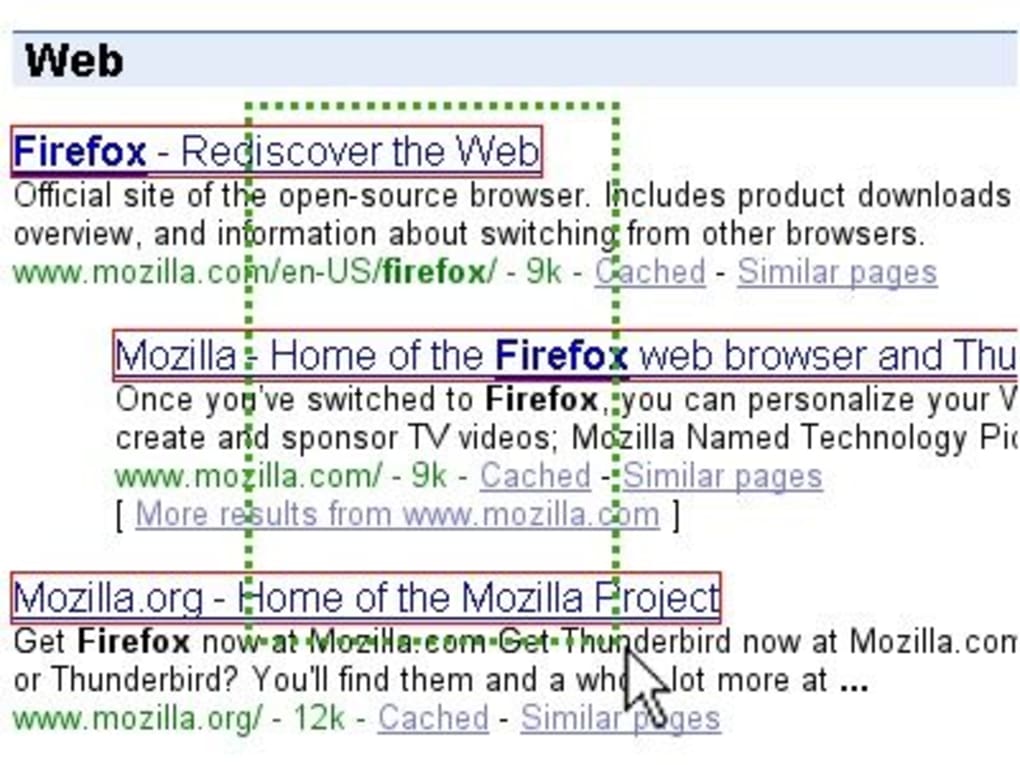
The core functionality of Snap Links centers around its intuitive drag-and-drop mechanism. After installation, the extension seamlessly integrates into the Firefox browser. To open multiple links, users simply need to:
- Navigate to the webpage containing the desired links.
- Drag the mouse cursor to create a rectangular selection box around the links.
- Release the mouse button. This action triggers Snap Links to open all selected links in new tabs within the browser.
This straightforward process eliminates the repetitive clicking required for opening multiple links individually, saving users considerable time and effort. The selection process is visually clear, making it easy for users to precisely target their desired links.
Advantages of Using Snap Links
Snap Links offers several key advantages that contribute to a more efficient browsing experience:
- Time Savings: The most significant benefit of Snap Links is its ability to save users considerable time. This is particularly noticeable when navigating pages with numerous links, such as search results or news aggregators. The elimination of repetitive clicking significantly speeds up the browsing process, allowing users to access information more quickly.
-
Enhanced Productivity: By streamlining the process of opening multiple links, Snap Links directly contributes to improved productivity. Users can access and review multiple resources simultaneously, facilitating research, comparison shopping, or any task requiring the rapid access of numerous webpages.
-
Intuitive User Interface: The drag-and-drop interface is exceptionally user-friendly. Even users unfamiliar with browser extensions will quickly grasp the functionality. The visual feedback during selection ensures that users have clear control over which links will be opened.
-
Improved Workflow: Snap Links integrates seamlessly into the existing workflow of Firefox users. It doesn’t require significant changes to browsing habits, making the transition smooth and easy. The addition of this functionality is additive, improving the existing user experience without disrupting familiar processes.
-
Free and Open-Source (implied): The information provided suggests the extension is free to use, making it accessible to a broader audience. While not explicitly stated, the mention of being a Mozilla add-on implies it’s likely open-source, further enhancing transparency and community involvement.
Limitations and Potential Issues
Despite its many advantages, Snap Links does have some limitations:
-
Visibility Limitation: Snap Links only selects and opens links that are currently visible within the browser window. Links that are outside the visible area (e.g., requiring scrolling to view) will not be included in the selection. This limitation can be somewhat frustrating if a user needs to open links located further down a page. The user may need to manually scroll and perform multiple selections.
-
Potential Conflicts with Other Extensions: As noted in the author’s review, Snap Links can potentially conflict with other extensions, particularly those that modify mouse behavior or utilize similar selection mechanisms, such as mouse gesture extensions. Users may need to disable conflicting extensions or adjust settings to ensure proper functionality. This highlights the importance of considering potential compatibility issues when installing multiple browser extensions.
-
Limited Functionality: Snap Links’ functionality is specifically focused on opening multiple links. It does not offer any additional features, such as link organization, bookmarking, or tab management capabilities. While its core function is executed well, users seeking more comprehensive link management tools may need to explore alternative solutions.
-
No Customizability (implied): The description doesn’t mention any customization options. The lack of flexibility might limit its appeal to users who prefer personalized workflows or require specific selection behaviors.
Snap Links Compared to Alternative Solutions
While Snap Links provides a convenient method for opening multiple links, other solutions exist, each with its own set of strengths and weaknesses. These include:
-
Manual Clicking: The most basic approach, manual clicking remains a viable option, especially for a smaller number of links. However, it lacks the speed and efficiency of Snap Links for larger link sets.
-
Browser’s Built-in Features: Some browsers offer built-in features for handling multiple links, such as selecting multiple links with Ctrl+click (or Cmd+click on macOS), but this is often less efficient than Snap Links’ drag-and-drop interface.
-
Other Browser Extensions: The Firefox add-on marketplace contains numerous other extensions that offer tab management and link handling capabilities, potentially providing more comprehensive functionality than Snap Links, though potentially with a more complex user interface. Some might offer advanced features like automated link sorting or filtering.
The best approach for opening multiple links depends on individual needs and preferences. Users with a high volume of link opening might find Snap Links particularly valuable, while those requiring more nuanced link management might opt for a more feature-rich extension.
User Experience and Feedback
While user reviews for Snap Links are currently absent from the provided text, the author’s review suggests a generally positive user experience. The intuitive interface and significant time-saving potential are highlighted as key benefits. However, the potential for conflicts with other extensions and the limitation to visible links are acknowledged as potential drawbacks. Future user reviews will provide a more comprehensive understanding of the user experience, offering valuable insights into the practical application and effectiveness of the extension.
The lack of user reviews currently available necessitates further investigation to fully assess user satisfaction and identify potential areas for improvement. Future updates could address some of the current limitations, potentially adding features like customizable selection behavior, support for links outside the viewport, or improved compatibility with other extensions.
Conclusion
Snap Links offers a valuable tool for users who frequently need to open multiple web links simultaneously. Its simple, intuitive drag-and-drop interface significantly enhances browsing efficiency and productivity. While certain limitations exist regarding link visibility and potential conflicts with other extensions, the overall user experience appears positive, based on the available information. The free availability and straightforward functionality make Snap Links a worthwhile addition for those seeking a streamlined way to manage multiple links within their Firefox browser. The absence of user feedback currently prevents a definitive conclusion on widespread user satisfaction, but initial impressions suggest a positive impact on browsing efficiency. Future updates and user reviews will provide a more complete picture of Snap Links’ long-term effectiveness and usability.
File Information
- License: “Free”
- Latest update: “January 3, 2024”
- Platform: “Windows”
- OS: “Windows XP”
- Language: “English”
- Downloads: “5.6K”
- Size: “92.79 KB”


