
SoundWire Server is a free, user-friendly application designed to bridge the gap between your Windows PC (or Linux machine) and your Android smartphone or tablet, enabling effortless audio streaming. This powerful yet lightweight program allows you to listen to your computer’s audio—whether it’s music, movies, games, or even live microphone input—directly on your Android device, eliminating the need for cumbersome workarounds or complicated setups. In this comprehensive review, we’ll explore its features, functionality, applications, and overall user experience.
Effortless Audio Streaming: How SoundWire Server Works
SoundWire Server functions as a dedicated audio server, creating a connection between your Windows PC and your Android device over your local area network (LAN). It essentially installs the necessary audio device modules on your computer and transmits the audio stream to your Android device via this network connection. This process is remarkably simple and requires minimal technical expertise. Once installed on both your PC and Android device, the application automatically detects the server, allowing for quick and easy connection.
The core functionality revolves around audio mirroring or casting. SoundWire Server doesn’t capture audio from specific applications; instead, it mirrors the default audio output of your Windows PC. This means any sound playing on your computer—from your favorite music streaming service like Spotify or YouTube to system sounds—will be relayed to your Android device. This versatility makes it ideal for a wide range of uses, from enjoying music privately on your smartphone to using your PC as a more sophisticated audio source for a baby monitor setup.
Unlike some competing audio streaming solutions, SoundWire Server is designed for low latency, minimizing the delay between the audio playing on your computer and its arrival on your Android device. This makes it suitable for applications where real-time audio is crucial, such as watching videos or participating in online video conferencing. The program employs Opus audio compression, a modern and efficient codec known for its balance of audio quality and low bandwidth usage. This helps ensure smooth, uninterrupted streaming even on less robust network connections.
Key Features and Capabilities of SoundWire Server
SoundWire Server is more than just a basic audio streamer; it offers several features to enhance the user experience and cater to diverse needs:
-
Multi-connection support: The application can handle up to 10 simultaneous connections, allowing you to stream audio to multiple Android devices concurrently. This is particularly useful in scenarios where multiple users might need to listen to the same audio stream.
-
Pro Mode: For advanced users, SoundWire Server incorporates a “Pro Mode,” offering fine-grained control over buffer latency. Adjusting this setting allows users to optimize the audio stream for different network conditions and individual preferences, minimizing jitter and audio dropouts.
-
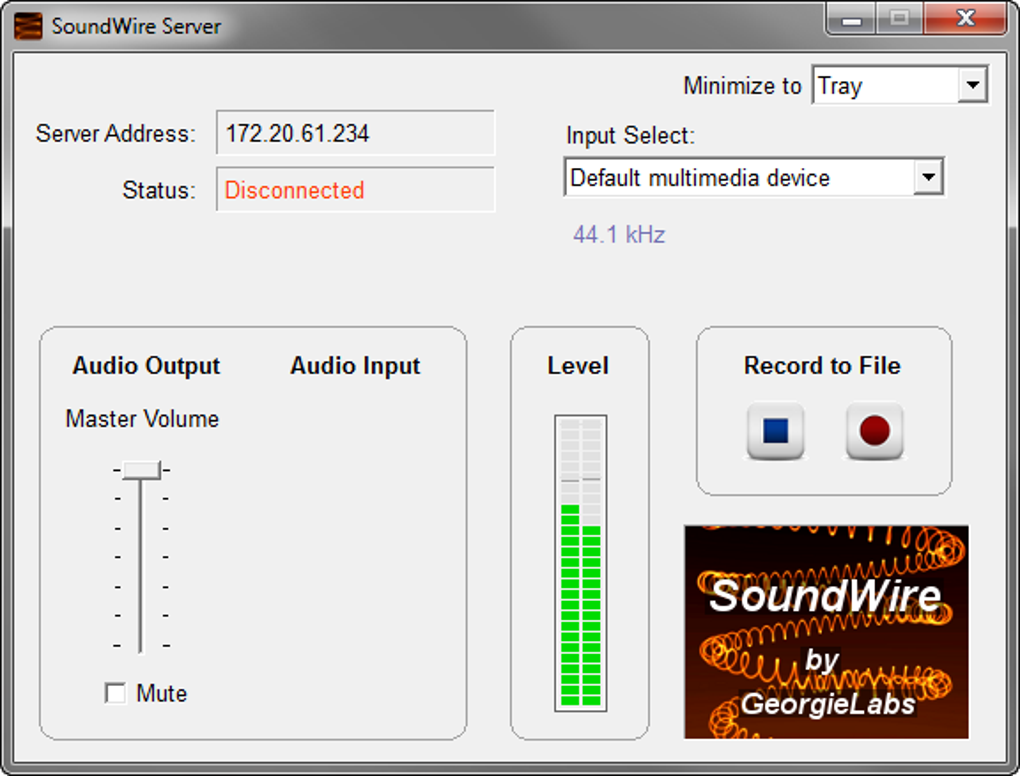
Simple Interface: The program boasts a clean and intuitive interface, making it accessible to users of all technical skill levels. The straightforward design ensures that even first-time users can quickly set up and begin streaming audio. The main controls, including volume adjustment and device selection, are prominently displayed, simplifying the overall process.
-
Compatibility: SoundWire Server is designed for Windows and Linux operating systems (both 32-bit and 64-bit versions are supported). The Android application is available through the Google Play Store, offering seamless integration with a wide range of Android smartphones and tablets. While it doesn’t officially support macOS or iOS, its cross-platform functionality across Windows and Android makes it a compelling option for many users.
-
Unlimited Opus Compression: Unlike some previous versions which may have had limitations, SoundWire Server now boasts unlimited Opus audio compression, offering high-quality audio streaming without restrictions on stream duration or file size.
-
Regular Updates: The app receives regular updates through the Google Play Store, ensuring that users benefit from bug fixes, performance improvements, and new features as they become available. This commitment to ongoing development and maintenance is a testament to the developer’s commitment to providing a high-quality, reliable service.
Applications and Use Cases of SoundWire Server
The versatility of SoundWire Server extends to a variety of applications:
-
Music Streaming: Easily stream your favorite music from your PC’s library or your preferred streaming service directly to your Android device. This allows you to enjoy your music on your smartphone or tablet while freeing up your computer for other tasks.
-
Movie and Video Playback: Watch videos and movies on your PC and enjoy the audio through your Android device, providing a more comfortable listening experience with better sound quality.
-
Gaming: While not ideally suited for competitive gaming due to potential latency, SoundWire Server can provide a convenient way to enhance the audio experience for less demanding games.
-
Baby Monitoring: Use your PC’s microphone and SoundWire Server to create a simple baby monitoring system. Simply place the PC near the baby’s crib and listen to the audio on your Android device in another room. This offers an inexpensive and readily available alternative to dedicated baby monitors.
-
Surveillance: In conjunction with a PC’s microphone or a connected security camera with audio capabilities, SoundWire Server could facilitate basic home surveillance, allowing audio monitoring from a remote location.
-
Multimedia Playback: SoundWire Server seamlessly integrates with a wide variety of multimedia players on your PC, including iTunes, VLC, and many more. It’s not tied to a specific application and works universally, making it a highly flexible solution for all your audio needs.
- Raspberry Pi Support: The application’s support for Raspberry Pi, a compact and versatile single-board computer, opens up opportunities for DIY audio projects and embedded systems.
Setting Up and Using SoundWire Server
Setting up SoundWire Server is remarkably straightforward. The process involves installing the application on both your Windows PC and your Android device. Once installed, launch the SoundWire Server application on your computer and select your default multimedia device as the audio source. The application’s volume meter will visually confirm that the audio is being transmitted. On your Android device, launch the SoundWire app, and it will automatically detect and connect to the server. If multiple servers are detected, you can choose the specific server you wish to connect to.
Once connected, you’re ready to stream audio from your PC. The application features an equalizer allowing for fine-tuning the audio to your preferences, customizing the output to your hearing and listening environment. Additionally, you can adjust buffer settings and compression parameters within the application to optimize streaming performance and minimize latency. Adjusting these values can significantly affect the audio quality, especially on slower network connections, allowing you to balance between high fidelity and consistent streaming.
The application’s intuitive design, simple menu navigation, and readily available help options make it accessible to even less technically adept users. The developer’s ongoing efforts in maintaining and updating the application ensure that users continue to experience a streamlined, effective service. The app’s free-to-use nature adds to its attractiveness, making it a readily available and versatile solution for a wide variety of users.
File Information
- License: “Free”
- Latest update: “February 11, 2025”
- Platform: “Windows”
- OS: “Windows 7”
- Language: “English”
- Downloads: “206.7K”
- Size: “2.00 MB”


