
Synfig Studio is a powerful, free, and open-source 2D animation software designed for both novice and experienced animators. Developed by the Synfig Studio Development Team, this program offers a robust suite of tools and features, enabling the creation of high-quality vector-based animations, from simple cartoons to complex feature-film-level projects. Its open-source nature makes it accessible to a wide range of users, regardless of budget or experience level, positioning it as a compelling alternative to proprietary animation software. This comprehensive review explores Synfig Studio’s capabilities, user experience, and place within the broader landscape of 2D animation tools.
Understanding Synfig Studio’s Core Functionality
At its heart, Synfig Studio is a complete, end-to-end solution for 2D animation. Unlike some applications that require multiple programs or plugins for different stages of the animation pipeline, Synfig Studio handles everything from initial design and animation to rendering and export. This streamlined workflow significantly improves efficiency, especially for individual animators or small teams working on projects with limited resources.
The software’s core strength lies in its vector-based animation approach. This means animations are created using mathematical equations to define shapes and lines, rather than relying on pixel-based images. This approach provides several key advantages:
- Scalability: Vector graphics can be scaled to any size without losing quality, unlike raster graphics which become pixelated when enlarged. This is crucial for animation, where images might need to be resized for different output resolutions or formats.
- Clean Lines and Sharp Details: Vector graphics produce clean, crisp lines and details, making them ideal for creating polished and professional-looking animations.
- Efficiency: Working with vector graphics can often be more efficient than working with pixel-based images, especially when dealing with complex animations involving transformations and effects.
Synfig Studio’s commitment to making high-quality animation accessible is reflected in its design philosophy. It aims to empower animators to produce feature-film-quality work without requiring extensive resources or a large team. This focus on accessibility is a key differentiator and a significant draw for independent animators and smaller studios. The software’s open-source nature further reinforces this commitment, allowing for community contributions and ensuring its continued development and improvement.
The User Experience: A Blend of Familiarity and Complexity
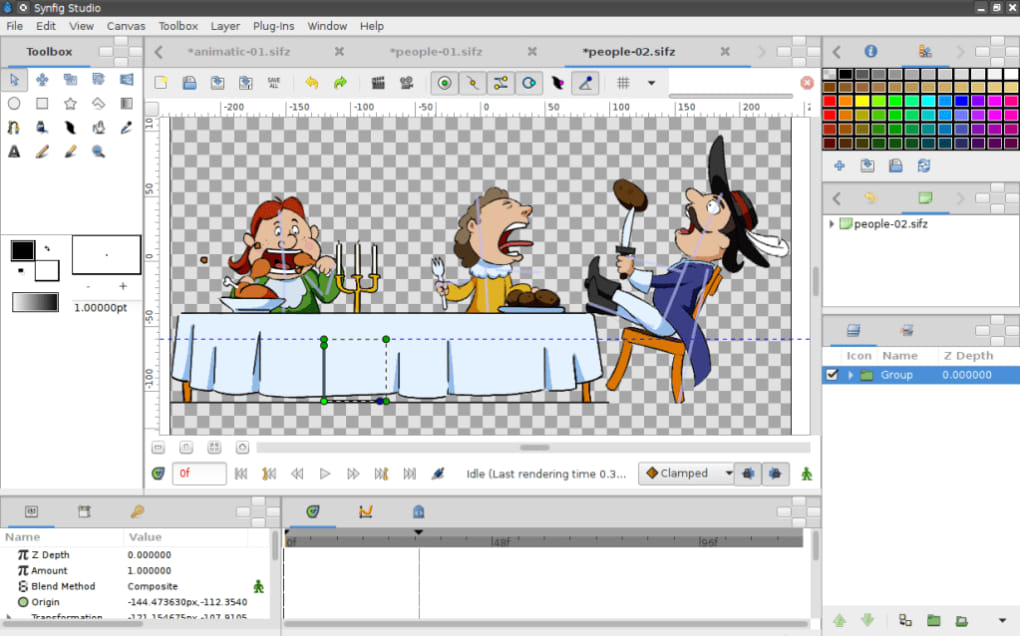
Synfig Studio’s interface is designed to be both intuitive and powerful, blending familiar elements with specialized animation tools. The layout is fairly standard, making it relatively easy for users familiar with other graphic design or animation software to navigate. However, the software’s depth of features and capabilities contributes to a somewhat steep learning curve, particularly for beginners.
Before beginning a new project, users set key parameters via the Canvas Menu (accessible via the F8 key or menu), including canvas size and frame rate. This initial setup is crucial for defining the animation’s scope and technical specifications. The drawing tools themselves are fairly standard, including shape tools (rectangles, ellipses, etc.), a Bézier pen for precise curve creation, a paint bucket for filling shapes, and more. Users can also import pre-made assets, streamlining the workflow for those who prefer to work with existing artwork or elements.
Object control is flexible and allows for precise manipulation of individual elements. Animation is initiated by clicking the record button (represented by a person icon), allowing for intuitive keyframe-based animation. Various layers and layer types provide extensive control over animation effects. For instance, different layers can be used to simulate subtle movements, such as lip-syncing in character animation.
Advanced Features and Techniques
Beyond the basic drawing and animation tools, Synfig Studio boasts a range of advanced features that enhance its capabilities:
- Digital Tweening: A major advantage of Synfig Studio is its elimination of the need for manual tweening (inbetweening). Traditional animation requires the animator to manually draw intermediate frames between keyframes, a time-consuming and laborious process. Synfig Studio’s digital tweening system automates this, using sprites and sophisticated algorithms to generate smooth transitions between keyframes, significantly accelerating the animation workflow.
- Layer Types and Effects: The software offers a variety of layer types, each with unique properties and capabilities. These layers facilitate complex effects, allowing animators to create sophisticated animation sequences with ease. For example, filters, transformations, and blend modes allow for fine-tuned control over visual elements.
- Sound Integration: Synfig Studio allows for the incorporation of soundtracks, further enhancing the immersive quality of the animations. This feature is essential for creating dynamic and engaging animated projects.
- Rendering and Export: Upon completion of the animation, users can fine-tune settings such as quality and anti-aliasing before rendering and exporting the final product in various formats, catering to different output needs and platforms.
These advanced features contribute to the software’s overall power and versatility, making it suitable for creating a wide variety of animations, from simple looping animations to complex narratives.
Synfig Studio’s Strengths and Weaknesses
While Synfig Studio offers a compelling combination of features and accessibility, it’s essential to acknowledge both its strengths and weaknesses.
Strengths:
- Free and Open-Source: This is a significant advantage, making the software accessible to everyone, regardless of budget. The open-source nature also encourages community involvement, leading to ongoing development and improvements.
- Powerful Vector-Based Animation: Synfig Studio’s reliance on vector graphics ensures scalability and high-quality output, ideal for professional-level animation.
- Digital Tweening: The automated tweening system significantly speeds up the animation process, saving animators considerable time and effort.
- Comprehensive Feature Set: The software provides a comprehensive range of tools and features, enabling users to create sophisticated animations.
- Cross-Platform Availability: While primarily known for its Windows version, Synfig Studio also boasts versions for other operating systems, expanding its accessibility.
Weaknesses:
- Steep Learning Curve: The software’s depth of features and capabilities contribute to a significant learning curve, especially for beginners. The comprehensive nature of the program can be overwhelming for those new to animation software.
- Community Support and Documentation: While the open-source community provides support, the documentation could be improved in terms of clarity and comprehensiveness. This can sometimes make problem-solving and troubleshooting challenging for new users.
- Occasional Bugs and Instability: As with any open-source software, Synfig Studio may experience occasional bugs or instability. While generally reliable, users should be prepared for the possibility of unexpected issues.
Conclusion: A Powerful Tool for Dedicated Animators
Synfig Studio stands as a robust and viable option in the world of 2D animation software. Its open-source nature, powerful vector-based capabilities, and automated tweening system make it a particularly attractive choice for independent animators and small teams with limited resources. While the learning curve is steep, the rewards for dedicated users are significant. The software’s potential for creating high-quality animations, combined with its accessibility, solidifies its position as a noteworthy and increasingly popular tool for the 2D animation community. The ongoing development and community support further suggest a bright future for Synfig Studio, ensuring its continued evolution and improvement.
File Information
- License: “Free”
- Latest update: “October 4, 2024”
- Platform: “Windows”
- OS: “Windows 8”
- Language: “English”
- Downloads: “141.1K”
- Size: “111.35 MB”


