
Task Manager DeLuxe offers a robust and feature-rich alternative to the standard Windows Task Manager, providing advanced monitoring capabilities and enhanced control over your PC’s processes. While the built-in Task Manager primarily serves as a tool for ending unresponsive applications, Task Manager DeLuxe goes significantly further, incorporating advanced functionalities such as registry key monitoring and detailed performance analysis. This comprehensive approach makes it an invaluable tool for both casual users and experienced PC troubleshooters.
Enhanced Functionality and Advanced Features
Unlike many task management utilities, Task Manager DeLuxe stands out due to its comprehensive suite of advanced features. These features extend beyond the basic functionalities of its default Windows counterpart, providing a deeper level of insight into system performance and process management. Its ability to monitor registry keys, for instance, offers a unique capability to identify lingering registry entries associated with uninstalled applications—a feature often overlooked by simpler task managers. This detail-oriented approach is particularly beneficial for users who need to identify and resolve software conflicts or residual files that can negatively impact system performance.
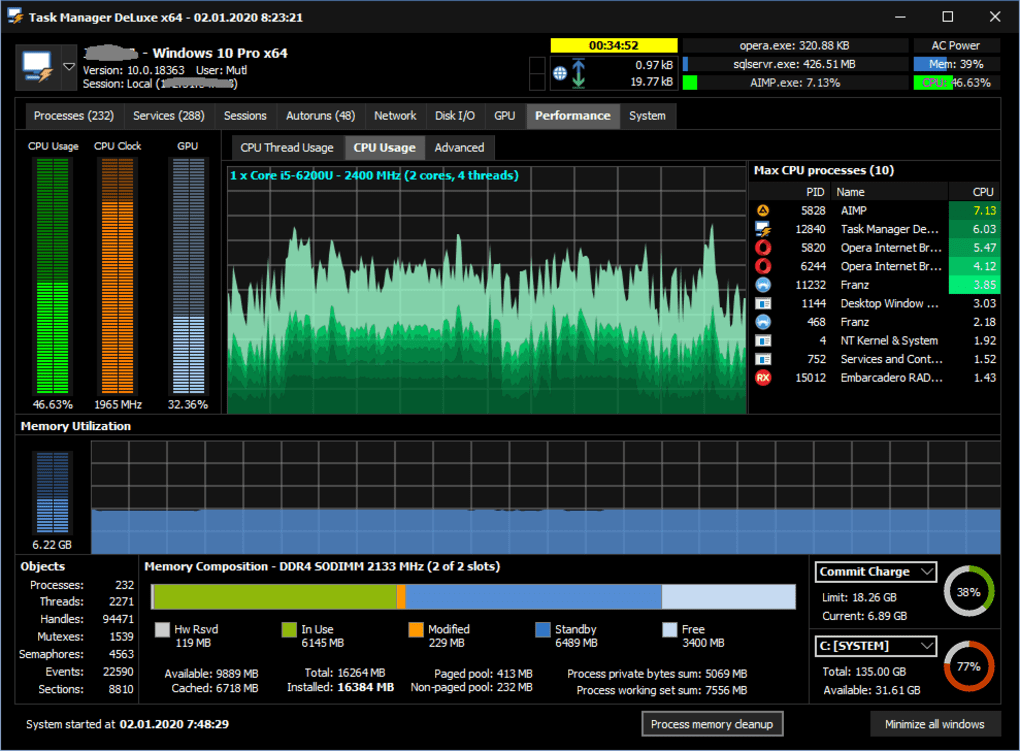
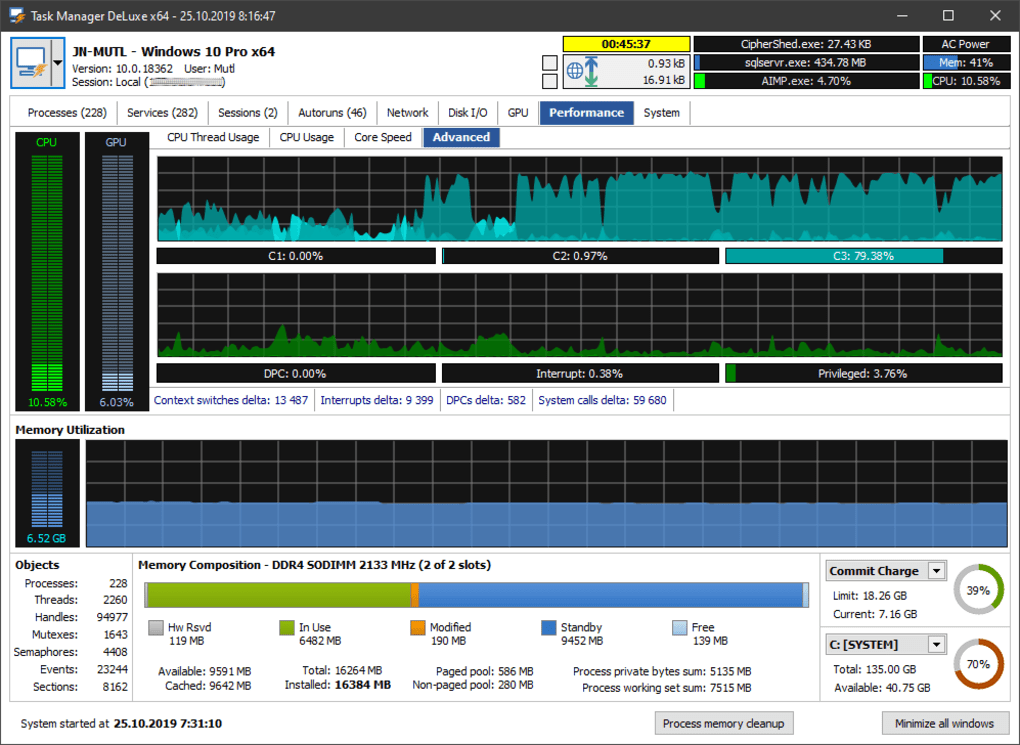
The program’s performance monitoring capabilities are equally impressive. The dedicated performance tab presents a wealth of information about your system’s resource utilization, providing a comprehensive overview of CPU usage, memory consumption, disk activity, and network traffic. This granular level of data allows users to identify performance bottlenecks, pinpoint resource-intensive processes, and diagnose potential hardware or software issues with greater ease. Furthermore, Task Manager DeLuxe provides detailed system and task information, aiding in the diagnosis of buggy software and helping users understand the resource demands of individual applications.
The user-friendly interface, while not employing Aero transparency, is intuitive and well-organized, making navigation and data interpretation straightforward. Even users unfamiliar with advanced system monitoring tools will find the layout easy to understand and use effectively. The clear presentation of information ensures that even complex data points are readily accessible, eliminating the need for extensive technical expertise to interpret the results.
Portability and Ease of Use
A notable advantage of Task Manager DeLuxe is its self-contained nature. It requires no installation, operating entirely from a single executable file. This eliminates the need for registry entries or complex installation procedures, making it highly portable and ideal for use on multiple computers or as a diagnostic tool on a USB drive. This portability is particularly beneficial for IT professionals, system administrators, or anyone frequently troubleshooting issues on different machines. The ease of uninstalling the program, simply by deleting the single file, further enhances its practicality and convenience.
Addressing Common PC Issues and Troubleshooting
Task Manager DeLuxe serves as a powerful tool for addressing a wide range of common PC problems. Its capabilities extend beyond simply ending unresponsive applications; it allows users to proactively monitor system performance, identify resource hogs, and diagnose potential conflicts before they escalate into significant issues. The detailed information provided on processes, registry entries, and system resources empowers users to take effective actions to resolve problems efficiently. This proactive approach to problem-solving is significantly more efficient than waiting for problems to manifest into noticeable system slowdown or application crashes.
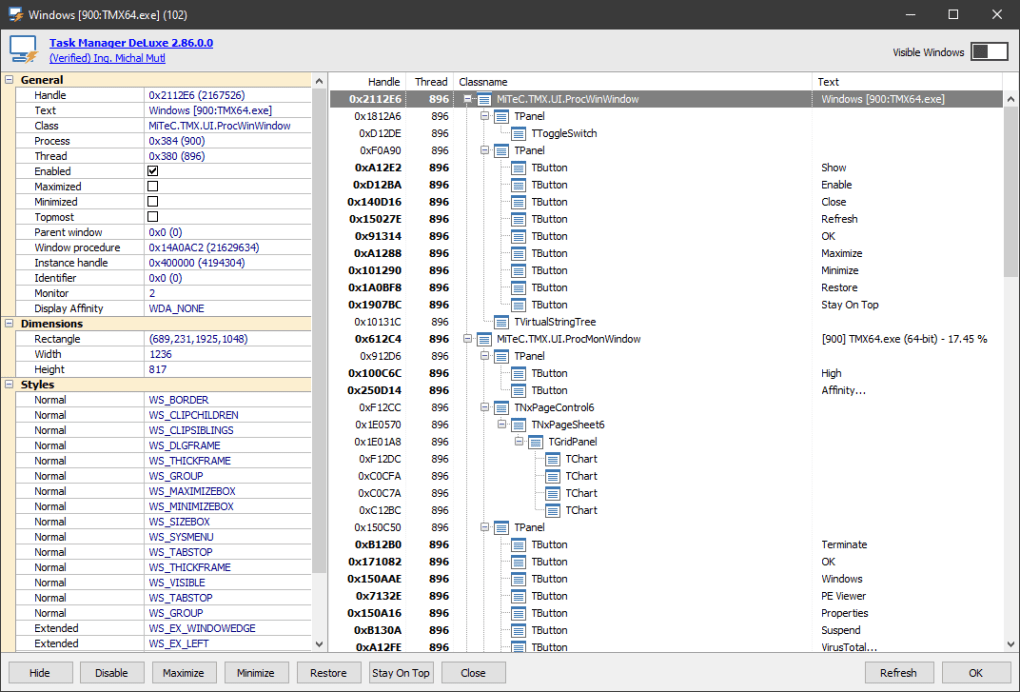
For instance, if an application is causing your system to run slowly, Task Manager DeLuxe can help you pinpoint the culprit. By examining the CPU usage and memory consumption of various processes, you can easily identify which application is using excessive resources. The ability to then terminate these processes allows for immediate relief and improved system performance. Similarly, if you are experiencing system instability or frequent crashes, Task Manager DeLuxe can help you identify problematic processes or drivers that may be contributing to the issue.
Comparison with Alternative Task Managers
While several alternative task managers exist, Task Manager DeLuxe distinguishes itself through its combination of advanced features and user-friendly design. While other applications might offer some of its individual capabilities, few provide the comprehensive suite of features found within Task Manager DeLuxe in such an accessible package. Some alternatives might focus heavily on performance monitoring, others on process killing, but Task Manager DeLuxe successfully integrates these functionalities along with registry key monitoring and detailed system information into a cohesive and efficient application.
Many simpler task managers primarily function as process killers, lacking the advanced monitoring and diagnostic capabilities of Task Manager DeLuxe. Other, more feature-rich applications may have steeper learning curves or require complex installations. Task Manager DeLuxe strikes a balance, offering a powerful feature set without sacrificing ease of use. Its portable nature and straightforward interface make it accessible to users of all technical skill levels, making it a versatile tool for both casual users and experienced system administrators.
Conclusion: A Must-Have for PC Users
Task Manager DeLuxe offers a significant upgrade to the standard Windows Task Manager, providing advanced features and detailed system information without sacrificing ease of use. Its portability, combined with its powerful functionalities, makes it an indispensable tool for anyone seeking greater control over their PC’s performance and stability. Whether you’re a casual user occasionally needing to troubleshoot application issues or an IT professional diagnosing complex system problems, Task Manager DeLuxe provides a robust and efficient solution. The absence of Aero transparency in the interface is a minor drawback, easily outweighed by the many advantages this powerful and portable tool offers. Its ability to monitor registry keys, provide detailed performance statistics, and operate from a single file makes it a must-have application for users who want a more in-depth understanding and control of their computer’s performance. The seamless integration of these advanced features within an easy-to-use interface positions Task Manager DeLuxe as a top choice among task management utilities.
File Information
- License: “Free”
- Latest update: “May 28, 2025”
- Platform: “Windows”
- OS: “Windows 2000”
- Language: “English”
- Downloads: “143.9K”


