
Teleparty, formerly known as Netflix Party, is a free browser extension revolutionizing how we consume online media. It allows groups of up to 50 individuals, regardless of geographical location, to watch movies, TV shows, and other streaming content simultaneously. This synchronized viewing experience is enhanced by an integrated chat feature, fostering real-time interaction and shared enjoyment amongst participants. This comprehensive guide delves into the intricacies of Teleparty, exploring its functionality, compatibility, installation process, and the overall user experience it provides.
Understanding Teleparty’s Functionality
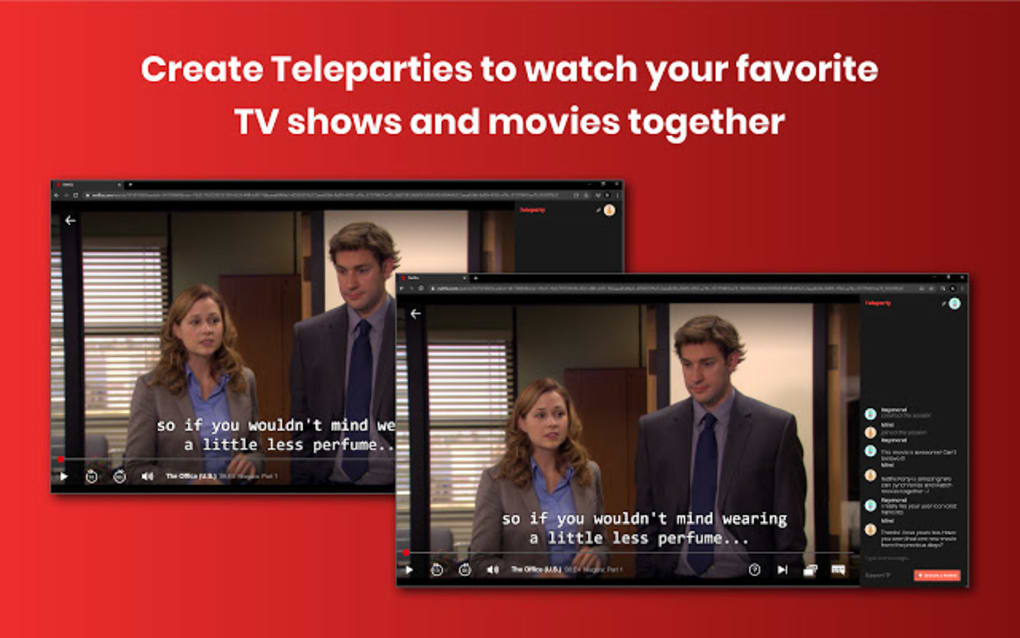
Teleparty’s core function is to synchronize the playback of streaming content across multiple devices. Imagine the frustration of trying to coordinate the “play” button with friends over a phone call – Teleparty eliminates this. Once a Teleparty session is initiated, all participants’ playback controls are linked, ensuring everyone watches at the same pace. This eliminates the need for awkward timing adjustments and maintains the collective viewing experience.
Beyond synchronized playback, Teleparty integrates a chat feature directly within the browser window. This chat panel, easily toggled on or off, allows for real-time conversation amongst participants without disrupting the viewing experience. You can discuss the unfolding events on screen, share jokes, or simply engage in casual banter – all while enjoying the synchronized media.
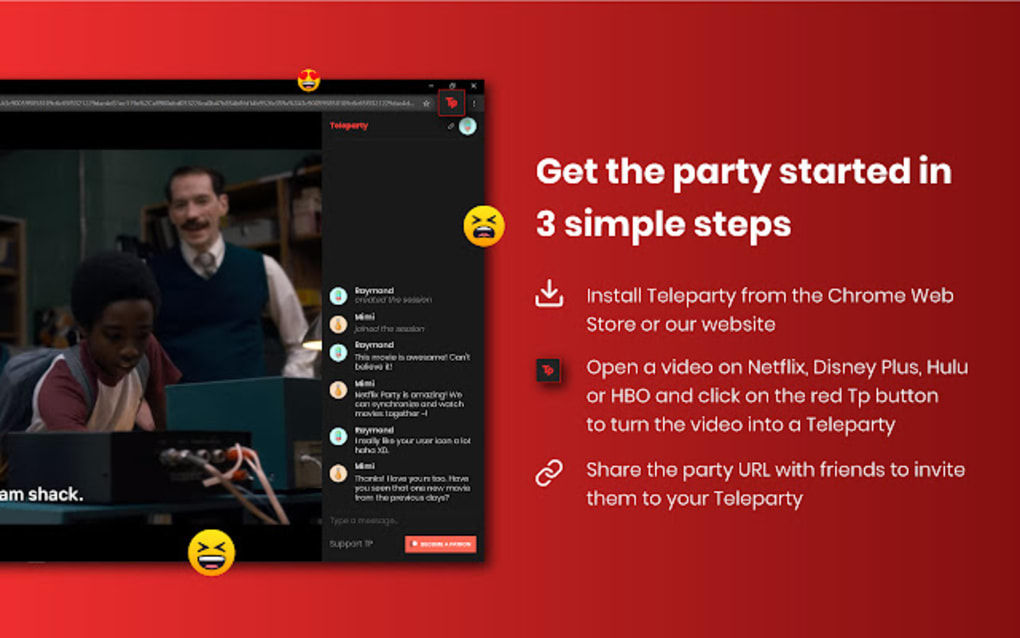
The setup process is straightforward. The host initiates a Teleparty session by clicking the extension’s icon in their browser. A window appears, providing options to control who manages playback (“Only I have control” or shared control) and enabling or disabling the chat function. The host then copies and shares a unique URL with other participants. Each URL is specific to the chosen media, ensuring everyone is watching the correct movie or episode.
Teleparty Compatibility and Requirements
Teleparty operates as a browser extension compatible primarily with Chromium-based browsers such as Google Chrome, Microsoft Edge, and Brave. This widespread compatibility makes it accessible to a broad range of users. While the extension itself is standalone and doesn’t require a login, accessing specific streaming content necessitates individual subscriptions to services like Netflix, Disney+, Hulu, HBO Max, and others.
For example, if your group intends to watch a Netflix show, everyone involved needs an active Netflix account. The same principle applies to other streaming platforms. Teleparty acts as the synchronizing agent, linking individual accounts to enable simultaneous viewing, not as a substitute for streaming subscriptions. It is important to note that Teleparty is currently only available for installation on Windows and macOS desktop computers and laptops. Mobile devices, smart TVs, and gaming consoles are not supported at this time.
Downloading and Installing Teleparty
The Teleparty download process is straightforward. Once you navigate to the official Teleparty website or your browser’s extension store (like the Chrome Web Store), you’ll find the extension for download. Upon installation, the Teleparty icon (typically “TP”) will appear in your browser’s toolbar.
It’s recommended to pin the Teleparty icon to your toolbar for easy access. This usually involves clicking the puzzle-piece icon (representing extensions), locating Teleparty in the list, and then selecting the pin option. This ensures the extension remains readily available without having to navigate through the extensions menu each time you want to start a viewing party. This convenience dramatically improves the user experience, streamlining the initiation of viewing sessions.
Creating and Managing a Teleparty Session
Creating a Teleparty session is remarkably simple. Once the extension is installed and pinned, the host starts by navigating to the desired video on their chosen streaming platform. After this, they click the Teleparty icon in their browser toolbar. A small window appears, prompting the host to initiate the party. This window allows the host to choose whether they alone will control playback (“Only I have control”) or whether shared control is preferred.
After selecting their control preference, the host can proceed to copy a unique URL generated by the application and share it with their intended participants. This URL is specific to the currently selected movie or episode. The host also has the option to disable the chat feature when creating the URL by unchecking the “Show Chat” option. Upon receiving this URL, invited participants must click the Teleparty icon in their browsers and paste the URL into the extension’s interface.
It’s crucial to understand that once a Teleparty session is initiated with a particular URL, the content cannot be changed or skipped within that specific session. The shared URL is tied to the particular movie, episode, or video selected by the host. To access different content, a new URL needs to be created by the host and shared with participants. The chat box within the Teleparty interface will display actions taken by each member.
Teleparty’s Strengths and Weaknesses
Teleparty provides a highly convenient and engaging way to watch online media with friends or family regardless of their geographical locations. Its intuitive interface and ease of use are major advantages.
Pros:
- Synchronized Playback: Ensures seamless viewing for all participants.
- Integrated Chat Feature: Facilitates real-time communication without interrupting playback.
- Customizable Profiles: Allows users to create personalized profiles with nicknames and profile pictures.
- Wide Browser Compatibility: Works with popular Chromium-based browsers.
- Free to Use: Available without any cost, supported primarily by donations.
Cons:
- Limited Platform Availability: Currently not accessible on mobile devices, smart TVs, or gaming consoles.
- Inability to Skip Around: Once a session starts, navigating within the selected content is limited to the host, unless shared control is enabled.
- Dependence on Individual Streaming Subscriptions: Each participant requires a subscription to the relevant streaming platform.
Teleparty and the Future of Remote Socialization
Teleparty embodies the evolving landscape of remote socialization. It leverages technology to bridge geographical distances and foster shared experiences, offering a more engaging alternative to simply calling or video chatting while watching separate streams. As technology advances and consumer demand increases, it’s reasonable to anticipate future updates and improvements, potentially including expanding platform availability and introducing new features.
The developers of Teleparty, driven by donations, continue to update and enhance the platform. If issues arise, users can usually resolve them by reinstalling the extension. Should problems persist, contacting the development team for support is an option. In conclusion, Teleparty provides a unique and enriching way to enjoy online streaming with friends and family, strengthening virtual bonds through shared experiences.
File Information
- License: “Free”
- Version: “3.1.1”
- Latest update: “May 24, 2023”
- Platform: “Windows”
- OS: “Windows 8”
- Language: “English”
- Downloads: “48.1K”


