
Timed Shutdown, a legacy software utility for Windows, offers a straightforward solution for automatically controlling your computer’s power state. While no longer actively developed, its simplicity and functionality continue to be appreciated by users seeking basic power management features. This article delves into the capabilities of Timed Shutdown, explores its historical context, and provides insights into alternative solutions for modern operating systems.
Understanding Timed Shutdown’s Functionality
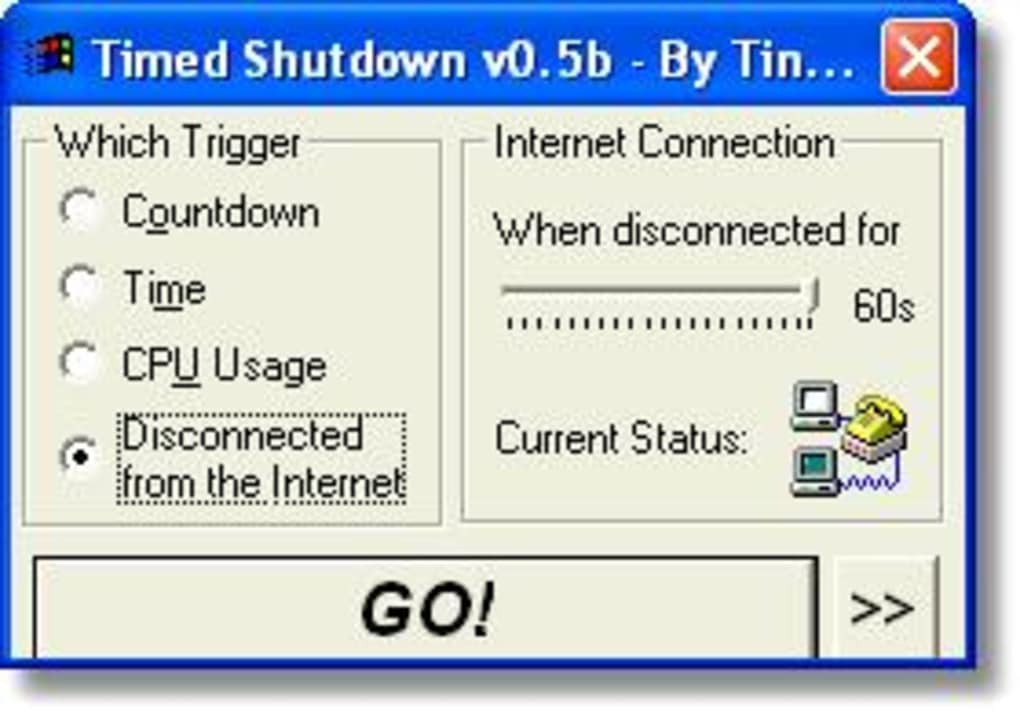
Timed Shutdown, as the name suggests, is designed to automatically shut down, restart, log off, disconnect, or hibernate a Windows computer based on pre-defined triggers. Its key features include:
-
Scheduled Shutdown: Users can set a specific time for the computer to power down. This is useful for tasks like overnight backups or ensuring the machine is off during non-working hours.
-
Delay-Based Shutdown: The program allows for shutting down after a specified duration, enabling users to automate processes that take an unpredictable amount of time. Imagine a lengthy download; Timed Shutdown could be configured to power off the machine once the download completes.
-
CPU Usage Trigger: Timed Shutdown can be set to shut down when CPU usage falls below a certain threshold. This is particularly helpful for situations where a resource-intensive task is completed, and keeping the machine running is no longer necessary.
-
Internet Disconnection Trigger: Another trigger option allows for automatic shutdown when the internet connection is lost. This can prevent unnecessary energy consumption if the computer relies on an internet connection for its primary functions.
-
Countdown Timer: To avoid accidental shutdowns, Timed Shutdown provides a customizable countdown timer (ranging from 5 to 60 seconds) before execution of the selected action. This gives users a chance to cancel the operation if needed.
-
System Tray Integration: The program minimizes to the system tray, maintaining a low profile while running. This reduces interference with other applications and keeps the main interface unobtrusive.
-
Command Line Support: For advanced users, Timed Shutdown supports command-line parameters, allowing for integration with batch files or scripting. This enhances its flexibility for automating complex workflows.
The program’s core functionality revolves around these triggers, offering a level of customization suitable for various needs. While the interface might seem dated compared to modern applications, its straightforward design is one of its strengths. It avoids unnecessary complexity, focusing solely on its core task of automated power management.
Historical Context and Legacy Software
Timed Shutdown was last updated in June 2008, making it a piece of legacy software. This means it hasn’t received updates or security patches in over fifteen years. While it might have functioned flawlessly on older Windows versions like Windows 98, its compatibility with modern operating systems (Windows 10, Windows 11) is not guaranteed and could present potential issues. Using legacy software carries inherent risks, including security vulnerabilities and potential incompatibility with newer system drivers or hardware.
The program’s popularity in countries like Romania, India, and Serbia during its active development period highlights its utility in regions with less readily available or less sophisticated power management solutions. However, the modern computing landscape offers built-in features and more sophisticated third-party options that provide similar functionalities with improved security and compatibility.
Comparison with Modern Alternatives
Modern Windows operating systems provide integrated features for scheduling tasks, including automated shutdowns and restarts. The Task Scheduler, a built-in tool, allows for creating scheduled tasks with far greater granularity and control than Timed Shutdown. Users can set tasks to run at specific times, on specific days, based on various triggers, and even configure complex dependencies between tasks.
Moreover, numerous third-party applications offer enhanced power management capabilities. These often include features beyond simple shutdowns, such as:
- Advanced Power Profiles: Options to optimize power consumption based on different usage scenarios.
- Energy Monitoring: Tools to track energy usage and identify power-hungry applications.
- Remote Control: The ability to control the computer’s power state remotely.
- Improved User Interface: More intuitive and modern interfaces than the dated Timed Shutdown interface.
- Security Updates: Regular updates to address security vulnerabilities, a crucial factor absent in legacy software.
While Timed Shutdown offers a basic, no-frills approach, modern alternatives provide more sophisticated and secure ways to manage your computer’s power. Choosing a current, actively maintained solution is strongly recommended to mitigate potential security risks and benefit from ongoing updates and improvements.
Security Considerations and Best Practices
The lack of updates for Timed Shutdown raises significant security concerns. Unpatched software is vulnerable to exploits and malware. Using outdated software increases the risk of compromising your system’s security. This risk far outweighs the convenience of a simple, legacy application, especially considering the readily available alternatives.
Best practices for managing your computer’s power include:
- Using Built-in Tools: Leverage the Task Scheduler in Windows for scheduling power-related actions.
- Employing Up-to-Date Software: Choose modern power management applications that receive regular updates.
- Regular System Scans: Perform regular malware scans to detect and remove any potential threats.
- Strong Passwords and Security Measures: Ensure robust password protection and other security measures to protect your system.
Ignoring security best practices can lead to system instability, data loss, and potential identity theft. Prioritizing security is paramount when managing your computing environment.
Conclusion: Moving Beyond Timed Shutdown
Timed Shutdown served a valuable purpose in its time, providing a simple solution for basic power management. However, its age and lack of updates render it unsuitable for modern computing needs. The built-in features of Windows and the wealth of modern alternatives offer superior functionality, security, and user experience.
While nostalgia might tempt some to use legacy software, prioritizing security and leveraging modern tools is crucial for a safe and efficient computing experience. Modern power management solutions offer far greater flexibility, control, and, most importantly, security compared to the outdated Timed Shutdown. Therefore, adopting a current alternative is strongly advised for all users.
File Information
- License: “Free”
- Version: “0.51b”
- Latest update: “June 18, 2008”
- Platform: “Windows”
- OS: “Windows 98 SE”
- Language: “English”
- Downloads: “106.1K”
- Size: “1.71 MB”


