
Torrent Search, developed by Gwendal Le Bihan, is a free, Windows-based application designed to streamline the process of locating and downloading torrent files. This application distinguishes itself from simple web searches by directly aggregating results from multiple torrent websites, presenting a consolidated list of options to the user. While not a torrent client itself (it doesn’t handle the download process directly), Torrent Search acts as a powerful search engine specifically tailored for the torrent ecosystem. This review will delve into its features, benefits, drawbacks, and alternatives.
Understanding Torrent Search’s Functionality
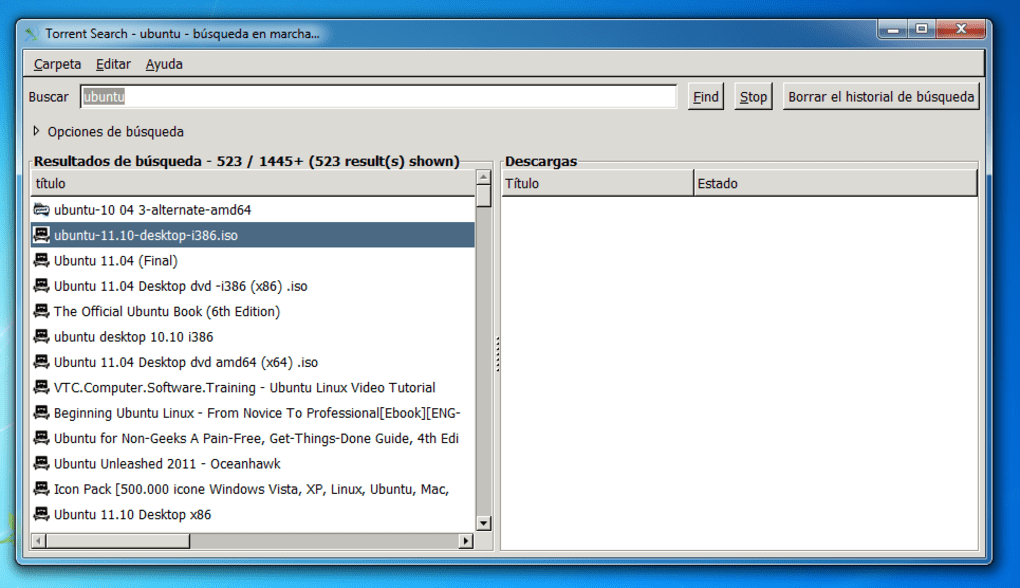
Torrent Search operates as a centralized search engine for torrent files. Instead of manually navigating numerous torrent websites, users input their search query into Torrent Search, and the application simultaneously queries several popular torrent sites. This drastically reduces the time and effort required to find desired files. The results are then presented in a clear, concise format, allowing users to easily compare available torrents based on criteria such as file size, number of seeders and leechers (peers actively uploading parts of the file), upload date, and file name.
The application’s core strength lies in its efficient search algorithm. It’s designed to quickly sift through numerous torrent listings, returning relevant results promptly. This speed is a key advantage over manually searching individual torrent websites, where site navigation, loading times, and advertising can significantly impact search efficiency. Furthermore, the app’s built-in search filters offer additional refinement capabilities. Users can filter out torrents with no seeders (essential for successful downloads), eliminate duplicate entries, and specify exact phrase matches within file names for increased precision.
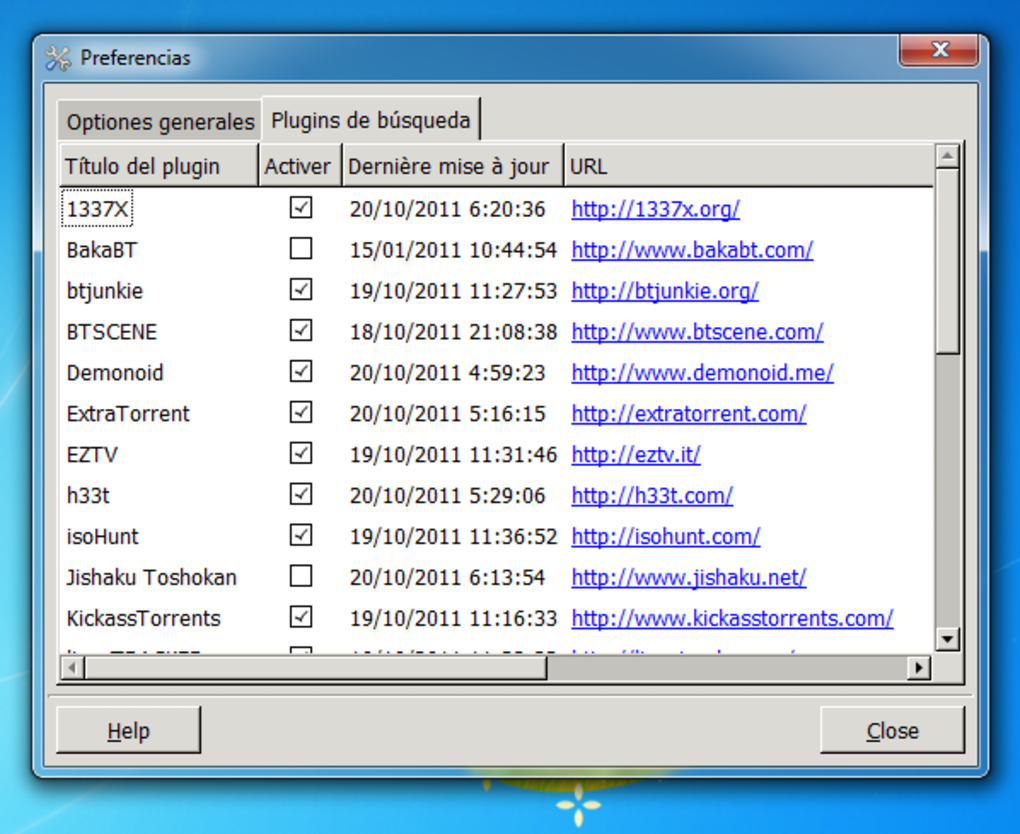
Beyond basic search functionality, Torrent Search offers an extensible architecture through plugin support. This feature allows users to expand the range of torrent websites the application searches, potentially uncovering additional torrents not indexed by the default sources. Adding plugins enhances the application’s reach and provides access to a wider variety of sources, bolstering the chances of finding the desired content. However, users should exercise caution when adding plugins, ensuring they download them from trusted sources to avoid introducing malware or compromising system security.
User Interface and Experience
Torrent Search boasts a user-friendly interface designed for ease of use. The minimalist design prioritizes functionality over complexity, making the application accessible even to users unfamiliar with torrenting software. The clean layout ensures that finding and selecting desired torrent files is straightforward. The information presented for each torrent listing is concise but comprehensive, providing users with the necessary details to make informed decisions before initiating a download. The entire process, from initiating a search to selecting a torrent, is intuitive and requires minimal user interaction.
This simplicity, however, could be considered a double-edged sword. While it benefits novice users, experienced torrent users might find the feature set relatively basic compared to more advanced torrent search tools. For example, advanced filtering options beyond those already mentioned might be desired by some users. Likewise, the lack of integrated download management could be seen as a limitation.
Performance and Limitations
While Torrent Search excels at quickly locating torrent files, its performance in the actual download process is less impressive. The application itself doesn’t handle downloading; it simply provides links to torrents on external websites. As a result, download speeds are dependent entirely on the torrent’s seeders, leechers, and the user’s internet connection. This means that even if the application finds a torrent quickly, the actual download might still take considerable time, particularly for larger files or torrents with few seeders. This is a critical point to consider, as download speed is often a primary concern for torrent users.
Another limitation is the infrequent release of updates. While the application functions well, a lack of frequent updates could mean missed opportunities to improve functionality, security, or compatibility with emerging torrent websites. This also leaves open the possibility that certain features might become outdated or malfunction as torrenting infrastructure changes.
The absence of an integrated download manager is another noticeable drawback. Most dedicated torrent clients include built-in download management features that allow users to pause, resume, and manage multiple downloads simultaneously. The absence of such features in Torrent Search forces users to rely on external download managers or the built-in download capabilities of their web browsers, potentially affecting download management and introducing additional software dependencies.
Alternatives to Torrent Search
The torrent search engine market offers various alternatives to Torrent Search, each with its own set of strengths and weaknesses. Here are a few notable options:
-
uTorrent: While not a search engine itself, uTorrent is a popular and efficient BitTorrent client. It excels at downloading torrents but requires users to manually search for torrents on their preferred websites.
-
Super Torrent Search: This application provides a similar functionality to Torrent Search, offering a comprehensive search across multiple torrent sources. It’s worth exploring to compare performance and features.
-
UltraTorrent: Another established torrent client that offers download management features and frequently receives updates. Similar to uTorrent, it doesn’t inherently provide search functionality.
-
Torrent Harvester: This search engine targets a broader range of file types, not just torrents. It can be useful for users seeking various download sources.
-
Everything: While not a torrent-specific application, Everything is a powerful file search tool for Windows. While it doesn’t search torrent websites, it’s exceptionally fast and efficient at locating files already downloaded onto the user’s system.
Conclusion
Torrent Search provides a convenient solution for finding torrent files, offering a quick and streamlined search experience. Its intuitive interface and efficient search algorithm are major strengths. However, its limitations regarding download speeds and the lack of an integrated download manager should be considered. Users prioritizing speed and convenience in finding torrents will likely appreciate its functionality. However, users expecting robust download management or frequent updates might find its features somewhat lacking and should explore alternative torrent clients or search engines. Ultimately, the best choice depends on individual needs and priorities within the context of responsible and legal torrent usage. Remember that the legality of downloading copyrighted material via torrents varies significantly across jurisdictions. Always ensure your torrenting practices comply with the relevant laws and regulations in your region.
File Information
- License: “Free”
- Version: “0.11.0”
- Latest update: “September 23, 2021”
- Platform: “Windows”
- OS: “Windows Vista”
- Language: “English”
- Downloads: “39.5K”
- Size: “7.09 MB”


