
TorrentFetcher, a free Windows software application, simplifies the process of finding torrent files. Categorized as P2P (Peer-to-Peer) downloading software within the broader category of downloading software, it offers a multi-search functionality for users seeking to download various files via the BitTorrent protocol. This review delves into its features, functionality, history, and provides an overall assessment of its value and utility in the context of modern torrenting practices.
Understanding TorrentFetcher’s Functionality and Features
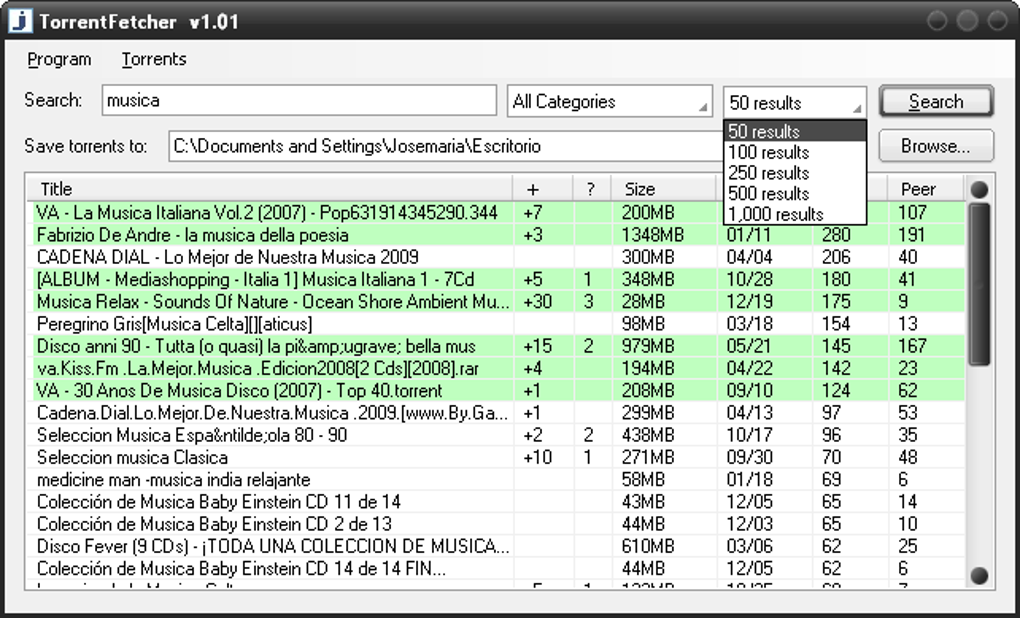
TorrentFetcher’s primary function is to act as a search engine specifically designed for locating torrent files. Unlike traditional torrent clients (such as uTorrent or BitTorrent), which manage the download process, TorrentFetcher focuses solely on the discovery phase. Users input their search query, and TorrentFetcher scours various torrent indexing websites to return a list of relevant results. This consolidated search simplifies the hunt for specific files, eliminating the need to manually navigate numerous torrent sites.
While the software’s interface is arguably simplistic, this minimalism contributes to its ease of use. The primary window presents a clean search bar and displays search results in a straightforward list format. Each result typically includes the torrent’s name, size, seeders/leechers count (indicating the availability of the file), and a link to download the torrent file. The user then selects the desired torrent file and opens it within their chosen torrent client to initiate the actual download. This two-step process (search and download) is fundamental to TorrentFetcher’s design.
The software’s key advantage lies in its consolidated search capability. Users can find torrents from multiple sources without visiting each individual website. This streamlined approach significantly reduces the time and effort required to locate desired files. However, it’s crucial to note that the availability of specific torrents depends on the indexing websites TorrentFetcher accesses. Changes in those websites’ policies or indexing practices may affect the search results.
A Look Back: TorrentFetcher’s History and Evolution
Introduced in 2011, TorrentFetcher has enjoyed a period of sustained use, accumulating a significant number of downloads. While the specific metrics may vary depending on the source, data suggests a considerable user base, particularly in regions like the Republic of Korea, Poland, and South Africa. The software’s longevity, despite a lack of major updates in recent years, speaks to its sustained utility among its user community.
The last reported update was in March 2017 (version 1.02), indicating that the development of TorrentFetcher has largely stagnated. This lack of active development raises concerns about its compatibility with modern systems and potential security vulnerabilities. While it reportedly functions on Windows XP and earlier versions, compatibility with newer Windows versions might be inconsistent or require additional configurations. The absence of newer versions also means it likely misses out on many features and improvements found in more recent torrent search tools.
Security and Privacy Considerations when using TorrentFetcher
The use of torrenting technology, while convenient, presents inherent security and privacy risks. TorrentFetcher itself doesn’t inherently pose a greater security risk than other search tools if downloaded from the official source. However, the nature of torrenting means users should be vigilant about several aspects:
-
Malware risk: Downloading torrent files from untrusted sources significantly increases the risk of malware infections. Malicious files disguised as legitimate content are commonly circulated on torrent networks. This is not a risk unique to TorrentFetcher, but rather an inherent danger associated with using the BitTorrent protocol. Users should only download torrents from reputable and trusted sources and always scan downloaded files with up-to-date antivirus software.
-
Copyright infringement: Downloading copyrighted material without permission is illegal in many jurisdictions. TorrentFetcher, being a search tool, doesn’t explicitly encourage or condone illegal activities, but it facilitates access to potentially copyrighted content. Users are responsible for understanding and complying with copyright laws in their respective regions.
- Privacy concerns: Torrenting activities can be tracked by internet service providers (ISPs) and potentially by third parties. While TorrentFetcher itself doesn’t directly collect user data, the act of downloading and sharing files over a peer-to-peer network can leave a digital footprint. Using a Virtual Private Network (VPN) is strongly recommended to protect user privacy and anonymity while using torrenting software. The use of a VPN encrypts user internet traffic, making it difficult to identify the downloaded content or the user’s location.
TorrentFetcher in the Landscape of Modern Torrenting Tools
Compared to modern alternatives, TorrentFetcher appears somewhat dated. The absence of recent updates and the lack of features found in contemporary torrent search engines or integrated torrent clients put it at a disadvantage. Many modern clients incorporate torrent search functionality directly into their applications, offering a more streamlined and integrated experience. Some torrent clients also offer features like download scheduling, bandwidth management, and enhanced security features. Additionally, many newer torrent search engines leverage advanced search algorithms and better indexing techniques, leading to more comprehensive and accurate search results.
The simplicity of TorrentFetcher, while initially appealing, can be viewed as a limitation. The absence of advanced features means it lacks the functionality and robustness of more modern tools. The lack of regular updates also means the software might not be optimized for newer operating systems and may lack security patches.
Alternatives to TorrentFetcher
Given the limitations of TorrentFetcher, numerous alternatives provide superior functionality and enhanced security. These alternatives range from standalone torrent search engines to fully featured torrent clients with integrated search functionality:
-
Integrated Torrent Clients: Many popular BitTorrent clients, such as qBittorrent, Transmission, and Deluge, integrate search functionality into their user interface. This provides a unified and efficient approach to locating and downloading torrent files. These clients often offer more features and security enhancements than TorrentFetcher.
-
Standalone Torrent Search Engines: Several websites specialize in indexing torrent files, offering robust search capabilities and filters. However, care should be taken in selecting such websites, as some may contain malware or promote illegal activities. Reputable and well-maintained torrent search engines are crucial for reducing security risks.
Conclusion
TorrentFetcher, despite its historical presence and initial appeal due to its simplicity, reveals limitations in the context of contemporary torrenting tools. Its lack of recent updates, relatively basic feature set, and absence of advanced security considerations place it at a disadvantage compared to newer and more advanced alternatives. While it might still function for some users, the risks associated with using outdated software, combined with the inherent risks of torrenting itself, strongly suggest considering more modern and robust options. The user should always prioritize their security and privacy when engaging in any peer-to-peer file sharing activities. Remember that downloading copyrighted material without permission is illegal and could have severe consequences.
File Information
- License: “Free”
- Version: “1.02”
- Latest update: “March 9, 2017”
- Platform: “Windows”
- OS: “Windows XP”
- Language: “English”
- Downloads: “6.3K”
- Size: “429.96 KB”


