
Total Registry is a free, offline utility application developed by Pavel Yosifovich that serves as an alternative to the built-in Windows Registry Editor (Regedit.exe). While Regedit provides basic functionality for viewing and modifying registry keys, Total Registry enhances this experience by offering a broader range of features and a more user-friendly interface (although admittedly somewhat dated in its visual design). This detailed guide will explore the capabilities of Total Registry, its advantages and disadvantages, and provide crucial considerations before using this powerful tool.
Understanding the Windows Registry and the Need for Registry Editors
The Windows Registry is a hierarchical database that stores crucial information about your system’s hardware, software, and user preferences. It’s a complex system, and improper modification can lead to serious instability or even system failure. Therefore, caution is paramount when working with registry editors. While the built-in Regedit offers a basic level of access and manipulation, it lacks certain features that power users might find beneficial. This is where Total Registry steps in, aiming to provide a more comprehensive and convenient experience for those who frequently interact with the Windows Registry.
Total Registry’s strength lies in its ability to present the entirety of the Windows Registry in a more organized and accessible format. The standard Regedit can feel overwhelming to navigate, particularly for those unfamiliar with the Registry’s structure. Total Registry seeks to alleviate this issue, offering features designed to simplify the process of viewing, searching, and managing registry keys and values.
However, it’s critical to reiterate that working with the Windows Registry carries inherent risks. Incorrect modifications can lead to system crashes, application malfunctions, and data loss. It is strongly recommended that users back up their system before making any changes using Total Registry or any other registry editor. Creating a system restore point is also a wise precaution. Only users with a strong understanding of the Windows Registry should attempt to modify its contents.
Key Features of Total Registry
Total Registry offers a number of features designed to enhance the user experience compared to the standard Windows Registry Editor. These features include:
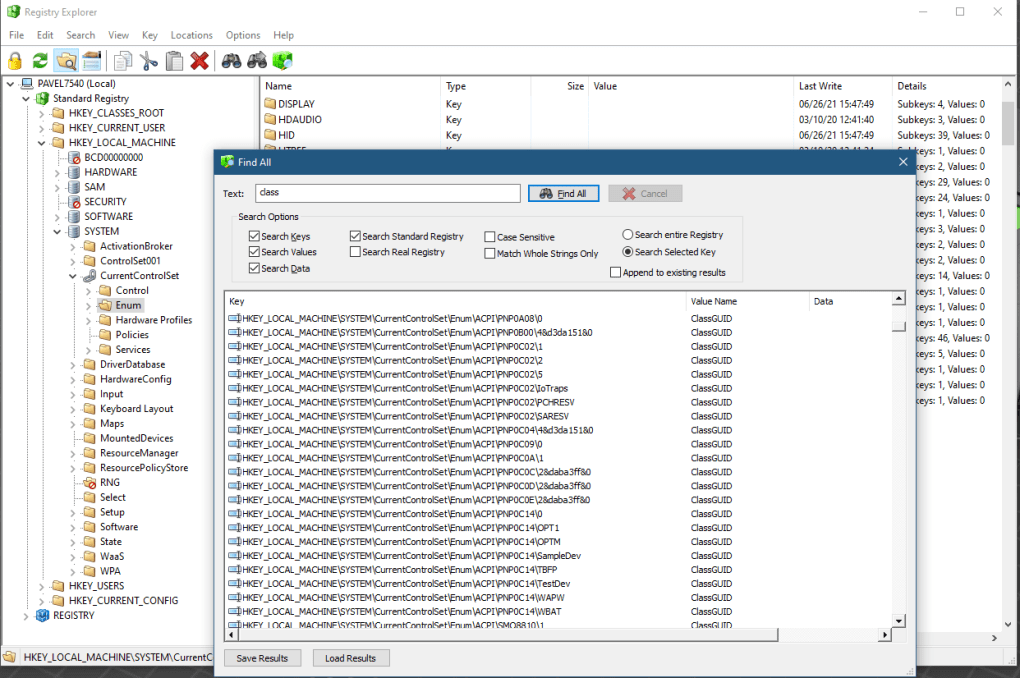
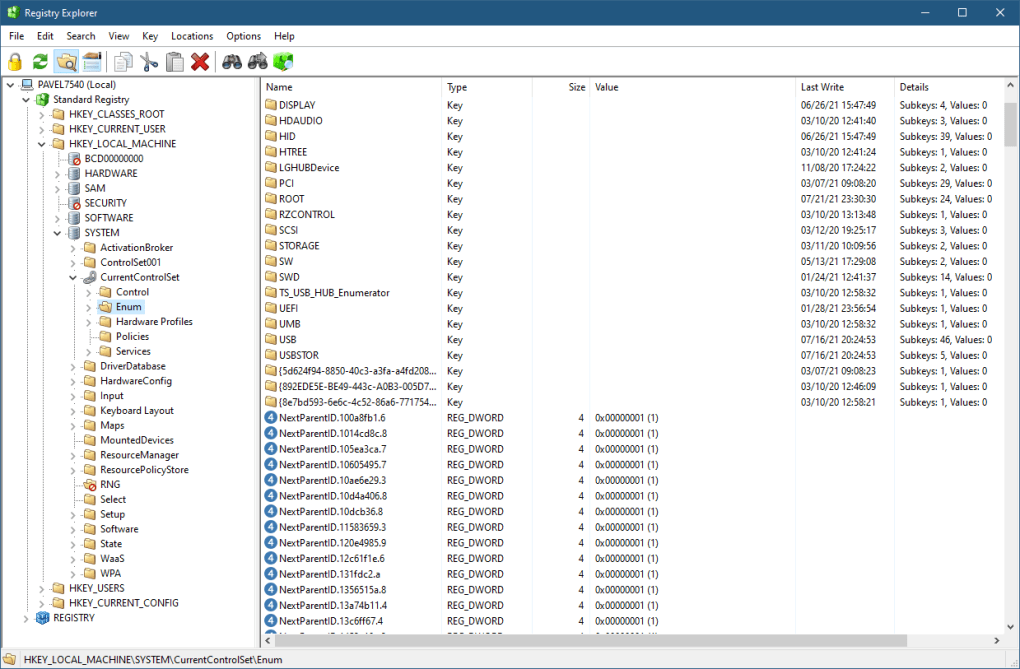
- Improved Navigation and Organization: Total Registry presents the registry in a user-friendly tree-view structure, making it easier to browse through the various keys and subkeys. It also provides a tabular view displaying key information such as name, type, size, and last modification date, allowing for efficient sorting and filtering. This organized presentation contrasts with the sometimes daunting and less intuitive presentation of Regedit.
-
Enhanced Search Capabilities: Locating specific registry keys within the vast database can be time-consuming. Total Registry’s enhanced search functionality allows users to quickly find the specific keys and values they are looking for, significantly improving workflow efficiency. This is particularly useful when dealing with large and complex registries.
-
Comprehensive View of Registry Information: Total Registry displays detailed information for each key, including permissions and accessibility status. This detailed view provides users with a more complete understanding of each registry entry, aiding in making informed decisions during modifications. It shows inaccessible keys and links, information often hidden in Regedit.
-
Import and Export Functionality: Total Registry supports importing and exporting registry keys, enabling users to back up their modifications or transfer registry settings between different systems. This backup functionality is crucial for mitigating the risk associated with registry modifications.
-
Clipboard Integration: Total Registry allows users to easily copy keys and values to the clipboard, streamlining the process of sharing or transferring registry data. This facilitates collaboration and sharing of registry configurations.
-
Undo and Redo Functionality: Mistakes happen, especially when working with complex systems. Total Registry offers undo and redo features, allowing users to revert unwanted changes, mitigating potential damage to the system. This safety net is essential for reducing the risk associated with manual registry modifications.
-
Hex Editor: For advanced users, Total Registry incorporates a hex editor, providing low-level access to registry data. This advanced feature allows for direct manipulation of binary data within the registry, offering a high degree of control for experienced users.
-
Installation-Free Operation: Unlike many applications, Total Registry does not require installation. This makes it portable and convenient to use on multiple machines without requiring administrator privileges for installation.
Advantages and Disadvantages of Using Total Registry
While Total Registry offers several compelling advantages over the built-in Windows Registry Editor, it’s crucial to consider its limitations:
Advantages:
-
Enhanced User Interface: Despite its outdated appearance, Total Registry’s interface is generally considered more intuitive and easier to navigate than the standard Regedit interface. The organized view simplifies the management of registry keys and values.
-
Additional Features: The inclusion of features such as a hex editor, enhanced search functionality, and undo/redo capabilities makes Total Registry a more powerful tool for experienced users.
-
Portability and Ease of Use: Its installation-free nature makes it highly portable and convenient to use on various systems.
-
Free and Offline Operation: Total Registry is entirely free to use and does not require an internet connection, making it accessible to a wider range of users.
Disadvantages:
- Outdated Interface: The visual design of Total Registry is undeniably dated, and it lacks the modern aesthetic of many contemporary applications. This is purely a visual concern and does not affect its functionality.
-
Steep Learning Curve: While the interface is more user-friendly than Regedit, using Total Registry still requires a reasonable understanding of the Windows Registry. Novices should avoid making modifications without thorough research and understanding.
-
Risk of System Instability: Improper use of any registry editor, including Total Registry, can lead to system instability, application malfunctions, or even data loss. Extreme caution is necessary.
Alternatives to Total Registry
While Total Registry provides a valuable alternative to the standard Windows Registry Editor, several other registry editors are available, each with its own strengths and weaknesses. These alternatives often offer more modern interfaces and advanced features, but they might come with a price tag or require installation. Researching these alternatives is worthwhile before settling on Total Registry.
Conclusion: Cautious Use Recommended
Total Registry offers a functional and, for experienced users, a superior alternative to the built-in Windows Registry Editor. Its enhanced features, such as improved navigation, search capabilities, and undo/redo functionality, streamline the process of managing the Windows Registry. However, it is crucial to remember that incorrect modifications to the registry can have severe consequences. Before using Total Registry, always back up your system and create a system restore point. Only users with a sound understanding of the Windows Registry should attempt to make modifications, and even then, extreme caution is advised. Always approach registry editing with the understanding that mistakes can be costly. If you are unsure about any aspect of registry modification, seek guidance from experienced users or professionals. Total Registry, while a powerful tool, should be treated with the respect and caution its potential impact demands.
File Information
- License: “Free”
- Version: “0.95”
- Latest update: “January 31, 2023”
- Platform: “Windows”
- OS: “Windows 10”
- Language: “English”
- Downloads: “271”
- Size: “1.83 MB”


