
Typing Magic is a typing tutor application designed to help users learn to type and improve their typing skills. The software boasts the ability to help users master typing within two weeks with just twenty minutes of daily practice. This review will delve into the strengths and weaknesses of Typing Magic, providing a comprehensive overview to help potential users decide if it’s the right tool for their typing improvement journey.
Features and Functionality
Typing Magic presents itself as a straightforward and efficient typing tutor. Its core functionality revolves around structured lessons and exercises designed to progressively build typing speed and accuracy. The software typically starts with basic lessons, focusing on individual keys and common letter combinations, gradually increasing complexity to include words, sentences, and ultimately, paragraphs. This incremental approach allows users to build a solid foundation before tackling more challenging material.
One of the key selling points of Typing Magic is its claimed ability to teach users to type proficiently within two weeks of dedicated practice. This claim hinges on a five-hour total training regimen, which translates to approximately 20 minutes of daily practice. While the feasibility of this claim may vary depending on individual learning styles and prior experience, the structured approach and clear progression certainly contribute to efficient learning.
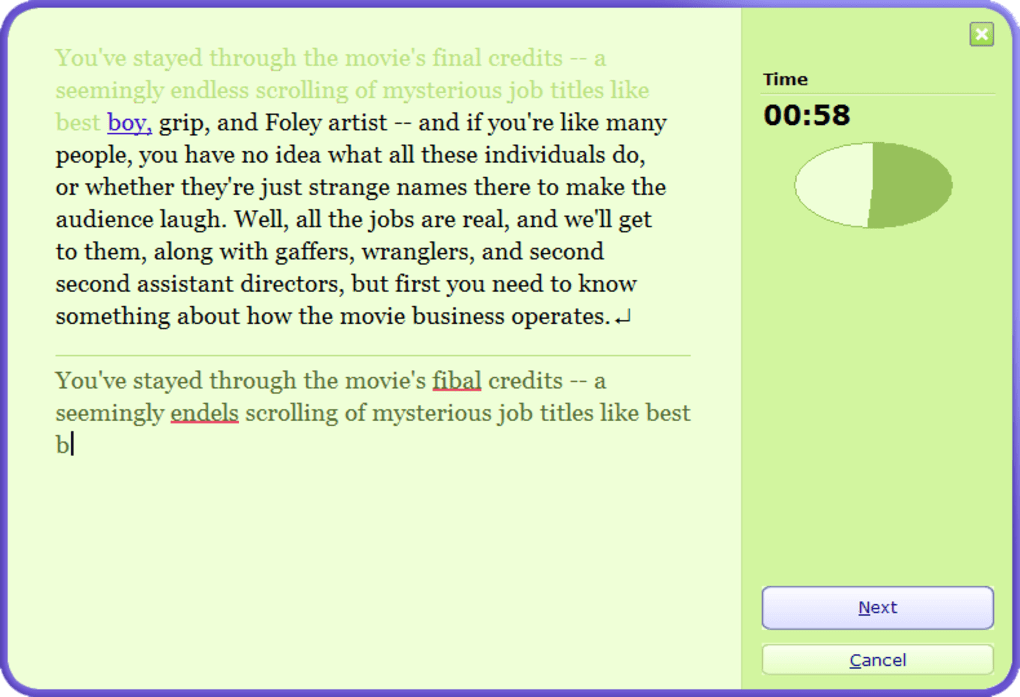
The software typically includes a progress tracking system that monitors key metrics like words per minute (WPM), accuracy, and overall performance. This real-time feedback mechanism allows users to track their progress and identify areas where they need to focus more attention. This feature is valuable for maintaining motivation and demonstrating tangible progress over time.
The user interface (UI) is often cited as a point of contention. While functional, it’s frequently described as rather uninspired and visually underwhelming. The lack of aesthetic appeal may detract from the overall user experience, particularly for individuals who value visually engaging software. However, the focus on functionality may appeal to users who prioritize efficiency over flashy design.
Pros and Cons of Typing Magic
Pros:
-
Structured Learning Path: The software’s progressive lesson structure provides a clear and logical path for learning to type, making it suitable for both beginners and those looking to improve existing skills. The methodical approach ensures that fundamental skills are mastered before more advanced techniques are introduced.
-
Time-Efficient Training: The advertised two-week timeframe, requiring only 20 minutes of daily practice, is attractive to those with limited time. This makes it an ideal choice for busy individuals who want to improve their typing skills without extensive time commitments.
-
Progress Tracking: The built-in progress tracking system allows users to monitor their improvement, providing valuable feedback and motivation to continue practicing. This feature provides a clear visualization of progress and helps users stay engaged with the learning process.
-
Beginner-Friendly: The software requires no prior typing skills, making it accessible to absolute beginners. This low barrier to entry makes it an excellent option for those entirely new to touch typing.
-
Ease of Use: Despite the uninspired UI, the software is generally considered easy to navigate and understand. The intuitive design means users can quickly grasp the core functionalities and begin practicing without needing extensive tutorials or instruction.
Cons:
-
Occasional Glitches: Users have reported occasional glitches and technical issues, which can disrupt the learning process and be frustrating. The frequency and severity of these issues may vary, but it’s a recurring concern mentioned in user reviews.
-
Dull Interface: The user interface is frequently criticized for its lack of visual appeal. While functionality is prioritized, a more engaging and visually stimulating interface could significantly improve the overall user experience.
-
Limited Replay Value: Once the core lessons are completed, the software may offer limited additional content or challenges, potentially leading to a decline in user engagement after initial mastery. The lack of ongoing engagement features may affect long-term use.
-
Dedicated Practice Required: The software’s success hinges on dedicated, consistent practice. While the daily 20-minute commitment is relatively manageable, inconsistency will significantly impact progress. Users need to be committed to the daily practice regimen to achieve the advertised results.
-
Platform Limitations: Typing Magic is primarily available for Windows, limiting its accessibility for users of other operating systems like macOS or Linux. This restricts the potential user base and reduces the software’s overall reach.
Comparison with Alternative Typing Tutors
Typing Magic is not the only typing tutor application available. Several alternatives offer similar functionalities but with different strengths and weaknesses. Comparing Typing Magic to other popular options helps to further contextualize its position in the market. Some popular alternatives include:
-
TypingMaster: This software often receives praise for its comprehensive approach and advanced features, including personalized training plans and detailed performance analysis. However, it may be less beginner-friendly than Typing Magic due to its complexity.
-
TypingClub: This free online typing tutor offers a gamified approach to learning, making it a more engaging option for users who respond well to game mechanics. However, the free version may lack the comprehensive features found in paid applications.
-
Klavaro Touch Typing Tutor: This free and open-source software offers a customizable and highly configurable learning experience. While flexible and powerful, it may require a steeper learning curve than more user-friendly options.
-
Mavis Beacon Teaches Typing: This long-standing typing tutor is known for its fun and engaging approach, employing interactive games and challenges to make the learning process more enjoyable. However, it may be less structured than Typing Magic’s more linear approach.
Each of these alternatives presents a unique set of features and approaches. The best choice depends on individual preferences, learning styles, and specific needs. Typing Magic may be suitable for those prioritizing a structured, time-efficient, and easy-to-use approach, while others may find alternative applications better suited to their needs.
User Reviews and Overall Impression
User reviews of Typing Magic offer a mixed perspective. While many users report positive experiences with the software, praising its effectiveness and ease of use, others criticize its occasional glitches, dull interface, and limited post-completion content. The overall impression suggests that Typing Magic is a functional and capable typing tutor, particularly for beginners, but its shortcomings in terms of UI and potential technical issues should be considered.
Ultimately, the suitability of Typing Magic depends on individual needs and expectations. Its strengths lie in its structured learning path, time-efficient training, and accessibility for beginners. However, potential users should be aware of its reported glitches, uninspiring UI, and limited long-term engagement features. Considering these factors and comparing it to alternative options will help potential users make an informed decision about whether Typing Magic is the right typing tutor for them.
File Information
- License: “Full”
- Version: “varies-with-device”
- Latest update: “November 24, 2021”
- Platform: “Windows”
- OS: “Windows 11”
- Language: “English”
- Downloads: “12.2K”


