
Typing proficiency is an invaluable skill in today’s digital age. It’s no longer a mere supplementary skill but a fundamental requirement for navigating the modern world, impacting productivity, efficiency, and overall digital literacy. Whether you’re a student, professional, or simply someone looking to enhance their digital capabilities, improving typing speed and accuracy can significantly improve various aspects of life. This review focuses on Typing Trainer, a software application designed to help users improve their typing skills through a combination of lessons, games, and analytical tools. We will explore its features, strengths, weaknesses, and overall effectiveness as a typing training tool.
Game-Like Learning Approach
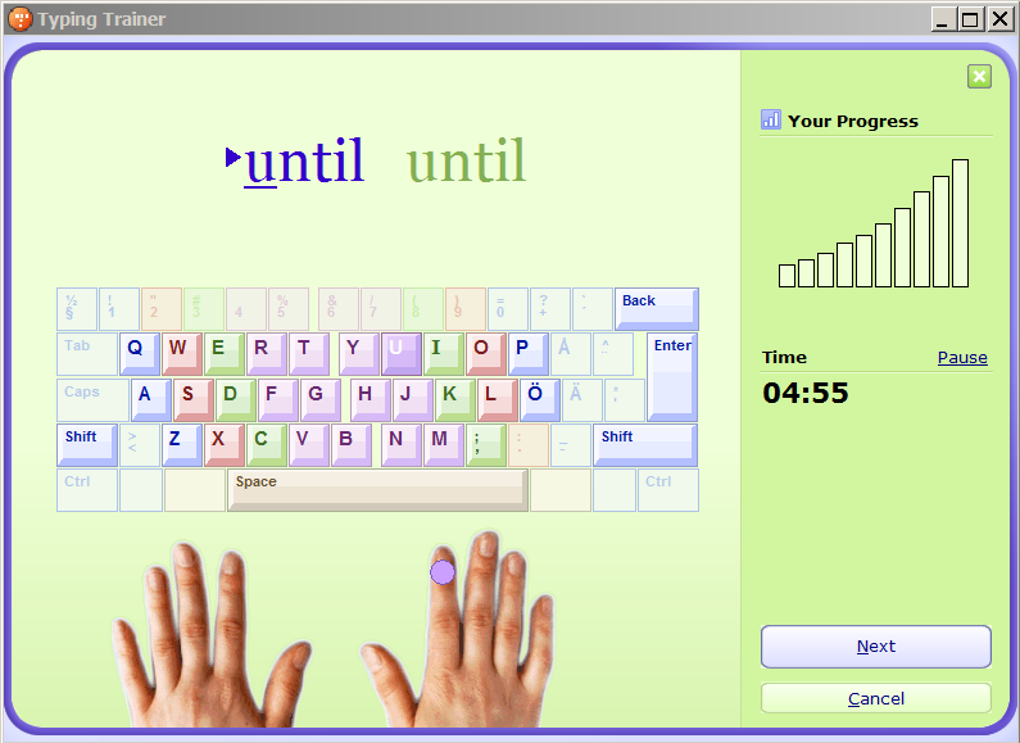
Typing Trainer employs a game-like approach to its lessons, making the learning process more engaging and less tedious than traditional typing tutorials. The program’s interface utilizes a bright purple and green color scheme, which while possibly appealing to younger learners, might seem somewhat childish or distracting to more mature users. The core concept of gamification is effective, transforming what could be a mundane exercise into an enjoyable activity. However, the repetition inherent in many of the exercises, along with potentially excessively long lesson durations, could become monotonous for some users. Shorter, more frequent exercises might provide a more effective learning experience and maintain engagement. While the repetitive nature aids in muscle memory development, the balance between repetition and variety should be carefully considered for optimal learning outcomes.
Feature-Rich Functionality
Typing Trainer boasts a comprehensive suite of features beyond basic typing exercises. It incorporates a key review function, allowing users to identify and address their individual weaknesses. This feature allows for personalized learning, focusing on areas where improvement is most needed. Users can filter this analysis based on specific exercises, pinpointing troublesome keys within particular contexts. The inclusion of several typing tests provides valuable assessment tools for measuring typing speed and accuracy. These tests are beneficial for both self-assessment and for employers seeking to evaluate the typing skills of potential or current employees. The program’s inclusion of three distinct games—Bubbles, WordTris, and Clouds—adds an extra layer of interactive engagement to the learning process, making practice more enjoyable and less of a chore.
The Unique Typing Analyzer
A standout feature of Typing Trainer is its Typing Analyzer. This innovative tool monitors typing activity in other applications, identifying recurring errors and patterns. Based on this analysis, it generates personalized lesson plans tailored to the user’s specific weaknesses. This adaptive learning approach effectively addresses individual needs, maximizing the efficiency of the training process. The ability to enable or disable the Typing Analyzer’s launch at Windows startup provides users with control over their learning experience and system resource management. This adaptive approach makes the software more relevant to a user’s specific typing issues, making the learning process feel more tailored and effective.
Minor Annoyances and Areas for Improvement
While Typing Trainer offers a comprehensive set of features, a few minor drawbacks exist. The program’s default theme music, though easily disableable in the settings, could be considered intrusive to some users. While the inclusion of background music is a common feature in many applications designed to be engaging and less monotonous, the option to disable this feature is appreciated. This speaks to the importance of providing customization options to tailor the user experience based on individual preferences. The somewhat childish graphics, while perhaps suitable for children, may not appeal to all adult users. The visuals are an important component of user experience, impacting engagement and overall satisfaction. While this might not be a significant detractor for many users, the use of real-life images that do not seamlessly integrate with the program’s overall aesthetic is an area for improvement.
Performance and Effectiveness
Ultimately, the effectiveness of Typing Trainer depends on the individual user’s commitment and learning style. While the software provides a strong foundation for improving typing skills through gamified lessons, regular practice, and personalized feedback, consistent effort from the user remains crucial. For users who benefit from a game-like learning environment and who appreciate the personalized insights offered by the Typing Analyzer, the software is highly effective. However, those who prefer a more structured or less visually engaging approach may find other typing trainers more suitable. The software’s ability to track progress and provide detailed reports adds value for users seeking to monitor and evaluate their improvement.
Comparison with Alternative Typing Trainers
Typing Trainer stands alongside other typing training software options, each with its own strengths and weaknesses. TypingMaster, KeyBlaze Free Typing Tutor, and Sonma Typing-Expert represent alternative options that users might consider. While a direct comparison requires detailed analysis of each program’s features and functionalities, the key differentiators often lie in the interface design, gamification approach, analytical tools, and overall cost. Typing Trainer distinguishes itself through its unique Typing Analyzer, offering a level of personalization not always found in other typing trainers. The choice between Typing Trainer and alternative software will largely depend on individual preferences and specific learning needs.
Conclusion: Is Typing Trainer Right for You?
Typing Trainer offers a compelling combination of interactive lessons, engaging games, and powerful analytical tools. Its game-like approach makes the learning process enjoyable, while its personalized feedback and adaptive learning features cater to individual needs. The minor drawbacks, such as the potentially childish graphics and repetitive exercises, are largely offset by the software’s comprehensive features and effective learning methodologies. If you’re seeking a fun, effective, and personalized way to improve your typing skills, Typing Trainer is definitely worth considering. However, users seeking a more minimalist or strictly structured approach might find other typing trainers better suited to their needs. Ultimately, the best typing trainer will vary depending on individual learning styles and preferences. Trying the free version to gauge compatibility is always recommended before committing to a full-fledged learning journey.
File Information
- License: “Free”
- Version: “8”
- Latest update: “September 12, 2018”
- Platform: “Windows”
- OS: “Windows XP”
- Language: “English”
- Downloads: “237.7K”
- Size: “5.27 MB”


