
uGet is an open-source download manager primarily designed for Linux users but also compatible with Windows and Android. Its focus on simplicity and efficiency makes it a compelling alternative to more feature-rich, often commercial, download managers. This review delves into uGet’s functionalities, strengths, weaknesses, and its place within the broader landscape of download management software.
Core Features and Functionality
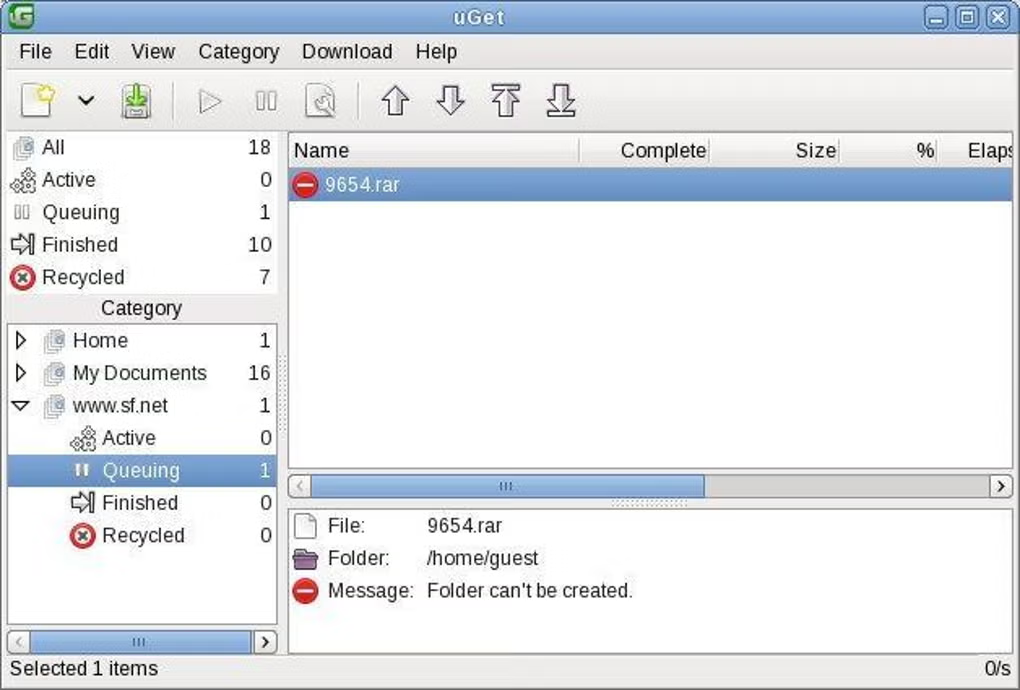
uGet’s core strength lies in its straightforward approach to downloading files. It provides a streamlined interface, prioritizing ease of use without sacrificing essential features. At its heart, uGet offers:
-
Download Queue: A central queue manages all active and pending downloads, allowing users to add, remove, pause, and resume downloads with ease. This functionality is crucial for managing multiple simultaneous downloads and prioritizing important files. The queue displays download progress, speed, and estimated time remaining, providing users with a clear overview of their download activities.
-
Clipboard Monitoring: This feature automatically detects files URLs copied to the system clipboard, prompting the user to add them to the download queue. This eliminates the manual process of inputting URLs, significantly enhancing workflow efficiency, especially for users who frequently download files from various sources. The user can easily configure the clipboard monitoring to filter specific websites or file types to avoid unwanted additions.
-
Batch Downloading: The ability to process multiple downloads in a batch is a key feature for users who need to download numerous files at once. This simplifies bulk downloading, saving significant time and effort compared to adding each file individually. The batch download functionality also supports pausing and resuming the entire batch, adding another layer of user control.
-
Multiple Protocol Support: uGet handles a variety of download protocols, ensuring broad compatibility across different file hosting services and websites. The specific protocols supported might vary depending on the version, but generally includes HTTP, HTTPS, FTP, and potentially others. This ensures versatility and minimizes incompatibility issues with various online resources.
-
Resume Functionality: Interrupted downloads are a common frustration. uGet’s robust resume capability allows users to seamlessly continue downloads from where they left off, avoiding the need to restart the entire download process. This is particularly valuable for large files or unstable internet connections.
-
Simple and Intuitive Interface: The user interface is designed for simplicity and clarity. The intuitive layout makes it easy for users of all technical skill levels to navigate and utilize the application’s full functionality without requiring extensive training. The minimal design reduces visual clutter, focusing attention on the essential aspects of download management.
Beyond these core features, uGet may offer additional functionalities in more recent versions, such as integrated search capabilities, download speed optimization, and support for various plugins or extensions. However, its strength continues to lie in its core capabilities, providing a stable and reliable download experience.
Advantages of Using uGet
Several factors contribute to uGet’s appeal as a download manager. Its open-source nature allows for community contributions and continuous improvements. This transparency fosters trust and enables users to examine the codebase for security vulnerabilities or functional enhancements.
The software is completely free of charge, eliminating licensing fees and subscription costs. This makes it an attractive option for budget-conscious users or those seeking cost-effective solutions. Furthermore, its lightweight nature minimizes system resource consumption, making it suitable for both high-end and low-end systems.
uGet’s cross-platform compatibility, extending to Windows and Android, adds to its practicality. Users can transition seamlessly between operating systems without needing to learn a new download manager. The consistency of the user experience across different platforms simplifies the download process, regardless of the device used.
Limitations and Potential Drawbacks
While uGet offers several advantages, it also has limitations. It might not be as feature-rich as some commercial download managers. Advanced users may find that the lack of highly specialized features restricts their ability to finely tune download settings or integrate the software into more complex workflows.
The open-source nature, while a benefit in many respects, can also introduce some challenges. Updates might not be as frequent or as polished as those of commercial software. While the community actively contributes, the development cycle may be slower, leading to occasional delays in addressing bugs or adding new functionalities.
Additionally, the beta versions of uGet might occasionally exhibit instability. Users should carefully consider this potential instability before relying on uGet for critical downloads or during periods requiring absolute reliability. It is advisable to use stable releases whenever possible.
Comparison to Other Download Managers
Comparing uGet to other download managers requires considering individual needs and preferences. Commercial software often boasts a broader range of features, including advanced scheduling capabilities, download speed optimization algorithms, and integration with cloud storage services. These advanced features come at a cost, however, both financially and in terms of increased system resource usage.
uGet provides a practical alternative for users who prioritize simplicity, stability, and open-source principles over an abundance of advanced features. Its lightweight design and ease of use make it a suitable option for users who need a straightforward and reliable download manager without the complexities of more feature-laden alternatives.
Conclusion: Who Should Use uGet?
uGet is an excellent choice for users who value simplicity, reliability, and open-source software. Its streamlined interface and ease of use make it accessible to beginners, while its core functionalities are sufficient for many users’ daily download needs. The lack of extensive advanced features is not a significant drawback for those who prioritize straightforwardness and efficient download management.
If you are a Linux user looking for a lightweight and reliable download manager, uGet is a strong contender. Its compatibility with Windows and Android expands its appeal to a broader audience. However, users seeking advanced features, extensive customization options, or the most robust stability may prefer commercial alternatives with more extensive functionality and potentially faster development cycles. Ultimately, the best download manager depends on individual needs and priorities. But for users who value simplicity, stability, and the freedom of open-source software, uGet offers a strong and viable option.
File Information
- License: “Free”
- Version: “2.2.1”
- Latest update: “May 23, 2023”
- Platform: “Windows”
- OS: “Windows 7”
- Language: “English”
- Downloads: “10.5K”
- Size: “10.15 MB”


