
Minecraft, at its core, is a game of blocks, creativity, and exploration, governed by a set of fundamental rules – gravity being one of the most immutable. Players dig down, build up, and always, without fail, fall towards the earth. But what if this core principle could be bent, twisted, or even completely redefined? Enter “Up And Down And All Around – Gravity – Minecraft Mod,” a remarkable utility by Mysteryem that shatters conventional physics, offering players an unprecedented level of control over the very forces that ground them.
Originally conceived as a contribution to “The Modding Trials,” this modification began humbly, allowing players only the bizarre ability to “fall upwards.” However, through iterative development, it blossomed into a comprehensive gravity manipulation system, empowering players to dictate the direction of attraction across all cardinal points: up, down, north, east, west, and south. This isn’t just a simple toggle; it’s a suite of tools that transforms how one interacts with the blocky landscapes of Minecraft, presenting a fresh perspective on construction, exploration, and problem-solving. While its age and compatibility quirks necessitate a closer look, its innovative approach to gameplay remains a compelling argument for players seeking to inject a truly novel mechanic into their older Minecraft experiences.
Unraveling the Mechanics of Gravity Manipulation
The essence of the “Up And Down And All Around” mod lies in its ability to fundamentally alter how players perceive and interact with the game world. No longer confined to a single, downward pull, the world becomes a playground where the concept of “up” is as fluid as a river. This section delves into the sophisticated tools and mechanics that underpin this gravity-defying experience, exploring how each component contributes to a genuinely unique gameplay dynamic.
Beyond Up and Down: A New Dimension of Movement
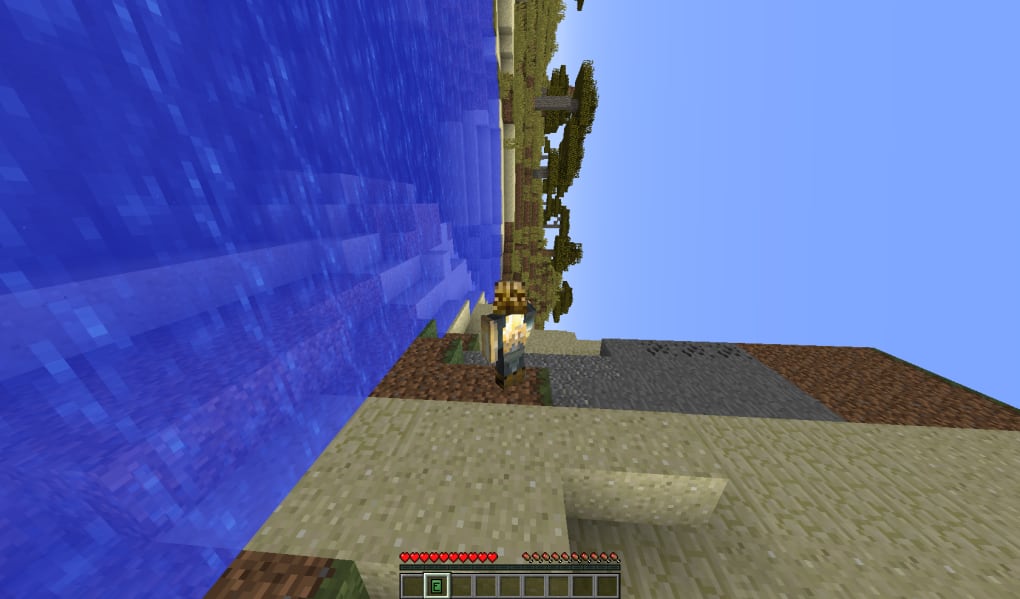
At the heart of this mod’s appeal is its titular promise: “Up And Down And All Around.” Initially, gravity mods often offered a simple binary switch – either normal gravity or inverse gravity. This mod, however, elevates the concept by introducing directional gravity across all six cardinal directions. Imagine walking along a wall, with “down” now oriented horizontally, or constructing a ceiling-mounted base where your personal gravity keeps you firmly attached to the underside of a massive structure.
This isn’t merely a cosmetic change; it’s a re-evaluation of fundamental traversal. Building complex structures takes on new meaning when you can build from any orientation. Navigating treacherous ravines or soaring mountains becomes a matter of strategic gravity shifts rather than just careful block placement or endless staircases. It encourages a complete rethinking of movement patterns, opening avenues for innovative parkour challenges, multi-directional labyrinth designs, and even unique combat scenarios where players can manipulate their gravitational pull to outmaneuver opponents. The sheer freedom to reorient oneself within the Minecraft world is a game-changer, fostering creativity that extends beyond the traditional vertical and horizontal planes. It turns the familiar into the fantastic, prompting players to experiment with layouts and movements they previously thought impossible.
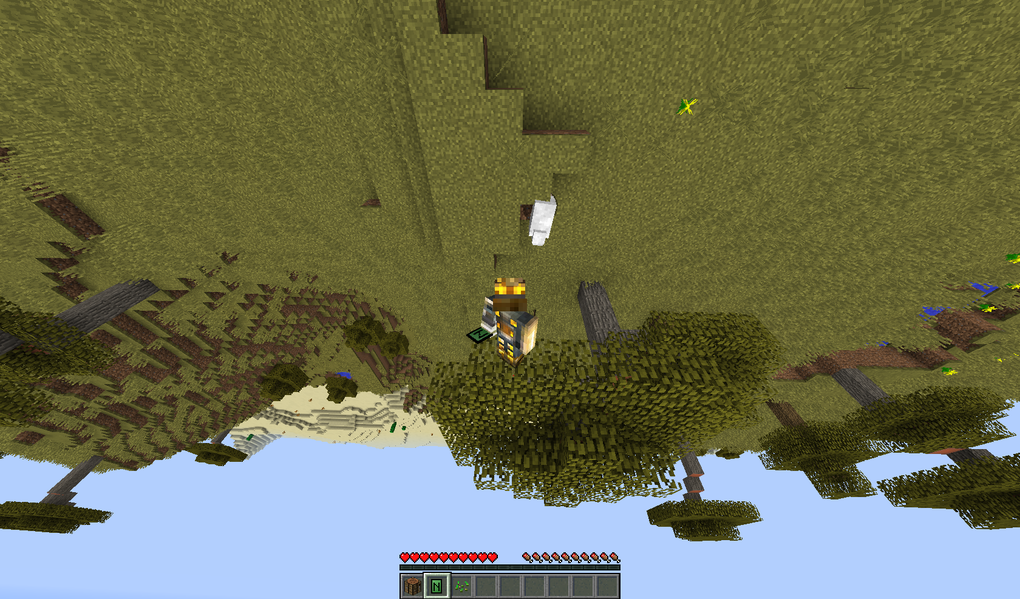
The Core Tools of Gravity Control: Generators, Controllers, and Anchors
To facilitate this multi-directional freedom, the mod introduces three distinct yet interconnected tools, each serving a specific purpose in the grand scheme of gravity manipulation. Mastering these tools is key to unlocking the mod’s full potential and creating truly dynamic environments.
Gravity Generators
These powerful blocks are the architects of area-specific gravity shifts. Placed strategically, a Gravity Generator establishes a zone within which the gravitational pull is directed as per its configuration. This means an entire room, corridor, or even a sprawling exterior area can have its “down” redefined. The implications for gameplay are vast. Picture an anti-gravity chamber where players float freely, or a vertical shaft where gravity consistently pulls upwards, allowing for effortless ascent.
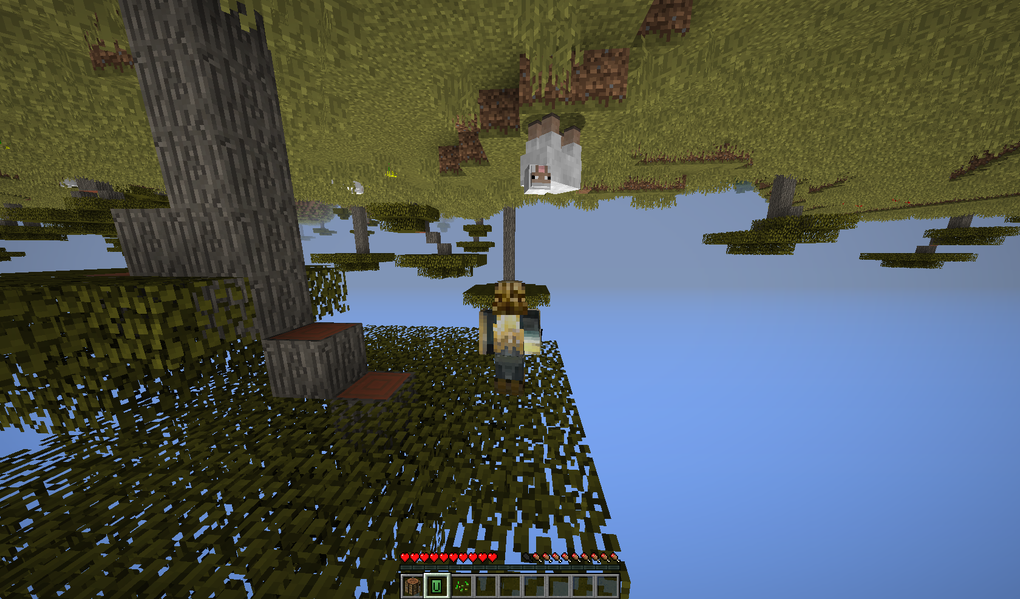
Gravity Generators are perfect for crafting intricate puzzles where players must navigate changing gravitational fields, creating automated systems where items flow in unconventional directions, or designing unique battle arenas where environmental gravity becomes a tactical element. Their area-of-effect nature makes them ideal for large-scale environmental modifications, turning static landscapes into dynamic, physics-bending challenges. For instance, a builder might create a spiraling tower where each section has gravity pulling towards its center, creating an inward-facing architectural marvel. Or a map maker could design a dungeon with a “zero-g” zone, followed by an “up-gravity” puzzle, forcing players to adapt their movement strategies constantly.
Gravity Controllers
While Generators handle environmental gravity, Gravity Controllers offer a more personal and immediate form of gravitational command. These items, when held in a player’s inventory, grant the ability to change one’s personal gravity direction at will. This allows for on-the-fly adjustments, providing unparalleled freedom of movement. Imagine exploring a vast cave system, seamlessly transitioning from walking on the floor to clinging to the ceiling, then dropping onto a distant wall, all with a quick inventory interaction.
The Gravity Controller is the explorer’s best friend, enabling swift and creative traversal. It transforms daunting vertical ascents into simple walks up a wall, and precarious jumps into controlled descents onto an opposing surface. Furthermore, its immediate activation makes it a valuable tool for dodging attacks, gaining tactical high ground, or simply enjoying the sheer novelty of defying conventional physics. The ability to switch gravity directions at a moment’s notice fundamentally changes how players perceive and navigate obstacles, turning what was once a barrier into a mere change of perspective. It empowers the individual player, giving them god-like control over their personal gravitational pull, making every movement a deliberate choice rather than a predetermined fall.
Gravity Anchors
Unlike Generators and Controllers, which primarily affect players, Gravity Anchors focus on items. These intriguing devices ensure that items within their proximity are always attracted in a specific direction, regardless of the overarching gravity defined by generators or personal controllers. Once an Anchor’s direction is set, it cannot be changed, making it a fixed point of gravitational influence for inanimate objects. However, players must exercise caution when crafting them, as their effects are instantaneous and irreversible once placed.
Gravity Anchors are exceptionally useful for creating controlled item flow systems in environments where gravity is otherwise chaotic or non-standard. For example, in a “zero-g” build, an Anchor could ensure that harvested resources consistently fall into a collection chute, preventing them from floating off indefinitely. They can also be used in puzzle design, guiding specific items along predetermined paths, or in elaborate Rube Goldberg-esque contraptions where item movement is critical. The fixed nature of Anchors means they require careful planning, but their ability to stabilize item behavior in an otherwise unstable gravitational field makes them invaluable for intricate designs. They provide a predictable element in an unpredictable world, allowing for industrial applications even in the most outlandish gravitational landscapes.
Strategic Applications in the Minecraft World
The combined power of Gravity Generators, Controllers, and Anchors opens a Pandora’s Box of creative possibilities within Minecraft. The article mentions their utility on “Cube Block maps,” which perfectly illustrates the kind of environments where this mod truly shines.
Imagine building a city where skyscrapers are not just tall, but also extend horizontally from walls, with entire districts oriented to a different “down.” Parkour maps could feature sections where gravity flips mid-jump, requiring players to react instantly and reorient themselves. Puzzle maps could revolve around manipulating gravity fields to move blocks, activate switches, or transport items across impossible distances. Combat arenas could introduce dynamic gravitational zones, forcing players to adapt their strategies as the ground beneath them shifts its pull.
For the ambitious builder, the mod facilitates architectural marvels that defy traditional structural logic. Spherical bases with inward gravity, labyrinthine complexes stretching across all dimensions, or even floating islands held together by localized gravitational fields – the only limit is imagination. Resource gathering and automated farms can also be reimagined, with items traveling along walls or ceilings via cleverly placed anchors and generators. The mod isn’t just about fun; it’s about fundamentally changing the sandbox experience, empowering players to sculpt not just blocks, but the very physics of their world.
Navigating Compatibility and Technical Considerations
While the “Up And Down And All Around” mod presents an exciting array of gameplay possibilities, its unique nature and development history mean that players must approach it with an understanding of its technical limitations and compatibility quirks. Integrating such a fundamental physics-altering mod into the dynamic world of Minecraft modding requires careful consideration to ensure a smooth and enjoyable experience.
Understanding Version Limitations: The Older Minecraft Requirement
Perhaps the most significant technical caveat of “Up And Down And All Around – Gravity – Minecraft Mod” is its incompatibility with newer versions of the game. Specifically, the article states that it “does not work with Minecraft 1.14 or newer.” This is a critical piece of information for any potential user. Minecraft’s development over the years has seen significant architectural changes, particularly with updates like 1.13 (The Update Aquatic) and 1.14 (Village & Pillage), which overhauled large portions of the game’s code, including world generation, rendering, and entity handling.
This means that players wishing to experience the mod’s gravity-bending features must run an older version of Minecraft, typically 1.12.2 or earlier, which was a highly stable and popular version for modding. This immediately presents a trade-off: access to this unique gravity mod comes at the cost of missing out on all the new features, blocks, biomes, mobs, and performance improvements introduced in subsequent vanilla updates. For some, the novelty of gravity manipulation will outweigh the desire for newer content; for others, it might be a deal-breaker.
It also implies that the mod is unlikely to receive future updates to support newer Minecraft versions, as adapting such a deeply integrated mod to new game architectures would be a monumental task for a developer, especially for a project born from “The Modding Trials.” Therefore, players should be prepared to set up a dedicated instance of an older Minecraft version specifically for this mod and any other compatible mods they wish to run alongside it. This often involves using a specialized launcher like MultiMC or CurseForge (which, when configured for older versions, can manage multiple game instances effectively) to avoid conflicts with newer game installations.
Mod Conflicts and Workarounds
The intricate nature of Minecraft mods often leads to conflicts when multiple modifications attempt to alter the same core game mechanics or inject code into similar areas. “Up And Down And All Around” is no exception, and the article explicitly lists several known incompatibilities: “Chiseled Me, LagGoggles, and Surge.”
- Chiseled Me: This mod allows players to change their size, becoming tiny or giant. It’s plausible that changing player scale and simultaneously altering gravitational physics creates conflicting transformations and rendering issues.
- LagGoggles: A performance profiling mod, LagGoggles might interfere with the mod’s physics calculations or how it hooks into the game’s update loop, leading to crashes or incorrect readings.
- Surge: Another performance enhancement mod, Surge likely optimizes game processes in a way that clashes with the custom physics engine introduced by the gravity mod, potentially causing instability or unexpected behavior.
Beyond these specific examples, it’s a general rule that any mod significantly altering player movement, physics, rendering of entities, or core game loops could potentially conflict with “Up And Down And All Around.” This necessitates careful testing when combining it with other mods. Players might need to troubleshoot by disabling mods one by one to identify the source of a conflict.
A notable workaround mentioned is the ability to “edit the config” to avoid “taking damage or dying when you are above y=255” when using mods like “Galacticraft/Advanced Rocketry.” These space-faring mods often allow players to travel far beyond the vanilla world height limit. The gravity mod might have a default damage-dealing mechanism or an unintended interaction at extreme altitudes, and the config option provides a crucial safety net for inter-mod compatibility in specific scenarios. This highlights the importance of checking mod configuration files for customization options that can mitigate potential issues.
Visual Glitches and Gameplay Quirks
Beyond core functionality and compatibility, mods can also introduce minor visual or gameplay quirks that, while not game-breaking, can affect the overall experience. The article points out two such issues with “Up And Down And All Around”:
- Baubles rendered at weird angles when under the effect of this mod: Baubles is a popular API (Application Programming Interface) and mod that adds extra inventory slots for accessories like amulets, rings, and belts. When a player’s gravity is manipulated, it seems the rendering logic for these Baubles items gets confused, causing them to appear misaligned or at odd angles relative to the player model. This is primarily a cosmetic issue, but it can be visually jarring and detract from immersion. It suggests that the mod’s changes to the player’s orientation or internal physics calculations aren’t perfectly synchronized with how Baubles renders its accessory items.
- Elytra does not work when under the effect of this mod: The Elytra, introduced in Minecraft 1.9, allows players to glide through the air. Its functionality is inherently tied to vanilla gravity and momentum physics. When “Up And Down And All Around” is active, especially when gravity is oriented sideways or upwards, the Elytra’s flight mechanics break down. This is an expected limitation, as gliding relies on a consistent downward pull and forward momentum that is directly contradicted by altered gravity. While disappointing for players who enjoy aerial traversal, it’s a logical consequence of overriding fundamental physics. It simply means players must choose between gliding with Elytra (and normal gravity) or manipulating gravity (and losing Elytra functionality).
These quirks reinforce the idea that “Up And Down And All Around” is a mod that makes profound changes to the game’s core. While the trade-offs are understandable, players should be aware of them before diving in, preparing for a slightly different visual experience and altered traversal options when gravity is being actively manipulated.
The Legacy and Appeal of Gravity Mods
Minecraft’s vast modding scene is a testament to its flexibility and the community’s boundless creativity. Among the countless additions, mods that fundamentally alter core game mechanics, such as gravity, often leave a lasting impression. “Up And Down And All Around” stands as a prime example of how a single, well-executed concept can redefine the entire gameplay experience.
Why Gravity Manipulation Enhances Gameplay
The allure of gravity manipulation in a game like Minecraft is multi-faceted. Firstly, it offers a radical departure from the familiar. For seasoned players, the ability to walk on walls or fall upwards injects a fresh sense of wonder and novelty into a game they might have played for thousands of hours. It forces a complete re-evaluation of spatial awareness and problem-solving. A simple jump across a gap becomes a strategic decision: do I jump, or do I reorient gravity to walk across the ceiling?
Secondly, it unlocks unprecedented creative potential. Builders are no longer bound by a single “down,” allowing for architectural designs that defy real-world physics. Floating cities, inverse towers, and multi-dimensional bases become tangible possibilities. This empowers players to push the boundaries of their imagination, creating structures and experiences that would be impossible in vanilla Minecraft.
Thirdly, it adds layers of complexity and challenge. Whether it’s navigating a puzzle map with constantly shifting gravity fields or engaging in combat where the “ground” can suddenly become a wall, the mod introduces dynamic variables that keep gameplay engaging and unpredictable. It rewards adaptability and quick thinking, making every interaction more meaningful. The inherent fun of defying reality is a powerful motivator, transforming the mundane act of moving from point A to point B into an exciting journey of discovery and mastery. It taps into a primal desire to control fundamental forces, offering a unique sandbox within a sandbox.
A Niche, Yet Enduring, Contribution to Minecraft Modding
Despite its limitations, particularly its incompatibility with newer Minecraft versions, “Up And Down And All Around – Gravity – Minecraft Mod” holds a significant place in the modding ecosystem. It’s a niche mod, appealing primarily to players willing to delve into older game versions for a specific, profound gameplay alteration. However, its enduring presence and positive reception (as indicated by its “fun addition” status) speak volumes about its impact.
The mod represents a class of modifications that aren’t just about adding new content, but about changing the very rules of the game. It encourages a deeper interaction with Minecraft’s physics engine, highlighting the incredible flexibility of the game’s architecture when harnessed by creative mod developers. For those who value innovation and a truly different gameplay loop over the latest vanilla features, this mod offers a compelling reason to revisit older Minecraft eras. It’s a testament to the fact that sometimes, the most impactful mods are those that bravely challenge the game’s most fundamental assumptions, offering a vision of what Minecraft could be if gravity were merely a suggestion rather than a law. Its legacy is in inspiring players to think beyond the conventional and embrace the extraordinary.
Installation and Getting Started
For those convinced by the allure of defying gravity, getting “Up And Down And All Around – Gravity – Minecraft Mod” up and running requires a few standard modding steps. As this mod is designed for older Minecraft versions, the process typically involves using a specific mod loader.
-
Install Minecraft Forge (for older versions): Given the mod’s age, you will most likely need Minecraft Forge, which is the most common modding API for older Minecraft versions. You’ll need to download the correct version of Forge that matches the Minecraft version the gravity mod supports (e.g., Minecraft 1.12.2). Visit the official Forge website, navigate to the “Files” section, select your desired Minecraft version, and download the “installer” JAR file. Run this installer, and it will set up a new Forge profile in your Minecraft launcher.
-
Download the Mod File: Obtain the “Up And Down And All Around – Gravity – Minecraft Mod” JAR file from a reputable modding site like PhanMemFree.org or other trusted sources. Ensure the version of the mod matches the version of Minecraft (and Forge) you have installed.
-
Locate Your Mods Folder: Open your Minecraft launcher, select the Forge profile you just installed, and click “Play” at least once. This will generate the necessary game files, including a “mods” folder. You can usually find this folder by:
- Opening your Minecraft launcher.
- Going to “Installations.”
- Hovering over your Forge profile and clicking the folder icon that appears.
- This will open the
.minecraftdirectory. Inside, you should find a folder namedmods. If it’s not there, create it.
-
Place the Mod File: Drag and drop the downloaded “Up And Down And All Around – Gravity – Minecraft Mod” JAR file into the
modsfolder. Do not extract the JAR file. -
Launch Minecraft: Close and reopen your Minecraft launcher. Select the Forge profile you installed (it should be named something like “forge-1.12.2”) and click “Play.”
-
Verify Installation: Once the game loads, you should be able to access the mod’s features. You might need to craft the Gravity Generators, Controllers, or Anchors as per the mod’s crafting recipes (which you might find on the mod’s download page or by using a mod like JEI - Just Enough Items). If the game crashes or behaves unexpectedly, double-check your Minecraft and mod versions, and consider removing other mods to identify conflicts. Remember to consult any specific instructions provided by the mod author on PhanMemFree or the original download source.
Conclusion
“Up And Down And All Around – Gravity – Minecraft Mod” offers a genuinely transformative experience for players willing to revisit older versions of Minecraft. It transcends the typical mod, moving beyond mere content additions to fundamentally alter one of the game’s most basic physical laws. With its innovative Gravity Generators, personal Gravity Controllers, and reliable Gravity Anchors, the mod unlocks an entirely new dimension of creative building, strategic movement, and puzzle design.
While it comes with its share of limitations – particularly its incompatibility with Minecraft 1.14 and newer, and known conflicts with certain other mods – these are largely understandable given the profound changes it introduces. The minor visual quirks, such as Baubles rendering at odd angles, and the expected loss of Elytra functionality when gravity is altered, are small trade-offs for the unparalleled freedom of movement and architectural possibility it provides.
For the adventurous player, the dedicated builder, or simply anyone seeking a fresh and challenging perspective on the familiar world of Minecraft, “Up And Down And All Around – Gravity – Minecraft Mod” remains a compelling and highly recommended addition. It’s a testament to the modding community’s ability to constantly reimagine and enhance a beloved game, proving that even fundamental rules can be bent, twisted, and thoroughly enjoyed. Download it from PhanMemFree and prepare to see your Minecraft world in a whole new, gravity-defying light.
File Information
- License: “Free”
- Version: “2.9.1”
- Latest update: “January 31, 2023”
- Platform: “Windows”
- OS: “Windows 7”
- Language: “English”
- Downloads: “1K”
- Size: “732.49 KB”


