
Video Player is a straightforward and user-friendly application designed for playing HTML5 videos directly on your Windows device. Its simplicity and ease of use make it particularly appealing for children, yet its functionality extends beyond basic playback. This review will delve into the features, pros, cons, and overall user experience of this video player.
Key Features and Functionality
Video Player stands out due to its streamlined interface and intuitive controls. The player boasts a clean, YouTube-esque viewing window, minimizing distractions and focusing on the video content. This design choice enhances usability, particularly beneficial for younger users who might be overwhelmed by complex interfaces.
A significant advantage of Video Player is its support for HTML5 videos. This broad compatibility ensures that users can play a wide range of video files without encountering format issues. Furthermore, the software seamlessly integrates with Google Drive and Chromecast, allowing users to easily access and stream videos from their Google Drive accounts to Chromecast-enabled devices. This integration streamlines the viewing process and offers flexibility in playback options.
Playlist functionality is another noteworthy feature. Users can create and manage playlists, allowing for continuous playback of multiple videos. The synchronization feature, leveraging a single Google Drive folder, facilitates seamless playback across multiple devices. This collaborative aspect is particularly useful for families or individuals who wish to share and view videos across different computers or mobile devices.
While Video Player shines in its simplicity and core functionalities, it lacks extensive customization options compared to more feature-rich media players. Users seeking advanced controls or personalized settings might find its options somewhat limited. However, this simplicity is a significant strength for its target audience – individuals who prioritize ease of use over granular control.
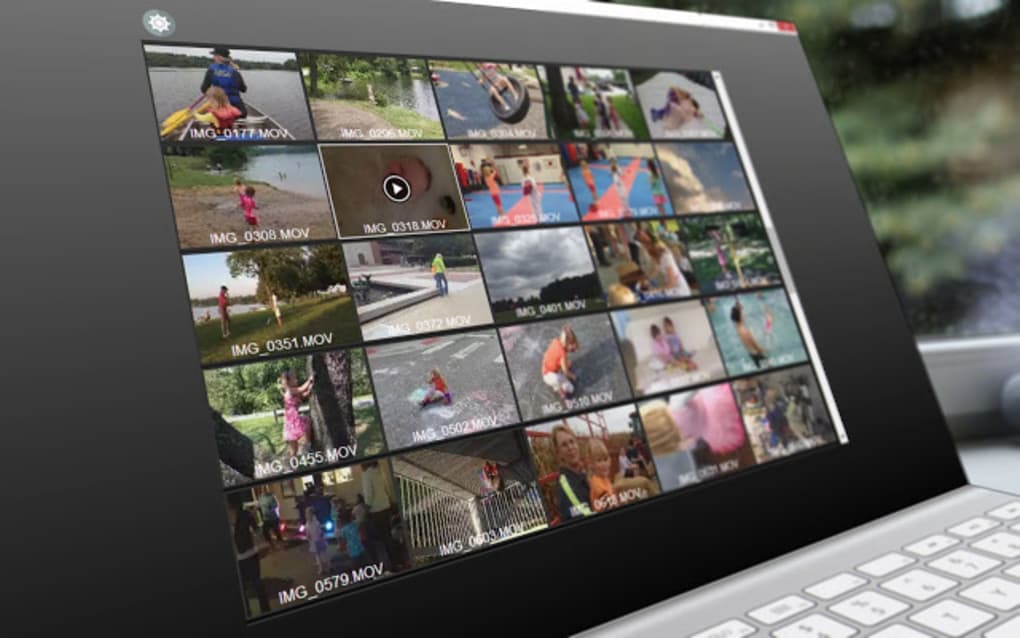
Ease of Use and User Interface
One of Video Player’s most compelling features is its user-friendly interface. The design is intentionally minimalist, prioritizing ease of navigation and intuitive controls. Buttons are clearly labeled and easily accessible, ensuring a smooth user experience, even for those unfamiliar with video players.
The YouTube-like viewing window provides a familiar and comfortable viewing experience. The focus on the video content minimizes visual clutter, enhancing the viewing experience. This design choice makes the application particularly accessible to younger users or those less technologically proficient. Navigation within playlists is also seamless, allowing users to easily select and play videos.
The integration with Google Drive and Chromecast simplifies the process of accessing and streaming videos. Users can effortlessly access their cloud-stored videos and share them on their televisions or other compatible devices with a few simple clicks. This smooth integration streamlines the overall user experience, reducing the complexity often associated with media playback. This makes the player highly convenient for sharing videos within a family or group setting.
Pros and Cons
Pros:
-
Simple and Intuitive Interface: The user-friendly interface is a major strength, making it accessible to users of all technical skill levels, particularly children. The clear layout and easy-to-understand controls ensure a smooth and enjoyable viewing experience.
-
HTML5 Video Support: The player’s compatibility with HTML5 videos ensures a wide range of video formats can be played without any issues. This broad compatibility eliminates the need for codec installations or format conversions, simplifying the playback process.
-
Google Drive and Chromecast Integration: Seamless integration with Google Drive and Chromecast offers flexibility and convenience. Users can access their videos stored in Google Drive and easily stream them to their Chromecast-enabled devices. This integration significantly enhances the application’s versatility.
-
Playlist Functionality: The ability to create and manage playlists enables users to enjoy continuous playback of multiple videos without interruption. This feature is beneficial for longer viewing sessions or thematic video collections.
-
Device Synchronization (via Google Drive): Synchronization via a shared Google Drive folder ensures seamless playback across multiple devices. This feature facilitates easy sharing and collaborative viewing experiences within a household or among friends.
Cons:
-
Limited Customization Options: Compared to more advanced media players, Video Player offers limited customization options. Users seeking extensive personalization might find the available settings insufficient.
-
Chrome Extension Requirement (Potential): While not explicitly stated in the provided text, the description hints at the potential need for a Google Chrome extension. This might present a minor inconvenience for users who prefer not to install browser extensions. Further clarification on this aspect is needed.
-
No Offline Playback (Implied): The text emphasizes Google Drive and Chromecast integration, suggesting that offline playback might not be a supported feature. This limitation could be a drawback for users who prefer to watch videos without an internet connection.
-
Potential Lack of Advanced Features: The focus on simplicity might mean that advanced features such as subtitle support, video speed adjustment, or screen capture are absent. Users requiring such features would need to explore alternative media players.
Comparison with Alternative Video Players
The market offers a plethora of video players, each with its own set of strengths and weaknesses. Comparing Video Player to its competitors reveals its niche. While it might lack the advanced features of professional-grade players, its simplicity and ease of use set it apart.
Alternatives like VLC Media Player are known for their extensive format support and advanced features, but their interfaces can be more complex. Other players might focus on specific functionalities, such as streaming or online video playback. Video Player’s strength lies in its balance of simplicity and essential functionality, making it ideal for users who prioritize ease of use without sacrificing core playback capabilities.
Conclusion
Video Player presents a compelling solution for users who need a simple yet effective way to play HTML5 videos. Its intuitive interface, Google Drive and Chromecast integration, and playlist functionality make it a convenient choice for families and individuals alike. While its lack of extensive customization might deter power users, its simplicity and ease of use are significant advantages, particularly for children or those seeking a hassle-free video playback experience. The focus on user-friendliness makes Video Player a valuable tool for casual users who prioritize ease of use above advanced features. The application’s strengths make it a strong contender in the crowded market of media players, effectively catering to a specific audience seeking a straightforward and uncomplicated video playback solution. However, potential users should carefully weigh the pros and cons before making a decision based on their individual needs and preferences.
File Information
- License: “Free”
- Version: “varies-with-device”
- Latest update: “July 20, 2021”
- Platform: “Windows”
- OS: “Windows XP”
- Language: “English”
- Downloads: “21.7K”


