
VirtualRouter Plus is a lightweight, portable application for Windows that transforms your personal computer into a fully functional Wi-Fi access point. This allows you to share your computer’s internet connection with other devices, such as smartphones, tablets, and laptops, creating a convenient home network without the need for additional hardware. Its ease of use and lack of installation requirements make it a popular choice for users seeking a simple solution for creating a wireless hotspot. However, while praised for its simplicity, it also has a history of stability issues that should be considered before using it as a primary networking solution.
Effortless Hotspot Creation: Simplicity and Usability
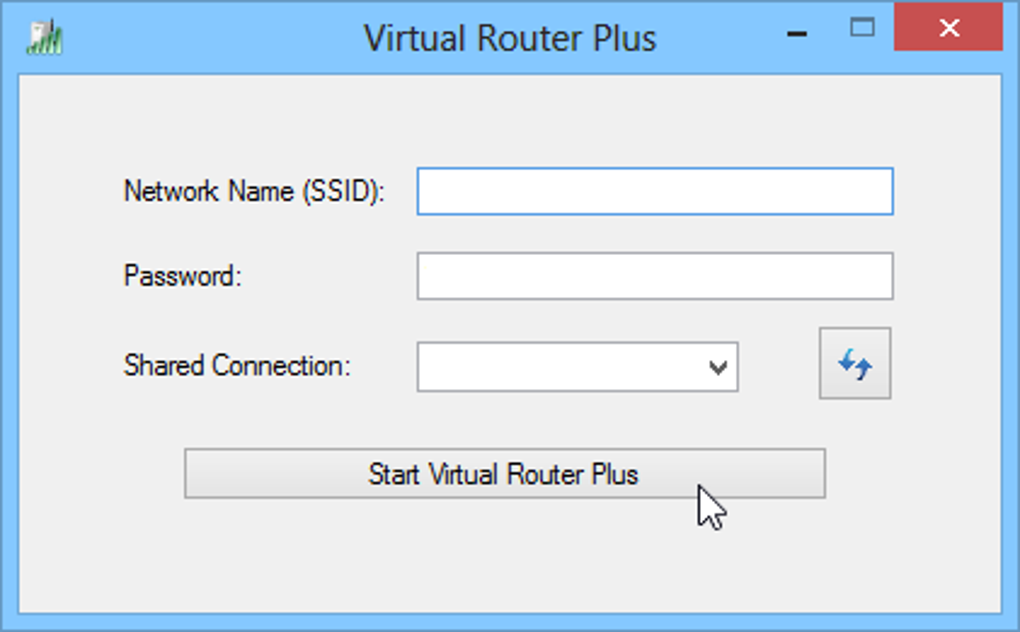
One of the key advantages of VirtualRouter Plus is its remarkable ease of use. Unlike many other similar applications, it requires no installation process. Simply download the executable file and run it. The user interface is clean and intuitive, presenting only the essential options necessary to create a Wi-Fi network. The process involves selecting a network name (SSID) and a password for security purposes, and then clicking the “Start VirtualRouter Plus” button. Within seconds, your PC transforms into a Wi-Fi hotspot, ready to connect with other devices. This simplicity makes it an ideal choice for users who are not technically inclined or prefer a quick and hassle-free solution. The lack of complex settings and options contributes to its user-friendliness, allowing even novice users to create and manage a wireless network effortlessly.
Technical Specifications and System Requirements
VirtualRouter Plus is designed for Windows operating systems, offering compatibility with Windows 7 and later versions. The application’s small footprint (approximately 1.84 MB) ensures minimal impact on system resources. The latest version, 2.6.0, released on July 11, 2023, incorporates bug fixes and performance improvements. While its size is small, users should be aware that using VirtualRouter Plus requires sufficient system resources and a stable internet connection to ensure optimal performance for both the host PC and connected devices. The program’s lightweight nature makes it a suitable option even for older or less powerful computers. However, performance may vary depending on the system’s capabilities and the number of connected devices. The program itself doesn’t demand high specifications, but the overall network performance depends on the host PC’s capabilities and internet speed.
Performance and Stability Concerns: A Balancing Act
While VirtualRouter Plus shines in its ease of use, its history is marked by inconsistent reports regarding stability. While many users have found it reliable and effective for creating temporary wireless hotspots, there have been numerous reports of connection drops, instability, and occasional malfunctions. These issues may manifest in various ways, ranging from intermittent disconnections to complete failures of the hotspot. The lack of sophisticated features, while contributing to its simplicity, might also be a factor contributing to the observed instability in certain scenarios.
It’s crucial to understand that the performance of VirtualRouter Plus is heavily dependent on the host computer’s configuration, the strength of the internet connection, and the number of connected devices. Overloading the host PC with numerous connected devices consuming significant bandwidth can significantly impact the stability and performance of the Wi-Fi hotspot. The application’s reliance on the host’s resources can be a factor in its instability when tasked with managing a large number of concurrent connections.
Alternatives and Comparison: Weighing the Options
While VirtualRouter Plus offers a straightforward approach to creating a Wi-Fi hotspot, several alternative applications provide more advanced features and potentially greater stability. Some popular alternatives include Connectify Hotspot, Virtual Router Manager, and My WIFI Router. These applications often offer more configuration options, advanced security features (such as WPA2 encryption), and potentially more robust performance. However, these alternatives often come with increased complexity, requiring more technical knowledge to configure and use effectively.
The choice between VirtualRouter Plus and alternative solutions depends largely on individual needs and priorities. For users who primarily need a quick and easy solution for occasional use, and are willing to accept some potential instability, VirtualRouter Plus may suffice. However, for users requiring a reliable and robust Wi-Fi hotspot with advanced features and better stability, investing time in learning a more feature-rich alternative might be a more suitable option. A comparison of features, ease of use, and stability is recommended before making a decision.
Conclusion: A Simple Solution with Trade-offs
VirtualRouter Plus is a useful tool for those needing a simple and easy-to-use way to turn their Windows PC into a Wi-Fi hotspot. Its portability and lack of installation are significant advantages. However, the potential for stability issues should be considered. Its simplicity comes at the cost of potentially reduced performance and reliability compared to more feature-rich alternatives. Users should weigh the trade-offs between ease of use and stability when deciding whether VirtualRouter Plus is the right solution for their needs. For infrequent use and situations where a temporary hotspot is sufficient, its simplicity might outweigh the potential drawbacks. However, for critical applications requiring high reliability and consistent performance, exploring other more feature-complete alternatives may be a better choice.
File Information
- License: “Free”
- Latest update: “July 11, 2023”
- Platform: “Windows”
- OS: “Windows 7”
- Language: “English”
- Downloads: “890.2K”
- Size: “1.84 MB”


