
In an increasingly interconnected world, the ability to access, manage, and share personal digital assets seamlessly is paramount. From critical work documents to cherished family photos and an extensive music library, our digital lives are rich and ever-expanding. However, the convenience of cloud services often comes with implicit trade-offs in terms of data control and privacy. Enter Weezo, a remarkably ambitious software that champions user autonomy by transforming your home computer into a powerful, secure, and personal digital hub accessible from anywhere with an internet connection. Despite its unassuming name, Weezo presents itself as an all-encompassing solution designed to simplify your digital life, enhance productivity, and put you firmly in charge of your own data.
At its core, Weezo is an innovative program that empowers users to remotely control and access the entirety of their home computer’s files and services. Imagine leaving an important presentation on your desktop, only to realize you need it while on a business trip. Or perhaps you want to share a large video file with a friend without the hassle of uploading it to a third-party service. Weezo addresses these common dilemmas and many more, offering a robust set of features that stretch beyond mere file access to include collaborative tools, multimedia streaming capabilities, and a strong emphasis on security. This makes it an ideal choice for anyone who values control, privacy, and versatility in their digital interactions, carving out a unique niche in the crowded landscape of remote access and file-sharing applications.
Unlocking Unprecedented Control: Remote Access and File Management
The fundamental promise of Weezo lies in its capacity to grant users complete command over their home computer and its contents, regardless of their physical location. This is not just about viewing files; it’s about interacting with your entire digital environment as if you were sitting right in front of your machine. The implications for convenience and productivity are profound, reshaping how individuals manage their digital lives.
Bridging the Digital Divide: Access Anywhere, Anytime
Weezo effectively dissolves the geographical barriers between you and your personal computer. Whether you are across town at a coffee shop, on vacation in a different country, or simply in another room, your home machine becomes a perpetually available resource. This “access anywhere, anytime” philosophy underpins Weezo’s design, offering a level of flexibility that traditional local file storage or even basic cloud services often fail to match.
Consider a professional who frequently travels. With Weezo, there’s no need to meticulously sync files before departure or worry about forgetting a crucial document. All files residing on their home PC are just a few clicks away, accessible via any internet-connected computer. This eliminates the anxiety associated with remote work or urgent access needs, transforming a potential crisis into a minor inconvenience. For students, it means always having their entire research library, assignments, and multimedia resources at their fingertips. Families can share holiday photos or home videos instantly, even if a family member is thousands of miles away. The convenience extends to everyday scenarios too, such as accessing a specific software configuration or a unique utility stored on your home machine that isn’t replicated on your laptop. This omnipresent access capability distinguishes Weezo as a truly empowering tool, turning your personal computer into a resilient, always-on server tailored specifically to your needs.
A Secure Gateway to Your Digital Archives
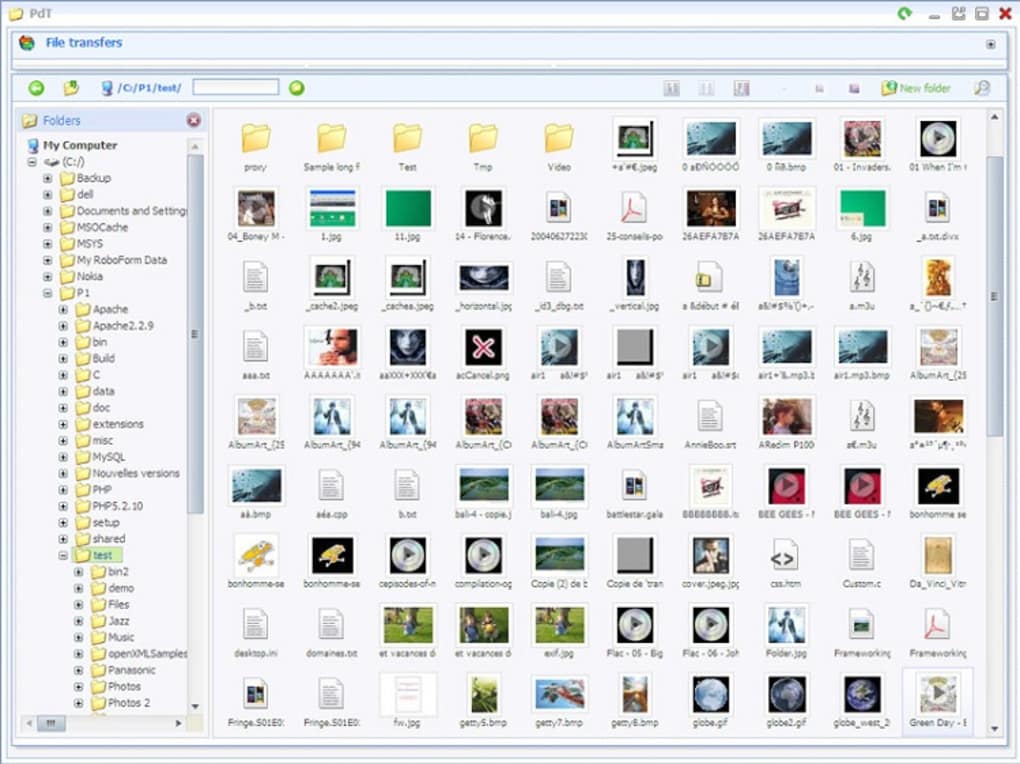
While convenience is a major draw, Weezo does not compromise on the security of your precious digital archives. In an age where data breaches and privacy concerns loom large, the robust security measures integrated into Weezo offer peace of mind. The program utilizes Secure Sockets Layer (SSL) to encrypt all connections to your PC, establishing a secure tunnel for data transfer. This is the same encryption standard used by financial institutions and e-commerce websites, ensuring that your data remains confidential and protected from unauthorized interception during transmission.
Beyond encrypted connections, Weezo employs a sophisticated approach to access control. It automatically generates random passwords for its various services, reducing the vulnerability associated with predictable or easily guessed credentials. This multi-layered security framework means that even if one component were to be compromised (an unlikely event given the strong encryption), the overall system remains resilient. For users who are deeply concerned about the security of their data, particularly those hesitant about entrusting their information to third-party cloud providers, Weezo provides a compelling alternative. It allows you to maintain absolute control over your data by keeping it on your own hardware, under your own security protocols, rather than dispersing it across remote servers managed by external entities. This commitment to security, combined with the unparalleled access it offers, solidifies Weezo’s position as a reliable and trustworthy solution for personal digital management.
Beyond Simple Sharing: Collaboration and Multimedia Powerhouse
Weezo’s utility extends far beyond mere remote file access, venturing into the realms of collaborative work and multimedia content management. It transforms your personal computer into a versatile hub capable of facilitating dynamic interactions and serving a wide array of digital media.
Seamless Collaboration for the Modern User
In an era defined by teamwork and shared endeavors, effective collaboration tools are indispensable. Weezo integrates several features designed to streamline collaborative efforts, making file sharing and interaction surprisingly intuitive and efficient. One of its standout functionalities is the effortless file sharing mechanism, which allows users to simply drag and drop files directly into the program. Upon doing so, Weezo intelligently processes these files, automatically zipping them for efficient transfer or, remarkably, generating a BitTorrent file for easy peer-to-peer distribution. This latter feature is particularly powerful for sharing large files or entire collections with multiple recipients, leveraging the robust and widely adopted BitTorrent protocol without requiring users to navigate complex torrent creation software.
Furthermore, Weezo simplifies the process of making local files accessible to others. Users can designate specific folders on their computer to serve as shared repositories. Any files placed into these designated folders instantly become viewable and downloadable via the Weezo web interface. This means you can curate specific content for colleagues, friends, or family members, granting them secure access without having to manually send individual files. For project teams, this could mean a central repository for shared documents. For community groups, it could be a place to distribute newsletters or event photos. The control remains firmly with the host, who dictates what is shared and with whom. This collaborative suite empowers users to not only access their own data remotely but also to become a central point for sharing and interaction, fostering a more connected and productive digital environment.
Your Private Media Hub: Streaming and Content Serving
Weezo truly shines as a personal media hub, offering robust capabilities for streaming and serving diverse forms of content directly from your home computer. For many, digital media constitutes a significant portion of their digital footprint, and Weezo provides an elegant solution for managing and enjoying it.
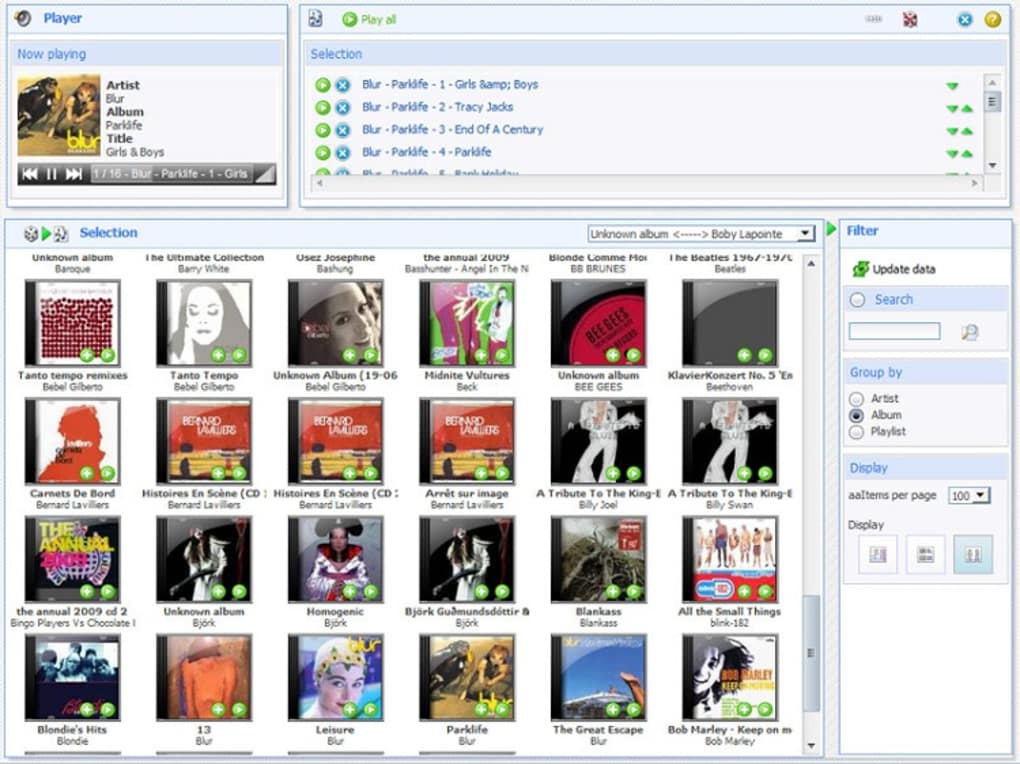
The program offers an exceptionally easy way to upload and serve video, music, and photos. This functionality is a godsend for power users, content creators, bloggers, and aspiring YouTubers who wish to host their own content directly from their machines. While mainstream platforms like YouTube and Vimeo offer widespread reach, hosting your own content via Weezo provides absolute control over distribution, branding, and monetization (if applicable), bypassing platform-specific algorithms or content policies. Imagine running a personal blog where you embed videos directly from your Weezo server, ensuring faster loading times and complete ownership of the viewing experience. Musicians can stream their entire discography, photographers can showcase high-resolution portfolios, and families can host their private photo and video archives for seamless access by loved ones.
Beyond serving, Weezo excels as a personal media consumption device. It boasts integration with popular media players like iTunes and Winamp, allowing users to stream their entire music collection to any connected device. This means your carefully curated playlists and extensive music library are always available, whether you’re at work, on a road trip, or simply relaxing with a different device. The multimedia capabilities extend even further to include streaming TV from around the world. While there are numerous services dedicated solely to media streaming, Weezo’s advantage lies in consolidating these functions within a single, secure, and user-controlled platform. This holistic approach to media management transforms your home computer into a powerful entertainment and distribution center, putting you in command of how your media is consumed and shared.
Security, Privacy, and User Empowerment
In an increasingly digitized world, the twin concerns of security and privacy have become paramount. Weezo tackles these concerns head-on, weaving them into the very fabric of its design. It’s not just about protecting data; it’s about empowering users with the tools to manage their digital interactions responsibly and with confidence.
Fortifying Your Digital Connection
Weezo’s commitment to security is a cornerstone of its appeal. The program employs industry-standard encryption protocols to fortify every digital connection established with your home computer. Specifically, the use of SSL (Secure Sockets Layer) ensures that all data transmitted between your remote device and your Weezo-enabled PC is encrypted. This means that sensitive information, whether it’s personal documents, financial data, or private conversations, is scrambled and unintelligible to any unauthorized third parties attempting to intercept the data stream. This level of encryption is analogous to what is used in online banking and secure web browsing, offering a robust shield against cyber threats.
Beyond encryption, Weezo takes proactive steps to protect access points. It automatically generates strong, random passwords for its various services, mitigating the risk of brute-force attacks or access via commonly used passwords. This approach minimizes human error in password selection and ensures that each service operates under unique and complex credentials. The combination of strong encryption and intelligent password management creates a formidable barrier against unauthorized access, making your personal data residing on your home computer remarkably secure. For individuals wary of the vulnerabilities associated with public Wi-Fi networks or unencrypted connections, Weezo provides a secure conduit, ensuring that your digital interactions remain private and protected regardless of your remote location.
Tailored Access and Transparent Monitoring
True security is not just about keeping intruders out; it’s also about managing who gets in and monitoring their activities. Weezo offers sophisticated access control features that allow you to tailor permissions for multiple users, giving you granular control over who can access what on your system. This is invaluable for families, small businesses, or collaborative projects where different individuals may require varying levels of access to shared resources. You can set up distinct user accounts, each with specific privileges, ensuring that sensitive data is only accessible to authorized personnel, while general content can be shared more broadly.
Moreover, Weezo ensures transparency in user activity. It features a system that generates pop-up alerts, notifying you in real-time about who is accessing your files and services. This real-time monitoring capability provides an immediate overview of active connections and user interactions, offering an added layer of security and accountability. If an unfamiliar user attempts to connect, or if an authorized user accesses resources at an unusual time, you are immediately informed, allowing for prompt action if necessary. This blend of strong encryption, automatic password generation, customizable user permissions, and transparent activity monitoring empowers users to not only protect their data but also to actively manage and oversee its access. In an era where digital sovereignty is increasingly valued, Weezo stands out by placing the power of security and privacy directly in the hands of the user, offering absolute control over their own digital footprint.
A Holistic Suite of Productivity Tools
While Weezo excels in remote access, file management, and multimedia streaming, its ambition stretches further to encompass a range of productivity-enhancing tools. It’s designed not just to be a remote server but a comprehensive digital companion that streamlines various aspects of your online and offline activities.
Streamlining Your Digital Workflow
Modern life often involves juggling numerous digital tasks, from staying updated with news to managing online bookmarks and communicating with peers. Weezo integrates several features aimed at streamlining these common digital workflows, consolidating them within its secure framework. This integration means fewer separate applications to manage and a more cohesive digital experience.
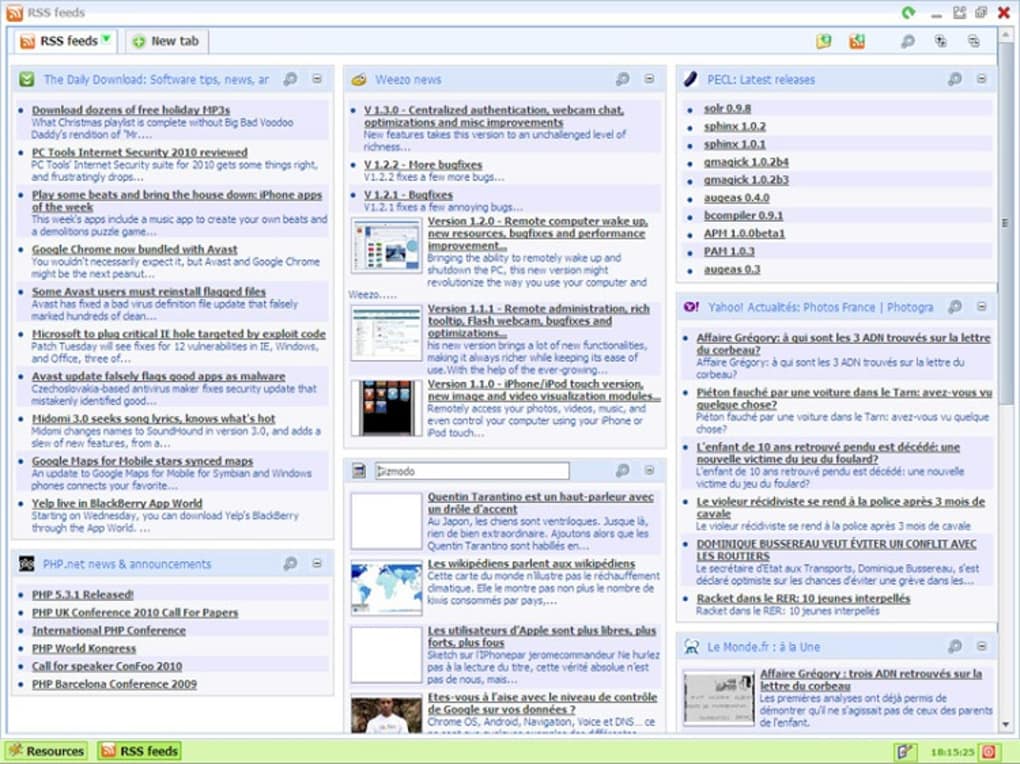
One such feature is its collaborative RSS reader. RSS (Really Simple Syndication) remains an invaluable tool for aggregating content from various websites, blogs, and news sources into a single, digestible feed. Weezo’s collaborative RSS reader takes this a step further, allowing multiple users to share, discover, and discuss content from their subscribed feeds. This is particularly useful for teams staying abreast of industry news, or for families sharing articles of common interest. Instead of each person managing their own RSS subscriptions in isolated applications, Weezo provides a centralized, shared platform, fostering collective information consumption and discussion. This integrated approach saves time, reduces digital clutter, and promotes a more efficient way of consuming online content.
Integrated Features for Enhanced Convenience
Beyond content aggregation, Weezo enhances daily digital convenience through other integrated tools. The bookmark sync feature is a prime example. For anyone who uses multiple devices or browsers, keeping bookmarks synchronized can be a persistent challenge. Weezo offers a secure, user-controlled solution, ensuring that your favorite websites and frequently visited pages are consistent across all your access points. This eliminates the frustration of searching for a bookmark saved on one device when you’re using another, ensuring a seamless browsing experience regardless of where you are or what device you’re on.
Furthermore, Weezo includes a built-in chat program. While there are countless standalone messaging applications available, having an integrated chat function within Weezo provides a direct, secure communication channel for users accessing your services. This is especially useful for collaborative projects or for users sharing files via Weezo, allowing for immediate discussion and feedback without switching to an external application. The convenience of having these tools—an RSS reader, bookmark sync, and chat program—integrated into a single, secure platform cannot be overstated. While, as the original commentary notes, “other tools out there that perform these functions (and are arguably better) but they store information in the cloud,” Weezo’s strength lies in offering these functionalities while allowing you to maintain absolute control over your own data. This commitment to data sovereignty, coupled with a diverse feature set, makes Weezo a powerful and attractive option for users seeking a holistic and privacy-conscious digital solution.
The User Experience: Function Over Form?
No software is without its quirks, and Weezo, despite its impressive array of functionalities, is no exception. While its backend power and security features are robust, the user-facing aspect, particularly its interface, has drawn attention, suggesting a design philosophy that prioritizes functionality over aesthetic polish.
A Functional Interface with Room for Refinement
The primary critique leveled against Weezo’s user interface is its visual presentation. Described as “childish,” with a “mishmash of colors and glossy icons,” the interface appears to be a notable departure from the sleek, minimalist designs prevalent in modern software. This visual inconsistency, coupled with “a lot of unused space on some of the pages,” can contribute to a perception of sloppiness or an outdated aesthetic. In today’s competitive software landscape, where user experience (UX) and intuitive design are often as crucial as underlying functionality, a less refined interface can sometimes be a barrier to adoption for new users or a source of minor frustration for existing ones.
However, it is vital to emphasize that this aesthetic critique does not detract from Weezo’s core capabilities. As the original review succinctly puts it, “While not pretty, it functions just fine.” This highlights a key distinction: despite its visual shortcomings, the interface is entirely functional and effective in allowing users to navigate its features and manage their data. All the powerful tools—remote access, file sharing, multimedia streaming, security settings, and collaboration features—are accessible and work as intended. Users can still configure settings, upload files, stream media, and manage permissions without encountering operational issues due to the interface design. The information is presented clearly enough for a user to understand, even if the visual journey isn’t particularly pleasing.
This suggests that Weezo’s developers have likely focused their resources on building a stable, secure, and feature-rich backend, perhaps viewing interface aesthetics as a secondary concern. For a segment of the user base, particularly power users or those who prioritize functionality and data control above all else, this approach might be perfectly acceptable. They are more interested in what the software does than how it looks. Nevertheless, acknowledging this aspect of Weezo is important for a balanced review. For the program to achieve broader appeal and truly compete with modern cloud services and remote access tools that often boast elegant designs, future iterations would significantly benefit from an investment in interface modernization. Polishing its visual presentation would not only enhance the user experience but also better reflect the sophistication and power that lies beneath its unassuming exterior, potentially attracting a wider audience who value both form and function.
Weezo in the Ecosystem of Digital Tools
The digital landscape is crowded with tools designed for file sharing, remote access, and data management. Weezo operates within this complex ecosystem, offering a distinctive approach that sets it apart from both traditional cloud services and other specialized applications. Understanding its unique position helps to clarify why it might be the ideal choice for certain users.
Differentiating from Cloud Services and Competitors
The most significant differentiator for Weezo lies in its fundamental philosophy: empowering users with absolute control over their own data. In an era dominated by cloud storage providers like Google Drive, Dropbox, and OneDrive, convenience often comes at the cost of relinquishing direct ownership and control over your data. These services store your files on remote servers, managed by third parties, which can raise concerns about privacy, data sovereignty, and potential vendor lock-in. While highly convenient for accessibility and collaboration, they inherently involve trusting an external entity with your most sensitive information.
Weezo offers a powerful counter-narrative. By transforming your home computer into your personal cloud, it ensures that your data remains physically on your hardware, under your direct supervision and security protocols. This appeal resonates strongly with individuals and organizations who prioritize privacy, who are wary of storing sensitive data on third-party servers, or who simply prefer the autonomy of managing their own digital infrastructure. The ability to “have absolute control over your own data” is not just a feature; it’s a core principle that guides Weezo’s design and functionality.
Comparing Weezo to other remote access tools like VNC (Virtual Network Computing) or UltraVNC also highlights its distinct advantages. While VNC clients excel at providing full remote desktop control, allowing you to see and interact with your computer’s screen remotely, Weezo focuses more on granular file access, sharing, and content serving, along with integrated productivity features. It’s less about controlling the entire desktop visually and more about managing specific files and services programmatically. This distinction makes Weezo a lighter, more purpose-built solution for file-centric remote access rather than a full remote desktop replacement.
Furthermore, Weezo integrates file-sharing capabilities often associated with dedicated peer-to-peer (P2P) clients like uTorrent or BitTorrent. However, unlike these clients which often focus solely on the distribution of large files, Weezo bundles this functionality with remote access, multimedia streaming, and security features. It offers the best of both worlds: the efficiency of BitTorrent for sharing large files, combined with the security and control of a personal server. Similarly, while applications like Omemo offer online shared virtual drives, they still operate within a cloud framework. Weezo’s self-hosted approach offers an unparalleled level of data control that these alternatives cannot provide. By consolidating these diverse functionalities—remote access, secure file sharing, multimedia serving, and integrated productivity tools—all while maintaining user sovereignty over data, Weezo carves out a unique and valuable niche in the digital tool ecosystem. It’s an ambitious program that succeeds in empowering users to be the masters of their own digital domains.
Getting Started with Weezo: Installation and Configuration
Embarking on your journey with Weezo is a straightforward process, designed to get you up and running with your personal digital command center as quickly as possible. The program emphasizes ease of use, ensuring that even those without extensive technical expertise can leverage its powerful features.
The initial step involves downloading Weezo, which is readily available for Windows platforms. As a free program, it offers immediate accessibility without any upfront cost. Once the installer is downloaded, the installation process follows standard Windows procedures: a simple double-click, followed by prompts to agree to terms, select an installation directory, and optionally create desktop shortcuts. The file size is relatively modest (around 21.04 MB as of recent versions), ensuring a quick download and installation time. Weezo is compatible with various Windows versions, including Windows 7 and newer, making it accessible to a wide user base.
Upon successful installation, Weezo will typically guide you through an initial setup wizard. This wizard is crucial for configuring the basic parameters of your personal server. Key steps include:
- Setting Up Your Host PC: Weezo needs to be installed on the computer you intend to access remotely – your “host” PC. This machine will act as the server for all your files and services. It’s recommended that this PC has a stable internet connection and remains powered on when you wish to access its resources remotely.
- Creating Admin Credentials: You’ll be prompted to create administrative credentials for your Weezo server. This usually involves a username and a strong password. These credentials are vital for securely managing your Weezo installation and should be kept confidential. Remember, Weezo also generates random passwords for its various services to bolster security further.
- Configuring Network Access: Weezo automatically handles many network complexities, but you may need to ensure your router allows necessary connections. Often, Weezo will use UPnP (Universal Plug and Play) to automatically configure port forwarding on your router. If UPnP is not enabled or fails, you might need to manually configure port forwarding in your router’s settings to allow incoming connections to your Weezo server. Don’t worry, Weezo’s documentation or community support usually provides clear instructions for this if needed.
- Designating Shared Folders: To make files accessible, you’ll need to specify which folders on your host PC you want Weezo to serve. This is where you select your document archives, music libraries, photo albums, or any other content you wish to access or share remotely. You can set permissions for these folders, determining who can view or download their contents.
- Adding Users and Permissions: For collaborative features or multi-user access, you can easily add other users within Weezo’s interface. For each user, you can define specific access rights, granting them permission to view certain folders, stream specific media, or utilize particular services like the chat program or RSS reader. This granular control is a cornerstone of Weezo’s security and collaborative design.
Once these initial configurations are complete, your Weezo server will be active. You can then access it from any internet-connected device (another computer, a smartphone, or tablet) by navigating to the unique web address provided by Weezo or by using a dedicated client if available. The web interface, despite its visual critiques, is functional and allows you to browse files, stream media, and interact with the various integrated tools. The relatively low barrier to entry for installation and configuration ensures that users can quickly begin to leverage Weezo’s extensive capabilities, transforming their home computer into a powerful, secure, and personalized digital hub.
Conclusion: Weezo – A Bold Vision for Digital Autonomy
Weezo, with its quirky name and ambitious feature set, stands as a testament to the power of user-centric design in the digital age. It boldly challenges the prevailing paradigm of cloud-dependent digital life by offering a robust, secure, and versatile platform that empowers individuals to regain absolute control over their own data and digital experiences. From its core functionality of remote file access and management to its expansive suite of collaborative tools, multimedia streaming capabilities, and integrated productivity features, Weezo positions itself as a comprehensive solution for the modern user.
The program’s unwavering commitment to security, evident in its use of SSL encryption, automatic password generation, and transparent user monitoring, provides a crucial layer of trust and peace of mind. In a world grappling with data breaches and privacy concerns, Weezo offers a compelling alternative to third-party cloud services, allowing users to keep their precious digital assets securely rooted on their own hardware. Its collaborative features, including easy drag-and-drop file sharing and BitTorrent generation, foster seamless interaction, while its multimedia capabilities transform your home PC into a personal content-serving and entertainment hub.
While its interface may currently be more functional than fashionable, reflecting a focus on backend robustness over aesthetic polish, this minor critique does little to diminish the immense value Weezo brings to the table. Its “ambitious” nature is its greatest strength, as it successfully integrates a disparate array of functionalities into a single, cohesive, and user-controlled ecosystem.
For the power user, the privacy advocate, the content creator, or anyone simply seeking a more autonomous and secure way to manage their digital life, Weezo presents a unique and highly effective solution. It’s an invitation to take back ownership of your digital world, transforming your personal computer into a true command center, always accessible, always secure, and always under your control. Weezo is not just a piece of software; it’s a statement about digital freedom and empowerment in an increasingly interconnected landscape.
File Information
- License: “Free”
- Latest update: “July 11, 2023”
- Platform: “Windows”
- OS: “Windows 7”
- Language: “English”
- Downloads: “6.3K”
- Size: “21.04 MB”


