
OmniPeek Network Analyzer, developed by WildPackets (now part of Savvius), is a powerful software tool designed for comprehensive network monitoring and analysis. It provides a robust suite of capabilities for troubleshooting, debugging, and optimizing multiprotocol networks, offering valuable insights into network performance and security. While not known for its user-friendly interface, its depth of functionality makes it a valuable asset for network professionals and developers requiring in-depth analysis capabilities. This review explores its strengths, weaknesses, and overall suitability for various network-related tasks.
Understanding OmniPeek’s Core Functionality
OmniPeek’s primary function is packet analysis. It captures and decodes network traffic, providing a detailed view of the data flowing across a network. This allows users to identify bottlenecks, pinpoint the sources of network issues, and gain a comprehensive understanding of network behavior. Unlike simpler network monitoring tools that provide only high-level statistics, OmniPeek delves into the granular details of individual packets, revealing the intricate workings of network communications. This level of detail is crucial for diagnosing complex problems that might be overlooked by less sophisticated tools.
The software’s capabilities extend beyond simple packet capture. It supports a wide range of network protocols, enabling the analysis of diverse network traffic types, from common protocols like TCP/IP and HTTP to more specialized protocols used in specific network environments. This broad protocol support makes OmniPeek versatile and adaptable to a wide variety of network configurations and applications. The ability to decrypt SSL-encrypted packets is a particularly valuable feature, providing visibility into traffic that would otherwise be obscured from standard network monitoring tools. This capability is essential for identifying security vulnerabilities and troubleshooting issues related to secure connections.
Key Features and Benefits of OmniPeek Network Analyzer
OmniPeek offers a comprehensive set of features that cater to the needs of experienced network administrators and developers. Some of its key strengths include:
-
Deep Packet Inspection: The software’s core strength lies in its ability to perform deep packet inspection, providing detailed information about each packet captured. This granular level of detail enables precise identification of the source and destination of network traffic, the protocols used, and the content of the packets themselves (subject to decryption capabilities).
-
Multiprotocol Support: OmniPeek supports a vast array of network protocols, ensuring compatibility with diverse network environments. This broad support minimizes the need for multiple specialized tools, streamlining the network analysis process.
-
SSL Decryption: The capacity to decrypt SSL-encrypted packets is a significant advantage. This allows network professionals to inspect the contents of secure connections, facilitating the identification of security breaches and the troubleshooting of problems related to secure communication channels. This is particularly critical in security audits and incident response scenarios.
-
Real-time Monitoring and Analysis: OmniPeek provides real-time monitoring of network traffic, allowing immediate identification and analysis of network events. This is crucial for rapid response to network issues and performance optimization.
-
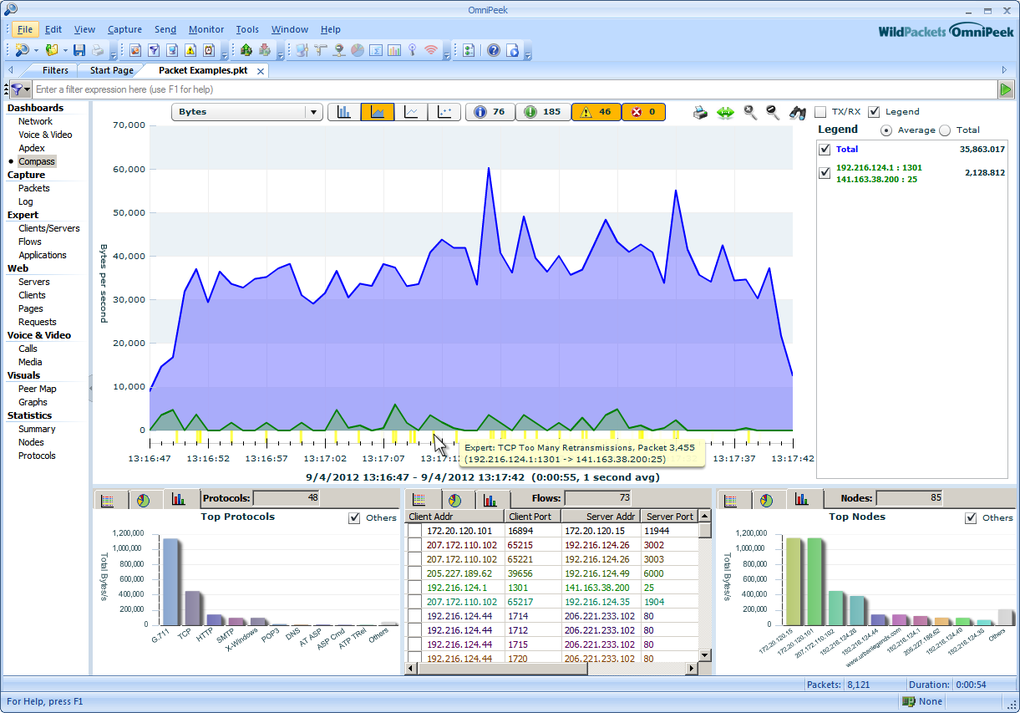
Flexible Reporting and Visualization: The software offers advanced reporting and visualization capabilities. Users can generate detailed reports, custom graphs, and charts to present their findings clearly and effectively. This visual representation of network data facilitates a better understanding of complex network behavior.
-
Extensive Filtering and Searching: OmniPeek’s powerful filtering and searching capabilities enable users to focus on specific aspects of network traffic. This capability is critical when dealing with high-volume network traffic, allowing efficient analysis by narrowing down the data to only relevant information.
-
Integration with Other Tools: OmniPeek can integrate with other network management tools, extending its functionality and enhancing its value within a broader IT infrastructure.
Limitations and Considerations
Despite its robust features, OmniPeek has some limitations:
-
Steep Learning Curve: The software is not known for its user-friendly interface. Its complexity and extensive feature set can pose a significant learning curve, particularly for users with limited experience in network analysis. The comprehensive set of options and detailed settings can be overwhelming for new users.
-
Resource Intensive: Given the depth of its analysis, OmniPeek can be resource-intensive, requiring significant processing power and memory. This should be considered when deploying it on systems with limited resources.
-
Cost: The software’s cost can be prohibitive for some users, particularly individuals or small businesses. While a free trial is available, the cost of a full license might be a significant investment.
Target Audience and Use Cases
OmniPeek is primarily designed for experienced network administrators, security professionals, and software developers who require in-depth network analysis capabilities. Its suitability for various use cases include:
-
Network Troubleshooting: Identifying and resolving network performance bottlenecks and connectivity issues.
-
Security Auditing and Incident Response: Detecting and analyzing security incidents, identifying intrusion attempts and vulnerabilities.
-
Application Development and Testing: Monitoring and optimizing the network performance of applications under development or testing.
-
Network Performance Optimization: Identifying and addressing areas of inefficiency in network performance.
-
Compliance and Regulatory Reporting: Generating reports to meet regulatory compliance requirements.
While its advanced functionality caters well to experienced users, the steep learning curve may make it less suitable for less technically proficient individuals. The lack of a simplified interface aimed at less technically adept users limits its accessibility to a broader audience.
In conclusion, OmniPeek Network Analyzer remains a powerful tool for in-depth network analysis, boasting a comprehensive feature set and capabilities that are unmatched by many competitors. However, its complexity and steep learning curve should be carefully considered. The significant investment required for the software license, coupled with the need for significant technical expertise, restricts its accessibility to a specific niche of users. For those with the necessary skills and resources, OmniPeek can be an invaluable asset for comprehensive network analysis, troubleshooting, and optimization. But for users seeking a simpler, more user-friendly network monitoring solution, other tools might be more appropriate.
File Information
- License: “Demo”
- Version: “7.9”
- Latest update: “August 20, 2019”
- Platform: “Windows”
- OS: “Windows XP”
- Language: “English”
- Downloads: “13.5K”
- Size: “183.49 MB”


