
WRITEit is a productivity software application developed by Lenovo, designed specifically for Lenovo devices equipped with touchscreen capabilities. This application transforms your Lenovo device into a digital writing pad, allowing you to write directly onto the screen using either your finger or a compatible Lenovo stylus. WRITEit goes beyond simple note-taking; it integrates seamlessly with your computer’s operating system, enabling intuitive interaction with various applications and software. This detailed review explores the functionality, performance, and user experience offered by WRITEit.
How WRITEit Works: Seamless Integration and Intuitive Interaction
WRITEit’s core functionality centers around its ability to replace traditional mouse input with touch gestures. This allows for a more natural and intuitive interaction with your computer’s operating system and applications. Whether you’re navigating files, selecting options in a program, or simply controlling your cursor, WRITEit provides an alternative input method that leverages your touchscreen capabilities.
Beyond navigation, WRITEit shines in its note-taking and annotation features. Users can easily jot down notes, create sketches, highlight text, or add annotations directly onto any digital content displayed on the screen. This functionality extends to all applications and software installed on your Lenovo device, providing a consistent and unified writing experience across different programs.
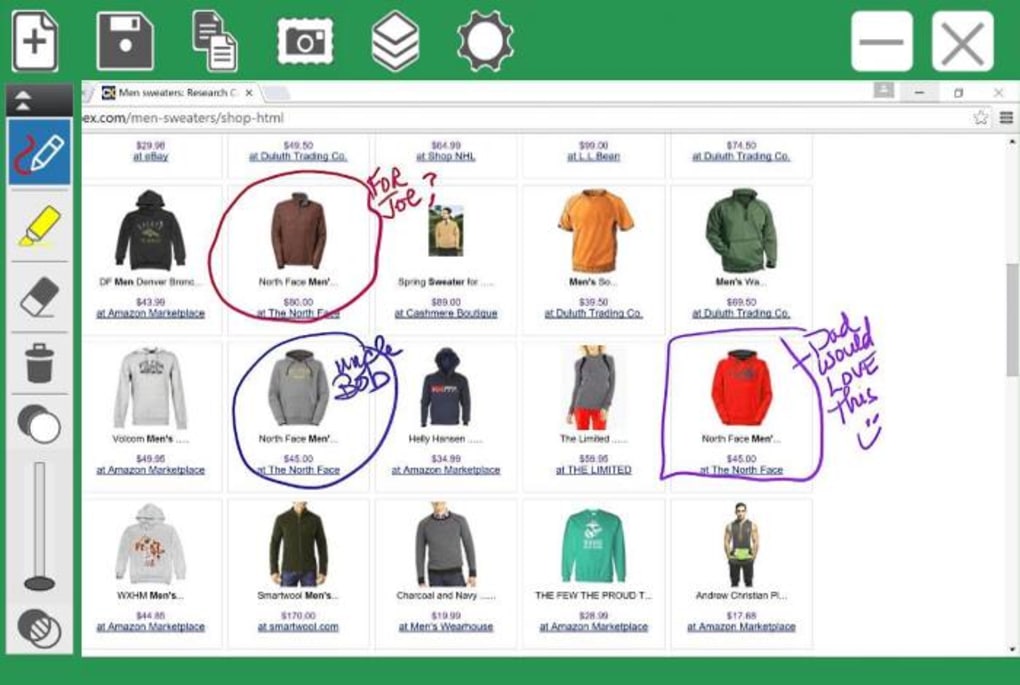
The process is straightforward: Simply initiate the touchscreen feature using either an external stylus or your finger. WRITEit provides a range of tools for various tasks. These include a selection of twelve pen colors with three different width options, four highlighter colors, and an eraser for making corrections or adjustments. Users can easily switch between these tools to create notes, drawings, or annotations as needed. Furthermore, the application offers blank canvases for freeform drawing or note-taking, allowing for creative expression or detailed brainstorming. Completed drawings and annotations can be saved as image files, facilitating easy sharing and integration into presentations or other documents.
One of WRITEit’s most powerful features is its ability to convert handwritten text into typed text. This handwriting recognition technology aims to bridge the gap between the traditional pen-and-paper experience and the efficiency of digital typing. The application automatically attempts to decipher your handwritten words, converting them into typed text in real-time. This automated conversion process significantly enhances the usability of the application, making it ideal for taking notes during lectures, meetings, or brainstorming sessions.
Should the handwriting recognition encounter difficulties, WRITEit provides a helpful feature that displays a list of potential word suggestions. If the initial automatic detection is inaccurate, the user can simply select the correct word from the suggestions, correcting any errors made by the software. This collaborative approach ensures accuracy, and greatly reduces the frustration often associated with handwriting recognition software.
Performance and Accuracy: A Balancing Act of Speed and Precision
WRITEit generally performs well, offering a fluid and responsive user experience. However, the inherent limitations of writing on a touchscreen surface must be acknowledged. Compared to traditional pen and paper, or even a dedicated writing tablet, the resulting handwriting may appear less polished, exhibiting some wobble or irregularity. This is a common challenge with touchscreen writing, and is not solely a drawback of WRITEit.
Recognizing this potential limitation, Lenovo has prioritized the accuracy of its handwriting recognition feature. This feature acts as a crucial element in mitigating the impact of less-than-perfect penmanship. In most cases, WRITEit accurately detects and converts handwritten text, ensuring that the final result is readable and usable. Only when handwriting is exceptionally illegible or significantly deviates from typical writing styles does the software struggle to accurately interpret it. This robust handwriting recognition algorithm is a significant strength of WRITEit, transforming what could be a limiting factor into a significant advantage.
Customization and Additional Features: Tailored to Individual Needs
WRITEit’s user-friendliness extends beyond its core functionality. The application offers several customization options to enhance user experience and cater to individual preferences. Users can specify their handedness (left or right), allowing the app to optimize its interface for their dominant hand. This seemingly minor adjustment can have a significant impact on comfort and ease of use, particularly during prolonged periods of writing.
Furthermore, users can independently enable or disable specific features, such as auto-conversion (handwriting to text), ink gestures (using specific strokes for commands), and image insertion. This degree of control allows users to tailor the application to their specific needs and workflow, optimizing the WRITEit experience for maximum productivity. The ability to selectively toggle these features ensures that WRITEit remains flexible and adaptable to varying user preferences and application scenarios.
Advantages and Disadvantages: Weighing the Pros and Cons
WRITEit presents a compelling suite of features, but like any software, it comes with its own set of strengths and weaknesses.
Pros:
- Wide Compatibility: WRITEit works seamlessly with most desktop applications and software, allowing users to annotate and write within various programs.
- Image Export: Completed drawings and annotations can easily be exported as image files, enabling seamless integration with other documents and presentations.
- Intuitive Tools: The application provides a simple and intuitive set of drawing tools, including a variety of pen colors, thicknesses, highlighters, and an eraser.
- Handwriting Recognition: The accurate handwriting recognition feature significantly enhances productivity, converting handwritten text into typed text.
Cons:
- Lenovo Device Requirement: WRITEit is exclusive to Lenovo devices with touchscreen functionality, limiting its accessibility.
- Stylus Dependency (Recommended): While finger input is possible, using a compatible Lenovo stylus significantly enhances the writing experience and accuracy.
- Older OS Compatibility: WRITEit’s compatibility with older operating systems might be limited, potentially excluding users with older Lenovo devices.
- Limited Color Options (Relative): While offering a decent selection, the color palette might be considered limited compared to professional art or drawing applications.
Conclusion: A Powerful Tool for Lenovo Users
WRITEit stands as a valuable productivity application for users of Lenovo touchscreen devices. Its intuitive design, seamless integration with various software, and advanced handwriting recognition capabilities offer a significant improvement over traditional methods of digital note-taking and annotation. While its exclusivity to Lenovo devices and potential compatibility issues with older operating systems represent limitations, the benefits provided to compatible users are substantial. WRITEit effectively bridges the gap between the ease of physical writing and the efficiency of digital input, providing a powerful tool for students, professionals, and anyone who values a fluid and natural writing experience on their Lenovo computer.
File Information
- License: “Free”
- Version: “2.0.62”
- Latest update: “December 4, 2019”
- Platform: “Windows”
- OS: “Windows 8”
- Language: “English”
- Downloads: “27.6K”
- Size: “85.68 MB”


