
Xirrus Wi-Fi Inspector is a free Windows application designed to simplify Wi-Fi network discovery, connection, and troubleshooting. Its intuitive interface and radar-like visualization make it accessible to both novice and experienced computer users. This detailed guide explores its features, benefits, limitations, and alternatives, providing a comprehensive overview of this helpful utility.
Simplifying Wi-Fi Connectivity and Troubleshooting
Xirrus Wi-Fi Inspector streamlines the process of finding and connecting to Wi-Fi hotspots. Its primary function is to scan your surroundings for available Wi-Fi networks, displaying them in an easy-to-understand format. This eliminates the need for manual searching through system settings, making it particularly convenient for users in areas with multiple available networks. The software displays key information about each network, including signal strength, allowing users to make informed decisions about which network to connect to based on signal quality and proximity.
Beyond simple network discovery, Xirrus Wi-Fi Inspector also incorporates troubleshooting capabilities. It helps identify potential connection issues, providing users with valuable insights into why they might be experiencing connectivity problems. This functionality can save significant time and frustration by pinpointing the source of connectivity problems, whether it’s a weak signal, network congestion, or other technical issues. This proactive approach to troubleshooting is a key advantage for users who may lack the technical expertise to diagnose such problems independently.
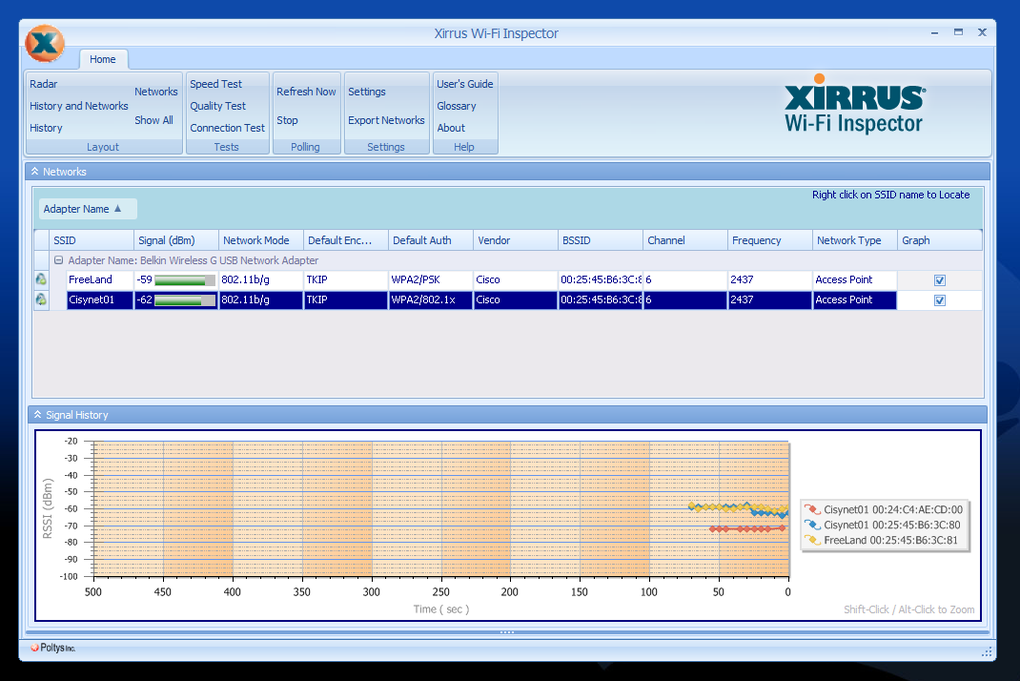
The application’s intuitive design contributes to its ease of use. Even users with limited computer experience can quickly grasp its functionality. The user interface avoids complex jargon and technical details, presenting information in a clear and concise manner. This user-friendly approach is crucial for making the software accessible to a broad range of users, regardless of their technical proficiency.
Radar-Style Interface and Network Information
A distinctive feature of Xirrus Wi-Fi Inspector is its radar-style visualization of nearby Wi-Fi networks. This visual representation simplifies the identification of available networks and their respective signal strengths. The radar graphically illustrates the location and strength of each detected network, using a color-coded system or similar visual cues to indicate signal intensity. This innovative approach enhances the user experience, providing a more engaging and intuitive method of network discovery compared to traditional list-based approaches.
The software provides detailed information for each detected network, extending beyond just the network name (SSID) and signal strength. This detailed information may include security protocols used (e.g., WPA2, WEP), network channel, and other relevant technical specifications. This level of detail empowers users to choose networks that best suit their needs, considering factors such as security and potential interference from other nearby networks. The inclusion of this technical information caters to users who desire a more granular understanding of their Wi-Fi environment.
Advantages and Limitations of Xirrus Wi-Fi Inspector
Xirrus Wi-Fi Inspector offers several significant advantages:
- Ease of use: Its intuitive interface and simplified design make it accessible to users of all technical skill levels.
- Comprehensive network discovery: The application efficiently scans for available networks and provides detailed information about each one.
- Effective troubleshooting: Its built-in troubleshooting features help identify and resolve connectivity issues.
- Radar-style visualization: The unique visual representation of networks enhances the user experience.
- Free availability: The software is free to download and use.
However, Xirrus Wi-Fi Inspector also has some limitations:
- Windows-only compatibility: The software is only available for Windows operating systems, excluding users of macOS, Linux, or other platforms.
- Potential for bugs: User reviews mention the presence of minor bugs, although the frequency and severity of these issues are not consistently reported.
- Limited advanced features: Compared to some more sophisticated network analysis tools, Xirrus Wi-Fi Inspector lacks advanced features such as detailed spectrum analysis or in-depth performance metrics.
Alternatives to Xirrus Wi-Fi Inspector
While Xirrus Wi-Fi Inspector provides a solid foundation for Wi-Fi network management, several alternative applications offer expanded functionalities or compatibility with different operating systems. Some popular alternatives include:
- InSSIDer: A popular and free Wi-Fi analyzer that provides detailed information about networks, including channel usage and signal strength. It is available for Windows.
- WifiInfoView: A free tool that analyzes wireless networks and provides extensive information about each network’s properties. It is also available for Windows.
- NetSpot: A more comprehensive and feature-rich Wi-Fi analyzer for both Windows and macOS. It offers advanced features such as heatmap generation and detailed site surveys. This is a paid software option.
- Homedale: A free and open-source network scanning tool with a strong focus on security analysis. It can help identify vulnerabilities in your Wi-Fi network. It offers cross-platform support.
The choice of alternative depends on the user’s specific needs and preferences. Users needing only basic network discovery and troubleshooting may find Xirrus Wi-Fi Inspector perfectly adequate. However, users requiring more advanced features or cross-platform compatibility may prefer one of the alternative applications listed above. The selection process should involve comparing the features and functionalities of each option to determine the best fit for individual requirements.
Conclusion
Xirrus Wi-Fi Inspector is a user-friendly and effective tool for managing Wi-Fi networks on Windows systems. Its intuitive interface, comprehensive network discovery capabilities, and integrated troubleshooting features make it a valuable asset for both novice and experienced users. While its Windows-only compatibility and potential for minor bugs are drawbacks, its overall ease of use and free availability make it a compelling choice for users seeking a simple yet effective solution for their Wi-Fi needs. Users with more advanced requirements or those using non-Windows operating systems will want to explore the alternative applications discussed previously. The best choice ultimately depends on individual needs and preferences.
File Information
- License: “Free”
- Latest update: “July 11, 2023”
- Platform: “Windows”
- OS: “Windows 10”
- Language: “English”
- Downloads: “142.7K”
- Size: “15.57 MB”


