
BitComet is a veteran in the world of BitTorrent clients, offering a robust feature set for downloading torrent files. While its interface might appear dated compared to newer alternatives, its powerful capabilities and unique features continue to attract users seeking a comprehensive and efficient torrenting experience. This review delves into BitComet’s functionalities, strengths, weaknesses, and alternatives to provide a complete understanding of this long-standing download manager.
BitComet’s Core Functionality: Downloading Torrent Files
At its heart, BitComet is a BitTorrent client designed to download torrent files. It leverages the peer-to-peer (P2P) file-sharing protocol, enhancing download speeds by utilizing multiple sources simultaneously. Unlike some simpler clients that rely solely on BitTorrent, BitComet integrates support for HTTP and FTP downloads, further diversifying its resource acquisition methods and bolstering download speeds. This multifaceted approach allows for faster downloads, especially for popular torrents with numerous seeders and leechers. The software boasts availability in over 52 languages, making it accessible to a global user base.
Beyond the basic download function, BitComet incorporates several features aimed at optimizing the downloading process. The inclusion of an integrated antivirus program is a notable security feature, scanning downloaded files before they are fully transferred to prevent malware infections. This proactive approach enhances user safety, a crucial aspect often overlooked in some competing applications.
User Interface and Experience: A Blend of Familiarity and Complexity
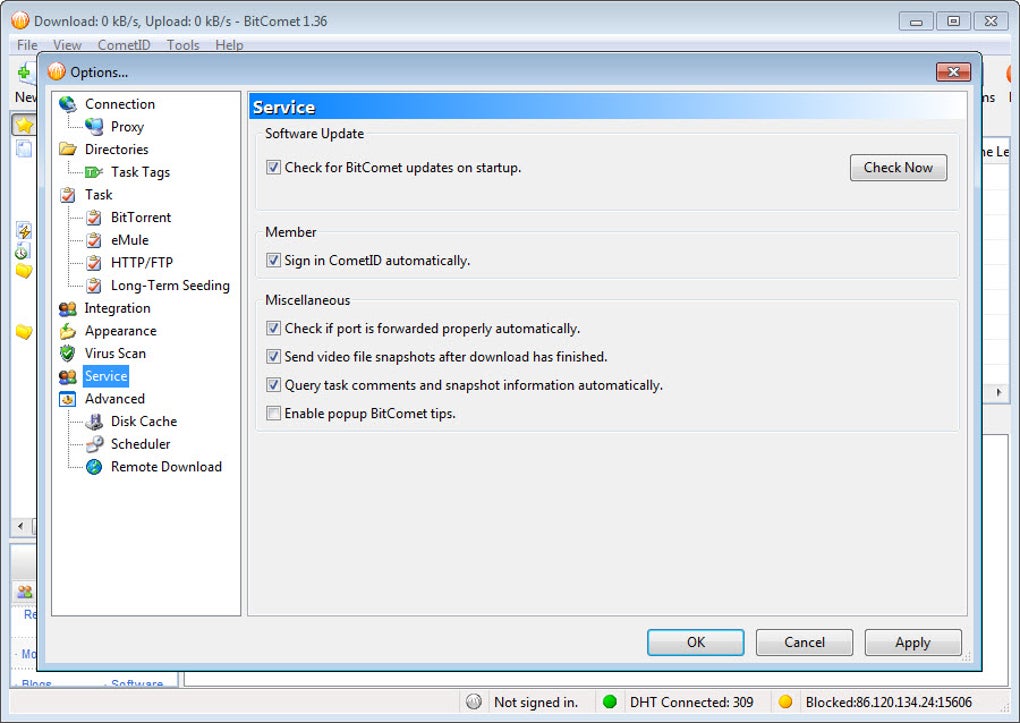
BitComet’s interface, while functional, might present a learning curve for newcomers. It’s designed with a Windows Explorer-like structure, which is familiar to many users, yet it lacks the streamlined simplicity of some modern torrent clients. The abundance of features, though beneficial for advanced users, can be overwhelming for those less experienced with torrenting. The layout, while organized, may appear cluttered and less intuitive compared to the sleek, minimalist designs found in newer applications.
Despite its complexity, BitComet allows for customization. Users can enable or disable various toolbars and panels to tailor the interface to their preferences and level of expertise. This degree of customization gives experienced users control over their environment, focusing only on the features they frequently use.
Notable Features: Enhancing Download Efficiency and Control
BitComet stands out due to its rich feature set, beyond the standard torrent downloading functionality. Some of its key features include:
-
Simultaneous Downloads: Handle multiple downloads concurrently, maximizing bandwidth utilization and efficiently downloading several files at once.
-
File Segregation: Organize downloaded files based on their type, simplifying file management and preventing clutter.
-
Proxy Configuration: Bypass geographical restrictions and enhance privacy by configuring proxy settings, crucial for users concerned about their online anonymity.
-
IP Address Masking: Further enhancing privacy, this feature helps mask the user’s IP address, a vital tool in regions with restrictive internet regulations.
-
Instant Resume: Seamlessly resume interrupted downloads, preventing the need to restart the entire download process in the event of connection issues.
-
Download Speed Limits: Control the download and upload speeds, preventing the client from overwhelming the internet connection and allocating bandwidth effectively. This is especially important for users with limited bandwidth or who share their internet connection.
-
Disk Cache Optimization: BitComet employs intelligent disk caching, reducing hard drive read/write operations, protecting the hard drive from potential wear and tear caused by frequent high-speed data transfers. The efficient management of disk caching also minimizes file fragmentation, ensuring smoother and more efficient file access.
-
Long-Term Seeding Technology: BitComet addresses the common issue of torrents getting stuck at 99% completion by utilizing Long-term Seeding technology. This feature actively searches for additional seeders, ensuring a complete download even if original seeders become unavailable. Once complete, the application automatically renames files, facilitating organization.
- Magnet Link Support: Beyond torrent files, BitComet supports magnet links, a convenient method for accessing torrent information without downloading a torrent file.
Advanced Capabilities: Remote Management and Preview Functionality
BitComet’s capabilities extend beyond basic downloading:
-
Built-in Torrent Search: The integrated search function allows users to locate download links directly within the application, simplifying the process of finding desired files.
-
Remote Management: Control downloads and uploads remotely, enabling users to manage their downloads from anywhere with an internet connection. This functionality is invaluable for users who want to monitor and manage downloads while away from their computer.
-
Automated System Actions: Configure the application to automatically shut down or put the computer to sleep after a download completes. This automatic shutdown feature saves energy and is useful for overnight downloads.
-
Download Preview: BitComet’s unique ability to preview files (like AVI and WMV) before they are fully downloaded is a significant advantage. This feature allows users to verify file quality and language before committing to a complete download, saving time and bandwidth.
Alternatives to BitComet: Exploring Other Torrent Clients
While BitComet offers a powerful feature set, users might find other clients better suited to their needs. Several alternatives provide similar functionality with potentially more user-friendly interfaces:
-
uTorrent: Known for its lightweight nature and efficient resource usage. It’s a popular choice for those seeking a simpler and less resource-intensive torrent client.
-
qBittorrent: An open-source alternative praised for its clean interface and robust features. Its open-source nature makes it a transparent and trustworthy option for privacy-conscious users.
-
Vuze (formerly Azureus): A powerful client offering advanced features and a more modern interface than BitComet. It offers a user-friendly experience combined with advanced functionalities.
Should You Download BitComet?
The decision to use BitComet depends on individual priorities. If a comprehensive feature set and advanced capabilities are paramount, BitComet is a strong contender. Its unique features, like long-term seeding and download preview, offer significant advantages. However, its dated interface and potential complexity might deter users seeking a simple and straightforward experience. For those prioritizing a clean and easy-to-use interface, alternatives like uTorrent or qBittorrent are strong contenders. Weighing the need for extensive features against the preference for a user-friendly interface is key when choosing a BitTorrent client. Ultimately, the “best” client is subjective and depends on individual needs and preferences.
File Information
- License: “Free”
- Latest update: “May 30, 2025”
- Platform: “Windows”
- OS: “Windows 2000”
- Language: “English”
- Downloads: “2.4M”


