
Splashtop Personal is a remote access software application designed to provide convenient control over your personal computer from a tablet or smartphone. This review will delve into its features, ease of use, performance, limitations, and compare it to alternative solutions. We will explore whether this free, home-network-focused software meets the needs of the average user and examine the value proposition of its optional “Access Anywhere” subscription.
Effortless Setup and Intuitive Interface
One of Splashtop Personal’s most appealing aspects is its remarkably straightforward setup process. The installation and configuration are streamlined, requiring minimal technical expertise. The process typically involves three simple steps:
-
Download and installation on the host PC: The Splashtop streamer application is downloaded and installed on the computer you wish to access remotely. This acts as the bridge between your computer and your mobile device. The installer guides you through the process, ensuring a smooth and user-friendly experience, even for less tech-savvy individuals.
-
Installation on the remote device: The Splashtop Personal app is then installed on your tablet or smartphone (iOS, Android, etc.). This is the application you will use to control your computer remotely. The app itself is lightweight and readily available on major app stores.
- Account creation and login: Finally, you create a Splashtop Personal account and log in on both the host PC and the remote device. This links the two applications and allows for secure and seamless connection. The account creation process is straightforward and intuitive.
This entire process typically takes less than five minutes, a significant advantage over more complex remote desktop solutions. The user interface on both the host and remote applications is intuitive and designed for ease of navigation, minimizing any learning curve.
High-Performance Remote Access and Features
Splashtop Personal offers impressive remote access capabilities, allowing you to control your computer from virtually anywhere within your home network. This extends beyond simple file access; it provides complete control over your computer’s functions:
-
Full File Access: You can seamlessly access and manage all files and folders on your computer, just as if you were sitting directly in front of it. This includes opening, editing, and saving documents, accessing images, and managing other files.
-
Application Control: The software grants full control over your installed applications. Launch programs, open documents within those programs, and interact with them as if you were using a mouse and keyboard directly connected to the PC. This functionality is crucial for productivity and accessibility.
-
Web Browsing: Browse the web using your computer’s browser with full Flash and Java support (though the relevance of Flash support is diminishing). This allows you to access websites and online services directly from your mobile device, maintaining the functionality and security of your desktop browser.
-
Microsoft Office and PDF Editing: The software provides seamless integration with Microsoft Office applications and PDF readers. You can open, edit, and save documents directly from your mobile device, eliminating the need to transfer files back and forth.
-
Gaming Support: One of Splashtop Personal’s notable features is its support for gaming. While not designed as a dedicated game streaming service, it enables you to play many PC games remotely. Its high-performance streaming technology allows for reasonably smooth gameplay, even with graphically intensive 3D games, though lag may be experienced depending on your network setup.
-
High-Quality Audio and Video Streaming: This is arguably Splashtop Personal’s standout feature. Unlike many remote desktop solutions that struggle with video and audio quality, especially over the internet, Splashtop Personal delivers remarkably high-quality streaming. On a stable, high-speed home network, you can even stream movies and videos with minimal noticeable lag or quality degradation.
Limitations and Considerations
While Splashtop Personal offers a compelling array of features, it is essential to acknowledge its limitations:
-
Local Network Dependency (Free Version): The free version of Splashtop Personal is exclusively designed for use within your local home network. This means you cannot access your computer remotely when away from home. This is a significant restriction for many users.
-
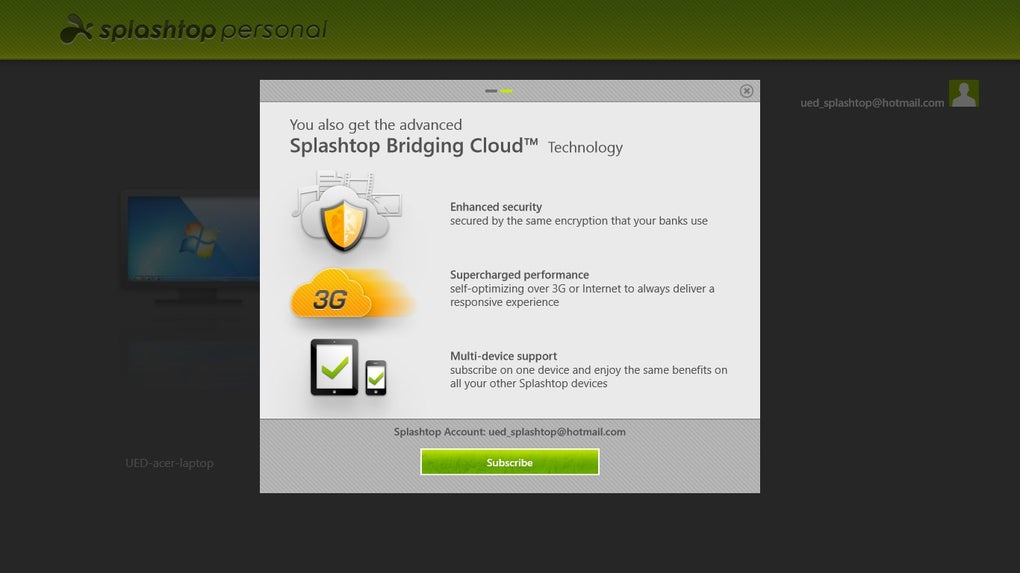
Access Anywhere Subscription: To access your computer remotely from outside your home network, you need to subscribe to the “Access Anywhere” pack, which comes at an additional cost. While this option extends the functionality, the pricing might be a deterrent for some.
-
Personal Use Only: Splashtop Personal is explicitly intended for personal use. It is not designed for professional or business applications. Using it for business purposes violates the terms of service and could result in account suspension. Separate business-oriented subscriptions are available from Splashtop for commercial use.
-
Number of Computers: While you can access up to five home computers with the free version, exceeding this number requires an upgrade to a paid plan.
-
Potential Network Congestion: The performance of Splashtop Personal is directly dependent on the stability and speed of your home network. Network congestion, caused by multiple devices or bandwidth limitations, can impact streaming quality and introduce lag.
Comparison with Alternative Solutions
Splashtop Personal competes with a range of remote desktop software solutions, each with its own strengths and weaknesses. Popular alternatives include TeamViewer, AnyDesk, Chrome Remote Desktop, and Microsoft Remote Desktop. While many of these alternatives offer similar core functionality, Splashtop Personal stands out with its:
-
Ease of Setup: The setup process for Splashtop Personal is arguably simpler and faster than some competitors.
-
High-Quality Streaming: Its emphasis on high-quality video and audio streaming is a notable advantage, often exceeding the capabilities of comparable free solutions.
-
Gaming Capabilities: While not a dedicated gaming streaming service, its ability to support many PC games is a useful feature often absent in other free remote desktop applications.
However, alternatives like TeamViewer offer more robust features, particularly for business use, and often provide cross-platform compatibility with greater flexibility than Splashtop Personal’s free edition.
Conclusion
Splashtop Personal is a highly capable and user-friendly remote desktop application ideal for personal use within a home network. Its simple setup, high-quality streaming, and unexpected gaming compatibility make it an attractive choice for many users. However, its restriction to local networks in its free version and the additional cost of the “Access Anywhere” pack are critical considerations. If you primarily need to access your computer within your home and value ease of use and high-quality streaming, Splashtop Personal is a strong contender. But if you require remote access from outside your home or need business-oriented features, exploring alternative solutions might be more appropriate. Ultimately, the best choice depends on individual needs and budget.
File Information
- License: “Free”
- Version: “varies-with-device”
- Latest update: “July 15, 2022”
- Platform: “Windows”
- OS: “Windows 10”
- Language: “English”
- Downloads: “7.8K”


