
In an increasingly interconnected world, the ability to access and manage computers remotely has transitioned from a niche technical requirement to an everyday necessity for businesses and individuals alike. Whether you’re an IT professional providing vital support, a remote worker needing access to your office workstation, or simply trying to assist a family member with a tech issue, a reliable remote desktop solution is indispensable. Amidst a landscape populated by feature-rich, often complex, applications, Supremo emerges as a noteworthy contender, offering a compelling blend of simplicity, security, and functionality. This in-depth article will explore Supremo’s capabilities, delving into what makes it a robust choice for remote access, support, and collaborative sessions, while also examining its specific advantages and limitations in detail.

Unveiling Supremo: A Powerful Yet Simple Remote Access Tool
At its core, Supremo is a versatile productivity tool designed to establish a secure and efficient connection between two computers. Its primary function is to facilitate either the remote control of a distant PC or the provision of remote access to your own machine for another authorized user. This fundamental capability addresses a wide array of scenarios, from effortlessly managing your home computer while on the go to initiating ad-hoc meetings or providing critical technical assistance to clients or colleagues located anywhere in the world. Its design philosophy emphasizes straightforward operation, ensuring that even users without extensive technical expertise can leverage its power effectively.
The Core Promise: Bridging Distances with Ease
The promise of remote access software lies in its ability to collapse geographical boundaries, making it feel as though you are directly in front of the distant machine. Supremo delivers on this promise by offering a direct, high-performance link. Imagine needing to retrieve a crucial document saved only on your office computer while you’re working from home, or perhaps a client requires immediate assistance with a software configuration. In these situations, Supremo acts as your digital conduit, granting you full control over the remote desktop environment.
This functionality extends beyond mere control; it’s about enabling productivity and fostering collaboration regardless of physical location. For businesses, this translates into streamlined IT support, reduced travel costs, and enhanced flexibility for remote teams. For individuals, it means peace of mind, knowing that assistance is just a click away, or that personal files are always within reach. Supremo achieves this without burdening the user with convoluted setup processes, a characteristic that immediately sets it apart in a crowded market.
Standing Apart: Simplicity in a Complex World
When discussing remote access applications, certain names inevitably rise to the forefront. TeamViewer, for instance, is often considered a frontrunner, lauded for its extensive suite of features encompassing not only remote control but also comprehensive meeting tools, presentation capabilities, and robust file transfer options. However, this wealth of functionality can often translate into a steep learning curve and a potentially overwhelming user experience, particularly for those who only require basic, reliable remote access.
Supremo distinguishes itself by deliberately choosing a path of focused simplicity. Instead of attempting to be an all-encompassing collaboration platform, it concentrates its efforts on perfecting the essentials: secure remote access, intuitive chatting for communication during sessions, and efficient file transfer. This streamlined approach makes Supremo exceptionally user-friendly, reducing the complexity often associated with such powerful tools. Users aren’t confronted with an intimidating array of options they may never use, which significantly lowers the barrier to entry and allows for quicker adoption and deployment.
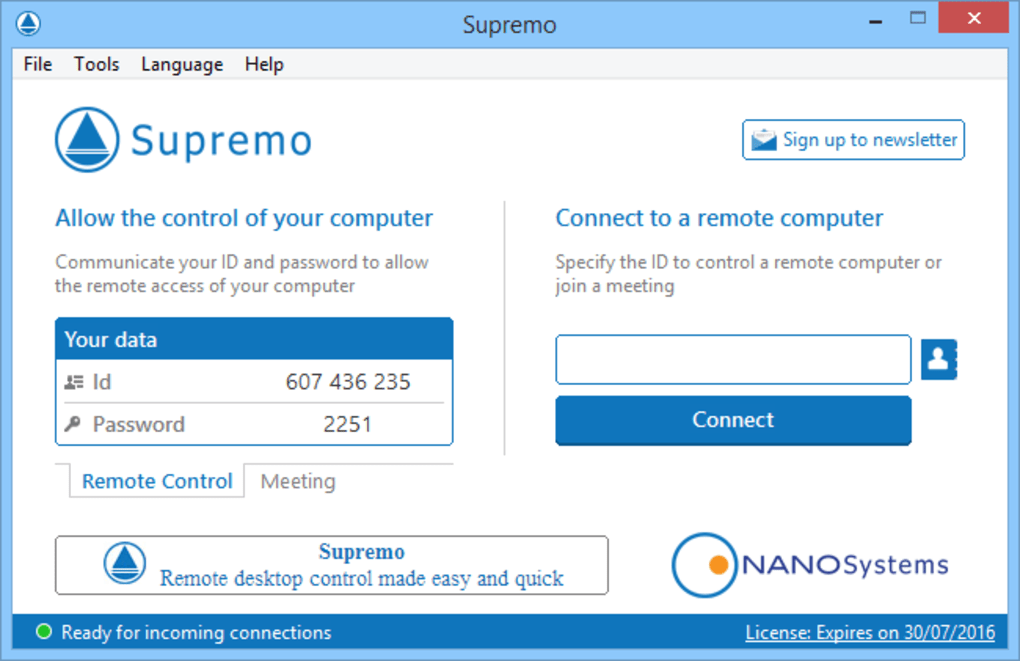
Furthermore, a significant advantage of Supremo’s design is its exceptionally small executable file. This makes it a truly portable program, requiring no formal installation process. Users can simply run the application directly from a USB drive, a network share, or even a cloud storage service. This portability eliminates the need for administrative privileges on the remote machine, sidesteps potential conflicts with existing software installations, and removes any dependencies on frameworks like .NET or Java. The absence of an installation routine also means there’s no risk of inadvertently installing unwanted third-party components or adware, a common concern with many downloadable software solutions. Operation is as straightforward as running the executable on both the host and client computers, each of which will then display a unique ID. This ID, along with a dynamically generated password, serves as the key to establishing the secure remote connection. This elegant simplicity ensures that users can connect rapidly and with minimal fuss, making Supremo an ideal choice for quick, impromptu support sessions or urgent access needs.
Security and Operational Excellence: Working with Confidence
While ease of use is a significant draw, the domain of remote access inherently demands uncompromising security. Granting external control over a computer system, even temporarily, necessitates robust protective measures to safeguard sensitive data and prevent unauthorized intrusions. Supremo addresses these critical concerns with a multi-layered security framework designed to instill confidence in its users. Moreover, its operational design prioritizes stability and user convenience, ensuring a smooth and reliable experience from the initial connection to the conclusion of the remote session.
Fortifying Connections: Advanced Encryption and Access Control
Supremo takes the security of its remote connections very seriously, employing industry-standard protocols to protect data in transit. At the heart of its security architecture is the AES 256-bit algorithm, a symmetric encryption standard widely recognized for its strength and reliability. This level of encryption ensures that all data exchanged between the two connected computers—including screen data, keyboard inputs, mouse movements, and file transfers—is thoroughly scrambled and practically impervious to eavesdropping or decryption by malicious actors. This robust cryptographic protection is paramount for maintaining the confidentiality and integrity of information during a remote session.
Beyond encryption, Supremo also boasts UAC (User Account Control) compatibility. UAC is a fundamental security feature in Windows operating systems that helps prevent unauthorized changes to the system. Supremo’s compatibility with UAC means that it can seamlessly interact with system-level prompts and elevated permissions, allowing administrators to perform necessary tasks on the remote machine without disrupting the security integrity of the operating system. This is crucial for tasks such as installing software, modifying system settings, or troubleshooting security-related issues.
Access control is another cornerstone of Supremo’s security provisions. To establish a connection, both an ID and a dynamic password are required. The unique ID identifies each computer in the Supremo network, while the dynamic password provides a constantly changing layer of protection, preventing brute-force attacks and ensuring that each session is authorized afresh. This dynamic password acts as a transient key, significantly enhancing security compared to static, unchanging credentials.
For organizations or individuals who manage a consistent set of remote machines, Supremo offers an invaluable whitelist feature. This allows users to create a predefined list of trusted computer IDs that are explicitly permitted to connect. Any connection attempt from an ID not present on this whitelist will be automatically ignored, providing an additional layer of access restriction and significantly reducing the risk of unauthorized access. This feature is particularly useful in managed environments where strict control over remote access points is required.
Furthermore, recognizing the diverse network configurations users operate within, Supremo allows for proxy configuration. This enables the application to connect to the internet via an existing proxy server, a common requirement in corporate environments or for users seeking an added layer of anonymity or network security. The flexibility to integrate with existing network infrastructures underscores Supremo’s adaptability.
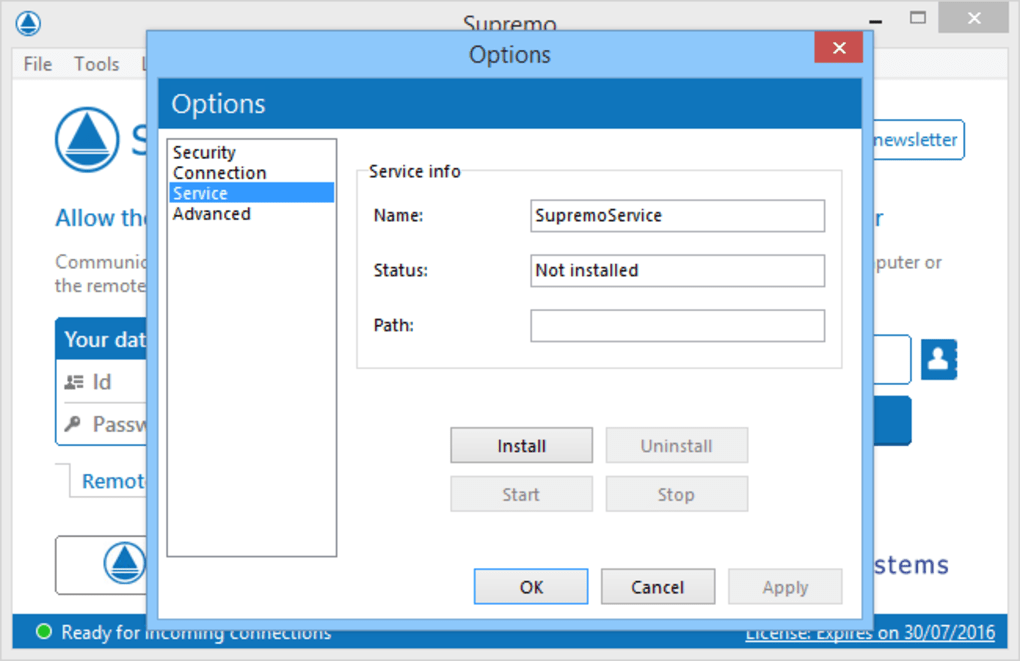
Finally, for scenarios requiring continuous or unattended access, Supremo offers the option to run at every Windows startup. This feature is ideal for servers, remote workstations, or home PCs that need to be accessible at all times without manual intervention. Users can configure this setting until further notice, ensuring reliable availability for scheduled maintenance, background tasks, or immediate support needs. This blend of strong encryption, granular access control, and operational flexibility solidifies Supremo’s position as a secure and reliable choice for remote desktop management.
Seamless Setup and Portability: No Installation, No Hassle
One of Supremo’s most significant differentiators, and a major contributor to its ease of use, is its minimal footprint and portable nature. Unlike many other remote access solutions that necessitate a full installation, often requiring administrator privileges and leaving traces on the system, Supremo operates as a small, standalone executable file. This means:
- Instant Deployment: There’s no lengthy setup wizard to navigate, no system files to register, and no changes made to the operating system’s registry. Users can simply download and run the application.
- True Portability: The executable can be stored on a USB drive, shared via email, or downloaded on demand. This is incredibly convenient for IT technicians who move between different client sites or for individuals assisting multiple family members with their computers, as they don’t need to install software on every machine they touch.
- Reduced Dependencies: Supremo avoids reliance on external frameworks like Java or .NET, which can sometimes lead to compatibility issues or require additional installations. This ensures a lighter, more self-contained application.
- Clean System: Since it doesn’t install, it doesn’t leave behind unwanted files, entries, or potential conflicts. This is particularly appealing for users concerned about system clutter or software bloat.
- No Admin Rights Required (for initial connection): While certain advanced functions or system-level tasks might still prompt for UAC elevation, the core ability to establish a remote connection often doesn’t require elevated administrative privileges, making it accessible to a wider range of users in various computing environments.
This “run-and-go” model is highly efficient, minimizing friction and allowing users to jump directly into resolving issues or accessing resources without administrative overhead.
Intuitive Interface and Robust Performance
Supremo’s commitment to simplicity extends to its user interface. The application presents an intuitive and uncluttered design, making it accessible even for inexperienced users. The main window clearly displays the local computer’s ID and password, alongside fields for entering the remote computer’s credentials. This straightforward layout ensures that connecting to a remote device is a quick and unambiguous process.
Once a connection is established, Supremo strives for smooth and responsive operation. Users report that the application generally works without triggering the operating system to hang or crash, providing a stable platform for remote work. During a remote session, all keyboard inputs and mouse actions are seamlessly transmitted to the remote PC. This includes common Windows key combinations and system-wide commands, such as minimizing all windows (Windows Key + D) or clipboard operations (copy, paste). This faithful replication of the local user experience on the remote machine is crucial for efficient and natural interaction.
An additional powerful feature is Supremo’s ability to support multiple clients linking to a single server simultaneously. This capability is invaluable for collaborative sessions, team troubleshooting, or training scenarios where several users need to view or interact with the same remote desktop environment. For example, an instructor could share their screen with multiple trainees, or multiple IT support staff could observe a single user’s issue to provide collective assistance. This multi-client support significantly enhances Supremo’s utility for teamwork and group activities, offering a level of flexibility that belies its simple exterior.
Beyond Basic Control: A Comprehensive Feature Set
While Supremo champions simplicity, it doesn’t shy away from integrating a range of robust features essential for a productive remote desktop experience. These functionalities extend beyond mere screen sharing, empowering users with tools for communication, efficient data management, and optimized display settings, all designed to enhance the overall effectiveness of remote interactions.
Efficient File Transfer and Real-time Communication
A crucial aspect of remote work and support is the ability to move files between connected machines. Supremo integrates a reliable file transfer feature, allowing users to effortlessly send and receive files and even entire folders to and from the remote PC. This is accessible directly from the operations menu, which is typically presented in a dedicated panel or accessible via the top of the server PC’s large window. This eliminates the need for external file-sharing services, maintaining data integrity and security within the established Supremo connection. Whether it’s sharing diagnostic logs, transferring important documents, or delivering updated software installers, the integrated file transfer capability is a significant convenience.
Beyond file exchange, real-time communication is paramount during remote sessions, especially for support scenarios. Supremo includes a built-in chat function, allowing users on both ends of the connection to communicate instantly via text. This integrated chat avoids the need to switch to external messaging applications, keeping all interactions centralized within the Supremo interface. This is particularly useful for clarifying instructions, confirming actions, or providing updates without interrupting the remote control flow. The ability to chat fluidly ensures that both the controller and the controlled user remain on the same page, enhancing efficiency and reducing misunderstandings.
Optimizing Your Remote Experience: Display and Control Enhancements
To cater to varying network conditions and user preferences, Supremo offers several options for optimizing the remote desktop viewing experience. Users can switch to full-screen mode, which maximizes the display of the remote desktop, immersing the user and eliminating distractions from their local machine. This is particularly beneficial for detailed work or presentations where every pixel matters.
For users needing even greater control over display performance, Supremo supports the installation of a video mirror driver. This specialized driver can significantly improve the speed and fluidity of the remote desktop, especially over slower connections or when dealing with graphically intensive applications. By directly accessing the graphics output, the video mirror driver can provide a smoother frame rate and reduce lag, making the remote interaction feel more immediate and responsive.
Further customization options include the ability to toggle keyboard mapping, which can be useful for resolving conflicts between local and remote keyboard layouts or for specific regional settings. Users can also choose to show all monitors connected to the remote PC, providing a comprehensive view of a multi-monitor setup. This is invaluable for IT support professionals or power users who need to manage complex workstations. Additionally, the color depth of the remote PC can be enhanced or reduced. While enhancing color depth provides a richer visual experience, reducing it can be a useful strategy to conserve bandwidth and improve performance on slower internet connections, offering a trade-off between visual fidelity and speed. These granular control features demonstrate Supremo’s commitment to providing a tailored and efficient remote desktop experience.
Streamlining Workflow: Address Book and Session Management
For individuals or organizations that frequently connect to the same set of computers, the need to repeatedly input IDs and passwords can become tedious. Supremo addresses this by offering an invaluable address book feature. This allows users to save the unique IDs and credentials of multiple remote computers, eliminating the need to look them up each time a connection is desired. The address book supports the creation of different groups, enabling users to organize their contacts logically—for example, by client, department, or purpose. This organizational capability is a significant time-saver and enhances overall efficiency.
Beyond saving contacts, the address book can also be exported to a file (e.g., a CSV file) and subsequently imported later. This functionality provides excellent flexibility for backup purposes, transferring contacts to a new computer, or sharing a standardized list of remote access points across a team.
In the context of accountability and auditing, Supremo incorporates session recording. The tool meticulously records all remote sessions, capturing details such as which ID connected to which server and the duration of the session. This record-keeping is vital for troubleshooting, security auditing, and maintaining compliance, especially in professional environments. Similar to the address book, these records can be exported to CSV files, making them easy to analyze, store, or integrate with other reporting systems. This comprehensive approach to managing connections and sessions underscores Supremo’s utility as a serious tool for both personal and professional remote access needs.
Evaluating Supremo: Strengths, Limitations, and Overall Value
When considering any software solution, a balanced perspective is essential. Supremo, despite its many commendable features, is not without its nuances. A thorough evaluation of its strengths, alongside an acknowledgment of its limitations, provides a clearer picture of its overall value proposition and helps users determine if it’s the right fit for their specific requirements.
The Upsides: What Makes Supremo Shine
Supremo boasts several compelling advantages that make it a highly attractive option in the remote desktop software market:
- Extremely Easy to Handle: This is arguably Supremo’s greatest strength. Its intuitive interface and simple operational model ensure that even users with minimal technical expertise can establish and manage remote connections quickly and without frustration. The focus on core functionalities—remote access, chat, and file transfer—means there’s no unnecessary complexity.
- Does Not Need Installation: The portability of Supremo is a massive boon. Being a small executable file means it can run instantly from anywhere, without administrative privileges (for initial connection), system modifications, or dependency on external frameworks. This makes it ideal for ad-hoc support, quick access, or use in environments where installing software is restricted.
- Allows Multiple Clients to Simultaneously Connect to the Server: This feature significantly enhances Supremo’s utility for collaborative tasks, team-based troubleshooting, or educational settings. Multiple users can view or interact with a single remote desktop, fostering teamwork and shared understanding.
- Password and Encryption-Protected Connection: Security is paramount, and Supremo delivers with robust measures. The use of AES 256-bit encryption for all data transmission, coupled with dynamic passwords and UAC compatibility, ensures that connections are secure and data remains confidential. The whitelist feature adds another layer of access control, making it suitable for secure professional environments.
- Proprietary Protocol and Firewall Transparency: Supremo’s use of a proprietary protocol means that, in many cases, there is no need to configure firewalls or routers. This significantly simplifies network setup and connectivity, especially for users who might not have the technical knowledge or administrative access to modify network settings.
- Free for Personal Use: For individual users, the fact that Supremo is available for free for personal use makes it an incredibly cost-effective solution for helping family and friends or accessing personal computers remotely. This accessibility broadens its appeal significantly.
These advantages collectively position Supremo as a highly accessible, secure, and efficient tool for a wide array of remote access needs.
Acknowledging the Drawbacks: Areas for Consideration
While Supremo excels in many areas, certain limitations should be taken into account before full adoption:
- The Image Quality of the Remote Control is Not That Good: One of the most frequently cited drawbacks is the perceived lower image quality of the remote desktop display. While adequate for general tasks like document editing or web browsing, this can be a noticeable issue for tasks requiring high visual fidelity, such as graphic design, video editing, or detailed image analysis. The compressed nature of remote desktop streams often prioritizes speed over pristine visuals, but Supremo’s implementation might lean more heavily towards compression, resulting in a less sharp or vibrant image.
- Less Impressive Frame Rate (even with video mirror driver installed): Related to image quality, the frame rate (how many individual images or frames are displayed per second) can also be less impressive. Even with the optional video mirror driver installed, which is designed to enhance performance, users might experience some choppiness or lag when interacting with fast-moving content, animations, or video on the remote desktop. This can impact the smoothness of the user experience, particularly for applications that demand high responsiveness.
- Susceptible to Interference / File Exchange Can Be Slow: The general performance of remote desktop software, including Supremo, is heavily dependent on network conditions. Slower internet connections, high network latency, or significant network interference can degrade performance, leading to delays in screen updates, input lag, and notably, slower file exchange speeds. While Supremo’s file transfer is functional, it might not always be the fastest option, especially for large files or folders over less-than-optimal connections. This can be a practical limitation for users who frequently need to transfer substantial amounts of data.
These performance-related caveats suggest that while Supremo is excellent for general remote control and support, users with specific needs for high-fidelity graphics, ultra-smooth interactions, or very rapid large file transfers might find its performance slightly less robust compared to some higher-end, enterprise-focused solutions. However, for its target market of simplicity and ease of use, these are often acceptable trade-offs.
The Verdict: A Worthy Contender in Remote Desktop Solutions
In a nutshell, Supremo stands out as a highly recommended application for anyone seeking a straightforward, secure, and free (for personal use) alternative to more complex remote desktop control software. Its primary appeal lies in its extremely user-friendly interface and the absence of an installation requirement, making it an ideal choice for novices and seasoned professionals alike who value quick deployment and minimal fuss.
The application comes rich with essential features, enabling users to perform a wide range of tasks on their connected PCs, from providing technical support and sharing files to conducting collaborative sessions with multiple clients. The robust security measures, including AES 256-bit encryption, dynamic passwords, and whitelisting capabilities, ensure that connections are consistently protected against unauthorized access. The flexibility of its address book and session recording further solidifies its utility for both casual and more structured remote access needs.
While there may be a few caveats concerning the image quality and frame rate, particularly for graphically intensive applications or over slower network connections, these are often minor trade-offs when weighed against the overwhelming advantages of simplicity, security, and portability. For the vast majority of remote desktop scenarios—be it for personal assistance, streamlined IT support, or basic remote work—Supremo offers a compelling and highly effective solution. All in all, for its ease of use, strong security, and comprehensive feature set packed into a portable form factor, Supremo is definitely worth giving a shot.
PhanMemFree.org Disclaimer: Laws concerning the use of this software vary from country to country. We do not encourage or condone the use of this program if it is in violation of these laws. PhanMemFree may receive a referral fee if you click or buy any of the products featured here.
Your review for Supremo Thank you for your review! Program review Your program review has been submitted successfully. Submit review
In PhanMemFree we scan all the files hosted on our platform to assess and avoid any potential harm for your device. Our team performs checks each time a new file is uploaded and periodically reviews files to confirm or update their status. This comprehensive process allows us to set a status for any downloadable file as follows:
Clean It’s extremely likely that this software program is clean. What does this mean? We have scanned the file and URLs associated with this software program in more than 50 of the world’s leading antivirus services; no possible threat has been detected.
Warning This software program is potentially malicious or may contain unwanted bundled software. Why is the software program still available? Based on our scan system, we have determined that these flags are possibly false positives. What is a false positive? It means a benign program is wrongfully flagged as malicious due to an overly broad detection signature or algorithm used in an antivirus program.
We’d like to highlight that from time to time, we may miss a potentially malicious software program. To continue promising you a malware-free catalog of programs and apps, our team has integrated a Report Software feature in every catalog page that loops your feedback back to us. Flag any particular issues you may encounter and PhanMemFree will address those concerns as soon as possible.
File Information
- License: “Free”
- Latest update: “June 30, 2025”
- Platform: “Windows”
- OS: “Windows 11”
- Language: “English”
- Downloads: “70.5K”


